


|
|

This chapter tells you how to prepare your site for installing a LightStream 2020 multiservice ATM switch (LS2020 switch). It provides a convenient checklist that you can use to ensure an orderly, step-by-step installation process. An LS2020 switch can be installed in any area that meets the specifications outlined in this chapter. A dedicated computer room with raised floors, controlled temperature and humidity, and clean air is desirable, but not required.
Use the checklist provided in Table 1-1 to prepare your LS2020 site and to ensure that you make adequate plans to obtain appropriate ancillary equipment.
If you plan to install more than one LS2020 switch, you may want to photocopy the blank site preparation checklist in Table 1-1 as a vehicle for collecting appropriate information for each switch.
| Checkmark Column | Task Description |
|---|---|
| Select a rack that meets the characteristics and dimensional requirements described in the section "Rack Selection Guidelines " that appears later in this chapter. | |
| Place the rack in an area that accommodates the cable routing and chassis clearance requirements described in the section "Site Selection and Space Requirements ." | |
| Ensure that the floor is capable of supporting the weight of the LS2020 system, as described in the section "Floor Loading Requirements." | |
| Ensure that your LS2020 switch will be placed in an area that meets the environmental requirements described in Table 1-4 . | |
| Ensure that your LS2020 switch will be placed in an area that accommodates the power consumption and component heat dissipation factors listed in Table 1-5 . | |
| Ensure that your power supply meets the site power, AC power, or DC power requirements presented in the section "Electrical Requirements." Ensure that each LS2020 system has its own dedicated branch power circuit with a circuit breaker and grounded outlet. For LS2020 systems equipped with redundant power trays, you may wish to have two separate power circuits. | |
| If you plan to use DC power, schedule a licensed electrician to wire the LS2020 chassis to the DC power source. | |
| To provide connectivity to each LS2020 node in the event of network problems, Cisco Systems recommends that you obtain a modem for each switch card in your LS2020 network. Select a modem according to the information provided in the section "Modem Recommendations ." | |
| Read the section "Miscellaneous Site Preparation Considerations" for information about safety factors, acoustic emissions, and applicable standards. | |
| For network management purposes, obtain a Sun workstation that meets the hardware and software requirements provided in the chapter entitled "Network Management System Requirements." | |
| Order data cables appropriate to your LS2020 switch configuration using the connector and cabling information provided in the chapter entitled "Connectors and Cables." | |
| If you are installing the LS2020 switch outside the United States, order the appropriate country power kit or DC mounting kit using the information provided in the chapter entitled "Connectors and Cables." | |
| Using the information provided in the appendix entitled "IP Addresses," derive the information below for each LS2020 switch that you plan to install. Note that each LS2020 switch requires unique information. | |
Chassis ID: ________________________ Node Name: ________________________ Primary IP Address: ________________________ Primary NP Address Subnet Mask: ________________________ Secondary NP Address: ________________________ Secondary NP Address Subnet Mask: ________________________ NP Ethernet Address: ________________________ NP Ethernet Address Subnet Mask: ________________________ Default Router: ________________________ | |
This section provides guidelines for selecting an equipment rack to house your LS2020 switch.
The rack you select for your LS2020 switch should be a TIA or EIA compliant, 19-inch (48.3 cm) wide rack with the following characteristics:
Table 1-2 shows the physical dimensions of the LS2020 switch and the shipping crate.
| Dimension | Chassis | Shipping Crate | ||
| Height | 26.07 inches | 66.2 cm | 36 inches | 91.4 cm |
| Width | 18.91 inches | 48.0 cm | 24 inches | 61.0 cm |
| Depth | 24.73 inches | 62.8 cm | 31 inches | 78.7 cm |
All chassis dimensions are within a manufacturing tolerance of plus or minus .02 inch (.05 cm). | ||||
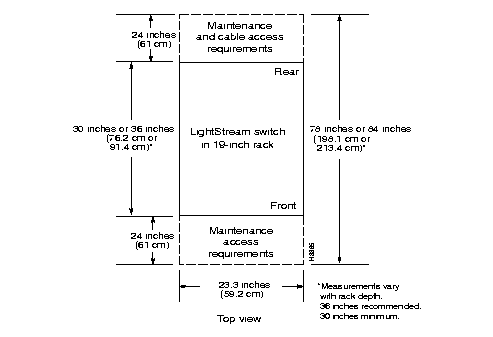
An LS2020 chassis requires 26.25 inches (15 rack units, or 66.7 cm) of vertical rack space. An LS2020 rack should be at least 30 inches (76.2 cm) deep; a depth of 36 inches (91.4 cm) is recommended to ensure adequate clearance at the rear of the chassis for installing fantails and interface cables.
If your LS2020 system contains low-speed line cards, cell line cards with T3/E3 access cards, or an E1 Circuit Emulation Access Card (CEMAC) fantail in a 75-ohm configuration, you must consider the vertical space requirements in planning the use of rack space for fantails. These requirements are discussed under separate headings below.
If you fully configure your LS2020 switch with nine low-speed line cards, the rack can accommodate a total of 18 V.35 and/or RS-449 fantails in some combination--two such fantails per card. However, in the case of X.21 fantails, the same LS2020 system requires only nine X.21 fantails--one per low-speed line card.
Each V.35, RS-449, or X.21 fantail requires 1.75 inches of vertical rack space (one rack unit, or 4.45 cm). Hence, in an LS2020 switch using V.35 or RS-449 fantails in some combination totaling 18, 31.5 inches (80 cm) of vertical rack space are required.
If you configure the rack with less than the maximum number of V.35, RS-449, or X.21 fantails, or with a mixture of such fantails, you can install them adjacent to each other (without intervening space) or distribute them over the rack in a manner that best suits your particular cabling and interconnection requirements.
An LS2020 switch fully configured with nine T3/E3 access cards can accommodate up to nine T3/E3 fantails (see Figure 3-18). Each fantail requires 1.75 inches of vertical rack space (one rack unit, or 4.45 cm).
As with the fantails for the low-speed line cards above, you can position the T3/E3 fantails physically adjacent to each other, or you can disperse them over the available vertical space on the rack.
An LS2020 switch fully configured with nine CEMAC access cards can accommodate a maximum of nine E1 fantails in a 75-ohm configuration (see Figure 3-21). Each E1 fantail requires 3.5 inches of vertical rack space (two rack units, or 8.9 cm).
As with other fantails, you can disperse the E1 fantails over the available rack space to suit your particular cabling and interconnection requirements or to accommodate the presence of other types of fantails in the LS2020 rack.
Consider the factors described below in selecting a location for your LS2020 switch.
Choose a location convenient to the data cables that you plan to connect to the LS2020 switch. Cisco Systems recommends that you develop a plan for managing external data cables. Such a plan might entail running cables under a raised floor or through a dropped ceiling, or placing the system in a low-traffic area where cables are less likely to be disturbed.
An LS2020 chassis takes in cooling air through the bottom of the front panel and exhausts it at the top rear and the top right side of the enclosure. The air vents on the right side can safely be covered with rack side panels, but they should not otherwise be blocked.
To minimize the potential for thermal problems with LS2020 circuitry, position the LS2020 chassis so that the air intake panel is not adjacent to the exhaust of other equipment. In addition, ensure that the LS2020 exhaust air is not near the air intake of other equipment.
To facilitate LS2020 maintenance and cable access, allow at least two feet of clearance at the front and rear of the LS2020 chassis. Figure 1-1 illustrates the overall LS2020 clearance requirements.
Ensure that the floor on which the LS2020 will stand can support the weight of the system. Using the information in Table 1-3, calculate the weight of your system. Add the weight of each optional component (line modules or fantails) to the weight of the appropriate base system or redundant base system to derive total system weight.
| System Configuration | Weight | |||
Base system/AC power1 | 96 lb (44 kg) | |||
Redundant base system/AC2 | 118 lb (53.6 kg) | |||
Base system/DC power | 91 lb (41 kg) | |||
Redundant base system/DC | 108 lb (49 kg) | |||
Optional Components: | | |||
Example: |
96.0 lb | |||
Total Weight | 126.1 lb | |||
| ||||
 | Warning An LS2020 system is heavy. Do not attempt to move the system alone. Avoid personal injury or equipment damage by using proper lifting and transport techniques. |
The physical environment during storage, transport, and operation of the LS2020 switch must meet the specifications outlined in Table 1-4 .
To ensure that your HVAC system is capable of maintaining the proper operating temperature range for your LS2020 switch, refer to the heat dissipation information provided in Table 1-5 .
| Factor | Requirement |
| Operating temperature at sea level (760 mm Hg)1 | 41o to 104o F (5o to 40o C) |
| Relative operating humidity | 10% to 90% noncondensing |
| Altitude1 | Up to 10,000 feet (3048 m) |
| Nonoperating temperature | -4o to 140o F. (-20o to 60o C.) |
| Nonoperating humidity | 10% to 95% noncondensing |
| Air quality | The LS2020 switch is designed to run in a noncorrosive, relatively dust-free environment. |
| |
| Component | Power Consumption | Heat Dissipation | |
Base system | 335W | 1145 Btu/hr | |
Redundant base system | 445W | 1525 Btu/hr | |
Optional components: Low-speed line module |
65W |
225 Btu/hr 190 Btu/hr 105 Btu/hr | |
Maximum configuration1 | 965W | 3325 Btu/hr | |
| |||
Each LS2020 chassis requires a dedicated branch circuit. If you choose to equip your LS2020 switch with a dual power cord, you must provide an independent power source for each cord.
The following notice applies to every LS2020 switch:
The LS2020 switch is designed to operate with all boards, bulkheads, filler panels, covers, and components (disks and blowers) in place and securely attached to the LS2020 chassis. When in place, these elements form an enclosure that
Each LS2020 chassis requires at least one dedicated branch circuit. If your system has a redundant power supply, you must provide a dedicated branch circuit for that power supply. Table 1-6, Table 1-7, and Table 1-8 summarize the power requirements for your LS2020 system.
| Power Option | Voltage | Current |
| AC | 100 to 240 | 20A to 10A |
| DC | 48 | 24A |
| Characteristic | Rating |
| Inlet power connector | IEC 320 C20 |
| Input voltage frequency phase | 100 to 240VAC, 50 to 60 Hz single |
| Input current | 16A to 8A |
| Power consumption1 | 975W maximum |
| Heat dissipation1 | 3330 Btu/hr maximum |
1. See Table 1-5 for additional power-related information. | |
| Characteristic | Rating |
|---|---|
| Input connections | Support for up to 2 separate -48VDC input feeds via 3-position terminal blocks |
| Input voltage | -43 to -60VDC |
| Input current | 24A |
| Power consumption1 | 975W maximum |
| Heat dissipation1 | 3330 Btu/hr maximum |
1. See Table 1-5 for additional power-related information. | |
To provide connectivity to each node in the event of network problems, Cisco Systems recommends that you obtain a modem for each LS2020 switch card in your network. (Each LS2020 chassis can have one or two switch cards.) The modem must be a V.42 Hayes-compatible device capable of operating at 2400 baud.
The following modems have been tested and are known to be compatible with the LS2020 switch:
The following modems have been tested and are known to be incompatible with the LS2020 switch:
An LS2020 switch emits a maximum of 68 db(A) of noise.
Table 1-9 lists the environmental standards for the LS2020 switch. Table 1-10 lists the applicable interface standards for the switch.
| Environmental Factor | Applicable Standard |
| Safety | UL 1950 (for AC systems)
UL 1459 (for DC systems) TUV (EN 60950) CSA 22.2 #9501 |
| Emissions | FCC Part 15 Class A
CISPR 22 Class A (EN 55022) |
| |
| Interface | Applicable Standard |
| V.35 interface1 | NET 2 Layer 1 |
| RS-449 interface1 | NET 2 Layer 1 |
| X.21 interface1 | NET 1 Layer 1 |
| E3 interface1 | G.703 at 34 Mbps (Germany) SIN 219 (UK) |
| |
|
|
