


|
|

This chapter describes the cabling requirements and other preinstallation guidelines for installing a Catalyst 2820 or 1900 switch. Several sample configurations are also included.
You can install your Catalyst 2820 or 1900 in the same locations as your other Ethernet hubs, bridges, and routers. This would normally be a wiring closet, but it could also be an office.
The switch can be mounted on a table, shelf, or rack. The key requirement is that it is located within 100 meters of its attached 10BaseT devices. As most of the LEDs and the cable connectors are on the front panel, you should ensure easy access to the front of the switch. Avoid routing any UTP cabling used to connect to switch ports near power lines, fluorescent lights, or other sources of electrical noise.
The Catalyst 2820 and Catalyst 1900 are compatible with the IEEE 802.3 CSMA/CD media access control layer and frame format. They therefore support existing network management software and diagnostic tools.
The 10BaseT ports are compatible with the IEEE 802.3 10BaseT standard and connect to individual workstations, 10BaseT hubs, or other 10BaseT compatible devices. The 100BaseTX ports are compatible with the IEEE 802.3u 100BaseTX specification and connect to 100BaseTX servers, hubs, backbone switches, and routers. 100BaseFX ports are compatible with the IEEE 802.3u 100BaseFX specification and connect to other 100BaseFX devices.
The high-speed expansion slots support the modules described in the Catalyst 2820 Modules User Guide.
Each type of port has its own cabling guidelines. These include the kinds of devices you can connect to the ports and the length and type of wiring you can use.
Use a straight-through cable to connect to ports on another device not marked with an X, such as a server or workstation. Use a crossover cable to connect to a port marked with an X, such as another Catalyst 2820, a 1900, or other 100BaseTX compatible hub, switch, or router. Pinouts for these cables are described in "Connector Pinouts" in Appendix A, "Technical Specifications."
The 10BaseT ports require Category 3, 4, or 5 UTP wiring. Attached devices must be within 100 meters of the switch and be 10BaseT-compatible.
Use the AUI port and an AUI connector to connect to an external thick coaxial, thin coaxial, or fiber-optic transceiver. Supported network and device distances will vary depending on the type of transceiver used.
100BaseTX ports require Category 5 UTP cabling. Attached devices must be within
100 meters of the port and be 100BaseTX-compatible.
The 100BaseFX port uses 50/125- or 62.5/125-micron multimode fiber-optic cabling. You can connect the 100BaseFX port to other 100BaseFX-compatible devices over distances of up to 2 kilometers.
Configuration and cabling guidelines for the modules that you can insert in the high-speed expansion slots are described in the Catalyst 2820 Modules User Guide.
This section describes several situations where the Catalyst 2820 and 1900 can be used in your network. The following scenarios are described:
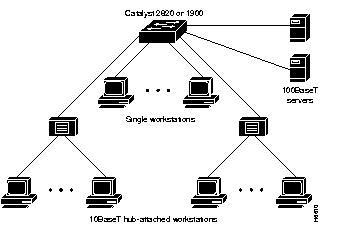
The Catalyst 2820 or 1900 supports 24 switched 10BaseT connections for single workstations or 10BaseT hubs. With the Catalyst 2820, you can use two 100BaseTX modules to connect to servers, as shown in Figure 2-1. With the Catalyst 1900, you can use the fixed 100BaseTX ports or the 100BaseFX port to connect to servers.
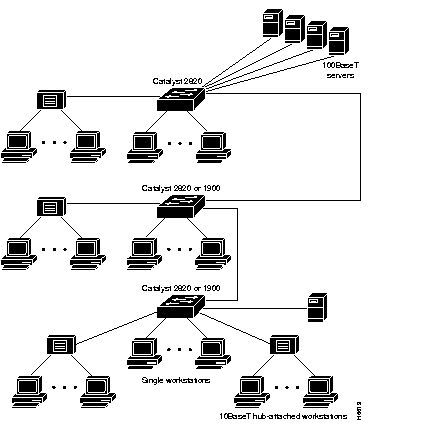
Multiple Catalyst 2820s or 1900s can be daisy-chained via full-duplex 100BaseT for up to 200 Mbps of bandwidth between switches. Additional high-speed ports using single or multiport Catalyst 2820 repeater modules can be used to connect to 100BaseT servers or other devices. Figure 2-2 is an example of such a configuration.
Multiple Catalyst 2820s or 1900s can be connected via shared 100BaseT by using a multiport repeater in a Catalyst 2820. More high-speed server connections can be added by using additional Catalyst 2820 modules, as shown in Figure 2-3.

Catalyst 2820s and 1900s can connect to a 100BaseT backbone switch or router, as shown in Figure 2-4. With support for full-duplex operation, each 100BaseT link supports up to 200 Mbps of bandwidth and fiber-optic cabling distances of up to 2 kilometers.
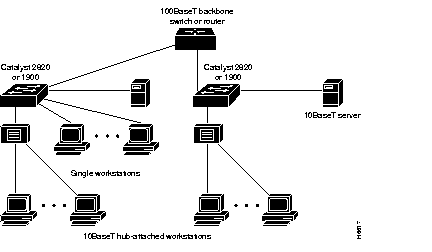
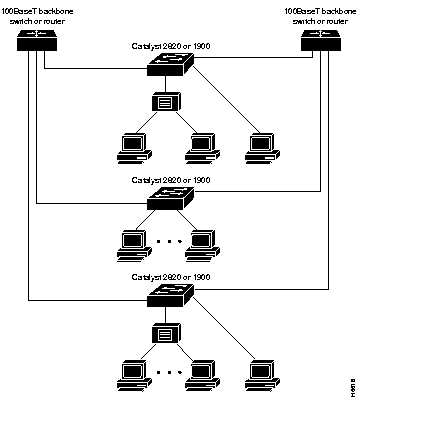
Figure 2-5 shows Catalyst 2820s and connecting to a 100BaseT backbone switch or router in a redundant backbone configuration, using the Spanning-Tree Protocol. With support for full-duplex operation, each 100BaseT link supports up to 200 Mbps of bandwidth and fiber-optic cabling distances of up to 2 kilometers.
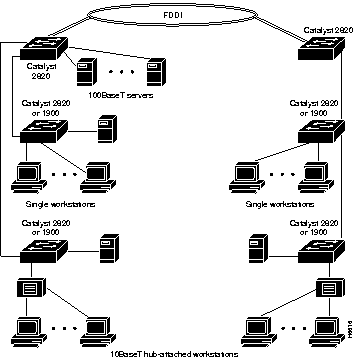
FDDI backbone connectivity can be provided by a Catalyst 2820 with a FDDI module. Catalyst 2820 FDDI modules support UTP single-attachment station (SAS), fiber-optic SAS, and fiber-optic dual-attachment station (DAS) configurations for connecting to servers, routers, concentrators, or the FDDI ring, as shown in Figure 2-6.
|
|