


|
|

This appendix provides connector and cable descriptions for the following fixed ports on the switch:
For information on the Catalyst 2820 module ports, refer to the Catalyst 2820 Modules User Guide and the Catalyst 2820 ATM Modules Installation and Configuration Guide.
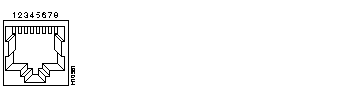
The 10BaseT RJ-45 ports (1x through 24x), as illustrated in Figure B-1, use the pin assignments described in Table B-1.
| Pin | Label |
|---|---|
| 1 | RD+ |
| 2 | RD- |
| 3 | TD+ |
| 4 | NC |
| 5 | NC |
| 6 | TD- |
| 7 | NC |
| 8 | NC |
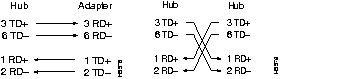
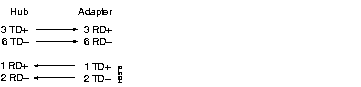
As indicated by the X, the 10BaseT ports have their transmit (TD) and receive (RD) signals internally crossed for attachment of an adapter using a straight-through cable.
When connecting the 10BaseT ports to 10BaseT-compatible servers and workstations, ensure that you use a straight-through cable wired for 10BaseT. When connecting to other switches or repeaters, ensure that you use a crossover cable.
When connecting the Catalyst 2820 100BaseT module ports to 100BaseT-compatible servers and workstations, ensure that you use a straight-through cable. When connecting to the 100BaseT port on another switch, hub, or router, ensure that you use a crossover cable.
The schematics of crossover and straight-through cables are shown in Figure B-2 and Figure B-3, respectively.
The Ethernet AUI port uses a 15-pin female connector, as shown in Figure B-4. The pin assignments for this port are described in Table B-2.

| Pin | Label | Description |
|---|---|---|
| 1 | GND | Ground |
| 2 | CI+ | Positive AUI differential collision-data input |
| 3 | TX+ | Positive AUI differential transmit-data input |
| 4 | GND | Ground |
| 5 | RX+ | Positive AUI differential receive-data output |
| 6 | GND | Ground |
| 7 | NC | -- |
| 8 | GND | Ground |
| 9 | CI- | Negative AUI differential collision data |
| 10 | TX- | Negative AUI differential transmit-data input |
| 11 | GND | Ground |
| 12 | RX- | Negative AUI differential receive data output |
| 13 | +12V | 12V supply for external MAU |
| 14 | GND | Ground |
| 15 | NC | -- |
The console port uses an 8-pin RJ-45 connector, as shown in Figure B-1. The supplied RJ-45-to-RJ-45 rollover cable and adapters are used to connect the console port of the switch to a management station or modem. The following sections describe the rollover cable and adapters for the console port.
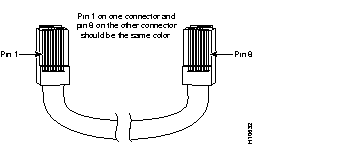
You can identify a rollover cable by comparing the two modular ends of the cable. Hold the cable ends side-by-side, with the tab at the back. The wire connected to the pin on the outside of the left plug should be the same color as the wire connected to the pin on the outside of the right plug (see Figure B-5).
Use the thin, flat, RJ-45-to-RJ-45 rollover cable and RJ-45-to-DB-9 female DTE adapter (labeled "TERMINAL") to connect the console port to a PC running terminal emulation software. Figure B-6 shows how to connect the console port to a PC. Table B-3 lists the pin assignments for the console port, the RJ-45-to-RJ-45 rollover cable, and the RJ-45-to-DB-9 female DTE adapter (labeled "TERMINAL").

| Console Port (DTE) | RJ-45-to-RJ-45 Rollover Cable | RJ-45-to-DB-9 Terminal Adapter | Console Device | |
|---|---|---|---|---|
| Signal | RJ-45 Pin | RJ-45 Pin | DB-9 Pin | Signal |
| RTS | 11 | 8 | 8 | CTS |
| DTR | 2 | 7 | 6 | DSR |
| TxD | 3 | 6 | 2 | RxD |
| GND | 4 | 5 | 5 | GND |
| GND | 5 | 4 | 5 | GND |
| RxD | 6 | 3 | 3 | TxD |
| DSR | 7 | 2 | 4 | DTR |
| CTS | 81 | 1 | 7 | RTS |
Use the thin, flat, RJ-45-to-RJ-45 rollover cable and RJ-45-to-DB-25 female DTE adapter (labeled "TERMINAL") to connect the console port to a terminal. Figure B-7 shows how to connect the console port to a terminal. Table B-4 lists the pin assignments for the console port, the RJ-45-to-RJ-45 rollover cable, and the RJ-45-to-DB-25 female DTE adapter (labeled "TERMINAL").

| Console Port (DTE) | RJ-45-to-RJ-45 Rollover Cable | RJ-45-to-DB-25 Terminal Adapter | Console Device | |
|---|---|---|---|---|
| Signal | RJ-45 Pin | RJ-45 Pin | DB-25 Pin | Signal |
| RTS | 11 | 8 | 5 | CTS |
| DTR | 2 | 7 | 6 | DSR |
| TxD | 3 | 6 | 3 | RxD |
| GND | 4 | 5 | 7 | GND |
| GND | 5 | 4 | 7 | GND |
| RxD | 6 | 3 | 2 | TxD |
| DSR | 7 | 2 | 20 | DTR |
| CTS | 81 | 1 | 4 | RTS |
Use the thin, flat, RJ-45-to-RJ-45 rollover cable and RJ-45-to-DB-25 male DCE adapter (labeled "MODEM") to connect the console port to a modem. Figure B-8 shows how to connect the console port to a modem. Table B-5 lists the pin assignments for the console port, the RJ-45-to-RJ-45 rollover cable, and the RJ-45-to-DB-25 male DCE adapter (labeled "MODEM").

| Console Port (DTE) | RJ-45-to-RJ-45 Rollover Cable | RJ-45-to-DB-25 Modem Adapter | Modem | |
|---|---|---|---|---|
| Signal | RJ-45 Pin | RJ-45 Pin | DB-25 Pin | Signal |
| RTS | 11 | 8 | 4 | RTS |
| DTR | 2 | 7 | 20 | DTR |
| TxD | 3 | 6 | 3 | TxD |
| GND | 4 | 5 | 7 | GND |
| GND | 5 | 4 | 7 | GND |
| RxD | 6 | 3 | 2 | RxD |
| DSR | 7 | 2 | 8 | DCD |
| CTS | 81 | 1 | 5 | CTS |
|
|