


|
|

June 30, 1997
This document provides a description of the redesigned faceplate of the 8-Port 100BaseTX Repeater Module and provides information on how to avoid potential problems with shielded twisted-pair cabling in Token Ring environments.
The complete product documentation for this product is as follows:
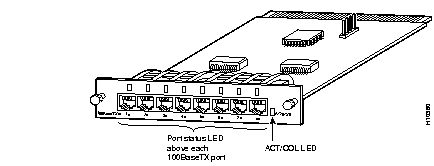
The faceplate of the Catalyst 2820 8-Port 100BaseTX Repeater Module (Figure 1) now has one port status LED above each 100BaseTX port and a single group status LED. Table 1 describes the color and related port status indicated by the new port status LEDs. Table 2 describes the color and related group status indicated by the new ACT/COL LED. The functional features, installation procedures, and connectivity information as provided in the Catalyst 2820 Modules User Guide still apply to this module.
| Color | Port Status |
|---|---|
| Flashing green | Link operational (with receive activity). |
| Solid green | Link operational (with no activity). |
| Flashing amber | Port disabled (due to a jabber or autopartition error). |
| Solid amber | Port disabled (by a network connection error or secure address violation or through the management console). |
| Off | No link. |
| Color | Port Status |
|---|---|
| Flashing green | Data being transmitted or received. |
| Flashing amber | Collision detected. |
| Off | No activity or no collisions detected. |
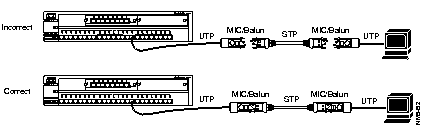
Shielded twisted-pair (STP) cable is the most commonly used cable in Token Ring environments. The media interface connectors (MICs) and baluns--used to create network connections with STP and unshielded-twisted pair (UTP) cabling--create a loopback when they are disconnected; the loopback might cause anomalies with the switch.
To prevent loopback problems when using STP cabling in a Token Ring network environment, make sure the MICs and baluns are never left unconnected when they are part of a link connected to the switch (see Figure 2).
Cisco Connection Online (CCO) is Cisco Systems' primary, real-time support channel. Maintenance customers and partners can self-register on CCO to obtain additional information and services.
Available 24 hours a day, 7 days a week, CCO provides a wealth of standard and value-added services to Cisco's customers and business partners. CCO services include product information, product documentation, software updates, release notes, technical tips, the Bug Navigator, configuration notes, brochures, descriptions of service offerings, and download access to public and authorized files.
CCO serves a wide variety of users through two interfaces that are updated and enhanced simultaneously: a character-based version and a multimedia version that resides on the World Wide Web (WWW). The character-based CCO supports Zmodem, Kermit, Xmodem, FTP, and Internet e-mail, and it is excellent for quick access to information over lower bandwidths. The WWW version of CCO provides richly formatted documents with photographs, figures, graphics, and video, as well as hyperlinks to related information.
You can access CCO in the following ways:
For a copy of CCO's Frequently Asked Questions (FAQ), contact cco-help@cisco.com. For additional information, contact cco-team@cisco.com.
|
|