


|
|

This appendix describes the cables and connectors that you use to connect to Catalyst 2916 modules.
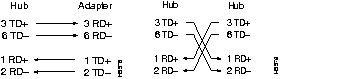
The 10/100 module ports are marked with an X, indicating that they have their transmit (TD) and receive (RD) signals internally crossed for attachment of an Ethernet adapter using a straight-through cable.
When connecting the 10/100 ports to 10BaseT or 100BaseTX-compatible servers and workstations, ensure that you use a Category 5 straight-through cable. When connecting to other switches or repeaters, ensure that you use a crossover cable.
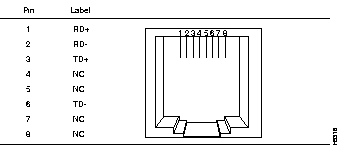
The 10/100 module has RJ-45 connectors on the front panel. Figure B-1 shows the pinout.
The schematics of crossover and straight-through cables are shown in Figure B-2.
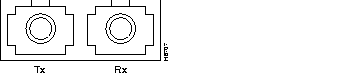
The 100BaseFX module uses duplex SC connectors, as shown in Figure B-3.
|
|