


|
|

The TN3270 application allows users with non- TN3270 servers to monitor statistics from TN3270 servers. For each instance of TN3270 Server running in the specified router, TN3270 Monitor establishes a TCP/IP connection to the first TN3270 Server-configured physical unit (using the IP address) and begins polling for the tn3270sGlobalTable and tn3270sStatsTable MIB variables. The TCP/IP connection allows the router to send TN3270 events to the TN3270 Monitor program. You can then view the events in filtered views.
For more information on the TN3270, see the following URL:
http:// www-tac-sj.cisco.com/CiscoCD/data/doc/software/10_2/cscg/56868.html
For more information on the commands used, see Access and Communication Servers Command Reference. For information about establishing TN3270 connections, refer to the Cisco Access Connection Guide.
This appendix provides a description of:
To access a device with TN3270 capabilities from CiscoView, complete the following steps:
Step 1 Go to CiscoView - Main.
Step 2 Select File>Open Device.
Step 3 Enter the IP Address or Host Name in the Host field.
Step 4 Enter the Read Community string.
Step 5 Enter the Write Community string.
Step 6 Click OK.
The main window for your device appears. For information on the functionality, see the online help associated with this product.
Step 7 Click on the TN3270 icon in the Toolbar.
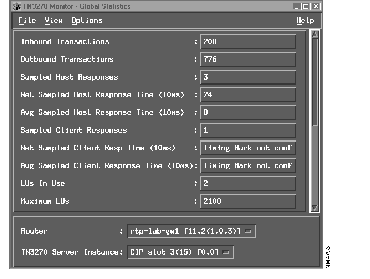
The TN3270 Monitor - Global Statistics window (Figure C-1) is the initial window for the TN3270 Monitor program where the polling results are displayed. The polling interval is dynamically configured in the Preferences window.
The items in the menu bar of this window allow you to access the functions of TN3270 Monitor.
| Menu Item | Description |
|---|---|
| Prints the contents of the current window to the default system printer. | |
| Exit | Exits theTN3270 Monitor program. |
| Menu Item | Description |
|---|---|
| Preferences | Displays the Preferences window, which allows you to override the defaults used by the program, such as the default print command. |
|
|