CiscoWorks 1.0.(x) network management software enables you to monitor complex internetworks and aids in-depth network planning, troubleshooting and analysis. It is integrated with SunNet Manager (SNM) as a suite of CiscoWorks applications that are accessible through SNM menus.
CiscoWorks uses network maps that are obtained either by entering information about devices manually or produced by using SNM's Discovery tool. It also contains a relational database that is based on Sybase. CiscoWorks conforms to the Simple Network Management Protocol (SNMP) and enables you to monitor and control any SNMP device on your network. Cisco Systems supports the Management Information Base (MIB) II variable set.
The functions performed by CiscoWorks can be broadly classified into the following five categories:
- Fault management--Network problems can arise from a variety of sources including devices, lines, interfaces, environment, and so on. CiscoWorks applications help you identify and diagnose such problems by monitoring or checking information about devices, and displaying the information. For example, you can display the network path between two devices to understand the sequence of hops between the source and destination. You can compare alternative routing paths and decide if changes in the routing paths would improve the routing process. Centralized logging provides the capability to store, query, or delete messages gathered from devices on the internetwork.
- Performance management--Optimal network performance depends on a variety of factors such as the amount of traffic on your network, the amount of traffic generated by specific protocols, the number of packet errors, and so on. CiscoWorks applications enable you to monitor your network performance by retrieving or polling performance information from a number of devices. You can use the acquired information to analyze and make performance-related decisions for your network. You can poll specific MIB variables on a device and display the information either in the form of a text summary or as a visual graph. You also can create custom reports by using the Sybase Data Workbench function provided by the Sybase software.
- Configuration management--Each network device contains configuration information that specifies how the device is set up and how it will perform. CiscoWorks provides the capability to edit a device's configuration file with a UNIX text editor and store it in the database. In addition, you can retrieve, modify, and download configuration files to devices. Stored configuration files for a device can be compared with one another or with the current device configuration.
- Device management--A database with an inventory of network devices and associated information is helpful for retrieving information when needed. CiscoWorks enables you to create a database with information on devices, individuals responsible for maintaining them, and associated locations.
- Security management--Specifying the type of tasks that can be performed by individuals with a valid password and login account can help prevent access to CiscoWorks applications and network devices by unauthorized individuals. You can set up your CiscoWorks environment to require a login to access any CiscoWorks application. This protection ensures that only authorized users can perform tasks such as configuring a router, deleting database information, or defining polling procedures.
Figure 1-1 provides a visual overview of the tasks explained in this manual, including installation, configuration, validation of installation, and learning to use some simple CiscoWorks applications.
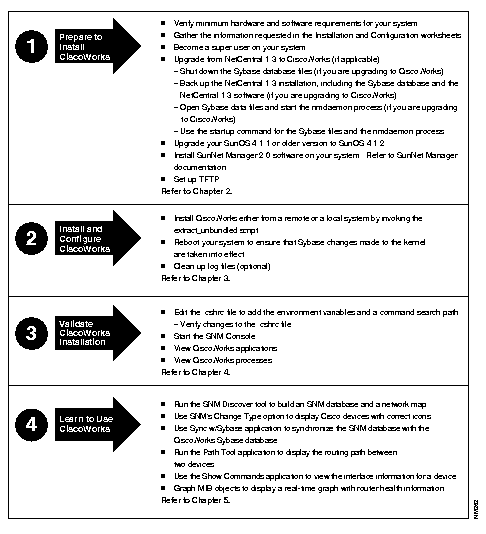
Figure 1-1: Installation and Configuration Process



