


|
|

This chapter describes preparatory information for installing and configuring CiscoWorks. Included are worksheets to help you gather the necessary information.
Figure 1-1provides an overview of the installation process, including preparation, installation, configuration, and validation
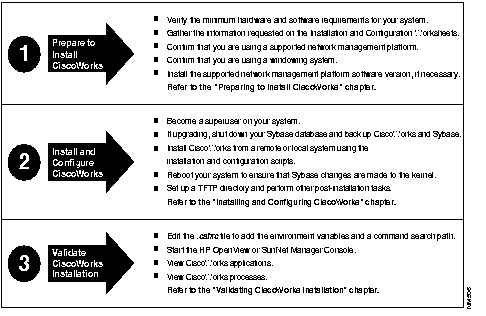
Before you install the CiscoWorks network management software, confirm that your computer system meets the related hardware and software-version requirements. In addition, you should note any special requirements about how you want CiscoWorks installed. For example, CiscoWorks prompts you during installation to supply information such as where you want CiscoWorks installed and whether you are performing an upgrade or new installation.
 | Time Saver If you do not have any special requirements, you can press Return to accept a default selection. |
To gather all the information you need to install CiscoWorks, first complete the installation worksheet. You can then refer to the worksheet, if necessary, as you proceed with the installation.
Follow these basic steps to prepare to upgrade from a previous release of CiscoWorks, or to install and configure CiscoWorks for the first time.
You are now ready to install and configure CiscoWorks on your system.
For Solaris 2.4, there is no upgrade path to Sybase 10 and CiscoWorks 3.2. This is a new installation.
You need the following hardware to run CiscoWorks:
Table 1-1 provides additional information on your system requirements for CiscoWorks and other software.
Software | Minimum Hard Disk Space Requirements |
|---|---|
| CiscoWorks, Version 3.2 | 150 MB |
| Sybase (provided with CiscoWorks), Version 10.0.2.6 | 37 MB for Sun
36 MB for HP-UX |
| HP OpenView, Version 3.3, 4.01, 4.1, or 4.11 | 50MB |
| SunNet Manager, Version 2.2.3 or 2.3 | 10 MB |
| Sybase tables storage | 85 MB total (nmsdb 25 MB; polldb, 60MB) |
| Total disk space (values are rounded up for improved performance) | 380 MB1 (minimum)
300 MB or more (recommended) |
The minimum swap space requirement (128 MB) is suitable for managing small networks.
The memory and swap space requirements depend on such factors as which applications you run, the number of applications you run concurrently, and the number of network devices that you manage with CiscoWorks. You may need to increase the swap space beyond the general minimum requirements, depending on your particular network management needs.
Table 1-2 lists the random access memory (RAM) requirements for your system.
| CiscoWorks Software and Applications | RAM Requirements |
|---|---|
| CiscoWorks1 software | 18 MB |
| CiscoWorks applications2 | 14 MB |
| Total RAM for CiscoWorks software and all CiscoWorks applications | 32 MB (minimum)3
64 MB (recommended) |
| Total swap space | 128 MB (recommended) |
In addition to the general operating system requirements, CiscoWorks applications have specific Cisco Systems system software requirements. Table 1-3 lists the CiscoWorks application requirements. For more up-to-date information, refer to the CiscoWorks Release Notes shipped with the product or on the Cisco Connection Documentation, Enterprise Series CD-ROM.
| CiscoWorks Application | Hardware or Software Requirement | Cisco Devices Supported |
|---|---|---|
| AutoInstall Manager | Neighbor router running one of the following:
New router running one of the following:
| Any Cisco devices |
| Configuration Management |
| |
| Device Polling | Supports MIB I and Cisco MIB variables up through Cisco IOS Release 11.1 | |
| Environmental Monitor | Cisco IOS Release 9.21
Revision 4 Environmental Monitor (ENVM) Card (Microcode version 2.0 or later) | Cisco 7000, AGS+ |
| Software Management suite (Software Library Manager, Software Inventory Manager, and Device Software Manager) | Cisco 3000, Cisco AGS+, Cisco 4000, and Cisco 7000 are supported by the following software releases:
All routers (collection of Cisco 3000, 4000, and 7000, or AGS+ routers)
| Device types with Flash memory: Cisco 3000, Cisco 4000, Cisco 7000, Cisco AGS+, and Cisco CGS and MGS
Device types with Run-from-Flash images: Cisco 2500 and Cisco 3000 |
The minimum swap space requirement (128 MB) is suitable for managing small networks.
The memory and swap space requirements depend on such factors as which applications you run, the number of applications you run concurrently, and the number of network devices that you manage with CiscoWorks. You may need to increase the swap space beyond the general minimum requirements, depending on your particular network management needs.\
The Information in table 1-4 is a guide to verify the system resources.
Complete the configuration worksheet by circling the correct choices and filling in the blanks.
| General Configuration Information | Default | Other |
|---|---|---|
| installation type: | New | Upgrade |
| Directory in which CiscoWorks is to be installed: | /usr/nms | Other: |
| Directory in which Sybase is to be installed: | /usr/nms/sybase | Other: |
| CiscoWorks Group Name: | cscworks | Other: |
| CiscoWorks group ID: | 55 | Other: |
| Usernames of individuals who will belong to CiscoWorks group: | Username:
Username: Username: Username: | |
| Ciscoworks username: | cscworks | Other: |
| Ciscoworks user ID number: | 100 | Other: |
| NMS path: | For SNM: /usr/nms | Other: |
| Install new mibs: | YES | NO |
| Sybase server name: | CW_SYSBASE | Other: |
| Polldb db size: | 40 | Other: |
| NMS db size: | 20 | Other: |
| NMS log size: | 5 | Other: |
| Polldb db location: | /usr/nms/sybase/data | Other: |
| TFTP Config: | YES | N/A |
| CW message log file: | /var/log/nmslog | Other: |
| Syslog facility for CiscoWorks messages: | local7 | Other: |
| Installing a TACACS server: | YES | NO |
| Start TACACS daemon during reboot: | YES | NO |
| TACACS username: | ||
| Username Password: | ||
| Using Extended TACACS mode: | YES | NO |
| Extended TACACS mode Password: | ||
| Enabling the CiscoWorks log purging utility: | YES | NO |
|
|