


|
|
Table B-1 describes the pin designations for the Ethernet AUI interface.
| Pin | Signal name | Direction |
|---|---|---|
| 1 | Logic Ground | (GND) |
| 2 | Collision Input+ (CI+) | In |
| 3 | Transmit Data+ (DO+) | Out |
| 4 | Logic Ground | (GND) |
| 5 | Receive Data+ (DI+) | In |
| 6 | +12V Logic Ground | (GND) |
| 7 | not used | |
| 8 | Logic Ground | (GND) |
| 9 | Collision Input- (CI-) | In |
| 10 | Transmit Data- (DO-) | Out |
| 11 | Logic Ground | (GND) |
| 12 | Receive Data- (DI-) | In |
| 13 | +12V Power (+12) | Out |
| 14 | Logic Ground | (GND) |
| 15 | Not used |
Table B-2 shows the Token Ring UTP pin designations for the RJ-45 connector:
| Pin | Signal Name | IBM-Type 3-Wire Color |
|---|---|---|
| 1 | ||
| 2 | ||
| 3 | T - | Blue with white stripe |
| 4 | R + | White with orange stripe |
| 5 | R - | Orange with white stripe |
| 6 | T + | White with blue stripe |
| 7 | ||
| 8 |
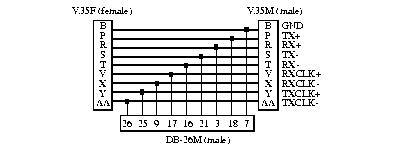
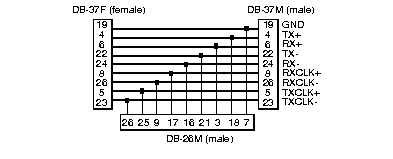
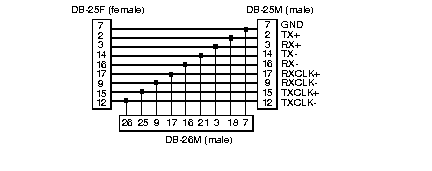
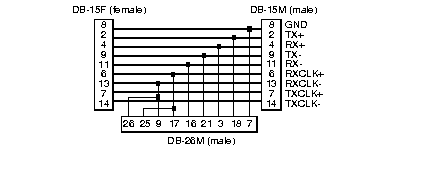
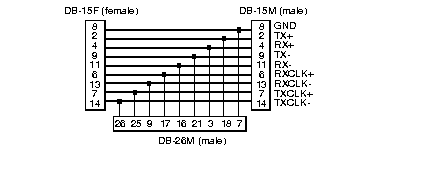
Interface types supported are V.35, RS-449, EIA-530, X.21 with one clock source, and X.21 with two clock sources. The cable configurations for these interfaces are shown in
Figures B-1 through B-5. Only the pins which are connected to the probe are shown. Pins which go straight through, connecting DTE to DCE, are not shown.
This connector accepts a 100-ohm Category 5 unshielded twisted-pair (UTP) or shielded twisted-pair (STP) cable with a TP-MIC plug. See Table B-3.
| Pin | Meaning |
|---|---|
| 1 | TX+ |
| 2 | TX- |
| 3, 4, 5, 6 | Not used |
| 7 | RX+ |
| 8 | RX- |
Table B-4 lists the pin designation for the RJ-12 connector used to connect a FDDI probe to an optical bypass switch.
| Pin | Meaning |
|---|---|
| 1 | Relay drive: + 5.0 V DC |
| 2 | Relay drive: + 5.0 V DC |
| 3 | Bypass_enable |
| 4 | Bypass_enable |
| 5 | Bypass_present |
| 6 | Return: grounded internally |
Table B-5 lists the RJ-45 connectors used to connect a SwitchProbe to half-duplex 100BASE-TX and 100BASE-T4 networks.
| Pin | 100BASE-TX | 100BASE-T4 |
|---|---|---|
| 1 | Transmit+ | TX_D1+ |
| 2 | Transmit- | TX_D1- |
| 3 | Receive+ | RX_D2+ |
| 4 | BI_D3+ | |
| 5 | BI_D3- | |
| 6 | Receive- | RX_D2- |
| 7 | BI_D4+ | |
| 8 | BI_D4- |
Table B-6 lists the pin connections for the 6-pin mini-DIN connector used to connect the Fast Ethernet FDX tap for 100BASE-FX to an optical bypass switch.
| Pin | Meaning |
|---|---|
| 1 | Secondary +5 V |
| 2 | Primary GND |
| 3 | Primary GND |
| 4 | Secondary GND |
| 5 | Common to 6 |
| 6 | Common to 5 |
Table B-7 shows the EIA-232 Pin Designations for the Console and Remote serial ports.
| Pins | Signal | Direction |
|---|---|---|
| 1 | Carrier Detect (DCD) | In |
| 2 | Receive Data (RXD) | In |
| 3 | Transmit Data (TXD) | Out |
| 4 | Data Terminal Ready (DTR) | Out |
| 5 | Signal GND | (GND) |
| 6 | Data Set Ready (DSR) | In |
| 7 | Request To Send (RTS) | Out |
| 8 | Clear To Send (CTS) | In |
| 9 | Ring Indicator (RI) | In |
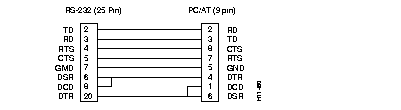
Use a null-modem cable to connect the Console port to an ASCII terminal. Figure B-6 illustrates sample wiring for the crossover cable type.
|
|