


|
|

December 18, 1997
These release notes describe the features and caveats for the Cisco 3800 Expansion Router Module. These release notes discuss the following topics:
Cisco 3800 Expansion Router Module installation and configuration information is documented in one Installation and Configuration Guide, on the Web and on the Cisco Documentation CD that came with your 3800 ERM. Further documentation about the 3800 ERM is found in a two-manual set for the Cisco 3800 which is summarized in Table 1 below.
For more detailed information, the Cisco IOS configuration guide and command reference are also on the Documentation CD.
| Books | Chapter Topics |
|---|---|
| · Cisco 3800 Expansion Router Module Installation and Configuration Guide | Cisco 3800 ERM Product Overview
Preparing to Install the 3800 ERM Installing the 3800 ERM Configuring the 3800 ERM Maintaining the 3800 ERM Cable Specifications |
| · Cisco 3800 Series Hardware Installation Guide | Introducing the Cisco 3800 Series
Installing Cisco 3800 Hardware Installing Cisco 3800 Cards Configuring the Cisco 3800 with IOS Connection Pinouts and Configurations Cisco 3800 Applications Technical Specifications Detailed Hardware Description Error Messages |
| · Cisco 3800 Series Software Configuration and Command Reference Guide | Command Overview
System Configuration and Setup Operating the Cisco 3800 Voice Port Commands FTC Trunk Commands Private Network-Network Interface Commands Switch Commands Serial Interface Commands |
These documents are available both as printed manuals and as electronic documents.
You can access the electronic documents either on the Cisco Documentation CD-ROM, or at Cisco Connection Online (CCO) on the World Wide Web.
On the CD-ROM, from the Cisco Documentation home page file:///CiscoCD/home/home.htm, find the section Cisco Product Documentation and click on Cisco StrataCom WAN Solutions. Click on Release 8.2, then Access Products and finally on the Cisco 3800 manual titles. The URL to get to Access Products is:
file:///CiscoCD/data/doc/wanbu/8_2/access/access.htm
From CCO, click on Service and Support, then click on Technical Documentation. From the Technical Documentation page find the section Cisco Product Documentation and click on Cisco StrataCom WAN Solutions. Click on Release 8.2, then Access Products and finally on the Cisco 3800 manual titles. The URL to get to Access Products is:
http://www.cisco.com/univercd/data/doc/wanbu/8_2/access/access.htm
Information about CCO and the Documentation CD-ROM is in the sections "Cisco Connection Online" and "Documentation CD-ROM" at the end of these release notes.
The 3800 ERM is an optional sub-system added to the Cisco 3800 chassis to provide multiprotocol routing and bridging capabilities between Ethernet and Token Ring LANs and the WAN facilities of the Cisco 3800. The ERM is a Cisco 2513 router modified to fit the Cisco 3800 chassis and substantially enhances the Cisco 3800 product.
The 3800 ERM is designed to fit in a three-slot and eight-slot Cisco 3800 chassis and be cabled to a serial port on the Cisco 3800's Combo card using a special serial transition cable. The 3800 ERM is inserted in the Cisco 3800 chassis and receives power from the backplane, but it does not perform any communications over the backplane. There is no integration internal to the Cisco 3800 chassis on the backplane or in the control, management and data transfer aspects of the systems.
| Interface | Cisco 3800 ERM |
|---|---|
| Interfaces |
|
The 3800 ERM is supported in IOS software release 11.2(7)P or higher. These release notes describe the features and caveats for Cisco Internetwork Operating System (Cisco IOS) Release 11.2(7)P for the Cisco 3800 ERM.
Prior to Cisco IOS Release 11.2, maintenance releases of major Cisco IOS software releases were used to deliver additional new features. Beginning with Cisco IOS Release 11.2, Cisco Systems provides software release "trains" based on a single version of Cisco IOS software. Maintenance releases of the Major train software deliver fixes to software defects only, thus providing the most stable software for your network, for the features you need. In addition to the Major train, there are Early Deployment (ED) trains, which primarily deliver new features.
The Release 11.2 P ED train delivers both fixes to software defects and support for new platforms for a broad range of hardware devices. The other ED train--Release 11.2F--delivers fixes to software defects, new platform support, and new cross-platform functionality.
These release notes do not describe all of the features that are available in Release 11.2 or Release 11.2P. For information about features in Release 11.2, refer to the Release Notes for Cisco IOS Release 11.2 which can be viewed at http://www.cisco.com/univercd/data/doc/software/11_2/relnotes/rn112.htm
For information about features in Release 11.2P, refer to the Release Notes for Cisco IOS Release 11.2P which can be accessed at http://www.cisco.com/univercd/data/doc/software/11_2/earlydel/ios112p.htm
Use these release notes in conjunction with the Release Notes for Cisco IOS Release 11.2 and 11.2P, because the software caveats that apply to these releases may also apply to Release 11.2(7)P.
The default image supplied with your 3800 ERM is LAN FRAD. By default the 3800 ERM is equipped with 4 MB of Flash and 4 MB DRAM memory. You may upgrade to IP/IPX/IBM/APPN or Enterprise, but to upgrade to these images requires more memory.
The memory requirements for the feature sets available for the 3800 ERM are listed in Table 3. If you don't have a minimum of the memory amounts listed, you must upgrade your memory.
To see what each feature set contains, see next section on feature sets.
| Part Number | Feature Set | Image Name | Required Flash Memory1 | Required DRAM Memory |
|---|---|---|---|---|
| SF382LF-11.2.7P | LAN FRAD/EIGRP2 | c2500fx-fin-1 | 4 MB | 4 MB |
| SF382LF2-11.2.7P | LAN FRAD/OSPF2 | c2500fx-f2in-1 | 4 MB | 4 MB |
| SF382A-11.2.7P | Enterprise | c2500-j-1 | 8 MB | 8 MB |
| SF382DSN-11.2.7P | IP/IPX/IBM & APPN Plus | c2500-ainr-1 | 8 MB | 8 MB |
There are four feature sets available for use with the 3800 ERM. The contents of each feature set are listed in Table 4.
The feature set table below uses the following conventions to identify features:
| Feature Set | ||||
|---|---|---|---|---|
| Feature | IP/IPX/IBM/APPN PLUS | Enterprise | EIGRP LAN FRAD | OSPF LANFRAD |
| LAN Support | ||||
| Apollo Domain | -- | X | -- | -- |
| AppleTalk 1 and 21 | -- | X | -- | -- |
| Banyan VINES | -- | X | -- | -- |
| Concurrent routing and bridging (CRB) | X | X | -- | -- |
| DECnet IV | -- | X | -- | -- |
| DECnet V | -- | X | -- | -- |
| GRE | X | X | X | X |
| Integrated routing and bridging (IRB)2 | X | X | X | X |
| IP | X | X | X | X |
| LAN extension host | X | X | X | X |
| Multiring | X | X | X | X |
| Novell IPX3 | X | X | X | X |
| OSI | -- | X | -- | -- |
| Source-route bridging4 | -- | -- | X | X |
| Transparent and translational bridging | X | X | X | X |
| XNS | -- | X | -- | -- |
| WAN Services | ||||
| Combinet Packet Protocol (CPP) | X | X | X | X |
| Dialer profiles | X | X | X | X |
| Frame Relay | X | X | X | X |
| Frame Relay SVC Support (DTE) | -- | X | -- | -- |
| Frame Relay traffic shaping | X | X | X | X |
| Half bridge/half router for CPP and PPP | X | X | X | X |
| HDLC | X | X | -- | -- |
| IPXWAN 2.0 | X | X | X | X |
| Multichassis Multilink PPP (MMP) | -- | X | -- | -- |
| PPP5 | X | X | X | X |
| SMDS | X | X | -- | -- |
| Switched 56 | X | X | -- | -- |
| Virtual Private Dial-up Network (VPDN) | -- | X | -- | -- |
| X.256 | X | X | -- | -- |
| WAN Optimization | ||||
| Bandwidth-on-demand | X | X | -- | -- |
| Custom and priority queuing | X | X | X | X |
| Dial backup | X | X | -- | -- |
| Dial-on-demand | X | X | -- | -- |
| Header7, link and payload compression8 | X | X | X | X |
| Header and link compression9 | X | X | -- | -- |
| Snapshot routing | X | X | -- | -- |
| Weighted fair queuing | X | X | X | X |
| IP Routing | ||||
| BGP | X | X | -- | -- |
| BGP410 | X | X | -- | -- |
| EGP | X | X | -- | -- |
| Enhanced IGRP | X | X | X | -- |
| Enhanced IGRP Optimizations | X | X | X | -- |
| ES-IS | -- | X | -- | -- |
| IGRP | X | X | X | -- |
| IS-IS | -- | X | -- | -- |
| Named IP Access Control List | -- | X | -- | -- |
| NHRP | X | X | -- | -- |
| On Demand Routing (ODR) | X | X | X | X |
| OSPF | X | X | -- | X |
| OSPF Not-So-Stubby-Areas (NSSA) | X | X | -- | X |
| OSPF On Demand Circuit (RFC 1793) | X | X | -- | X |
| PIM | X | X | -- | -- |
| Policy-based routing | X | X | -- | -- |
| RIP | X | X | X | X |
| RIP Version 2 | X | X | X | X |
| Other Routing | ||||
| AURP | -- | X | -- | -- |
| IPX RIP | X | X | X | X |
| NLSP | X | X | -- | -- |
| RTMP | -- | X | -- | -- |
| SMRP | -- | X | -- | -- |
| SRTP | -- | X | -- | -- |
| Multimedia and Quality of Service | ||||
| Generic traffic shaping | X | X | X | X |
| Random Early Detection (RED) | X | X | X | X |
| Resource Reservation Protocol (RSVP) | X | X | X | X |
| Management | ||||
| AutoInstall | X | X | X | X |
| Automatic modem configuration | X | X | -- | -- |
| HTTP Server | X | X | X | X |
| RMON events and alarms11 | X | X | X | X |
| SNMP | X | X | X | X |
| Telnet | X | X | X | X |
| Security | ||||
| Access lists | X | X | X | X |
| Access security | X | X | X | X |
| Extended access lists | X | X | X | X |
| Kerberized login | -- | X | -- | -- |
| Kerberos V client support | -- | X | -- | -- |
| Lock and key | X | X | X | X |
| MD5 routing authentication | X | X | X | X |
| RADIUS | X | X | -- | -- |
| TACACS+12 | X | X | X | X |
| IBM Support | ||||
| APPN13 | X | -- | -- | -- |
| BAN for SNA Frame Relay support | X | X | X | X |
| Bisync | X | X | X | X |
| Caching and filtering | X | X | X | X |
| DLSw+ | X | X | X | X |
| Downstream PU concentration (DSPU) | X | X | -- | -- |
| Frame Relay SNA support (RFC 1490) | X | X | X | X |
| Native Client Interface Architecture (NCIA) Server | X | X | -- | -- |
| NetView Native Service Point | X | X | X | X |
| Polled async (ADT, ADPLEX) | -- | -- | X | X |
| QLLC | X | X | X | X |
| DLSw (FRC 1795) | -- | -- | X | X |
| Response Time Reporter (RTR) | X | X | -- | -- |
| SDLC integration | X | X | X | X |
| SDLC transport (STUN) | X | X | X | X |
| SDLC-to-LAN conversion (SDLLC) | X | X | X | X |
| SNA and NetBIOS WAN optimization via local acknowledgment | X | X | X | X |
| SRB/RSRB14 | X | X | X | X |
| SRT | X | X | X | X |
| TG/COS | -- | X | -- | -- |
| TN3270 | X | X | -- | -- |
| Protocol Translation | ||||
| LAT | -- | X | -- | -- |
| PPP | -- | X | -- | -- |
| Rlogin | -- | X | -- | -- |
| Telnet | -- | X | -- | -- |
| TN3270 | -- | X | -- | -- |
| X.25 | -- | X | -- | -- |
| Remote Node15 | ||||
| ARAP 1.0/2.0 | -- | X | -- | -- |
| Asynchronous master interfaces | X | X | -- | -- |
| ATCP | -- | X | -- | -- |
| CPPP | X | X | -- | -- |
| CSLIP | X | X | -- | -- |
| DHCP | X | X | -- | -- |
| IP pooling | X | X | -- | -- |
| IPX and ARAP on virtual async interfaces | -- | X | -- | -- |
| IPXCP7 | X | X | -- | -- |
| MacIP | -- | X | -- | -- |
| NASI | -- | X | -- | -- |
| NetBEUI over PPP | -- | X | -- | -- |
| PPP | X | X | -- | -- |
| SLIP | X | X | -- | -- |
| Terminal Services15 | ||||
| LAT16 | -- | X | -- | -- |
| Rlogin | X | X | -- | -- |
| Telnet | X | X | -- | -- |
| TN3270 | -- | X | -- | -- |
| X.25 PAD | X | X | -- | -- |
| Xremote | -- | X | -- | -- |
There are no new software features specific to the ERM in Release 11.2(7). For information about other features in Release 11.2, refer to the Release Notes for Cisco IOS Release 11.2. For information about other features in Release 11.2P, refer to Release Notes for Cisco IOS Release 11.2P.
There are no significant caveats/modifications specific to the ERM in Release 11.2(7). For further information about other caveats/modifications in Release 11.2 and Release 11.2P, refer to the Release Notes for those releases.
This section discusses these hardware caveats relating to the 3800 ERM early prototypes:
The Cisco 3800 ERM is packaged with the items detailed below:
In early EFT prototypes of the 3800 ERM, the ERM's console port conformed to the pinout of the Cisco 3800's SRV console port for DBG1 signals only. Thus, in these early prototypes a custom console cable (P/N: 72-1323-01) needs to be used, instead of the standard RJ-45-to-RJ-45 roll-over console cable, to connect the 3800 ERM to the Cisco 3800's SRV port.
This section provides an assembly drawing and the pinout information for the custom cable and 3800 ERM console port:
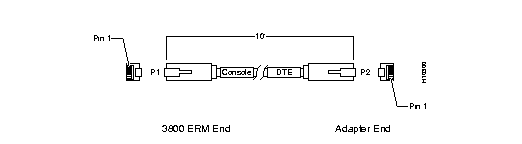
| 3800 ERM Console Port (DTE) | Terminal | ||
|---|---|---|---|
| Signal | P1 Pin# | P2 Pin# | Signal |
| RxD | 1 | 3 | TxD |
| DSR | 2 | 2 | DTR |
| DTR | 3 | 7 | DSR |
| GND | 4 | 5 | GND |
| GND | 5 | 4 | GND |
| TxD | 8 | 6 | RxD |
Use the RJ-45-to-RJ-45 custom cable and RJ-45-to-DB-9 female DTE adapter (labeled Terminal) to connect the console port to a PC running terminal emulation software. Figure 2 shows how to connect the console port to a PC. Figure 2 lists the pinouts for the asynchronous serial console port, the RJ-45-to-RJ-45 custom roll-over cable, and the RJ-45-to-DB-9 female DTE adapter (labeled Terminal).

| 3800 ERM Console Port (DTE) | RJ-45-to-RJ-45 Roll-Over Cable | RJ-45-to-DB-9 Terminal Adapter | Console Device | |
|---|---|---|---|---|
| Signal | RJ-45 Pin | RJ-45 Pin | DB-9 Pin | Signal |
| RTS | 6 NC | 8 | 8 | CTS |
| DTR | 3 | 7 | 6 | DSR |
| TxD | 8 | 6 | 2 | RxD |
| GND | 4 | 5 | 5 | GND |
| GND | 5 | 4 | 5 | GND |
| RxD | 1 | 3 | 3 | TxD |
| DSR | 2 | 2 | 4 | DTR |
| CTS | 7 NC | 1 | 7 | RTS |
Use the RJ-45-to-RJ-45 custom roll-over cable and RJ-45-to-DB-25 female DTE adapter (labeled Terminal) to connect the console port to a terminal. Figure 3 shows how to connect the console port to a terminal. Table 7 lists the pinouts for the asynchronous serial console port, the RJ-45-to-RJ-45 custom roll-over cable, and the RJ-45-to-DB-25 female DTE adapter (labeled Terminal).

| 3800 ERM Console Port (DTE) | RJ-45-to-RJ-45 Roll-Over Cable | RJ-45-to-DB-25 Terminal Adapter | Console Device | |
|---|---|---|---|---|
| Signal | RJ-45 Pin | RJ-45 Pin | DB-25 Pin | Signal |
| RTS | 6 NC | 8 | 5 | CTS |
| DTR | 3 | 7 | 6 | DSR |
| TxD | 8 | 6 | 3 | RxD |
| GND | 4 | 5 | 7 | GND |
| GND | 5 | 4 | 7 | GND |
| RxD | 1 | 3 | 2 | TxD |
| DSR | 2 | 2 | 20 | DTR |
| CTS | 7 NC | 1 | 4 | RTS |
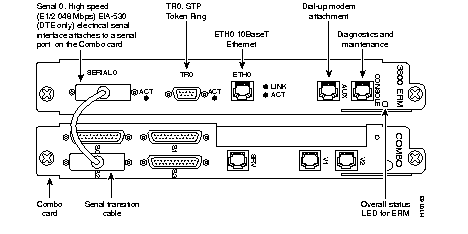
Serial0 of the ERM may be cabled to any of the serial ports of the Combo card.
Serial0 (S0) of the Rev3 Combo Card is not available if E1/T1 Daughter card is installed. In Figure 4, the Serial 2 port of the Combo card is used.
Cisco Connection Online (CCO) is Cisco Systems' primary, real-time support channel. Maintenance customers and partners can self-register on CCO to obtain additional information and services.
Available 24 hours a day, 7 days a week, CCO provides a wealth of standard and value-added services to Cisco's customers and business partners. CCO services include product information, product documentation, software updates, release notes, technical tips, the Bug Navigator, configuration notes, brochures, descriptions of service offerings, and download access to public and authorized files.
CCO serves a wide variety of users through two interfaces that are updated and enhanced simultaneously: a character-based version and a multimedia version that resides on the World Wide Web (WWW). The character-based CCO supports Zmodem, Kermit, Xmodem, FTP, and Internet e-mail, and it is excellent for quick access to information over lower bandwidths. The WWW version of CCO provides richly formatted documents with photographs, figures, graphics, and video, as well as hyperlinks to related information.
You can access CCO in the following ways:
For a copy of CCO's Frequently Asked Questions (FAQ), contact cco-help@cisco.com. For additional information, contact cco-team@cisco.com.
Cisco documentation and additional literature are available in a CD-ROM package, which ships with your product. The Documentation CD-ROM, a member of the Cisco Connection Family, is updated monthly. Therefore, it might be more up to date than printed documentation. To order additional copies of the Documentation CD-ROM, contact your local sales representative or call customer service. The CD-ROM package is available as a single package or as an annual subscription. You can also access Cisco documentation on the World Wide Web at http://www.cisco.com, http://www-china.cisco.com, or http://www-europe.cisco.com.
|
|