This chapter provides information on the Cisco 1000 series products. The information is organized into the following sections:
The Cisco 1000 series LAN extenders and routers are easy-to-install, inexpensive, multiprotocol access products designed for small offices and other remote sites.
There are currently four Cisco 1000 series models:
- Cisco 1003 ISDN router
- One 10BaseT Ethernet port (RJ-45)
- One ISDN BRI WAN port (RJ-45)
- One console port (RJ-45)
- One Type-2 PCMCIA slot for Flash ROM card
- Cisco 1004 ISDN router
- One 10BaseT Ethernet port (RJ-45)
- One ISDN BRI WAN port (RJ-45), with an integrated NT1 device
- One console port (RJ-45)
- One Type-2 PCMCIA slot for Flash ROM card
- Cisco 1005 serial router
- One 10BaseT Ethernet port (RJ-45)
- One serial WAN port (DB-60) that supports asynchronous serial communications up to 115.2 kbps (EIA/TIA-232 interface) and synchronous serial such as leased lines, Frame Relay, switched 56 kbps, SMDS, and X.25 up to 2.048 Mbps (EIA/TIA-232, EIA/TIA-449, V.35, X.21, and EIA-530)
- One console port (RJ-45)
- One Type-2 PCMCIA slot for Flash ROM card
The Cisco 1003 and Cisco 1004 routers are small, desktop routers that connect small, remote sites with Ethernet LANs to ISDN WANs.
The main difference between the two routers is that the Cisco 1004 router includes an integrated network termination 1 (NT1) device and the Cisco 1003 router does not. The ISDN service provider supplies the NT1 connection worldwide, except in North America, where the NT1 device is supplied by the customer. Therefore, the Cisco 1004 router is for use in North America, and the Cisco 1003 router is applicable worldwide.
The rear view of the routers looks the same except for the following differences, shown in Figure 127:
- The BRI port on the Cisco 1003 is labeled "ISDN S/T," and "Cisco 1003" is stamped on the upper left corner of the chassis (not illustrated).
- The BRI port on the Cisco 1004 is labeled "ISDN U," and "Cisco 1004" is stamped on the upper left corner of the chassis (not illustrated).
Figure 127: Cisco 1003 and Cisco 1004 Rear View
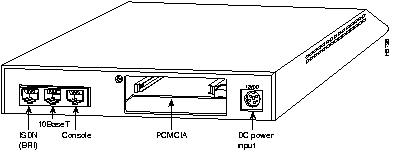
Table 68 lists a summary of features, and Table 69 lists the environmental specifications for the Cisco 1003 and Cisco 1004 routers.
Table 68: Cisco 1003 and Cisco 1004 Summary of Features
| Characteristic
| Description
|
|---|
| Supported network interfaces
| ISDN BRI (RJ-45)1
Ethernet 10BaseT (RJ-45)
Console port (RJ-45) (EIA/TIA-232)
|
| Processor type
| Motorola 68360
|
| Software
| IP, IPX, AppleTalk routing and bridging over ISDN.
|
| Dimensions (H x W x D)
| 1.75 x 8.0 x 8.3 in. (4.4 x 21 x 20.3 cm)
|
| Weight
| 6.0 lb (2.7 kg) shipping weight
|
1
The ISDN BRI port is labeled "ISDN S/T" on the Cisco 1003 router and "ISDN U" on the Cisco 1004 router. The Cisco 1004 router includes an integrated NT1 device.
Table 69: Cisco 1003 and Cisco 1004 Environmental Specifications
| Description
| Specification
|
|---|
| Power
| Cisco 1003 and Cisco 1004: 12 VDC output, minimum 0.5A
Desktop external power supply: 100 to 240 VAC at 50 to 60 Hz, 1.0A input
Wall-mount external power supply: 120 VAC at 60 Hz input (for Cisco 1004 routers used in North America only)
|
| Operating temperature range
| 32 to 104×F (0 to 40×C)
|
| Nonoperating temperature range
| -40 to 185×F (-40 to 85×C)
|
| Operating humidity (noncondensing)
| 10 to 90%
|
The Cisco 1003 and Cisco 1004 routers include the following standard features:
- One Ethernet 10BaseT port with an RJ-45 connector
- One ISDN BRI port with an RJ-45 connector (the Cisco 1004 router includes an integrated NT1 device)
- One console port with an RJ-45 connector
- Console cable kit and power supply
- One external PCMCIA slot for optional Type-2 Flash memory card
- Software booting over an Ethernet LAN using TFTP
- Optional Flash memory card to store software image and configuration files, allowing network-independent booting and software updates over the WAN or LAN connections
- LAN-to-LAN DDR routing over ISDN lines
- IP, IPX, and AppleTalk routing
- Transparent bridging
- IPX and SPX spoofing
- PPP compression and bandwidth-on-demand with load balancing for throughput up to 512 kbps
- HDLC and standards-based PPP
- Increased security with CHAP, PAP, packet filters, local password, and CLI/ANI
- Network management and monitoring through the console port or over the network using SNMP or Telnet
Table 70 lists the hardware product numbers for the Cisco 1003 and Cisco 1004 routers. If a product number ends with an equal sign (=), the item can be ordered only as a spare. If a product number does not end with an equal sign, the item can be ordered as a spare or as a configurable part of a system order.
Table 70: Cisco 1003 and Cisco 1004 Distributor Bundle Hardware Product Numbers
| Option
| Product Number
|
|---|
| Base System
|
|
| Cisco 1003 Ethernet/ISDN BRI router
| CISCO1003 -CH
|
| Cisco 1004 Ethernet/ISDN BRI router with NT1
| CISCO1004 -CH
|
| Options
|
|
| Console cable
| CAB-1000-CON=
|
| AC power supply
| PWR-1000-AC1=
|
| 8-MB DRAM SIMM
| MEM-1000-8MD=
|
The Cisco 1003 and Cisco 1004 routers support the following Cisco IOS releases:
- Cisco IOS Releases 11.2, 11.1, and 11.0 feature sets
Table 74 lists the Cisco IOS software product numbers and minimum memory requirements.
The software is available on 2-MB or 4-MB Flash ROM cards, on diskettes or on CD-ROMs as feature packs. For more information about software feature packs, see the "Cisco IOS Feature Packs" section in the "Cisco IOS Software" chapter earlier in the catalog.
The Cisco 1005 router is a small, desktop router that connects small, remote sites with Ethernet LANs to synchronous WANs at speeds up to 2.048 Mbps or to asynchronous WANs at speeds up to 115.2 kbps.
Figure 128 shows the rear view of the Cisco 1005 router.
Figure 128: Cisco 1005 Rear View
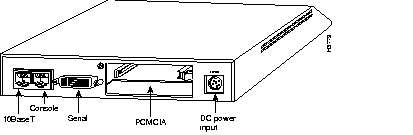
Table 71 lists a summary of features, and Table 72 lists the environmental specifications for the Cisco 1005 router.
Table 71: Cisco 1005 Summary of Features
| Characteristic
| Description
|
|---|
| Supported network interfaces
| Serial port (DB-60)1
Ethernet 10BaseT (RJ-45)
Console port (RJ-45) (EIA/TIA-232)
|
| Processor type
| MC68360
|
| Software
| IP, IPX, AppleTalk routing and bridging over leased lines, Frame Relay, Switched 56, SMDS, and X.25. IP/IPX routing over asynchronous WAN links. (See Table 74.)
|
| Dimensions (H x W x D)
| 1.75 x 8.0 x 8.3 in. (4.4 x 21 x 20.3 cm)
|
| Weight (average shipping)
| 6.0 lb (2.7 kg)
|
1
The serial port supports asynchronous communications through an EIA/TIA-232 interface and synchronous communications through the following interfaces: EIA/TIA-232, EIA/TIA-449, V.35, X.21, and EIA-530.
Table 72: Cisco 1005 Environmental Specifications
| Description
| Specification
|
|---|
| Power
| 12 VDC output, minimum 0.5A
External power supply: 100 to 240 VAC at 50 to 60 Hz, 1.0A input
|
| Operating temperature range
| 32 to 104×F (0 to 40×C)
|
| Nonoperating temperature range
| -40 to 185×F (-40 to 85×C)
|
| Operating humidity (noncondensing)
| 10 to 90%
|

Standard Features
The Cisco 1005 router includes the following features:
- One Ethernet 10BaseT port (RJ-45)
- One console port (RJ-45)
- Console cable kit and power supply
- One serial port (DB-60) that supports permanent and switched synchronous WAN links up to 2.048 Mbps and asynchronous WAN links up to 115.2 kbps
- One slot for an optional PCMCIA Flash memory card
- Software boot using TFTP over an Ethernet LAN connection or by using the optional Flash memory card
- IP, IPX, and AppleTalk routing
- Transparent bridging (over synchronous WAN links only)
- Support for the following synchronous WAN encapsulations: HDLC, LAPB, Frame Relay, SMDS, and X.25
- Support for the following asynchronous WAN encapsulations: PPP and SLIP
- Router management through the console port or over the network using SNMP or Telnet
- AutoInstall for downloading configuration files automatically over a WAN
Table 73 lists the hardware product numbers for the Cisco 1005. If a product number ends with an equal sign (=), the item can be ordered only as a spare. If a product number does not end with an equal sign, the item can be ordered as a spare or as a configurable part of a system order.
Table 73: Cisco 1005 Hardware Product Numbers
| Option
| Product Number
|
|---|
| Base System
|
|
| Cisco 1005 Ethernet/synchronous serial router
| CISCO1005
|
| Options
|
|
| Console cable
| CAB-1000-CON=
|
| AC power supply
| PWR-1000-AC1=
|
| EIA/TIA-232 male DTE interface, 10 ft (3 m)
| CAB-232MT
|
| EIA/TIA-449 male DTE interface, 10 ft (3 m)
| CAB-449MT
|
| EIA-530 male DTE interface, 10 ft (3 m)
| CAB-530MT
|
| V.35 male DTE interface, 10 ft (3 m)
| CAB-V35MT
|
| X.21 male DTE interface, 10 ft (3 m)
| CAB-X21MT
|
| 4-MB to 8-MB DRAM upgrade
| MEM-1005-8MD
|
| 8-MB DRAM SIMM
| MEM-1000-8MD=
|
The Cisco 1005 router supports the following software releases:
- Cisco IOS Releases 11.2, 11.1, and 11.0 feature sets
- Cisco IOS Releases 11.2, 11.1, and 11.0 platform-specific feature sets
Note The Cisco IOS Releases 11.0 and 11.1 feature sets support the asynchronous services, which provide dial-on-demand routing over asynchronous basic telephone lines on the Cisco 1005 router. Unlike other Cisco IOS feature sets available for the Cisco 1005 router, these asynchronous images do not support bridging.
Table 74 lists the Cisco IOS software product numbers for Cisco IOS Release 11.2.
Software feature sets for the Cisco 1005 are available on 2-MB or 4-MB Flash ROM cards or on diskettes.
The Cisco 1000 series routers offer the following types of feature sets:
- Basic. The basic feature set for the hardware platform.
- Plus. The basic feature set plus additional features.
- Plus 40. The basic feature set, Plus features, and 40-bit data encryption.
- Plus 56. The basic feature set, Plus features, and 56-bit data encryption.
Note Cisco IOS images with 40-bit Data Encryption Standard (DES) support may legally be distributed to any party eligible to receive Cisco IOS software. 40-bit DES is not a cryptographically strong solution so its use should be carefully evaluated.
Cisco IOS images with 56-bit DES are possibly subject to export and/or import controls and may have a limited distribution. For more information, contact your sales representative or distributor, or visit CCO at
http://www.cisco.com/wwl/export/encrypt.html , or send e-mail to export@cisco.com.
The Cisco IOS feature set tables use the following conventions to identify features:
- Ð: The feature is offered in the basic feature set.
- -: The feature is not offered in the feature set.
- Plus: The feature is offered only in the Plus feature sets.
- Encrypt: The feature is in the Encryption feature sets.
Software feature packs consist of CD-ROMs that contain Cisco IOS software feature set images and a Windows 95 application, which loads the images onto a router.
Software feature packs are available for most of the Cisco IOS Release 11.2. Table 74 lists the product numbers for feature sets and feature packs available in Cisco IOS Release 11.2.
For more information about software feature packs, see the "Cisco IOS Feature Packs" section in the "Cisco IOS Software" chapter earlier in the catalog.
Table 74: Software Product Numbers and Minimum Memory Requirements for Cisco IOS
Release 11.2--Cisco 1005
| Category
| IP Routing
| IP/IPX Routing1
| IP/AppleTalk Routing1
| IP/IPX/AppleTalk Routing
| IP/OSF/PIM Routing
|
|---|
| Software Product Numbers for the Cisco 10052
|
|
|
|
|
|
| Feature pack3
| CD10-C/H-11.2=
| -
| -
| CD10-A/B/E-11.2=
| -
|
Feature pack3
Plus feature set
| -
| -
| -
| CD10-A/B/E-11.2=
| -
|
Feature pack3
Plus 40 feature set
| -
| -
| -
| CD10-AP-11.2=
| -
|
Feature pack3
Plus 56 feature set
| -
| -
| -
| CD10-AW-11.2=
| -
|