|
|

This appendix describes how to turn termination on and off for Cisco 761, Cisco 765, Cisco 771, and Cisco 775 routers.
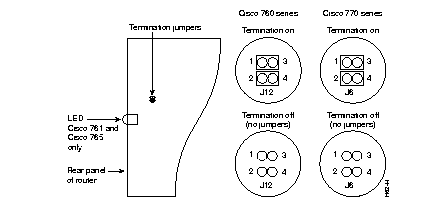
Termination for Cisco 761, Cisco 765, Cisco 771, and Cisco 775 routers is configured with a set of two termination jumpers on the router motherboard, inside the chassis. The location of the jumpers depends on which router model you are using.
 | Warning Network hazardous voltages are present in the BRI cable. If you detach the BRI cable, detach the end away from the router first to avoid possible electric shock. Network hazardous voltages also are present on the system card in the area of the BRI port (RJ-45 connector), regardless of when power is turned off. (To see translated versions of this warning, refer to the section "Translated Safety Warnings" in the document Regulatory Compliance and Safety Information included in your router package.) |
 | Caution Before opening the chassis, be sure that you have discharged all static electricity from your body, and be sure the power is OFF. Before performing any procedures described in this appendix, review the sections "Safety Recommendations," "Preventing Electrostatic Discharge Damage," and "Electromagnetic Interference Prevention" in the chapter "Preparing a Cisco 700 Series Router for Installation." |
This section describes how to configure termination for the Cisco 761, Cisco 765, Cisco 771, and Cisco 775 routers. This procedure consists of the following three steps:
This procedure requires a Number 1 Phillips screwdriver.
Take the following steps to open the chassis:
Step 1 Turn OFF the power. Do not unplug the power cable so that ESD voltages can be channeled to ground.
Step 2 Remove all interface cables from the rear-panel connectors of the router.
Step 3 Turn the router so that the rear panel is toward you.
Step 4 Use the Phillips screwdriver to remove the two screws located on the rear panel of the chassis. Put the screws in a safe place.
Step 5 Gently pull the top section up and away from the bottom section. Put the chassis top in a safe place.
Take the following steps to change the termination jumpers on the Cisco 761, Cisco 765, Cisco 771, and Cisco 775 routers:
Step 1 Locate the termination jumpers on the motherboard. Refer to Figure C-1 for jumper location.
Step 2 Gently change both jumpers, as indicated in Figure C-1, to set the router's termination.
Take the following steps to close the chassis:
Step 1 Correctly position the top and bottom chassis sections and press them together.
Step 2 When the two sections fit snugly together, turn the chassis so that the rear panel is toward you.
Step 3 Replace the two chassis screws, tightening them to no more than 8 or 9 inch/pounds of torque.
Step 4 Reinstall the chassis on the wall, rack, or desktop.
Step 5 Replace all network cables.
|
|