


|
|

This appendix provides the following pinout information:
Your router comes with a console and auxiliary cable kit, which contains the cable and adapters you need to connect a console (an ASCII terminal or PC running terminal emulation software) or modem to your router. The console and auxiliary cable kit includes the following items:
For console connections, proceed to the section "Console Port Signals and Pinouts" later in this appendix; for modem connections, proceed to the section "Auxiliary Port Signals and Pinouts" later in this appendix.
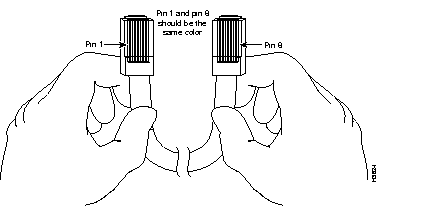
You can identify a roll-over cable by comparing the two modular ends of the cable. Holding the cables side-by-side, with the tab at the back, the wire connected to the pin on the outside of the left plug should be the same color as the wire connected to the pin on the outside of the right plug. (See Figure C-1.) If your cable was purchased from Cisco Systems, pin 1 will be white on one connector, and pin 8 will be white on the other (a roll-over cable reverses pins 1 and 8, 2 and 7, 3 and 6, and 4 and 5).
Use the RJ-45-to-RJ-45 roll-over cable and RJ-45-to-DB-9 female DTE adapter (labeled Terminal) to connect the console port to a PC running terminal emulation software. Figure C-2 shows how to connect the console port to a PC. Table C-1 lists the pinouts for the asynchronous serial console port, the RJ-45-to-RJ-45 roll-over cable, and the RJ-45-to-DB-9 female DTE adapter (labeled Terminal).

| Console Port (DTE) | RJ-45-to-RJ-45 Roll-Over Cable | RJ-45-to-DB-9 Terminal Adapter | Console Device | |
|---|---|---|---|---|
| Signal | RJ-45 Pin | RJ-45 Pin | DB-9 Pin | Signal |
| RTS | 11 | 8 | 8 | CTS |
| DTR | 2 | 7 | 6 | DSR |
| TxD | 3 | 6 | 2 | RxD |
| GND | 4 | 5 | 5 | GND |
| GND | 5 | 4 | 5 | GND |
| RxD | 6 | 3 | 3 | TxD |
| DSR | 7 | 3 | 4 | DTR |
| CTS | 81 | 1 | 7 | RTS |
Use the RJ-45-to-RJ-45 roll-over cable and RJ-45-to-DB-25 female DTE adapter (labeled Terminal) to connect the console port to a terminal. Figure C-3 shows how to connect the console port to a terminal. Table C-2 lists the pinouts for the asynchronous serial console port, the RJ-45-to-RJ-45 roll-over cable, and the RJ-45-to-DB-25 female DTE adapter (labeled Terminal).

| Console Port (DTE)1 | RJ-45-to-RJ-45 Roll-Over Cable | RJ-45-to-DB-25 Terminal Adapter | Console Device | |
|---|---|---|---|---|
| Signal | RJ-45 Pin | RJ-45 Pin | DB-25 Pin | Signal |
| RTS | 11 | 8 | 5 | CTS |
| DTR | 2 | 7 | 6 | DSR |
| TxD | 3 | 6 | 3 | RxD |
| GND | 4 | 5 | 7 | GND |
| GND | 5 | 4 | 7 | GND |
| RxD | 6 | 3 | 2 | TxD |
| DSR | 7 | 3 | 20 | DTR |
| CTS | 81 | 1 | 4 | RTS |
Use the RJ-45-to-RJ-45 roll-over cable and RJ-45-to-DB-25 male DCE adapter (labeled Modem) to connect the auxiliary port to a modem. Figure C-4 shows how to connect the auxiliary port to a modem. Table C-3 lists the pinouts for the asynchronous serial auxiliary port, the RJ-45-to-RJ-45 roll-over cable, and the RJ-45-to-DB-25 male DCE adapter (labeled Modem).

| AUX Port (DTE) | RJ-45-to-RJ-45 Roll-Over Cable | RJ-45-to-DB-25 Modem Adapter | Modem | |
|---|---|---|---|---|
| Signal | RJ-45 Pin | RJ-45 Pin | DB-25 Pin | Signal |
| RTS | 11 | 8 | 4 | RTS |
| DTR | 2 | 7 | 20 | DTR |
| TxD | 3 | 6 | 3 | TxD |
| GND | 4 | 5 | 7 | GND |
| GND | 5 | 4 | 7 | GND |
| RxD | 6 | 3 | 2 | RxD |
| DSR | 7 | 3 | 8 | DCD |
| CTS | 81 | 1 | 5 | CTS |
This section describes the pinouts for the Ethernet ports and cables.
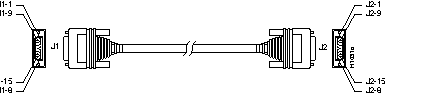
Figure C-5 shows an Ethernet (AUI) cable assembly, and Table C-4 lists an AUI cable pinout.
| Pin | Ethernet Circuit | Signal |
|---|---|---|
| 3 | DO-A | Data Out Circuit A |
| 10 | DO-B | Data Out Circuit B |
| 11 | DO-S | Data Out Circuit Shield |
| 5 | DI-A | Data In Circuit A |
| 12 | DI-B | Data In Circuit B |
| 4 | DI-S | Data In Circuit Shield |
| 2 | CI-A | Control In Circuit A |
| 9 | CI-B | Control In Circuit B |
| 1 | CI-S | Control In Circuit Shield |
| 6 | VC | Voltage Common |
| 13 | VP | Voltage Plus |
| 14 | VS | Voltage Shield (L25 and M25) |
| Shell | PG | Protective Ground |
Table C-5 lists the pinouts for the 10BaseT port. Table C-6 and Table C-7 list the pinouts for the cables you can use with the 10BaseT port.
| Pin | Description |
|---|---|
| 1 | TX+ |
| 2 | TX- |
| 3 | RX+ |
| 4 | - |
| 5 | - |
| 6 | RX- |
| 7 | - |
| 8 | - |
| RJ-45 Pin | Signal | Direction | RJ-45 Pin |
|---|---|---|---|
| 1 | TX+ | -> | 1 |
| 2 | TX- | -> | 2 |
| 3 | RX+ | <- | 3 |
| 4 | - | - | 4 |
| 5 | - | - | 5 |
| 6 | RX- | <- | 6 |
| 7 | - | - | 7 |
| 8 | - | - | 8 |
| RJ-45 Pin | Signal | Direction | RJ-45 Pin | Signal |
|---|---|---|---|---|
| 1 | TX+ | -> | 3 | RX+ |
| 2 | TX- | -> | 6 | RX- |
| 3 | RX+ | <- | 1 | TX+ |
| 4 | - | - | 4 | - |
| 5 | - | - | 5 | - |
| 6 | RX- | <- | 2 | TX- |
| 7 | - | - | 7 | - |
| 8 | - | - | 8 | - |
Table C-8 lists the Token Ring port pinouts. Use a Token Ring lobe cable to connect the Token Ring port to a MAU.
| 9 Pin2 | Signal |
|---|---|
| 1 | Receive |
| 3 | +5V1 |
| 5 | Transmit |
| 6 | Receive |
| 9 | Transmit |
Table C-9 lists the port pinouts for the 2-wire switched 56 DSU/CSU module. Use a straight-through RJ-11-to-RJ-11 cable to connect the 2-wire switched 56 port to an RJ-11 jack.
| RJ-11 6 Pin3 | Signal |
|---|---|
| 3 | Tip |
| 4 | Ring |
Table C-10 lists the port pinouts for the 4-wire 56/64-kbps DSU/CSU module. Use a straight-through RJ-48S-to-RJ-48S cable to connect the RJ-48S port to an RJ-48S jack.
| RJ-48S 8 Pin4 | Signal |
|---|---|
| 1 | Receive ring |
| 2 | Receive tip |
| 7 | Ring |
| 8 | Tip |
Table C-11 lists the fractional T1/T1 DSU/CSU module port pinouts. Use a straight-through RJ-48C-to-RJ-48C cable to connect the fractional T1/T1 port to an RJ-48C jack.
| RJ-48C8 Pin5 | Description |
|---|---|
| 1 | Receive ring |
| 2 | Receive tip |
| 4 | Ring |
| 5 | Tip |
The illustrations and tables in this section provide assembly drawings and pinouts for the EIA-530 DCE, EIA/TIA-232, EIA/TIA-449, V.35, and X.21 DTE and DCE cables, which are used with the five-in-one synchronous serial WAN module.
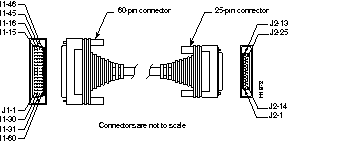
Figure C-6 shows the EIA-530 serial cable assembly, and Table C-12 lists the pinouts. Arrows indicate signal direction: --> indicates DTE to DCE, and <-- indicates DCE to DTE.
60 Pin | Signal | 25 Pin | Signal | Direction DTE DCE1 |
|---|---|---|---|---|
| J1-11 J1-12 | TxD/RxD+ TxD/RxD- | J2-2 J2-14 | BA(A), TxD+ BA(B), TxD- | --> --> |
| J1-28 J1-27 | RxD/TxD+ RxD/TxD- | J2-3 J2-16 | BB(A), RxD+ BB(B), RxD- | <-- <-- |
| J1-9 J1-10 | RTS/CTS+ RTS/CTS- | J2-4 J2-19 | CA(A), RTS+ CA(B), RTS- | --> --> |
| J1-1 J1-2 | CTS/RTS+ CTS/RTS- | J2-5 J2-13 | CB(A), CTS+ CB(B), CTS- | <-- <-- |
| J1-3 J1-4 | DSR/DTR+ DSR/DTR- | J2-6 J2-22 | CC(A), DSR+ CC(B), DSR- | <-- <-- |
| J1-46 J1-47 | Shield_GND MODE_2 | J2-1 - | Shield - | Shorted |
| J1-48 J1-49 | GND MODE_1 | - - | - - | Shorted |
| J1-5 J1-6 | DCD/DCD+ DCD/DCD- | J2-8 J2-10 | CF(A), DCD+ CF(B), DCD- | <-- <-- |
| J1-24 J1-23 | TxC/RxC+ TxC/RxC- | J2-15 J2-12 | DB(A), TxC+ DB(B), TxC- | <-- <-- |
| J1-26 J1-25 | RxC/TxCE+ RxC/TxCE- | J2-17 J2-9 | DD(A), RxC+ DD(B), RxC- | <-- <-- |
| J1-44 J1-45 | LL/DCD Circuit_GND | J2-18 J2-7 | LL Circuit_ GND | --> - |
| J1-7 J1-8 | DTR/DSR+ DTR/DSR- | J2-20 J2-23 | CD(A), DTR+ CD(B), DTR- | --> --> |
| J1-13 J1-14 | TxCE/TxC+ TxCE/TxC- | J2-24 J2-11 | DA(A), TxCE+ DA(B), TxCE- | --> --> |
Figure C-7 shows the EIA/TIA-232 cable assembly. Table C-13 lists the DTE pinouts. Table C-14 lists the DCE pinouts. Arrows indicate signal direction: --> indicates DTE to DCE, and <-- indicates DCE to DTE.
| 60 Pin | Signal | Description | Direction | 25 Pin | Signal |
|---|---|---|---|---|---|
| J1-50 J1-51 J1-52 | MODE_0 GND MODE_DCE | Shorting group | - | - | - |
| J1-46 | Shield GND | Single | - | J2-1 | Shield GND |
| J1-41 Shield | TxD/RxD - | Twisted pair no. 5 | --> - | J2-2 Shield | TxD - |
| J1-36 Shield | RxD/TxD - | Twisted pair no. 9 | <-- - | J2-3 Shield | RxD - |
| J1-42 Shield | RTS/CTS - | Twisted pair no. 4 | --> - | J2-4 Shield | RTS - |
| J1-35 Shield | CTS/RTS - | Twisted pair no. 10 | <-- - | J2-5 Shield | CTS - |
| J1-34 Shield | DSR/DTR - | Twisted pair no. 11 | <-- - | J2-6 Shield | DSR - |
| J1-45 Shield | Circuit GND - | Twisted pair no. 1 | - - | J2-7 Shield | Circuit GND - |
| J1-33 Shield | DCD/LL - | Twisted pair no. 12 | <-- - | J2-8 Shield | DCD - |
| J1-37 Shield | TxC/NIL - | Twisted pair no. 8 | <-- - | J2-15 Shield | TxC - |
| J1-38 Shield | RxC/TxCE - | Twisted pair no. 7 | <-- - | J2-17 Shield | RxC - |
| J1-44 Shield | LL/DCD - | Twisted pair no. 2 | --> - | J2-18 Shield | LTST - |
| J1-43 Shield | DTR/DSR - | Twisted pair no. 3 | --> - | J2-20 Shield | DTR - |
| J1-39 Shield | TxCE/TxC - | Twisted pair no. 6 | --> - | J2-24 Shield | TxCE - |
| 60 Pin | Signal | Description | Direction | 25 Pin | Signal |
|---|---|---|---|---|---|
| J1-50 J1-51 | MODE_0 GND | Shorting group | - | - | - |
| J1-46 | Shield GND | Single | - | J2-1 | Shield GND |
| J1-36 Shield | RxD/TxD - | Twisted pair no. 9 | <-- - | J2-2 Shield | TxD - |
| J1-41 Shield | TxD/RxD - | Twisted pair no. 5 | --> - | J2-3 Shield | RxD - |
| J1-35 Shield | CTS/RTS - | Twisted pair no. 10 | <-- - | J2-4 Shield | RTS - |
| J1-42 Shield | RTS/CTS - | Twisted pair no. 4 | --> - | J2-5 Shield | CTS - |
| J1-43 Shield | DTR/DSR - | Twisted pair no. 3 | --> - | J2-6 Shield | DSR - |
| J1-45 Shield | Circuit GND - | Twisted pair no. 1 | - - | J2-7 Shield | Circuit GND |
| J1-44 Shield | LL/DCD - | Twisted pair no. 2 | --> - | J2-8 Shield | DCD - |
| J1-39 Shield | TxCE/TxC - | Twisted pair no. 7 | --> - | J2-15 Shield | TxC - |
| J1-40 Shield | NIL/RxC - | Twisted pair no. 6 | --> - | J2-17 Shield | RxC - |
| J1-33 Shield | DCD/LL - | Twisted pair no. 12 | <-- - | J2-18 Shield | LTST - |
| J1-34 Shield | DSR/DTR - | Twisted pair no. 11 | <-- - | J2-20 Shield | DTR - |
| J1-38 Shield | RxC/TxCE - | Twisted pair no. 8 | <-- - | J2-24 Shield | TxCE - |
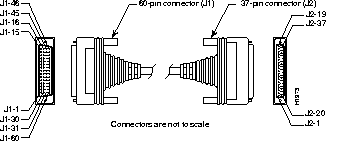
Figure C-8 shows the EIA/TIA-449 cable assembly. Table C-15 lists the DTE pinouts. Table C-16 lists the DCE pinouts. Arrows indicate signal direction: --> indicates DTE to DCE, and <-- indicates DCE to DTE.
| 60 Pin | Signal | Description | Direction | 37 Pin | Signal |
|---|---|---|---|---|---|
| J1-49 J1-48 | MODE_1 GND | Shorting group | - | - | - |
| J1-51 J1-52 | GND MODE_DCE | Shorting group | - | - | - |
| J1-46 | Shield_GND | Single | _ | J2-1 | Shield GND |
| J1-11 J1-12 | TxD/RxD+ TxD/RxD- | Twisted pair no. 6 | --> --> | J2-4 J2-22 | SD+ SD- |
| J1-24 J1-23 | TxC/RxC+ TxC/RxC- | Twisted pair no. 9 | <-- <-- | J2-5 J2-23 | ST+ ST- |
| J1-28 J1-27 | RxD/TxD+ RxD/TxD- | Twisted pair no. 11 | <-- <-- | J2-6 J2-24 | RD+ RD- |
| J1-9 J1-10 | RTS/CTS+ RTS/CTS- | Twisted pair no. 5 | --> --> | J2-7 J2-25 | RS+ RS- |
| J1-26 J1-25 | RxC/TxCE+ RxC/TxCE- | Twisted pair no. 10 | <-- <-- | J2-8 J2-26 | RT+ RT- |
| J1-1 J1-2 | CTS/RTS+ CTS/RTS- | Twisted pair no. 1 | <-- <-- | J2-9 J2-27 | CS+ CS- |
| J1-44 J1-45 | LL/DCD Circuit_GND | Twisted pair no. 12 | --> _ | J2-10 J2-37 | LL SC |
| J1-3 J1-4 | DSR/DTR+ DSR/DTR- | Twisted pair no. 2 | <-- <-- | J2-11 J2-29 | DM+ DM- |
| J1-7 J1-8 | DTR/DSR+ DTR/DSR- | Twisted pair no. 4 | --> --> | J2-12 J2-30 | TR+ TR- |
| J1-5 J1-6 | DCD/DCD+ DCD/DCD- | Twisted pair no. 3 | <-- <-- | J2-13 J2-31 | RR+ RR- |
| J1-13 J1-14 | TxCE/TxC+ TxCE/TxC- | Twisted pair no. 7 | --> --> | J2-17 J2-35 | TT+ TT- |
| J1-15 J1-16 | Circuit_GND Circuit_GND | Twisted pair no. 9 | - - | J2-19 J2-20 | SG RC |
| 60 Pin | Signal | Description | Direction | 37 Pin | Signal |
|---|---|---|---|---|---|
| J1-49 J1-48 | MODE_1 GND | Shorting group | - | - | - |
| J1-46 | Shield_GND | Single | - | J2-1 | Shield GND |
| J1-28 J1-27 | RxD/TxD+ RxD/TxD- | Twisted pair no. 11 | <-- <-- | J2-4 J2-22 | SD+ SD- |
| J1-13 J1-14 | TxCE/TxC+ TxCE/TxC- | Twisted pair no. 7 | --> --> | J2-5 J2-23 | ST+ ST- |
| J1-11 J1-12 | TxD/RxD+ TxD/RxD- | Twisted pair no. 6 | --> --> | J2-6 J2-24 | RD+ RD- |
| J1-1 J1-2 | CTS/RTS+ CTS/RTS- | Twisted pair no. 1 | <-- <-- | J2-7 J2-25 | RS+ RS- |
| J1-24 J1-23 | TxC/RxC+ TxC/RxC- | Twisted pair no. 9 | --> --> | J2-8 J2-26 | RT+ RT- |
| J1-9 J1-10 | RTS/CTS+ RTS/CTS- | Twisted pair no. 5 | --> --> | J2-9 J2-27 | CS+ CS- |
| J1-29 J1-30 | NIL/LL Circuit_GND | Twisted pair no. 12 | --> - | J2-10 J2-37 | LL SC |
| J1-7 J1-8 | DTR/DSR+ DTR/DSR- | Twisted pair no. 4 | --> --> | J2-11 J2-29 | DM+ DM- |
| J1-3 J1-4 | DSR/DTR+ DSR/DTR- | Twisted pair no. 2 | <-- <-- | J2-12 J2-30 | TR+ TR- |
| J1-5 J1-6 | DCD/DCD+ DCD/DCD- | Twisted pair no. 3 | --> --> | J2-13 J2-31 | RR+ RR- |
| J1-26 J1-25 | RxC/TxCE+ RxC/TxCE- | Twisted pair no. 10 | <-- <-- | J2-17 J2-35 | TT+ TT- |
| J1-15 J1-16 | Circuit_GND Circuit_GND | Twisted pair no. 8 | _ _ | J2-19 J2-20 | SG RC |
Figure C-9 shows the V.35 cable assembly. Table C-17 lists the DTE pinouts. Table C-18 lists the DCE pinouts. Arrows indicate signal direction: --> indicates DTE to DCE, and <-- indicates DCE to DTE.
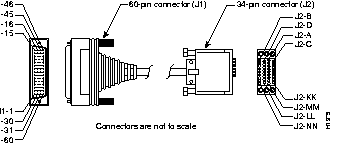
| 60 Pin | Signal | Description | Direction | 34 Pin | Signal |
|---|---|---|---|---|---|
| J1-49 J1-48 | MODE_1 GND | Shorting group | - | - | - |
| J1-50 J1-51 J1-52 | MODE_0 GND MODE_DCE | Shorting group | - | - | - |
| J1-53 J1-54 J1-55 J1-56 | TxC/NIL RxC_TxCE RxD/TxD GND | Shorting group | - | - | - |
| J1-46 | Shield_GND | Single | - | J2-A | Frame GND |
| J1-45 Shield | Circuit_GND - | Twisted pair no. 12 | - - | J2-B Shield | Circuit GND - |
| J1-42 Shield | RTS/CTS - | Twisted pair no. 9 | --> - | J2-C Shield | RTS - |
| J1-35 Shield | CTS/RTS - | Twisted pair no. 8 | <-- - | J2-D Shield | CTS - |
| J1-34 Shield | DSR/DTR - | Twisted pair no. 7 | <-- - | J2-E Shield | DSR - |
| J1-33 Shield | DCD/LL - | Twisted pair no. 6 | <-- - | J2-F Shield | RLSD - |
| J1-43 Shield | DTR/DSR - | Twisted pair no. 10 | --> - | J2-H Shield | DTR - |
| J1-44 Shield | LL/DCD - | Twisted pair no. 11 | --> - | J2-K Shield | LT - |
| J1-18 J1-17 | TxD/RxD+ TxD/RxD- | Twisted pair no. 1 | --> --> | J2-P J2-S | SD+ SD- |
| J1-28 J1-27 | RxD/TxD+ RxD/TxD- | Twisted pair no. 5 | <-- <-- | J2-R J2-T | RD+ RD- |
| J1-20 J1-19 | TxCE/TxC+ TxCE/TxC- | Twisted pair no. 2 | --> --> | J2-U J2-W | SCTE+ SCTE- |
| J1-26 J1-25 | RxC/TxCE+ RxC/TxCE- | Twisted pair no. 4 | <-- <-- | J2-V J2-X | SCR+ SCR- |
| J1-24 J1-23 | TxC/RxC+ TxC/RxC- | Twisted pair no. 3 | <-- <-- | J2-Y J2-AA | SCT+ SCT- |
| 60 Pin | Signal | Description | Direction | 34 Pin | Signal |
|---|---|---|---|---|---|
| J1-49 J1-48 | MODE_1 GND | Shorting group | - | - | - |
| J1-50 J1-51 | MODE_0 GND | Shorting group | - | - | - |
| J1-53 J1-54 J1-55 J1-56 | TxC/NIL RxC_TxCE RxD/TxD GND | Shorting group | - | - | - |
| J1-46 | Shield_GND | Single | - | J2-A | Frame GND |
| J1-45 Shield | Circuit_GND - | Twisted pair no. 12 | - - | J2-B Shield | Circuit GND - |
| J1-35 Shield | CTS/RTS - | Twisted pair no. 8 | <-- - | J2-C Shield | RTS - |
| J1-42 Shield | RTS/CTS - | Twisted pair no. 9 | --> - | J2-D Shield | CTS - |
| J1-43 Shield | DTR/DSR - | Twisted pair no. 10 | --> - | J2-E Shield | DSR - |
| J1-44 Shield | LL/DCD - | Twisted pair no. 11 | --> - | J2-F Shield | RLSD - |
| J1-34 Shield | DSR/DTR - | Twisted pair no. 7 | <-- - | J2-H Shield | DTR - |
| J1-33 Shield | DCD/LL - | Twisted pair no. 6 | <-- - | J2-K Shield | LT - |
| J1-28 J1-27 | RxD/TxD+ RxD/TxD- | Twisted pair no. 5 | <-- <-- | J2-P J2-S | SD+ SD- |
| J1-18 J1-17 | TxD/RxD+ TxD/RxD- | Twisted pair no. 1 | --> --> | J2-R J2-T | RD+ RD- |
| J1-26 J1-25 | RxC/TxCE+ RxC/TxCE- | Twisted pair no. 4 | <-- <-- | J2-U J2-W | SCTE+ SCTE- |
| J1-22 J1-21 | NIL/RxC+ NIL/RxC- | Twisted pair no. 3 | --> --> | J2-V J2-X | SCR+ SCR- |
| J1-20 J1-19 | TxCE/TxC+ TxCE/TxC- | Twisted pair no. 2 | --> --> | J2-Y J2-AA | SCT+ SCT- |
Figure C-10 shows the X.21 cable assembly. Table C-19 lists the DTE pinouts. Table C-20 lists the DCE pinouts. Arrows indicate signal direction: --> indicates DTE to DCE, and <-- indicates DCE to DTE.
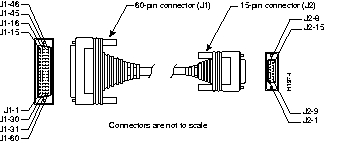
| 60 Pin | Signal | Description | Direction | 15 Pin | Signal |
|---|---|---|---|---|---|
| J1-48 J1-47 | GND MODE_2 | Shorting group | - | - | - |
| J1-51 J1-52 | GND MODE_DCE | Shorting group | - | - | - |
| J1-46 | Shield_GND | Single | - | J2-1 | Shield GND |
| J1-11 J1-12 | TxD/RxD+ TxD/RxD- | Twisted pair no. 3 | --> --> | J2-2 J2-9 | Transmit+ Transmit- |
| J1-9 J1-10 | RTS/CTS+ RTS/CTS- | Twisted pair no. 2 | --> --> | J2-3 J2-10 | Control+ Control- |
| J1-28 J1-27 | RxD/TxD+ RxD/TxD- | Twisted pair no. 6 | <-- <-- | J2-4 J2-11 | Receive+ Receive- |
| J1-1 J1-2 | CTS/RTS+ CTS/RTS- | Twisted pair no. 1 | <-- <-- | J2-5 J2-12 | Indication+ Indication- |
| J1-26 J1-25 | RxC/TxCE+ RxC/TxCE- | Twisted pair no. 5 | <-- <-- | J2-6 J2-13 | Timing+ Timing- |
| J1-15 Shield | Control_GND - | Twisted pair no. 4 | - - | J2-8 Shield | Control GND - |
| 60 Pin | Signal | Description | Direction | 15 Pin | Signal |
|---|---|---|---|---|---|
| J1-48 J1-47 | GND MODE_2 | Shorting group | - | - | - |
| J1-46 | Shield_GND | Single | - | J2-1 | Shield GND |
| J1-28 J1-27 | RxD/TxD+ RxD/TxD- | Twisted pair no. 6 | <-- <-- | J2-2 J2-9 | Transmit+ Transmit- |
| J1-1 J1-2 | CTS/RTS+ CTS/RTS- | Twisted pair no. 1 | <-- <-- | J2-3 J2-10 | Control+ Control- |
| J1-11 J1-12 | TxD/RxD+ TxD/RxD- | Twisted pair no. 3 | --> --> | J2-4 J2-11 | Receive+ Receive- |
| J1-9 J1-10 | RTS/CTS+ RTS/CTS- | Twisted pair no. 2 | --> --> | J2-5 J2-12 | Indication+ Indication- |
| J1-24 J1-23 | TxC/RxC+ TxC/RxC- | Twisted pair no. 4 | --> --> | J2-6 J2-13 | Timing+ Timing- |
| J1-15 Shield | Control_GND - | Twisted pair no. 5 | - - | J2-8 Shield | Control GND - |
Table C-21 lists the port pinouts for the ISDN WAN module (without integrated NT1). Table C-22 lists the BRI port and cable pinouts for the ISDN WAN module with an integrated NT1 device.
| RJ-458 Pin6 | TE1 | NT2 | Polarity |
|---|---|---|---|
| 3 | Transmit | Receive | + |
| 4 | Receive | Transmit | + |
| 5 | Receive | Transmit | - |
| 6 | Transmit | Receive | - |
| NT7 RJ-45 (8 Pin)8 | Wire | LT1 RJ-45 (8 Pin) |
|---|---|---|
| 4 | Tip | 4 |
| 5 | Ring | 5 |
|
|