


|
|

This chapter describes the equipment and site requirements for installing the Cisco AccessPath Integrated Access System. The chapter contains the following sections:
Before installing your Cisco AccessPath Integrated Access System, you should consider the power and cabling requirements that must be in place at your installation site, the equipment you will need to install the system, and the environmental conditions your installation site must meet to maintain normal operation. This chapter guides you through the process of preparing for your Cisco AccessPath Integrated Access System installation. For further information on AccessPath system physical specifications, refer to Table 1-2.
The following guidelines will help to ensure your safety and protect the equipment. This list does not cover all potentially hazardous situations, so be alert.
A fully configured Cisco AccessPath Integrated Access System weighs approximately 800 lb (263.6 kg). The chassis is not intended to be moved frequently. Before you install the system, make sure that your site is properly prepared so you can avoid having to move the chassis later to accommodate power sources and network connections.
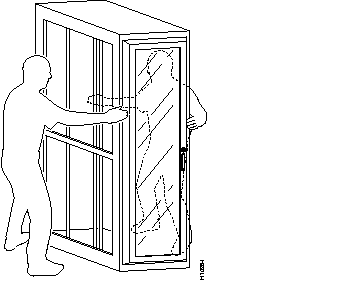
Whenever you move the AccessPath system or any heavy object, follow these guidelines:
An example of these guidelines in use is shown in Figure 2-1.
The port adapters and power supplies in the Router Shelves and the Switch Shelf are designed to be removed and replaced while the AccessPath system is operating without presenting an electrical hazard or damage. However, you must power down the Switch Shelf before removing or replacing its I/O controller and network processing engine. Additionally, you must power down Access Server Shelves when replacing their port adapters or power supplies.
Follow these basic guidelines when working with any electrical equipment.
In addition, use the guidelines that follow when working with any equipment that is disconnected from a power source, but still connected to telephone wiring or other network cabling.
 | Warning Read the installation instructions before you connect the system to its power source. |
Electrostatic discharge (ESD) damage, which occurs when electronic cards or components are improperly handled, can result in complete or intermittent system failures. The network processing engine, I/O controller, and each port adapter consists of a printed circuit board that is fixed in a metal carrier. Electromagnetic interference (EMI) shielding, connectors, and a handle are integral components of the carrier. Although the carrier helps protect the boards, use an antistatic strap whenever handling the network processing engine, I/O controller, and port adapters. Handle the carriers by the handles and the carrier edges only; never touch the boards or connector pins.
Following are guidelines for preventing ESD damage:
 | Caution For safety, periodically check the resistance value of the antistatic strap. The measurement should be between 1 and 10 megohm (Mohm). |
The environmental monitoring functionality in the AccessPath system protects it and its components from potential damage from overvoltage and overtemperature conditions. To assure normal operation and avoid unnecessary maintenance, plan your site configuration and prepare your site before installation. After installation, make sure the site maintains an ambient temperature of 32×F to 104×F (0×C to 40×C), and keep the area around the chassis as free from dust as is practical.
The following sections address the site environment requirements for the Cisco AccessPath Integrated Access System.
The AC-input power supplies uses a power factor corrector that allows the AccessPath system to operate on input voltage and frequency within the ranges of 100 to 240 VAC and 50/60 Hz.
The DC-input power supply allows the AccessPath shelves to operate at -48 VDC nominal in North America and -60 VDC in the European Community.
For information on the dimensions and weight of a fully populated AccessPath system, refer to Table 1-2.
For system power specifications, including input voltage and operating frequency ranges, refer to the following tables in the chapter "Cisco AccessPath Integrated Access System Product Overview":
Following are guidelines for setting up the plant wiring and cabling at your site. When planning the location of the new system, consider the distance limitations for signaling, electromagnetic interference (EMI), and connector compatibility, as described in the following sections.
When wires are run for any significant distance in an electromagnetic field, interference can occur between the field and the signals on the wires. This fact has two implications for the construction of plant wiring:
If you use twisted-pair cable in your plant wiring with a good distribution of grounding conductors, the plant wiring is unlikely to emit radio interference. If you exceed the recommended distances, use a high-quality twisted-pair cable with one ground conductor for each data signal when applicable.
If wires exceed recommended distances, or if wires pass between buildings, give special consideration to the effect of a lightning strike in your vicinity. The electromagnetic pulse caused by lightning or other high-energy phenomena can easily couple enough energy into unshielded conductors to destroy electronic devices. If you have had problems of this sort in the past, you may want to consult experts in electrical surge suppression and shielding.
The size of your networks and the distances between connections depend on the type of signal, the signal speed, and the transmission media (the type of cabling used to transmit the signals). For example, standard coaxial cable has a greater channel capacity than twisted-pair cabling. The distance and rate limits in the following descriptions are the IEEE recommended maximum speeds and distances for signaling; however, you can usually get good results at speeds and distances far greater than these. For example, the recommended maximum rate for V.35 is 2 Mbps, but it is commonly used at 4 Mbps without any problems. If you understand the electrical problems that might arise and can compensate for them, you should get good results with rates and distances greater than those shown here; however, do so at your own risk.
When preparing your site for network connections to the AccessPath system, you must consider a number of factors related to each type of interface:
Before installing the AccessPath system, have all additional external equipment and cables available.The information listed above is contained in the documentation that is shipped with each port adapter.
For ordering information, contact a customer service representative. See the section "Cisco Connection Online" in the chapter "About This Guide" for more information.
To easily access field replaceable units (FRUs) while the AccessPath system has routers, switches, and access servers installed in it, we have given you access to the shelves from both the front and the rear of the system.
Do not substitute a third-party vendor's rack mounting system for the one provided with the AccessPath system.
For an illustration of the Cisco AccessPath Integrated Access System rack footprint and outer dimensions, see Figure 2-2.
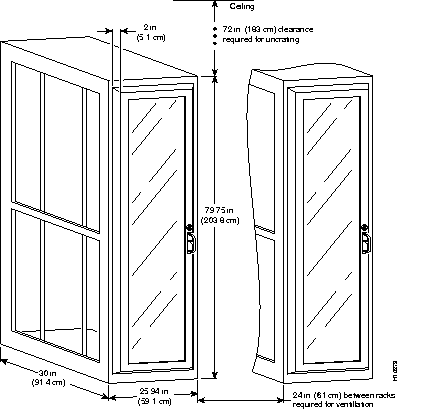
When planning your rack installation, consider the following guidelines:
In addition to the preceding guidelines, review the precautions for avoiding overtemperature conditions in the following section "Site Environment."
| Caution To prevent chassis overheating, never install the Cisco AccessPath Integrated Access System in a room that is not properly ventilated or air conditioned. |
Table 2-1 lists the operating and nonoperating environmental site requirements. The following ranges are those within which the Cisco AccessPath Integrated Access System will continue to operate; however, a measurement that is approaching the minimum or maximum of a range indicates a potential problem. You can maintain normal operation by anticipating and correcting environmental anomalies before they approach a maximum operating range.
| Specification | Minimum | Maximum |
|---|---|---|
| Temperature, ambient operating | 32×F (0×C) | 104×F (40×C) |
| Temperature, ambient nonoperating and storage | -4×F (-20×C) | 149×F (65×C) |
| Humidity, ambient (noncondensing) operating | 10% | 90% |
| Humidity, ambient (noncondensing) nonoperating and storage | 5% | 95% |
| Altitude, operating and nonoperating | Sea level (0 ft (0 m)) | 10,000 ft (3050 m) |
| Vibration, operating | 5 to 200 Hz, 0.5 g (1 oct/min) | - |
| Vibration, nonoperating | 5 to 200 Hz, 1 g (1 oct/min) 200 to 500 Hz, 2 g (1 oct/min) | - |
Planning a proper location for the AccessPath system and the layout of your equipment rack or wiring closet are essential for successful operation. Equipment placed too close together or inadequately ventilated can cause system overtemperature conditions. In addition, chassis panels made inaccessible by poor equipment placement can make system maintenance difficult. Following are precautions that can help avoid problems during installation and ongoing operation.
Follow these general precautions when planning your equipment locations and connections:
Follow these precautions and recommendations when planning power connections to the AccessPath system:
Your AccessPath system has been fully configured at the factory; no assembly is required. However, you will need the following tools and equipment to install the AccessPath system:
In addition, you might need the following external equipment:
After you install the chassis and verify that all the hardware is operating properly, you must make sure that the AccessPath system and the individual interfaces are correctly configured before you can connect to external networks. Cisco may have preconfigured your AccessPath system with this information or you may have elected to do it. In either case, refer to the Cisco AccessPath Integrated Access System Software Configuration Guide for information on checking configurations or entering them.
To assist you with your installation and to provide a historical record of what was done, by whom, use the Cisco AccessPath Integrated Access System Installation Checklist in Table 2-2. Make a copy of this checklist and indicate when each procedure or verification is completed. When the checklist is completed, place it in your site log (described at the end of this chapter) along with the other records for your AccessPath system.
| Task | Verified by | Date |
|---|---|---|
| Installation Checklist copied | ||
| Safety recommendations and guidelines reviewed | ||
| Site log established and background information entered | ||
| Site power voltages verified | ||
| Site T1 or E1 circuits installed and tested | ||
| Site environmental specifications verified | ||
| Required passwords, IP addresses, device names available | ||
| Required tools available | ||
| Network connection equipment available | ||
| AccessPath system received | ||
| AccessPath system and all accessories unpacked | ||
| Types and numbers of interfaces verified | ||
| Earthquake safety plate installed | ||
| AccessPath system cabling checked | ||
| AC power cable(s) connected to AC source(s) and AccessPath system; retention clip secured | ||
| DC power cable(s) connected to DC source(s) and AccessPath system | ||
| Captive installation screws on I/O controller and network processing engine checked | ||
| T1 or E1 network cables connected | ||
| ASCII terminal or modem attached to console port | ||
| Console port set for 9600 baud, 8 data bits, no parity, and 1 stop bit (9600 8N1) | ||
| System power turned on (DC OK LEDs are on) | ||
| System boot complete (I/O controller enabled LEDs are on) | ||
| I/O controller, network processing engine, and all port adapters operational (enabled LEDs on the port adapters and the I/O controller are on) | ||
| Console screen displays correct hardware configuration (displayed after system banner) | ||
| System ready for global and interface-specific configuration |
When you receive your AccessPath system, use the following procedure to check the contents of the shipping container. Use the Cisco AccessPath Integrated Access System Installation Checklist in Table 2-2 and the Cisco AccessPath Integrated Access System Component List in Table 2-3 to ensure you received all the components you ordered.
Step 1 Verify that the following are included in the shipping container (the accessories box might be separate):
Step 2 Check the contents of the accessories box against the Installation Checklist and the packing slip to verify that you received all listed equipment, which should include the following:
Step 3 Verify that the port adapters installed in your AccessPath system match the port adapter types on the packing list.
Step 4 Proceed to the section "Site Log" in this chapter, then to the chapter "Installing and Configuring the Cisco AccessPath Integrated Access System," to begin installation.
| Component | Description | Quantity Received |
|---|---|---|
Preinstalled Accessories
|
The following accessories should arrive preinstalled as part of the Cisco AccessPath Integrated Access System: Five power strips installed on the right side of the AccessPath system inside the front door Five power cables | |
| Read Me First Bag | The following accessories should arrive in a bag labeled "Read Me First":
|
|
Accessory Kit
|
AccessPath system documentation set and CD-ROM package:
Modem and cables for out-of-band connection to the AccessPath system (US only) |
To help ensure a successful installation, verify the preinstallation requirements discussed earlier in this guide and complete and return the Site Preparation Checklist in Table 2-4 to Cisco Systems. All site requirements must be met prior to shipment.
Have the installation site contact person fill out the Site Preparation Checklist. After you have completed the form, fax it to Cisco Systems. Please retain a copy of this checklist for your records.

Table 2-4 Table 2-4: 
Site Preparation Checklist
A site log provides a historical record of all actions relevant to the AccessPath system operation and maintenance. Keep your site log in a common place near the chassis where anyone who performs tasks has access to it. Site log entries might include the following:
Table 2-5 shows a sample site log page. Make copies of the sample or design your own site log to meet the needs of your site and equipment.
| Date | Description of Action Performed or Symptom Observed | Initials |
|---|---|---|
|
| ||
|
| ||
|
| ||
|
| ||
|
| ||
|
| ||
|
| ||
|
| ||
|
| ||
|
| ||
|
| ||
|
| ||
|
| ||
|
| ||
|
| ||
|
| ||
|
| ||
|
| ||
|
| ||
|
| ||
|
| ||
|
| ||
|
| ||
|
|
|
|