


|
|

The Cisco 90i is a single-width D4 channel unit that is compatible with existing D4 channel banks, using standard common equipment. The Cisco 90i transforms the D4 channel bank digroup from its traditional use as a time division multiplexer into a high-performance Frame Relay multiplexer. It supports four Integrated Services Digital Network (ISDN) Digital Subscriber Loops (IDSLs) running user data at 56, 64, 128, or 144 kbps.
Each subscriber has access to the full bandwidth of the T1 on a statistically multiplexed basis. Each of the four subscriber interfaces supports a standard twisted-pair 2B1Q loop of up to 18,000 ft. (5486.4 m) The Cisco 90i only supports dedicated leased-line subscriber connections, not switched or dialup ISDN connections.
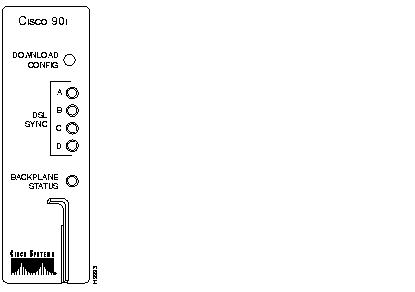
The Cisco 90i faceplate is shown in Figure 1.
Table 1 describes the Cisco 90i faceplate LEDs.
| LED | When On, Indicates... |
| DSL Sync A | Subscriber loop A (0) is out of sync. |
| DSL Sync B | Subscriber loop B (1) is out of sync. |
| DSL Sync C | Subscriber loop C (2) is out of sync. |
| DSL Sync D | Subscriber loop D (3) is out of sync. |
| Backplane Status | Receive T1 is out of sync, a voice channel unit has been detected in the same digroup as the Cisco 90i, or another Cisco 90i in the same digroup has failed and is incorrectly transmitting on the backplane. |
Table 2 describes the Cisco 90i faceplate DOWNLOAD CONFIG pushbutton.
| Pushbutton | When Pushed... |
| Download Config | Sends a message to the Cisco 90 Series DSL Management Agent requesting configuration data. |
More detailed information is available in the document D4 Carrier System Cisco 90i--ISDN Digital Subscriber Line (IDSL) Channel Unit.
Table 3 lists the settings for the D4 channel bank common equipment.
| Parameter | Setting |
| Line coding | B8ZS |
| Framing | ESF |
| Channel counting | Sequential (SEQ) |
| Timing source | EXT if office timing supply is connected to the channel bank--LOCT otherwise |
| T1 equalizer | Set by the distance from DSX-1 cross-connect |
Electrostatic discharge (ESD) can damage equipment and impair electrical circuitry.
ESD damage occurs when electronic components are improperly handled and can result in complete or intermittent failures.
Always follow ESD-prevention procedures when you remove and replace Cisco 90i Channel Units. Ensure that the D4 channel bank is electrically connected to earth ground. Wear an ESD-preventive wrist strap, ensuring that it makes good skin contact. Connect the grounding clip to an unpainted surface of the equipment frame to safely ground unwanted ESD voltages. To guard against ESD damage and shocks, the wrist strap and cord must operate properly. If no wrist strap is available, ground yourself by touching the metal part of the channel bank.
To install the Cisco 90i, perform the following steps:
1 Insert a Cisco 90i Channel Unit into the designated open slot in the D4 channel bank. Push the channel unit into its slot until the locking lever on the front panel of the unit engages.
2 Ensure all LEDs on the front panel of the Cisco 90i Channel Unit blink three times and then the Backplane Status LED goes off.
3 Press the recessed DOWNLOAD CONFIG pushbutton on the Cisco 90i Channel Unit to download the default configuration.
The default configuration can be changed on the DSL Management Agent through an SNMP manager.
Connect the loop side of the channel unit to the subscriber loop as follows:
| Port | Connection | Backplane |
| Port A (0) | T & R | 24 & 51 |
| Port B (1) | T1 & R1 | 20 & 47 |
| Port C (2) | E & EG | 45 & 19 |
| Port D (3) | M & MB | 46 & 48 |
If the loop side is properly terminated in a BRITE card or a network terminator (NT1), the associated DSL sync LED will go out.
See the Cisco 90 Series Installation and Administration Guide for centralized testing procedures.
The Cisco 90i requires no routine maintenance. Field repair of defective units should be limited to replacement of the unit only. Refer to your Cisco Information Packet for more information on service and support.
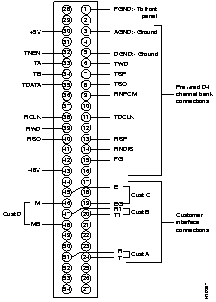
Connector pin assignments are detailed in Figure 2. All channel banks are pre-wired.
If you need technical assistance with a Cisco 90i Channel Unit that is under warranty or covered by a maintenance contract, contact Cisco's Technical Assistance Center (TAC) at 800 553-2447, 408 526-7209, or tac@cisco.com.
Cisco Connection Online (CCO) is Cisco Systems' primary, real-time support channel. Maintenance customers and partners can self-register on CCO to obtain additional information and services.
You can access CCO in the following ways:
DOC-90IDSLIG-JA
78-4701-01
|
|