


|
|

With your purchase you embark on the first step into the exciting world of internetworking, traveling to the millions of destinations along the information superhighway.
For first-time internetworking travelers preparing to embark, the journey starts here with the following items:
If you have any questions, please call Cisco Customer Service at 800 553- NETS (6387) or 408 526-4000.

Cisco Systems offers product documentation either on UniverCD, our library of product information in CD-ROM format, or on paper. UniverCD is updated every month, and is available both as a single CD-ROM or as an annual subscription. When you place your order, you can request UniverCD at no charge, or you can order printed documentation, which are charged items. Specify UniverCD on your sales order to receive all current spares documents because individual spares (field-replaceable units) publications are not orderable.
To order UniverCD or other Cisco publications, call Customer Service. You can also access Cisco technical documentation on the World Wide Web URL http://www.cisco.com.
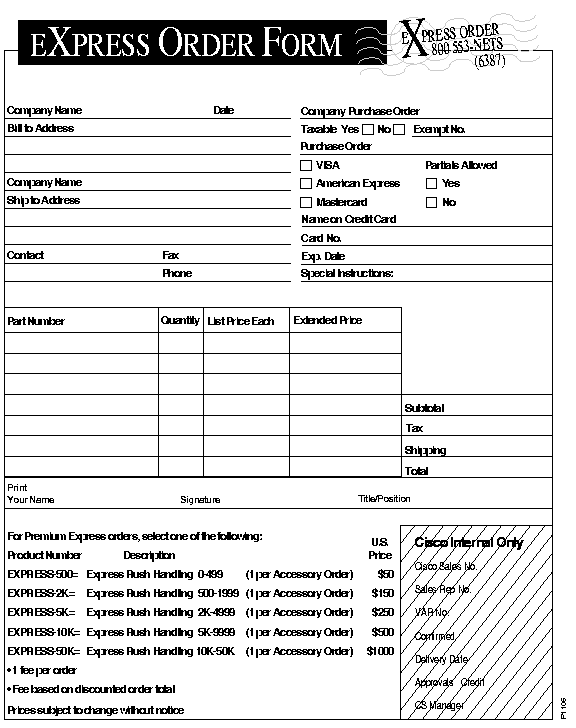
Each orderable document has a customer order number (for example, DOC-ABC1=) on the title page. Refer to the section "Ordering Cisco Documentation" for a complete list of orderable documentation and ordering instructions. An Express Order Form you should photocopy is in the back of this booklet. If you have comments about Cisco documentation, use the form in the middle of this booklet.
If you did not receive the documentation you ordered, immediately contact Customer Service. Have the sales order number (from your packing slip) and chassis model number ready.
Cisco Information Online (CIO) is Cisco Systems' primary, real-time support channel. Maintenance customers and partners can self-register on CIO to obtain additional content and services.
Available 24 hours a day, 7 days a week, CIO provides a wealth of standard and value-added services to Cisco's customers and business partners. CIO services include product information, release notes, technical tips, the Bug Navigator, configuration notes, brochures, descriptions of service offerings, and download access to public and authorized files.
CIO serves a wide variety of users through two interfaces that are updated and enhanced simultaneously--a character-based version and a multimedia version that resides on the World Wide Web (WWW). The character-based CIO (called "CIO Classic") supports Zmodem, Kermit, Xmodem, FTP, Internet e-mail, and fax download options, and is excellent for quick access to information over lower bandwidths. The WWW version of CIO provides richly formatted documents with photographs, figures, graphics, and video, as well as hyperlinks to related information.
You can access CIO in the following ways:
http://www.cisco.com.
cio.cisco.com.
For a copy of CIO's Frequently Asked Questions (FAQ), contact cio-help@cisco.com. For additional information, contact cio-team@cisco.com.

Before beginning installation (or maintenance) procedures, for your safety and to prevent equipment damage, always read the FCC and other regulatory material and the "Preparing for Installation" section in the user guide or installation guide that accompanied your order. Remember that all safety warnings appear in English and also in multiple languages in the back of the guide you received. In addition, read the Public Network Certification document that also accompanied your order before beginning any installation (or maintenance) procedures. Most importantly, always know your local laws and use good judgment.

This roadmap describes how Cisco documentation applies to specific tasks.
All documents are available on UniverCD, Cisco's interactive online library of product information. You can also access Cisco technical documentation on the World Wide Web URL http://www.cisco.com. Printed documentation can be ordered and paid for separately. Some printed documents automatically ship with the product and are marked "ships with product" in this roadmap. For more information, see the section "Ordering Cisco Documentation."

Documentation for Cisco products is available in either UniverCD-- the Cisco interactive online library of product information or printed books. Customers can request a free copy of UniverCD when they place an order and have the option of subscribing to a CD-ROM update service. Except for complimentary Cisco hardware installation or user guides and a few other exceptions, printed documentation must be ordered separately. This section contains a complete list of Cisco documentation. Contact Customer Service to order documentation.
Cisco offers UniverCD, which includes a complete set of Cisco customer documentation and selected marketing material on a single CD-ROM. UniverCD also includes updated bug information, which enables you to avoid problems or diagnose them more quickly.
With UniverCD, you can view, search, and print documentation on the following platforms with a CD-ROM drive: 68020, 68030, 68040, or systems based on PowerPC Macintosh computers, 80386SX or greater PCs, Sun SPARC systems, IBM RS/6000 workstations, and HP 9000 Model 700 or 800 systems. The viewing application conforms to user interface standards for Microsoft Windows and the Macintosh, Motif or OPEN LOOK on Sun SPARC systems and IBM RS/6000 workstations, and OpenView on HP 9000 Model 700 or 800 systems. The viewing application and the product documentation are on the same CD. UniverCD can be mounted on a file server and published across a network.
UniverCD is a series of interconnected documents that you navigate by clicking on hypertext links and using the navigation tools--the toolbar, the navigation bar, and the document button bar. In addition, UniverCD offers a powerful search facility to allow you to jump directly to the information that interests you.
UniverCD also provides several ways to return to documents that you have previously looked at. A history facility allows you to keep track of the documents that you have looked at in the last 60 days and look at them again. You can also save the location of documents that you reference regularly through hypertext links in a hotlist.
Information is stored on UniverCD in Hypertext Markup Language (HTML). The viewing application, Verity Mosaic, is provided on the CD. You use Verity Mosaic to look at Cisco documentation online, and to look at the array of information available on Cisco Information Online (CIO). You can also use Verity Mosaic to browse the World Wide Web.
Cisco Systems provides two delivery programs: standard and express. The standard program delivers Cisco documentation on a worldwide basis, and the Cisco Systems Express program delivers documentation to the United States and Canada.
Documents are shipped from Cisco within ten working days of order placement. Be sure to provide the following information when placing a purchase order:
If you have further questions, you can call 800 553-NETS or 408 526-7208. You can also send electronic mail to cs-group@cisco.com.
Cisco provides the Cisco Systems Express program for customers in the United States and Canada. Documentation can be ordered through Standard Express, which provides direct-to-factory ordering.
An Express order form you can photocopy is at the end of this section.
This section lists all customer documentation that supports the current Cisco Systems product line. After a product is no longer offered for sale, you can obtain relevant documentation on UniverCD. For example, UniverCD contains documentation that supports Software Releases 8.3, 9.1, 9.14, 9.17, 9.21, and Cisco Internetwork Operating System (Cisco IOS) 10.1.
You can order printed documentation in sets or individually. Documentation sets simplify the process of ordering documentation associated with your specific system. These sets are organized according to standard software (by release and product type), network management software, or special-order documentation. Hardware documents must be ordered individually.
UniverCD contains all software, internetwork management, hardware, and supplemental Cisco technical documentation, including special-order documents, release notes, configuration notes, and software caveats in a single CD-ROM. UniverCD is updated and shipped on the third Monday of each month. UniverCD options are listed in Table 1.
| Document Order Number | UniverCD Option | Price |
|---|---|---|
| DOC- UNIVERCD= | UniverCD (single CD) | $200 |
| DOC-UNIVERCDAS1= | UniverCD annual subscription | $2,000 |
| DOC-DOMOVRNGHT= | UniverCD subscription rush handling (U.S. only) | $13 |
| DOC-INTLCD= | UniverCD (single CD) international handling | $25 |
| DOC-INTLAS= | UniverCD subscription international handling | $250 |
You can order printed documentation in sets or individually. The sets listed in Table 2 were created to simplify the process of ordering documentation associated with your specific system. These sets are organized according to standard software (by release and product type), internetwork management software, special-order documentation.
Note that some publications must be ordered individually:
| Document Order Number | Document Set | Price |
|---|---|---|
| DOC-SPECIAL= | Special-Order Documentation (see Table 3 for a list) | $85 |
| DOC-SRIOS11.0= | Standard Router Software Documentation for Cisco Internetwork Operating System (Cisco IOS) Release 11.01 | $415 |
| DOC-SRIOS10.3= | Standard Router Software Documentation for Cisco Internetwork Operating System Release 10.31 | $375 |
| DOC-CSIOS11.0= | Standard Access and Communication Server Software Documentation for Cisco Internetwork Operating System Release 11.0 | $125 |
| DOC-CSIOS10.3= | Standard Access and Communication Server Software Documentation for Cisco Internetwork Operating System Release 10.3 | $180 |
| DOC-SRIOS10.2= | Standard Router Software Documentation for Cisco Internetwork Operating System Release 10.21 | $375 |
| DOC-CSIOS10.2= | Standard Access and Communication Server Software Documentation for Cisco Internetwork Operating System Release 10.2 | $180 |
| DOC-SRIOS10.0= | Standard Router Software Documentation for Cisco Internetwork Operating System Release 10.01 | $290 |
| DOC-CW2.0= | CiscoWorks 2.0 (SNM) Documentation | $155 |
| DOC-CW2.1OVS= | CiscoWorks 2.1 on HP OpenView (SunOS) Documentation | $75 |
| DOC-CW2.1OVH= | CiscoWorks 2.1 on HP OpenView (HP-UX) Documentation | $75 |
| DOC-CW2.1.2NV= | CiscoWorks 2.1(2) for NetView AIX | $75 |
| DOC-SYBASE-V4.9= | Sybase Documentation Set for CiscoWorks 2.0/2.1 | $335 |
| DOC-SYBASE-V10= | Sybase Documentation Set for CiscoWorks 3.0.1 | $294 |
| DOC-L2020UDK21= | LightStream 2020 User Documentation Kit (Release 2.1) | $160 |
| DOC-L2020CDK21= | LightStream 2020 Complete Documentation Kit (Release 2.1) | $210 |
| DOC-L2020UDK= | LightStream 2020 User Documentation Kit (Release 2.0) | $135 |
| DOC-L2020CDK= | LightStream 2020 Release 2.1 Complete Documentation Kit (Release 2.0) | $175 |
The special-order document set contains nonrelease-specific documents that provide value-added information, such as technology overviews, internetwork design guidelines, Cisco case studies, and troubleshooting procedures. The special-order set does not ship with initial system orders. It supplements the standard documentation. Special-order documents are updated approximately twice a year to include information on new technology and features. This documentation set includes the following publications:
Standard system software documentation sets include documents considered essential to software use and implementation. LightStream LS2020 software documentation is listed in Table 12 and Table 13.
Table 5 through Table 8 list the documents that support the various releases, but do not list the documents shipped with each release. Depending on the software release and product, the publications included in a standard package can vary. A standard set usually includes the following types of publications:
Cisco internetwork management software publications listed in Table 9 include CiscoWorks, Workgroup Director, Cisco Configuration Builder, and Total Control Manager documents.
Table 3 through Table 14 provide information about how to order individual documents.
| Document Order Number | Document Title | Price |
|---|---|---|
| DOC-TIS2= | Troubleshooting Internetworking Systems (for Software Release 9.21 and later)1 | $25 |
| DOC-CASES= | Internetworking Case Studies | $10 |
| DOC-IDG2= | Internetwork Design Guide | $25 |
| DOC-ITO= | Internetworking Technology Overview | $25 |
| Document Order Number | Document Title | Price |
|---|---|---|
| DOC-CAT8= | Cisco Systems Products Catalogue | $5 |
| DOC-ITA2= | Internetworking Terms and Acronyms | $25 |
| DOC-CSSB = | Cisco Systems, Inc. Warranty, Service, and Support booklet (this document) | $0 |
| Document Order Number | Document Title1 | Price |
|---|---|---|
| DOC-RPGS11.0= | Router Products Getting Started Guide | $10 |
| DOC-RPCG11.0= | Router Products Configuration Guide (four books) | $100 |
| DOC-RPCR11.0= | Router Products Command Reference (four books) | $100 |
| DOC-RPCS11.0= | Router Products Command Summary | $10 |
| DOC-PTCGCR11.0= | Protocol Translation Configuration Guide and Command Reference | $25 |
| DOC-SYSEM11.0= | System Error Messages | $10 |
| DOC-DEBUGCR11.0= | Debug Command Reference | $25 |
| DOC-MIBQR11.0= | Management Information Base (MIB) User Quick Reference | $10 |
| DOC-ACCSCR11.0= | Access and Communication Servers Command Reference (two books) | $50 |
| DOC-ACCSCG11.0= | Access and Communication Servers Configuration Guide | $25 |
| DOC-ACG11.0= | Cisco Access Connection Guide | $25 |
| DOC-ITA2= | Internetworking Terms and Acronyms | $25 |
| Document Order Number | Document Title1 | Price |
|---|---|---|
| DOC-RPGS10.3= | Router Products Getting Started Guide | $10 |
| DOC-RTCG10.0= | Router Products Configuration Guide (three books) | $75 |
| DOC-RPCGA10.3= | Router Products Configuration Guide Addendum | $0 |
| DOC-RTCF10.0= | Router Products Command Reference (three books) | $75 |
| DOC-RPCRA10.3= | Router Products Command Reference Addendum | $0 |
| DOC-RPCS10.3= | Router Products Command Summary | $10 |
| DOC-CFCGIGRP= | Enhanced IGRP Configuration Guide and Command Reference | $0 |
| DOC-PTCGCF10.0= | Protocol Translation Configuration Guide and Command Reference | $25 |
| DOC-SYSEM10.3= | System Error Messages | $10 |
| DOC-DEBUGCR10.3= | Debug Command Reference | $25 |
| DOC-MIBQR10.3= | Management Information Base (MIB) User Quick Reference | $10 |
| DOC-ACCSGS10.3= | Access and Communication Servers Getting Started Guide | $10 |
| DOC-ACCSCG10.3= | Access and Communication Servers Configuration Guide | $25 |
| DOC-ACCGA10.3= | Access and Communication Servers Configuration Guide Addendum | $0 |
| DOC-ACCSCR10.3= | Access and Communication Servers Command Reference (two books) | $50 |
| DOC-ACCRA10.3= | Access and Communication Servers Command Reference Addendum | $0 |
| DOC-ACG10.3= | Cisco Access Connection Guide | $25 |
| DOC-ITA2= | Internetworking Terms and Acronyms | $25 |
| Document Order Number | Document Title1 | Price |
|---|---|---|
| DOC-RPGS10.2= | Router Products Getting Started Guide | $10 |
| DOC-RTCG10.0= | Router Products Configuration Guide (three books) | $75 |
| DOC-RPCGA10.2= | Router Products Configuration Guide Addendum | $0 |
| DOC-RTCF10.0= | Router Products Command Reference (three books) | $75 |
| DOC-RPCRA10.2= | Router Products Command Reference Addendum | $0 |
| DOC-RPCS10.2= | Router Products Command Summary | $10 |
| DOC-CFCGIGRP= | Enhanced IGRP Configuration Guide and Command Reference | $0 |
| DOC-PTCGCF10.0= | Protocol Translation Configuration Guide and Command Reference | $25 |
| DOC-SYSEM10.2= | System Error Messages | $10 |
| DOC-DEBUGCR10.2= | Debug Command Reference | $25 |
| DOC-MIBQR10.2= | Management Information Base (MIB) User Quick Reference | $10 |
| DOC-ACCSGS10.2= | Access and Communication Servers Getting Started Guide | $10 |
| DOC-ACCSCG10.2= | Access and Communication Servers Configuration Guide | $25 |
| DOC-ACCSCR10.2= | Access and Communication Servers Command Reference (two books) | $50 |
| DOC-ACG10.2= | Cisco Access Connection Guide | $25 |
| DOC-ITA2= | Internetworking Terms and Acronyms | $25 |
| Document Order Number | Document Title | Price |
|---|---|---|
| DOC-RTGS10.0= | Router Products Getting Started Guide | $10 |
| DOC-RTCG10.0= | Router Products Configuration Guide (three books) | $75 |
| DOC-RTCF10.0= | Router Products Command Reference (three books) | $75 |
| DOC-RTCS10.0= | Router Products Command Summary | $10 |
| DOC-CFCGIGRP= | Enhanced IGRP Configuration Guide and Command Reference | $0 |
| DOC-RASCTG10.0= | Remote Access Server Connection Guide | $25 |
| DOC-PTCGCR10.0= | Protocol Translator Configuration Guide and Command Reference | $25 |
| DOC-EM10.0= | System Error Messages | $10 |
| DOC-DEBUGCF10.0= | Debug Command Reference | $25 |
| DOC-MIBQR10.0= | Cisco Management Information Base (MIB) User Quick Reference | $10 |
| DOC-ITA2= | Internetworking Terms and Acronyms | $25 |
| Document Order Number | Document Title1 | Price |
|---|---|---|
| DOC-CWUG2.X= | CiscoWorks User Guide | $25 |
| DOC-CWAIGNV = | CiscoWorks Administrator for NetView AIX 2.1 (2) | $25 |
| DOC-NETVIEW-SNM= | CiscoWorks 1.0 NetView Interface Installation and User Guide | $100 |
| DOC-CWSNMAIG2.0= | CiscoWorks 2.0 Administrator and Installation Guide (SNM) | $25 |
| DOC-CWAIGHPOV= | CiscoWorks Administrator and Installation Guide on HP OpenView (SunOS) | $25 |
| DOC-CWAIGHPUX= | CiscoWorks Administration and Installation Guide on HP OpenView (HP-UX) | $25 |
| DOC-CHRMWGSG= | CiscoWorks Hub/Ring Manager for Windows | $25 |
| DOC-CWIRGOSUX= | CiscoWorks Installation and Reference Guide on SunOS and HP-UX | $25 |
| DOC-CSBNSPIRG= | CiscoWorks Blue Native Service Point Installation and Reference Guide | $25 |
| DOC-DIRUG1= | Workgroup Director User Guide | $10 |
| DOC-SYBASE-V4.9= | Sybase Documentation Set for CiscoWorks 2.0/2.1 | $335 |
| DOC-SYBASE-V10- | Sybase Documentation Set for CiscoWorks 3.01 | $294 |
| DOC-USRTCM2.0= | Total Control Manager 2.0 (for Cisco Access Server 5100) | $25 |
| DOC-TV1600MUG= | TrueView Catalyst 1600 Manager User Guide | $10 |
| DOC-TVAMUG= | TrueView Alert Manager User Guide | $10 |
| DOC-TVAIUG= | TrueView Applications Installation and User Guide | $10 |
| DOC-VLANDIRGSG= | VlanDirector Getting Started Guide | $25 |
| DOC-CHRMWGSG= | Hub/Ring Manager for Windows Getting Started Guide | $25 |
| Document Order Number | Document Title | Price |
| DOC-RAC-SQS-2.1= | QuickStart Guide for Cisco Remote Access Client by Stampede | $10 |
| DOC-RAC-NQS-2.0= | QuickStart Guide for Cisco Remote Access Client by NTS | $10 |
| Document Order Number | Document Title | Price |
|---|---|---|
| DOC-ACCPROUG4= | AccessPro PC Card User Guide | $10 |
| DOC-1000HW1= | Cisco 1000 Series Hardware Installation | $5 |
| DOC-1003-1004UG= | Cisco 1003 and Cisco 1004 User Guide | $10 |
| DOC-1005UG= | Cisco 1005 User Guide | $10 |
| DOC-1020UG= | Cisco 1020 User Guide | $10 |
| DOC-1020CR= | Cisco 1020 Command Reference | $25 |
| DOC-WGEISAHW= | Workgroup CDDI/FDDI EISA Adapter Hardware Installation | $5 |
| DOC-WGEISASGIUG1= | Workgroup CDDI/FDDI EISA SGI Adapter User Guide | $10 |
| DOC-EISAHPUM1= | Workgroup CDDI/FDDI EISA HP Adapter User Guide | $10 |
| DOC-CDDI/FDDIUG= | Workgroup CDDI/FDDI EISA PC Adapter User Guide | $10 |
| DOC-SBUSUG1= | Workgroup CDDI/FDDI SBus Adapter User Guide | $10 |
| DOC-ATMSAUG= | ATM SBus Adapter User Guide | $10 |
| DOC-CATALYSTUG4= | Catalyst Series Workgroup Switch User Guide (Catalyst 1200) | $10 |
| DOC-WGCONCUG3= | CDDI/FDDI Workgroup Concentrator User Guide | $10 |
| DOC-WGWSC1400CON= | CDDI/FDDI Workgroup WS-C1400 Concentrator User Guide | $10 |
| DOC-5000UG2= | Catalyst 5000 User Guide | $10 |
| DOC-5000HIM2= | Catalyst 5000 Hardware Installation and Maintenance | $25 |
| DOC-5000CGCR2= | Catalyst 5000 Series Configuration Guide and Command Reference | $25 |
| DOC-1600TRSUG= | Catalyst 1600 Token Ring Switch User Guide | $10 |
| DOC-2500IG4= | Cisco 2500 Series Hardware Installation | $5 |
| DOC-2500IM4= | Cisco 2500 Series Hardware Installation and Maintenance | $25 |
| DOC-2500ASUG= | Cisco 2500 Series Access Server User Guide | $10 |
| DOC-2517UG= | Cisco 2517 and Cisco 2518 Router/Hub User Guide | $10 |
| DOC-5100ASUG= | Cisco Access Server 5100 User Guide | $10 |
| DOC-3000IG1= | Cisco 3000 Series Hardware Installation | $5 |
| DOC-3000IM2= | Cisco 3000 Hardware Installation and Maintenance | $25 |
| DOC-4000IG3= | Cisco 4000 Series Hardware Installation | $5 |
| DOC-4000IM3= | Cisco 4000 Series Hardware Installation and Maintenance1 | $25 |
| DOC-AGS+HI= | AGS+ Hardware Installation | $5 |
| DOC-AGS+IM2= | AGS+ Hardware Installation and Maintenance | $25 |
| DOC-M&CIM2= | M and C Hardware Installation and Maintenance | $25 |
| DOC-7010HIG2= | Cisco 7010 Hardware Installation | $5 |
| DOC-7010IM2= | Cisco 7010 Hardware Installation and Maintenance | $25 |
| DOC-7000HIG2= | Cisco 7000 Hardware Installation | $5 |
| DOC-7000IM3= | Cisco 7000 Hardware Installation and Maintenance | $25 |
| DOC-7505HIG1= | Cisco 7505 Hardware Installation | $5 |
| DOC-7505HIM1= | Cisco 7505 Hardware Installation and Maintenance | $25 |
| DOC-7507HIG1= | Cisco 7507 Hardware Installation | $5 |
| DOC-7507HIM1= | Cisco 7507 Hardware Installation and Maintenance | $25 |
| DOC-7513HIG1= | Cisco 7513 Hardware Installation | $5 |
| DOC-7513HIM1= | Cisco 7513 Hardware Installation and Maintenance | $25 |
| DOC-LS100UG= | Cisco LightStream 100 User Guide | $10 |
| DOC-LAN2LANUG= | LAN2LAN Personal Office for ISDN User Guide | $10 |
| Document Order Number | Document Title | Price |
| DOC-L2020SPCG= | LightStream 2020 Site Planning and Cabling Guide | $10 |
| DOC-L2020SO= | LightStream 2020 System Overview | $10 |
| DOC-L2020ITM= | LightStream 2020 Installation and Troubleshooting Manual | $10 |
| DOC-L2020CG= | LightStream 2020 Configuration Guide | $25 |
| DOC-L2020OG= | LightStream 2020 Operations Guide | $25 |
| DOC-L2020AG= | LightStream 2020 Administration Guide | $25 |
| DOC-L2020TRM= | LightStream 2020 Traps Reference Manual | $25 |
| DOC-L2020CARG= | LightStream 2020 Command and Attribute Reference Guide | $25 |
| DOC-L2020QRC= | LightStream 2020 CLI Quick Reference Card | $5 |
| Document Order Number | Document Title | Price |
| DOC-L2020SPCG21= | LightStream 2020 Site Planning and Cabling Guide | $10 |
| DOC-L2020SO21= | LightStream 2020 System Overview | $10 |
| DOC-L2020IG21= | LightStream 2020 Installation Guide | $10 |
| DOC-L2020HTM21= | LightStream 2020 Hardware Reference and Troubleshooting Guide | $25 |
| DOC-L2020CG21= | LightStream 2020 Configuration Guide | $25 |
| DOC-L2020OG21= | LightStream 2020 Network Operations Guide | $25 |
| DOC-L2020TRM21= | LightStream 2020 Traps Reference Manual | $25 |
| DOC-L2020CLI21= | LightStream 2020 CLI Reference Manual | $25 |
| DOC-L2020QRC21= | LightStream 2020 CLI Quick Reference Card | $5 |
| DOC-L2020NPRM21= | LightStream 2020 NP O/S Reference Manual | $25 |
| DOC-ITA2= | Internetworking Terms and Acronyms | $25 |
| Document Order Number | Document Title | Price |
| POINT&CLICK-1.0= | Point and Click Internetworking (two CD-ROMs)1 | $995 |
| POINT&CLICK-ED= | Point and Click Education CD-ROM | $252 |
| DOC-INTRONETSSG= | Introduction to Internetworking Self-Study Guide | $50 |
| DOC-ACSVRSSG= | Access Server Self-Study Guide | $75 |
| DOC-CATSWSSG= | Catalyst Series Workgroup Switch Self-Study Guide | $75 |
| DOC-CWWSSG= | CiscoWorks for Windows Self-Study Guide | $75 |
| DOC-1600TRSSSG= | Catalyst 1600 Token Ring Switch Self-Study Guide | $35 |
Please photocopy the Express Order Form in the back of this booklet and fax it to the number on the form.
See the beginning of this booklet for the Software License and Hardware Warranty information, which is also translated into multiple languages following the English text.
|
|