


|
|

The following is a list of the FastHub summaries contained in this appendix:
The 100BaseTX ports use standard RJ-45 connectors, as shown in Figure B-1. The pinouts are listed in Table B-1.

| Pin | Signal |
|---|---|
| 1 | RD+ |
| 2 | RD- |
| 3 | TD+ |
| 4 | NC |
| 5 | NC |
| 6 | TD- |
| 7 | NC |
| 8 | NC |
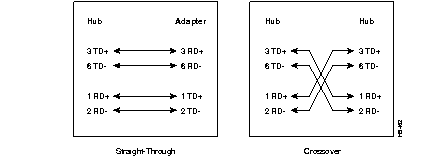
The shell for each connector is attached to the chassis ground. The 100BaseTX ports have their transmit (TD) and receive (RD) pairs internally crossed for attachment to an adapter using a Category 5 UTP straight-through cable. Straight-through and crossover cable schematics are shown in Figure B-2.
The 100BaseFX port connector is a multimode fiber-optic SC-type connector, as shown in Figure B-3.

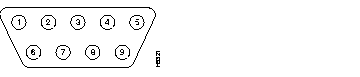
The NMM console port uses an EIA/TIA-232, 9-pin D-subminiature male connector, as shown in Figure B-4. The pinouts are listed in Table B-2.
| Pin | Signal |
|---|---|
| 1 | DCD |
| 2 | RD |
| 3 | TD |
| 4 | DTR |
| 5 | GND |
| 6 | DSR |
| 7 | RTS |
| 8 | CTS |
| 9 | RI |
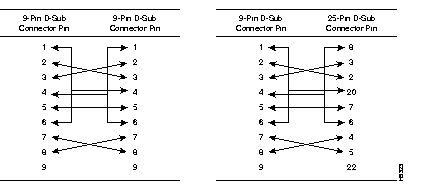
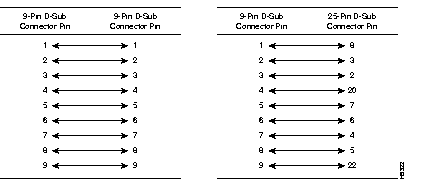
The shell is connected to the chassis ground. Use the supplied null-modem cable to connect to a terminal. Use a standard modem cable to connect to a modem. The null-modem cable schematic is shown in Figure B-5. The modem cable schematic is shown in Figure B-6.
|
|