


|
|

This chapter describes how to prepare your site for installation of the Catalyst 2926 switch and contains the following sections:
Planning a proper location for the switch and the layout of your equipment rack or wiring closet is essential for successful system operation. You should install your switch in an enclosed, secure area, ensuring that only qualified personnel have access to the switch and control of the environment. Equipment placed too close together or inadequately ventilated can cause system overtemperature conditions. In addition, poor equipment placement can make chassis panels inaccessible and difficult to maintain.
The switch operates as a standalone system mounted in a rack in a secure wiring closet. It requires a dry, clean, well-ventilated, and air-conditioned environment. The flow of ambient air must be maintained to ensure normal operation. If the airflow is blocked or restricted, or if the intake air is too warm, an overtemperature condition can occur. The switch's environmental monitor can then shut down the system to protect the system components.
To ensure normal operation and avoid unnecessary maintenance, plan your site configuration and prepare your site before installation. After installation, make sure the site maintains an ambient temperature of 0 to 40×C (32 to 104×F). It is essential to keep the area around the chassis as free from dust and foreign conductive material (such as metal flakes from nearby construction activity) as is possible. For a description of the environmental monitor and status levels, refer to the section "Environmental Monitoring" in Chapter 2, "Switch Description."
Multiple switches can be rack-mounted with little or no clearance above and below the chassis. However, when mounting a switch in a rack with other equipment, or when placing it on the floor near other equipment, ensure that the exhaust from other equipment does not blow into the intake vent of the chassis.
Cooling air is drawn in through the right side of the chassis. Keep the right side clear of obstructions, including dust and foreign conductive material, and away from the exhaust ports of other equipment.
Appendix A, "Technical Specifications," lists the operating and nonoperating environmental site requirements for the switches. To maintain normal operation and ensure high system availability, maintain an ambient temperature and clean power at your site. The environmental ranges listed in Appendix A, are those within which the switch will continue to operate; however, a measurement that approaches the minimum or maximum of a range indicates a potential problem. You can maintain normal operation by anticipating and correcting environmental anomalies before they exceed the maximum operating range.
 | Warning This unit is intended for installation in restricted access areas. A restricted access area is where access can only be gained by service personnel through the use of a special tool, lock and key, or other means of security, and is controlled by the authority responsible for the location. |
This section provides site power requirements for the Catalyst 2926 switch. Site power should be verified prior to installing the switch. This section consists of the following sections:
Follow these general requirements when preparing your site for the switch installation:
Follow these precautions when preparing your site for the switch installation:
| Warning Ultimate disposal of this product should be handled according to all national laws and regulations. |
| Warning Unplug the power cord before you work on a system that does not have an on/off switch. |
| Warning Before opening the chassis, disconnect the telephone-network cables to avoid contact with telephone-network voltages. |
| Warning Do not touch the power supply when the power cord is connected. For systems with a power switch, line voltages are present within the power supply even when the power switch is off and the power cord is connected. For systems without a power switch, line voltages are present within the power supply when the power cord is connected. |
| Warning Read the installation instructions before you connect the system to its power source. |
| Warning This unit might have more than one power cord. To reduce the risk of electric shock, disconnect the two power supply cords before servicing the unit. |
| Warning This product relies on the building's installation for short-circuit (overcurrent) protection. Ensure that a fuse or circuit breaker no larger than 120 VAC, 15A U.S. (240 VAC, 10A international) is used on the phase conductors (all current-carrying conductors). |
 | Caution The total maximum load on each AC input-power circuit must be within the rating of the wiring and breaker. An overload of input power can result if this requirement is not met. |
| Warning Care must be given to connecting units to the supply circuit so that wiring is not overloaded. |
| Warning This equipment is intended to be grounded. Ensure that the host is connected to earth ground during normal use. |
| Warning Do not work on the system or connect or disconnect cables during periods of lightning activity. |
| Warning Before working on a chassis or working near power supplies, unplug the power cord on AC units; disconnect the power at the circuit breaker on DC units. |
| Warning This unit has more than one power cord. To reduce the risk of electric shock, disconnect the two power supply cords before servicing the unit. |
When setting up the plant wiring, consider the following factors:
This section provides estimates of the power requirements and heat dissipation for the two available models of Catalyst 2926 switches. The power requirements might be useful for planning the power distribution system needed to support the switch. Heat dissipation is an important consideration for sizing the air conditioning requirements for an installation. The power and heat associated with a Catalyst 2926 switch varies based upon the average switching traffic levels.
Unless otherwise noted, the information assumes worst-case conditions. Typical numbers are approximately 30 percent below the numbers listed here.
Table 3-1 lists the power requirements and heat dissipation estimates for the Model C2926T switch, which is configured as follows:
| Model Number/ Card Type | AC Input Power (Watts) | Heat Diss. (BTU/HR) | Input Current at 90 VAC (Amps) | Input Current at 120 VAC (Amps) | Input Current at 180 VAC (Amps) | Input Current at 240 VAC (Amps) |
|---|---|---|---|---|---|---|
| C2926T chassis (with frame) | 42 | 144 | 0.47 | 0.35 | 0.23 | 0.18 |
| Supervisor, UTP1 | 71 | 243 | 0.79 | 0.59 | 0.39 | 0.30 |
| 10/100-Mbps board | 101 | 344 | 1.12 | 0.84 | 0.56 | 0.42 |
| Total | 214 | 731 | 2.38 | 1.78 | 1.18 | 0.90 |
Table 3-2 lists the power requirements and heat dissipation estimates for the Model C2926F switch, which is configured as follows:
| Model Number/ Card Type | AC Input Power (Watts) | Heat Diss. (BTU/HR) | Input Current at 90 VAC (Amps) | Input Current at 120 VAC (Amps) | Input Current at 180 VAC (Amps) | Input Current at 240 VAC (Amps) |
|---|---|---|---|---|---|---|
| C2926F chassis (with fans) | 42 | 144 | 0.47 | 0.35 | 0.23 | 0.18 |
| Supervisor, MMF1 | 62 | 212 | 0.69 | 0.52 | 0.34 | 0.26 |
| 10/100-Mbps board | 101 | 344 | 1.12 | 0.84 | 0.56 | 0.42 |
| Total | 205 | 700 | 2.28 | 1.71 | 1.13 | 0.86 |
This section provides cabling guidelines for determining how to build networks using Catalyst 2926 switches and describes connection equipment needed to connect to network devices.
When preparing your site for cabling to the switch, you need to consider several factors related to each type of switch interface. Use the following sections to determine your cabling requirements:
Before installing the switch, have all cables and any additional interface equipment on hand. If you intend to build your own cables, refer to the cable pinouts in Appendix B, "Cabling Specifications."
The network cabling components shown in Figure 3-1 consist of the following:
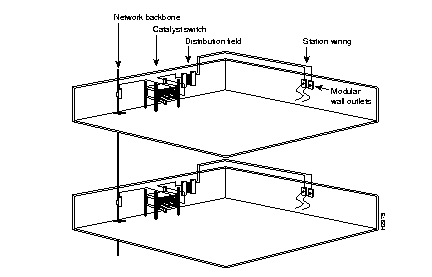
The length of your networks and the distances between connections depend on the type of signal, the signal speed, and the transmission media (the type of cabling used to transmit the signals). The distance and rate limits in the following tables are the IEEE-recommended maximum speeds and distances for signaling.
The following distance limits are provided as guidelines for planning your network connections before installation.
The maximum distances for Fast Ethernet network segments and connections depend on the type of transmission cable used. The term 10BaseT is an abbreviation for 10 Mbps transmission, Baseband medium, and T for twisted pair.
IEEE recommends a maximum distance of 328 feet (100 meters) between station (connection) and switch for 100BaseTX connections using Category 5 unshielded twisted-pair (UTP) cable. Refer to Table 3-3 for maximum cable distances.
| Transceiver Speed | Cable Type | Duplex Mode | Maximum Distance between Stations |
|---|---|---|---|
| 10 Mbps | Category 3 UTP | Full and half | 328 ft (100 m) |
| 100 Mbps | Category 5 UTP | Full and half | 328 ft (100 m) |
| 100 Mbps | Multimode fiber | Full | 1.2 miles (2 km) |
| 100 Mbps | Multimode fiber | Half | 1312 ft (400 m) |
The maximum distances for fiber-optic network connections are determined by the transmitter output power, receiver sensitivity, and type of optical source, as shown in Table 3-4.
| Item | Description |
|---|---|
| Transmitter Output Power | -19 to -14 dBm |
| Receiver Sensitivity | -32.5 to -14 dBm |
| Wavelength | 1270 to 1380 nm |
| Optical Source | LED |
| Maximum Span | 1.2 miles (2 km) |
The power budget (PB) is the maximum possible amount of power transmitted. The following is an example of multimode power budget calculations with sufficient power for transmission, based on the following variables:
Estimate the power budget as follows:
PB = 11.5 dB - 3 km (1.0 dB/km) - 4 (0.5 dB) - 3 (0.5 dB) - 0.5 dB (HOL) - 1 dB (CRM)
PB = 11.5 dB - 3 dB - 2 dB - 1.5 dB - 0.5 dB - 1 dB
PB = 2.5 dB
The 2.5-dB value indicates that this link would have sufficient power for transmission.
The following is an example with the same parameters as the previous example, but with a multimode link distance of 4 kilometers (2.5 miles):
PB = 11.5 dB - 4 km (1.0 dB/km) - 4 (0.5 dB) - 3 (0.5 dB) - 0.5 dB (HOL) - 1 dB (CRM)
PB = 11.5 dB - 4 dB - 2 dB- 1.5 dB - 0.5 dB - 1 dB
PB = 1.5 dB
The 1.5-dB value indicates that this link would have sufficient power for transmission. However, because of the dispersion limit on the link (4 km x 155.52 MHz > 500 MHz/km), this link would not work with multimode fiber. In this case, single-mode fiber is the better choice.
Statistical models more accurately determine the power budget than the worst-case method. Determining the link loss with statistical methods requires accurate knowledge of variations in the data link components. Statistical power budget analysis is beyond the scope of this document. For further information, refer to User-Network Interface (UNI) Forum specifications, ITU-T standards, and your equipment specifications.
The following publications contain information on determining attenuation and power budget:
The LED used for a multimode transmission light source creates multiple propagation paths of light, each with a different path length and time requirement to cross the optical fiber, causing signal dispersion (smear). HOL results from light from the LED entering the fiber and being radiated into the fiber cladding. A worst-case estimate of power margin (PM) for multimode transmissions assumes minimum transmitter power (PT), maximum link loss (LL), and minimum receiver sensitivity (PR). The worst-case analysis provides a margin of error, although not all the parts of an actual system will operate at the worst-case levels.
Refer to Table 3-5 for maximum cable transmission distances.
| Transceiver Type | Maximum Distance between Stations |
|---|---|
| Single-mode | 6.2 miles (10 km) |
| Multimode | 1.2 miles (2 km) |
| Category 5 UTP | 328 ft (100 m) |
PB is the maximum possible amount of power transmitted. The following equations list the calculation of the power budget:
PB = PT - PR
PB = -18.5 dBm - 30 dBm
PB = 11.5 dB
The power margin calculation is derived from the power budget and subtracts the link loss, as follows:
PM = PB - LL
If the power margin is positive, the link will work.
Table 3-6 lists the factors that contribute to link loss and the estimate of the link-loss value attributable to those factors.
| Link Loss Factor | Estimate of Link Loss Value |
|---|---|
| Higher-order mode losses | 0.5 dB |
| Clock recovery module | 1 dB |
| Modal and chromatic dispersion | Dependent on fiber and wavelength used |
| Connector | 0.5 dB |
| Splice | 0.5 dB |
| Fiber attenuation | 1 dB/km |
After calculating the power budget minus the data link loss, the result should be greater than zero. Results less than zero can indicate insufficient power to operate the receiver.
Table 3-7 lists the link attenuation and dispersion limits for a typical fiber-optic link.
| Single-Mode | Multimode | |
|---|---|---|
| Attenuation | 0.5 dB | 1.0 dB/km |
| Dispersion limit | No limit | 500 MHz/km1 |
As with all signaling systems, serial signals can travel a limited distance at any given bit rate; generally, the slower the baud rate, the greater the distance. Table 3-8 shows the standard relationship between baud rate and distance for EIA/TIA-232 signals.
| Rate (bps) | Distance (Feet) | Distance (Meters) |
|---|---|---|
| 2400 | 200 | 60 |
| 4800 | 100 | 30 |
| 9600 | 50 | 15 |
| 19,200 | 25 | 7.6 |
| 38,400 | 12 | 3.7 |
| 56,000 | 8.6 | 2.6 |
Ethernet transceivers are available from a variety of sources for Virtual Terminal Protocol (VTP) and multimode fiber-optic cabling (100BaseFX at 100 Mbps). Figure 3-2 shows an example of Fast Ethernet transceivers and connection equipment.
You might need additional data communications equipment to complete your installation.
When planning your connections, consider the types and locations of connectors on adjacent switching modules to avoid overlapping the transceiver and impairing access to other connections.
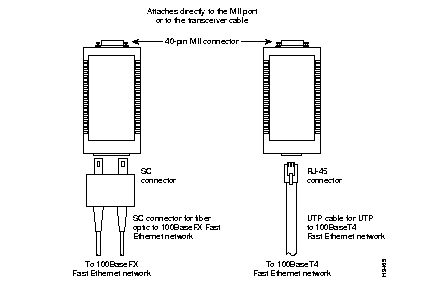
Table 3-9 lists the site planning activities that should be performed prior to the installation of the Catalyst 2926 switch. Completing each activity helps ensure a successful switch installation.
| Task No. | Planning Activity | Verified By | Time | Date |
|---|---|---|---|---|
1 | Space Evaluation:
Space and layout | |||
2 | Environmental Evaluation:
Ambient temperature | |||
3 | Power Evaluation:
Input power type | |||
4 | Grounding Evaluation:
Circuit breaker size | |||
5 | Cable and Interface Equipment Evaluation:
Cable type | |||
6 | EMI Evaluation:
Distance limitations for signaling |
|
|