


|
|

This preface describes who should read the Catalyst 5000 Series Command Reference, how it is organized, and its document conventions.
Cisco documentation and additional literature are available in a CD-ROM package, which ships with your product. The Documentation CD-ROM, a member of the Cisco Connection Family, is updated monthly. Therefore, it might be more current than printed documentation. To order additional copies of the Documentation CD-ROM, contact your local sales representative or call customer service. The CD-ROM package is available as a single package or as an annual subscription. You can also access Cisco documentation on the World Wide Web at http://www.cisco.com, http://www-china.cisco.com, or http://www-europe.cisco.com.
If you are reading Cisco product documentation on the World Wide Web, you can submit comments electronically. Click Feedback in the toolbar, select Documentation, and click Enter the feedback form. After you complete the form, click Submit to send it to Cisco. We appreciate your comments.
This publication is for experienced network administrators who are responsible for configuring and maintaining Catalyst 5000 series switches.
The major sections of this publication are as follows:
| Part 1 | Switch Commands | |
| Chapter 1 | Switch Command Quick Reference | Lists all switch CLI commands, their syntax, and a brief description of their function. |
| Chapter 2 | Switch Command-Line Interface | Describes how to access and use the Catalyst 5000 series switch CLI. |
| Chapter 3 | General Switch Commands | Provides complete information on the switch CLI command set (except for the clear, set, and show commands). |
| Chapter 4 | Switch Flash Commands | Provides complete information on the switch CLI Flash command set. |
| Chapter 5 | ROM Monitor Commands | Provides complete information on the switch CLI ROM monitor command set. |
| Chapter 6 | Switch clear Commands | Provides complete information on the switch CLI clear command set. |
| Chapter 7 | Switch set Commands | Provides complete information on the switch CLI set command set. |
| Chapter 8 | Switch show Commands | Provides complete information on the switch CLI show command set. |
| Part 2 | ATM Commands | |
| Chapter 9 | ATM Command Quick Reference | Lists all ATM CLI commands, their syntax, and a brief description of their function. |
| Chapter 10 | ATM Command-Line Interface | Describes how to access and use the Catalyst 5000 series ATM CLI. |
| Chapter 11 | General ATM Commands | Provides complete information on the ATM CLI command set (except for the show commands). |
| Chapter 12 | ATM show Commands | Provides complete information on the ATM CLI show command set. |
| Appendix A | List of Acronyms | Lists all the acronyms used in this publication. |
The Catalyst 5000 Series Command Reference publication is designed as a reference document. It provides complete descriptions of all the software commands used to configure and maintain Catalyst 5000 series switches.
Other documents in the Catalyst 5000 series documentation set include:
For quick software configuration procedures for the Catalyst 5000 series switches, refer to the Catalyst 5000 Series Quick Installation and Configuration Guide. For detailed software configuration information and procedures, refer to the Catalyst 5000 Series Software Configuration Guide.
If you use the Catalyst 5000 series switch in an ELAN, use this publication with the Cisco IOS Release 11.3 documentation set for routers and the LightStream 1010 User Guide (3.1). If you are using a LightStream 1010 ATM switch in the Catalyst 5500 series switch, refer to the LightStream 1010 ATM Switch Hardware Installation Guide, the LightStream 1010 ATM Switch Command Reference, or the LightStream 1010 ATM Switch Software Configuration Guide (11.2) publications for detailed information regarding installation and configuration.
If you are using the RSM, refer to the Catalyst 5000 Series Route Switch Module Installation and Configuration Note. If you need additional information on IOS commands, refer to the Configuration Fundamentals Command Reference publication.
Screen displays use the following convention:
| ^ | The symbol ^ represents the key labeled Control--for example, the key combination ^D in a screen display means hold down the Control key while you press the D key. |
Command descriptions use the following conventions:
| boldface font | Commands and keywords are in boldface. |
| italic font | Arguments for which you supply values are in italics. |
| [ ] | Elements in square brackets are optional. |
| { x | y | z } | Alternative keywords are grouped in braces and separated by vertical bars. |
| string | A nonquoted set of characters. Do not use quotation marks around the string or the string will include the quotation marks. |
Examples use the following conventions:
screen font
| Terminal sessions and information the system displays are in screen font.
|
| boldface screen font | Information you must enter is in boldface screen font. |
| < > | Nonprinting characters, such as passwords are in angle brackets. |
| [ ] | Default responses to system prompts are in square brackets. |
| !, # | An exclamation point (!) or a pound sign (#) at the beginning of a line of code indicates a comment line. |
Notes, cautions, and pointers use the following conventions:
| Note | Means reader take note. Notes contain helpful suggestions or references to material not covered in the publication. |
 | This pointer highlights an important line of text in an example.
|
 | Caution Means reader be careful. In this situation, you might do something that could result in equipment damage or loss of data. |
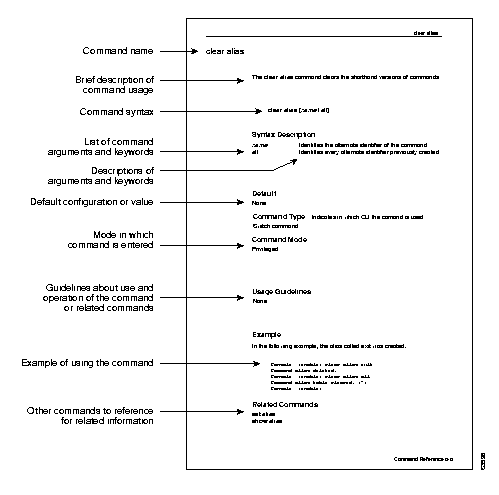
The following illustration explains the fields on a typical command reference page:
|
|