This appendix contains information on the CiscoWorks database table structures. The following tables are described:
- AutoInstall table
- Device inventory tables: admins, devices, interfaces, if_addresses, contacts, lines, locations, networks, people, phones, protocol_types, vendors
- Polling tables: attr, columns, pollers, polls, polls_config, start_stop
- Device configuration tables: DevConfigs, DevConfHist
- Domain tables including domains and domains_devices
- Global Commands and Scheduler tables: gcmds, gcmds_domains, and crons
- Configuration Snap-In Manager tables: pccmdset and pcdevset
- Software management tables: SysFiles
- Tables moved by the Copy_Tables Command
Certain tables that exist in the Sybase database are not described in this appendix. These tables include the security tables and will normally not have to be accessed. It is highly recommended that you do not edit these tables.
Note Depending on your network management platform, you may not have access to certain CiscoWorks applications and therefore do not have access to those associated tables.
This section provides a chart depicting the relationship between the major tables in the CiscoWorks database, and it provides table structure characteristics.
Table C-1 lists the conventions used in defining fields.
Table-to-table links throughout the database structure are accomplished using id fields, for example, device_id, people_id, admin_id, and so on.
Table C-1: Database Field Conventions
| Convention
| Description
|
|---|
| int
| A whole number between 231 -1 (2,147,483,647) and -231 (-2,147,483,648) inclusive. Storage size is 4 bytes.
|
| smallint
| A whole number between 215 -1 (32,767) and -215 (-32,768) inclusive. Storage size is 2 bytes.
|
| tinyint
| A whole number between 0 and 255 inclusive. Storage size is 1 byte.
|
| NULL
| A field that does not have to be filled in. The word null does not have to be entered; the field may be left blank if no data is to be entered.
|
| char
| A character defined by number of characters in paranthesis. Range is 255 characters or less.
|
| varchar
| A variable character defined by number of characters in parentheses. Range is 255 characters or less.
|
| text
| A text string, of size 2 -1(2, 147,483, 647) bytes or less.
|
| image
| A block of data, of size 2 -1(2, 147,483, 647) bytes or less.
|
| datetime
| January 1, 1753 to Decmeber 31, 9999. Storage size is 8 bytes.
|
Note Sybase software is case-sensitive, so enter all database tables in lowercase.
The AutoInstall Manager application uses the autoinstall table to store data records on the following items. (See Table C-2.)
Table C-2: auto_install Table File Structure
| Field Name
| Field Type
| Description
|
|---|
| aim_id
| int
| AutoInstall ID.
|
| aim_state
| tinyint
| Device state. Disabled = 0. Enabled = 1.
|
| device_id
| int
| Device ID. Links to the devices table.
|
| dev_if_name
| varchar (32) NULL
| Not used.
|
| dev_if_addr
| varchar (64) NULL
| IP address for the device.
|
| dev_if_subn
| varchar (64) NULL
| Subnet mask for the device.
|
| dev_dlci_num
| varchar (64) NULL
| Frame Relay Dlci Number
|
| helper_addr
| varchar (64) NULL
| Helper address.
|
| config_ver
| int NULL
| Configuration file version to use.
|
| neighbor_id
| int NULL
| Device ID of the neighbor device from the devices table.
|
| neigh_if_id
| int NULL
| Interface ID of the neighbor device used to access the if_addresses table. Links to the interfaces table.
|
Device Inventory Database Tables
Device inventory consists of all the information that you can associate with a specific device, including contact, address, telephone, and vendor data.
Figure C-1 illustrates CiscoWorks database table interrelationships for device inventory.
Figure C-1: Device Inventory Database Tables Relationships
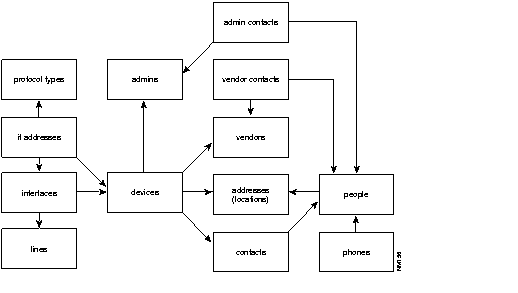
Table C-3 through Table C-18 are used for device inventory. These tables include the table name, field names, field size, and field type found in the database table.
Table C-3: admins Table File Structure
| Field Name
| Field Size
| Field Type
| Description
|
|---|
| admin_id
| smallint
|
| Administration ID.
|
| admin_name
| char (32)
|
| Full name of administrator.
|
| admin_desc
| char (64)
| NULL
| Description of administrator duties or location.
|
Table C-4: devices Table File Structure
| Field Name
| Field Size
| Field Type
| Description
|
|---|
| device_id
| int
|
| Device ID.
|
| device_type
| smallint
| NULL
| Specific Cisco device platform.
|
| device_name
| char (32)
|
| Name of Cisco device.
|
| device_domain
| varchar (128)
| NULL
| Internet domain in which this device belongs. For example, cisco.com.
|
| device_desc
| varchar (255)
| NULL
| Description of Cisco device.
|
| sysobject_id
| varchar (64)
| NULL
| Identifies vendor and device type.
|
| rd_community
| char (32)
| NULL
| Read community string.
|
| community
| char (32)
| NULL
| Write community string.
|
| enable_passwd
| varchar (32)
| NULL
| Password to enable the device.
|
| vty_passwd
| varchar (32)
| NULL
| Password to allow terminal interaction with a Cisco device.
|
| admin_id
| smallint
|
| Administration ID. Links to the admins table.
|
| serial_number
| char (32)
| NULL
| Identification number for the device chassis.
|
| vendor_id
| smallint
|
| Vendor ID. Links to the vendors table.
|
| address_id
| smallint
|
| Address ID. Links to the locations table.
|
| software_desc
| varchar (254)
| NULL
| Description of current software release on the device.
|
| software_ver
| char (16)
| NULL
| Current software release version number.
|
| hardware_desc
| char (64)
| NULL
| Description of device hardware.
|
| hardware_ver
| char (16)
| NULL
| Current hardware version number.
|
| platform_id
| int
| NULL
| Identification number for the Cisco device type
|
| has_flash
| int
| NULL
| Indication of Flash memory capabilities.
|
| has_env
| int
| NULL
| Indication of Environmental card capabilities.
|
| init_timestamp
| datetime
| NULL
| Date and time that the device was initialized.
|
| loaded_conf
| int
| NULL
| The configuration file marked with the flag.
|
| monitor_ints
| char (1)
| NULL
| Indication of interfaces being monitored by the Device Monitor daemon.
|
| monitor_env
| char (1)
| NULL
| Indication that the Environmental card is being monitored by the Device Monitor daemon.
|
| monitor_events
| char (1)
| NULL
| Indication that the Device Monitor daemon is monitoring device events.
|
| monitor_poll
| int
| NULL
| Indication that there is polling occurring.
|
Table C-5: interfaces Table File Structure
| Field Name
| Field Size
| Field Type
| Description
|
|---|
| interface_id
| int
|
| Interface ID.
|
| device_id
| int
|
| Device ID. Links to the devices table.
|
| interface_type
| int
| NULL
| Type of interface (serial, Ethernet, and so on).
|
| interface_speed
| int
|
| Interface Speed.
|
| interface_name
| char (32)
|
| Name of the interface.
|
| interface_desc
| char (64)
| NULL
| Description of the type of interface.
|
| hardware_addr
| char (64)
| NULL
| Description of device hardware. Links to the devices table.
|
| hardware_ver
| char (16)
| NULL
| Current hardware version number. Links to the devices table.
|
| line_id
| int
|
| Line ID. Links to the lines table.
|
Table C-6: if_addresses Table File Structure
| Field Name
| Field Size
| Field Type
| Description
|
|---|
| device_id
| int
|
| Device ID. Links to the devices table.
|
| interface_id
| int
|
| Type of interface (serial, Ethernet, and so on). Links to interfaces table.
|
| protocol_id
| int
|
| Protocol ID.
|
| protocol_addr
| char (64)
|
| Protocol address. Links to the protocols table.
|
| protocol_subn
| char (64)
|
| Protocol subnetmask.
|
Table C-7: contacts Table File Structure
| Field Name
| Field Size
| Field Type
| Description
|
|---|
| device_id
| int
|
| Device ID. Links to the devices table.
|
| people_id
| smallint
|
| People ID. Links to the peoples table.
|
Table C-8: lines Table File Structure
| Field Name
| Field Size
| Field Type
| Description
|
|---|
| line_id
| int
|
| Line ID.
|
| line_group_id
| int
| Null
| Line group ID.
|
| line_type
| smallint
| NULL
| Type of line used for this device:
- 0 = no designation (default setting)
- 1 = Ethernet thin wire
- 2 = Ethernet thick wire
- 3 = Ethernet twisted pair
- 4 = serial line
|
|
line_desc
| char (64)
| NULL
| Description of line.
|
Table C-9: locations Table File Structure
| Field Name
| Field Size
| Field Type
| Description
|
|---|
| address_id
| smallint
|
| Address ID.
|
| location
| char (64)
|
| Location of the device.
|
| street
| char (32)
| NULL
| Street name.
|
| street_two
| char (32)
| NULL
| Second line for street name.
|
| city
| char (16)
| NULL
| City name.
|
| state
| char (2)
| NULL
| State name.
|
| country
| char (16)
| NULL
| Country name.
|
| zip_code
| char (10)
| NULL
| Zip code or country code.
|
Table C-10: networks Table File Structure
| Field Name
| Field Size
| Field Type
| Description
|
|---|
| network_id
| smallint
|
| Network ID.
|
| network_name
| char (32)
|
| Name of the network where this device is located.
|
| admin_id
| smallint
|
| Administration ID. Links to the admins table.
|
Table C-11: people Table File Structure
| Field Name
| Field Size
| Field Type
| Description
|
|---|
| people_id
| smallint
|
| People ID.
|
| address_id
| smallint
|
| Address ID. Links to the locations table.
|
| last_name
| char (16)
|
| Last name of device contact person.
|
| first_name
| char (16)
|
| First name of device contact person.
|
| middle_name
| char (16)
| NULL
| Middle name of device contact person.
|
| phone_number
| char (16)
| NULL
| Telephone number of device contact person. Links to the phones table.
|
| email_addr
| char (64)
| NULL
| Electronic mail address of device contact person.
|
| title
| char (32)
| NULL
| Job title of device contact person.
|
| nic_id
| char (8)
| NULL
| Internet NIC ID.
|
| tacacs_user
| char (16)
| NULL
| Tacacs user name.
|
Table C-12: phones Table File Structure
| Field Name
| Field Size
| Field Type
| Description
|
|---|
| people_id
| smallint
|
| People ID. Links to the people table.
|
| phone_desc
| char (16)
| NULL
| Description of telephone number.
|
| phone_number
| char (32)
|
| Telephone number.
|
Table C-13: protocol types Table File StructureT
| Field Name
| Field Size
| Field Type
| Description
|
|---|
| protocol _types
| smallint
|
| Type of protocol running on the device.
|
| type_desc
| char (64)
|
| Description of the protocol type.
|
Table C-14: vendor Table File Structure
| Field Name
| Field Size
| Field Type
| Description
|
|---|
| vendor_id
| smallint
|
| Vendor ID.
|
| vendor_name
| char (32)
|
| Name of the vendor where the device was purchased.
|
| street
| char (32)
| NULL
| Street name of vendor.
|
| street_two
| char (32)
| NULL
| Second line for street name of vendor.
|
| city
| char (16)
| NULL
| City name for vendor.
|
| state
| char (16)
| NULL
| State name for vendor.
|
| country
| char (16)
| NULL
| Country name for vendor.
|
| zip_code
| char (16)
| NULL
| Zip code or country code for vendor.
|
Table C-15: admin_contacts Table Structure
| Field Name
| Field Size
| Field Type
| Description
|
|---|
| admin_id
| smallint
|
| Administration ID.
|
| people_id
| smallint
|
| People ID.
|
Table C-16: vendor_contacts Table Structure
| Field Name
| Field Size
| Field Type
| Description
|
|---|
| vendor_id
| smallint
|
| Vendor ID.
|
| people_id
| smallint
|
| People ID.
|
Table C-17: line_contacts Table Structure
| Field Name
| Field Size
| Field Type
| Description
|
|---|
| line_id
| smallint
|
| Line ID.
|
| people_id
| smallint
|
| People ID.
|
Table C-18: net_numbers Table Structure
| Field Name
| Field Size
| Field Type
| Description
|
|---|
| net_number_id
| smallint
|
| NetWork Number ID.
|
| network_id
| smallint
|
| NetWork ID.
|
| net_type
| smallint
| NULL
| Network Type.
|
| net_number
| char (32)
|
| NetWork Number.
|
| net_mask
| char (32)
| NULL
| NetWork Mask.
|
Polling Database Tables
Device polling consists of all the information that you want to gather from a device based on how you have set up your poll groups.
Figure C-2 illustrates CiscoWorks database table interrelationships in device polling.
Figure C-2: Device Polling Database Tables Relationships
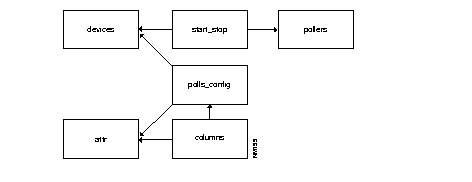
The following database tables are used during device polling. These tables are described in the following section.
- attr
- columns
- pollers
- polls
- polls_config
- start_stop
The tables listed in Table C-19 through Table C-24 are used for polling. These tables include the table name, field names, field size, field type, and description of the database records.
Table C-19: attr Table File Structure
| Field Name
| Field Size
| Field Type
| Description
|
|---|
| attr_id
| int
|
| Attribute ID.
|
| snm_name
| varchar (255)
|
| MIB element name in the Solstice Site/SunNet/Domain manager software.
|
| ncs_name
| varchar (255)
| NULL
| MIB element name in the CiscoWorks software.
|
| object_id
| varchar (255)
| NULL
| MIB object ID.
|
| iftable
| int
| NULL
| Interfaces table flag. 0 = not iftable. 1 = iftable.
|
Table C-20: columns Table File Structure
| Field Name
| Field Size
| Field Type
| Description
|
|---|
| poll_id
| smallint
|
| Poll ID.
|
| column_name
| varchar (30)
|
| Column of record in database.
|
| attr_id
| int
|
| Attribute ID. Links to the attr table.
|
| datatype
| smallint
|
| Sybase database type.
|
Table C-21: pollers Table File Structure
| Field Name
| Field Size
| Field Type
| Description
|
|---|
| poller_host
| char (15)
|
| Name of the workstation that nmpolld is running on.
|
| poller_id
| int
|
| Poller ID.
|
| pid
| int
|
| Process identification number.
|
Table C-22: polls Table File Structure
| Field Name
| Field Size
| Field Type
| Description
|
|---|
| poll_id
| int
|
| Poll ID.
|
| poll_name
| varchar (80)
|
| User-defined name for poll group.
|
| table_name
| char (30)
|
| Table name for data repository table.
|
| poll_rate
| int
| NULL
| Desired polling interval (secs). Defaults are -1 for tables to be deleted; 0 for tables to be disabled.
|
| poll_start
| char (4)
| NULL
| Starts polling.
|
| poll_stop
| char (4)
| NULL
| Stops polling.
|
| poll_days
| smallint
| NULL
| Polling dates.
|
| prepoll_id
| int
| NULL
| Prepoll ID.
|
| postpoll_id
| int
| NULL
| Postpoll ID
|
Table C-23: polls_config Table File Structure
| Field Name
| Field Size
| Field Type
| Description
|
|---|
| poll_id
| int
|
| Poll ID.
|
| poller_id
| varchar (80)
|
| Poller ID.
|
| device_id
| int
|
| Device ID. Links to the devices table.
|
| attr_id
| int
| NULL
| Attribute ID. Links to the attr table.
|
| inst
| varchar (255)
| NULL
| Instance ID. Links to the interface tables interface ID.
|
Table C-24: start_stop Table File Structure
| Field Name
| Field Size
| Field Type
| Description
|
|---|
| table_name
| char (30)
|
| Name of polling table.
|
| poller_id
| varchar (80)
|
| Poller ID.
|
| type
| tinyint
|
| Device status. 0 = start, 1 = stop, 2 = restart.
|
| clock_time
| datetime
|
| Date and time polling stopped, started, or restarted.
|
| device_id
| int
|
| Device ID. Links to the devices table.
|
Device Configuration Database Tables
Device configuration consists of all the information that you want to gather from a device during device configuration.
The tables listed in Table C-25 and Table C-26 are used for device configuration. These tables include the table name, field names, field size, field type, and description of the database records.
Table C-25: DevConfigs Table File Structure
| Field Name
| Field Size
| Field Type
| Description
|
|---|
| conf_id
| int
|
| Configuration ID.
|
| creator
| char (64)
|
| Name of person who created or loaded configuration.
|
| time_created
| int
|
| Date and time configuration was created.
|
| conf_stat
| char (2)
|
| Date and time configuration was started.
|
| user_image
| text
| NULL
| Name of the Cisco configuration file image.
|
| machine_image
| text
| NULL
| Name of the compiled configuration file version.
|
| comments
| text
| NULL
| Description of the configuration file.
|
Table C-26: DevConfHist Table File Structure
| Field Name
| Field Size
| Field Type
| Description
|
|---|
| device_id
| int
|
| Device ID. Links to the devices table.
|
| conf_id
| int
|
| Configuration ID. Links to the device_config table.
|
| conf_ver
| int
|
| Version of the configuration file.
|
| software_ver
| char (16)
|
| Software release version.
|
Domains consists of all the information on the collection of routers you have created to manage your network.
The tables listed in Table C-27 and Table C-28 are used for creating domains. These tables include the table name, field names, field size, field type, and description of the database records.
Table C-27: domains Table File Structure
| Field Name
| Field Size
| Field Type
| Description
|
|---|
| domain_id
| int
|
| Domain ID.
|
| domain_name
| char (32)
| NULL
| Name of the domain.
|
Table C-28: domains_devices Table File Structure
| Field Name
| Field Size
| Field Type
| Description
|
|---|
| domain_id
| int
|
| Domain ID. Links to the domains table.
|
| device_id
| int
|
| Device ID. Links to the devices table.
|
The Global Commands and Scheduler tables include information that CiscoWorks needs to send global commands to a device set.
The tables listed in Table C-29 through Table C-31 are used for the Global Command Manager application and the Scheduler utility. These tables include the table name, field names, field size, field type, and description of the database records.
Table C-29: gcmds Table File Structure
| Field Name
| Field Size
| Field Type
| Description
|
|---|
| gcmd_id
| int
|
| Global command ID.
|
| gcmd_name
| char (32)
| NULL
| Name of global command.
|
| command
| text
| NULL
| Command syntax.
|
| user_name
| char (32)
| NULL
| Name of user.
|
| status
| int
| NULL
| Status of command.
|
Table C-30: gcmds_domains Table File Structure
| Field Name
| Field Size
| Field Type
| Description
|
|---|
| gcmd_id
| int
|
| Global command ID. Links to the gcmds table.
|
| domain_id
| int
|
| Domain ID. Links to the domains table.
|
Table C-31: crons Table File Structure
| Field Name
| Field Size
| Field Type
| Description
|
|---|
| cron_id
| int
|
| Cron ID.
|
| gcmd_id
| int
|
| Global command ID. Links to the gcmds table.
|
| cron_name
| char (32)
| NULL
| Name of cron job in the Scheduler utility.
|
| user_name
| char (32)
| NULL
| Name of user.
|
| command
| text
| NULL
| Command syntax sent to Scheduler utility. Links to the gcmds table.
|
| status
| int
|
| Status of command. Links to the gcmds table.
|
| minutes
| int
|
| Time in minutes of cron.
|
| hour
| int
|
| Time in hours of cron.
|
| day
| int
|
| Day of cron job.
|
| month
| int
|
| Month of cron job.
|
| week
| int
|
| Week of cron job.
|
The configuration snap-in command tables include information that CiscoWorks needs to send snap-in commands to a device set.
The information listed in Table C-32 and Table C-33 is used for the Configuration Snap-In Manager application. These tables include the table name, field names, field size, field type, and description of the database records.
Table C-32: pccmdset Table File Structure
| Field Name
| Field Size
| Field Type
| Description
|
|---|
| cfgcmdset_id
| int
|
| Configuration snap-in command ID.
|
| group_name
| char (32)
|
| Name of the set of commands.
|
| group_type
| int
|
| Type of snap-in commands.
|
| the_group
| image
| NULL
| Set of snap-in commands.
|
| domain
| char (32)
| NULL
| Domain name. Links to the domains table.
|
| device_set
| char (32)
| NULL
| The set of devices to which the command will be sent.
|
| device_set_type
| int
|
| The platform type of the device set.
|
| description
| char (255)
| NULL
| A description of the configuration snap-in command.
|
Table C-33: pcdevset Table File Structure
| Field Name
| Field Size
| Field Type
| Description
|
|---|
| cfgdevset_id
| int
|
| Configuration snap-in device set ID.
|
| devset_name
| char (32)
| NULL
| Name of the set of devices to which the command will be sent.
|
| domain
| char (32)
| NULL
| Domain name. Links to the domains table.
|
| the_device
| image
| NULL
| Contains the collection of devices.
|
| ref_count
| int
|
| Reference count of the number of the command sets that link to the a device set.
|
| description
| char (255)
|
| A description of the device set.
|
The software management table consists of all the information that is required to perform the tasks for the Software Manager, Device Software Manager, and the Software Inventory Manager application.
The information listed in Table C-34 is used for the software management tasks. This tables includes the table names, field names, field size, field type, and description of the database records.
Table C-34: SysFiles Table File Structure
| Field Name
| Field Size
| Field Type
| Description
|
|---|
| file_id
| int
|
| Software image file ID.
|
| file_name
| varchar (128)
|
| Software image file name.
|
| rel_version
| char (32)
|
| Software image file release version.
|
| checksum
| int
|
| Checksum of the software image.
|
| length
| int
|
| Size of the software image file.
|
| platform
| char (32)
| NULL
| Platform type.
|
| compressed
| tinyint
| NULL
| Indication if the image file is compressed.
|
| user_alias
| char (32)
| NULL
| User-provided name for the software image file.
|
| comments
| text
| NULL
| Description or comments.
|
| image_name
| char (32)
| NULL
| Image name.
|
| image_family
| char (32)
| NULL
| image family.
|
Table C-35 lists the tables moved by the copy_tables command.
Table C-35: Tables Moved by the Copy_Tables Command
| Database
| Table Owner
| Table Name
|
|---|
| polldb
| nmsuper
| polls_config
|
| polldb
| nmsuper
| tables
|
| polldb
| nmsuper
| column
|
| polldb
| nmsuper
| summaryinfo
|
| polldb
| nmsuper
| grouptemplate
|
| polldb
| nmsuper
| polls
|
| polldb
| nmsuper
| attr
|
| polldb
| nmsuper
| action
|
| polldb
| nmsuper
| start_stop
|
| polldb
| nmsuper
| pollers
|
| polldb
| nmsuper
| msglog
|
| polldb
| nmsuper
| filterlog
|
| polldb
| nmsuper
| applog
|
| polldb
| nmsuper
| ciscolog
|
| polldb
| nmsuper
| sample
|
| polldb
| nmsuper
| sample_error
|
| polldb
| nmsuper
| sample_load
|
| polldb
| nmsuper
| sample_traffic
|
| polldb
| nmsuper
| sample_mix
|
| nms
| cisco_connect
| cisco_connect_users
|
| nms
| SAnms
| applications
|
| nms
| SAnms
| app_bits
|
| nms
| nmsuper
| auto_install
|
| nms
| nmsuper
| sw_inventory
|
| nms
| SAnms
| logins
|
| nms
| SAnms
| groups
|
| nms
| SAnms
| users
|
| nms
| SAnms
| group_users
|
| nms
| SAnms
| group_domains
|
| nms
| nmsuper
| gcmds_domains
|
| nms
| nmsuper
| gcmds
|
| nms
| nmsuper
| domains_devices
|
| nms
| nmsuper
| domains
|
| nms
| nmsuper
| summaryinfo
|
| nms
| nmsuper
| DevConfigs
|
| nms
| nmsuper
| DevConfHist
|
| nms
| nmsuper
| DevConFileLoc
|
| nms
| nmsuper
| interfaces
|
| nms
| nmsuper
| devices
|
| nms
| nmsuper
| crons
|
| nms
| nmsuper
| if_addresses
|
| nms
| nmsuper
| locations
|
| nms
| nmsuper
| admins
|
| nms
| nmsuper
| vendors
|
| nms
| nmsuper
| people
|
| nms
| nmsuper
| phones
|
| nms
| nmsuper
| contacts
|
| nms
| nmsuper
| admin_contacts
|
| nms
| nmsuper
| vendor_contacts
|
| nms
| nmsuper
| line_contacts
|
| nms
| nmsuper
| lines
|
| nms
| nmsuper
| networks
|
| nms
| nmsuper
| net_numbers
|
| nms
| nmsuper
| device_types
|
| nms
| nmsuper
| interface_types
|
| nms
| nmsuper
| protocol_types
|
| nms
| nmsuper
| line_types
|
| nms
| SAnms
| permissions
|
| nms
| nmsuper
| net_types
|
| nms
| nmsuper
| procinfo
|
| nms
| nmsuper
| SysFiles
|
| nms
| dbo
| SystemEvents
|
| nms
| dbo
| DumpDevices
|
| nms
| nmsuper
| pccmdset
|
| nms
| nmsuper
| pcdevset
|



