


|
|

This appendix contains several troubleshooting tools for you to use in case you encounter a problem while setting up or running AtmDirector. Commands and their options are also described.
Table A-1 lists some problems that you might encounter while using AtmDirector and some possible solutions.
| Problem | Probable Cause | Possible Solution |
|---|---|---|
Unable to discover an end host | Interim Local Management Interface (ILMI) is not enabled. | Enable ILMI on the affected end host. |
| No SNMP connection to the end host. | Set up the SNMP connection to the end host. Make sure all device requirements are met. See "Discovery Device Requirements."
| |
| The Sybase database server is unable to start. The AtmDirector database is marked suspect. | The AtmDirector database is in an inconsistent state. | Reinitialize the database using the atmd_setupdb command. Refer to "Using the atmd_setupdb Command."
Recover the database from a backup using the atmd_recover command. Refer to "Recovering the AtmDirector Database." |
In some cases, Cisco Systems customer support might ask you to turn on the topology and discovery debug options. These options enable the system to log verbose trace messages in the logfile file at the following location:
/opt/CSCOatmd/data/log
To enable these debug options, follow these steps:
Step 1 Select Options from the AtmDirector window, shown in Figure A-1. The Global Options window appears.
Step 2 Select the miscellaneous index tab. The miscellaneous index tab window appears, as shown in Figure A-2.
Step 3 In the Debug box, configure the settings, as follows:
Step 4 Click OK. The AtmDirector window reappears (Figure A-1).
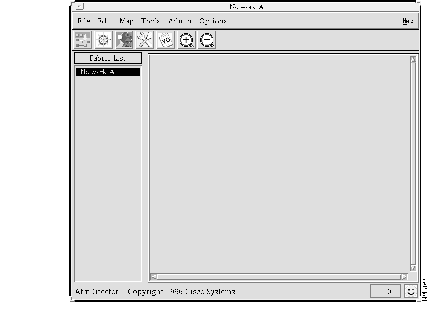
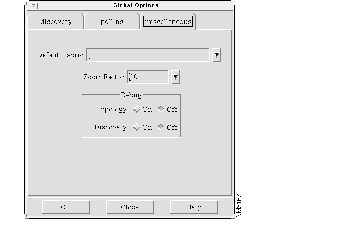
The atmdirector command starts the AtmDirector application. This command has several options you can use to start AtmDirector in a specific way or to perform specific functions.
atmdirector [-v | -b | -c | -tn | -h]| -v | Displays the version number of AtmDirector. |
| -b | Turns on the topology debug option to log verbose trace messages in the logfile file. Messages are displayed until you turn off the option. Refer to "Logging Trace Messages" for information about turning off the option. |
| -c | Creates a color map for only AtmDirector to use to avoid contention with other color-intensive applications. |
| -tn | Configures AtmDirector to wait n seconds for a response from the discovery process before reading in the database. The default is 30 seconds. |
| -h | Displays the command options and their descriptions. |
/opt/CSCOatmd/bin/atmdirector
Regular User
You might need to increase the amount of time that AtmDirector waits for a response from the discovery process before reading in the database if you start AtmDirector and one or both of the following conditions occur:
The topology debug option is turned on, as follows:
% atmdirector -b
AtmDirector:Debug  :Topology:Discovery connect timer is set to 10

AtmDirector:Debug  :Topology:Db server is AG_SYBASE

AtmDirector:Debug  :Topology:Waiting to connect to discovery

AtmDirector:Debug  :Topology:Connected to discovery

AtmDirector:Debug  :Topology:Topology is registered with discovery

AtmDirector:Debug  :Topology:Loading from the database

AtmDirector:Debug  :Topology:Created devicetypes

AtmDirector:Debug  :Topology:Created atmfabric for AdUnknown_Fabric

AtmDirector:Debug  :Topology:Created atmfabric for AdRootFabric

AtmDirector:Debug  :Topology:Created submap AdRootSubmap
.
.
.
The atmd_startup command starts the AtmDirector daemon processes.
atmd_startup/opt/CSCOatmd/etc/atmd_startup
Superuser
You might need to start AtmDirector daemon processes if the discovery process appears to not be functioning. For example, all devices are shown as unreachable (blue) on the topology map, or the discovery status box contains a blue sad face.
AtmDirector daemons are started, as follows:
# /opt/CSCOatmd/etc/atmd_startup
The Sybase data server CW_SYBASE is not running.
Starting it...
The Sybase backup server CW_BACKUP_SERVER is not running.
Starting it...

Starting AtmDirector, Version 1.0.8 daemons.
Starting cf_srvbrk...
cf_srvbrk successfully started.

Starting cf_pollsrvr...
cf_pollsrvr successfully started.

Starting ad_discovery...
ad_discovery successfully started.

All AtmDirector, Version 1.0.8 daemon processes are running.
The atmd_shutdown command shuts down the AtmDirector daemon processes.
atmd_shutdown [-dbsa sapsswd]| -dbsa | Shuts down the Sybase data server and the backup server in addition to the AtmDirector daemon processes. This option requires that you enter the previously created system administrator password for Sybase. |
| sapsswd | The system administrator password for Sybase. |
/opt/CSCOatmd/etc/atmd_shutdown
Superuser
You might need to shut down AtmDirector and the Sybase data and backup servers if you reinstall the product.
AtmDirector daemons are shut down, as follows:
# /opt/CSCOatmd/etc/atmd_shutdown
Stopping AtmDirector daemons.
Shutting down cf_srvbrk...
Shutting down cf__srvbrk...
Service Broker killed!
Shutting down cf_pollsrvr...
Shutting down cf__pollsrvr...
Shutting down ad_discovery...
Shutting down ad__discovery...
Terminated
cf_srvbrk terminated successfully.
cf__srvbrk terminated successfully.
cf_pollsrvr terminated successfully.
cf__pollsrvr terminated successfully.
ad_discovery terminated successfully.
ad__discovery terminated successfully.
All AtmDirector daemon processes are stopped.
The atmd_setupdb command performs the following three tasks:
The command checks whether each task has been previously completed. If the task has been performed already, it proceeds to the next task. If the task has not been performed already, it performs the task.
atmd_setupdb [-create | -all] | Caution This command removes the entire Sybase data server, including databases of other products that are using the Sybase data server. |
| -create | Forces AtmDirector to discard the current AtmDirector database (if present) and build a new one. |
| -all | Forces AtmDirector to perform all three tasks: reinitialize the Sybase data server, discard and create an AtmDirector database, and initialize the AtmDirector database to its default settings. |
/opt/CSCOatmd/etc/atmd_setupdb
Superuser
You might need run atmd_setupdb if the AtmDirector database becomes corrupted.
The Sybase data server and the AtmDirector database are created, and the AtmDirector database is initialized, as follows:
# /opt/CSCOatmd/etc/atmd_setupdb
Database setup script for AtmDirector, Version 1.0.8.
This script will create and initialize the database tables required
by AtmDirector.
The following Sybase variable values are already set from the
AtmDirector install, and will be used during this setup.
  Sybase location    ($SYBASE)  = /opt/CSCOsyb
  Sybase data server ($DSQUERY) = CW_SYBASE
  Sybase backup server          = CW_BACKUP_SERVER
Please answer the following questions.  You may terminate the
database setup at any time by answering 'q' (without the quotes).
You may return to the previous question at any time by typing '^'
(without the quotes).
The Sybase dataserver CW_SYBASE is not configured.
The Sybase data and backup servers do not appear to be properly
configured.  You may choose to configure them now.
Note that if the Sybase servers are already configured, this will
destroy any data that exists on them.
Do you wish to configure Sybase (y/n)?  y
A system administrator ('sa') password is required for the
configured Sybase data server.  This password will be required
in the future for performing database administration, so do not
forget it!
Enter the Sybase 'sa' password?
Reenter the password to verify?
This script will create a new Sybase database that will be
used to store data for AtmDirector.
Please enter the size of the database you wish to create in MB.
You may use the following guidelines to choose a size.
  For a small network, specify 20.
  For a medium sized network, specify 50.
  For a large network, specify 75.
Enter the database size in MB? [20]  50
This script will create a new Sybase physical device that will be
used to store data for AtmDirector.  This can either be a regular file
or a raw partition.
Please enter the name of the regular file or raw partition in
which to create the database.
Enter the database file name? [/opt/CSCOsyb/data/atmd_datadevice]
This script will create a new Sybase physical device that will be
used to store the database log for AtmDirector.  This can
either be a regular file or a raw partition.
Please enter the name of the filesystem file or raw partition in
which to store the transaction log for this database.
Enter the log file name? [/opt/CSCOsyb/data/atmd_logdevice]
The following additional default values will be used for setting
up the AtmDirector database.
AtmDirector log size        - 12
The following additional default values will be used for
configuring Sybase.
Data server TCP port        - 5990
Backup server TCP port      - 6089
master database device      - /opt/CSCOsyb/data/atmd_master
master database size        - 17
sybsysprocs device          - /opt/CSCOsyb/data/atmd_sybsysprocs
sybsysprocs size            - 14
Temp database device        - /opt/CSCOsyb/data/atmd_tempdevice
Temp database size          - 20
You may accept these standard values and proceed with the setup,
or you may customize one or more of these values.
Do you wish to proceed with these values (y/n)?  y
You have chosen the following values for this setup.
AtmDirector Database        - Create
AtmDirector database device - /opt/CSCOsyb/data/atmd_datadevice
AtmDirector database size   - 50
AtmDirector log device      - /opt/CSCOsyb/data/atmd_logdevice
AtmDirector log size        - 12
Configure Sybase            - Yes
Data server TCP port        - 5990
Backup server TCP port      - 6089
master database device      - /opt/CSCOsyb/data/atmd_master
master database size        - 17
sybsysprocs device          - /opt/CSCOsyb/data/atmd_sybsysprocs
sybsysprocs size            - 14
Temp database device        - /opt/CSCOsyb/data/atmd_tempdevice
Temp database size          - 20
You may accept these values and proceed with the install (y), reject
the values and reenter them from the beginning (n), return to the last
question (^), or quit without installing (q).
Continue with the install (y/n)?  y
Initializing the Sybase data server...
Please be patient.  This process will take about two minutes.
Initializing the Sybase backup server...
Configuring the server for 100 connections...
Temporarily shutting down data server...
Restarting data server.  Please wait...
Setting the backup server...
Building the tempdb data device...
Configuring the master database...
Dropping existing database and devices, if any...
Creating physical database devices...
Creating database atmddb...
Done with database creation.
Setting database options for atmddb.
Creating user atmdroot for database atmddb.
Creating database messages.
Creating database tables.
Creating triggers.
Setting thresholds on the transaction log.
Adding initial database entries.
atmd_setupdb successfully completed!
#
|
|