


|
|

The FastPAD commands are a set of commands concerned with configuring a FastPAD multiplexer for interconnection via your IPX network. FastPADs are interconnected via IPX Frame Relay Service PVCs. FastPAD/IPX interconnection requires the use of an FTC front card and FTI back card on the IPX. The FastPAD is connected to the FTI card installed in the IPX. The FRP/FRI cards provide the adaptation layer to convert data between Frame Relay format and IPX FastPacket format. In addition, since the Frame Relay/FastPAD connectivity is an option, this option must be enabled for your system software.
The FastPAD acts as a feeder into the IPX. The FastPAD encapsulates this traffic into FastPAD type frames and transmits it over frame relay PVCs. These PVCs are transmitted over a FastPAD trunk that feeds into an IPX frame relay port on an FTC/FTI card set. FastPAD connections are mapped to frame relay virtual circuits within the IPX, switched to the remote IPX, and delivered to the remote FastPAD.
There are five types of FastPAD connections: switched voice connections, permanent voice connections, data connections, frame relay connections, and frame forwarding connections. FAX connections are not a separate connection type. They are transmitted over switched voice or voice connections. When a FAX connection is required, the FastPAD automatically detects the FAX transmission and suppresses the use of any voice compression algorithms. A voice, data, or FAX connection from one FastPAD must always terminate on another FastPAD. Frame relay and frame forwarding traffic may be terminated on another FastPAD or on an FRP in an IPX.
The FastPAD connects to an IPX via an FTC/FTI card set on the IPX, where the FTC is the front card and the FTI is the back card. There are four types of FTI back cards: V.35, X.21, T1, and E1.
Initial FastPAD configuration is performed at the FastPAD with either the StrataView FastPAD, FastPAD FP Tools, or by replacing the FastPAD FlashPak. Following this, the FastPAD composite link (to the IPX) configuration and connection configuration is performed by using the IPX commands described in this appendix.
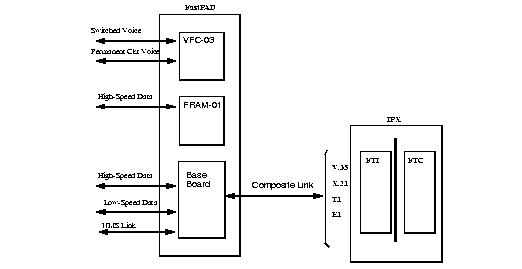
The FastPAD always contains a base card and may also contain expansion cards. The base card is designated "b", while the expansion cards are designated 1-5 for the FastPAD Micro and 1-8 on the standard FastPAD. The expansion ports can contain either Voice FAX Cards (VFC-03) or Frame Relay Access Modules (FRAM-01).
The base card on the FastPAD Micro supports a composite port for connection to the IPX, one high-speed data port, one low-speed data port, and an NMS port (for a PC running the StrataView FastPAD NMS application). The base card on the standard FastPAD supports a composite port for connection to the IPX, one high-speed data port, five low-speed data ports, and an NMS port (Figure 17-1). When adding connections to the FastPAD base card ports, the letter "b" is used for slot designation. When adding connections to the FastPAD expansion cards, a number 1 through 8 is used, as applicable.
Voice connections are supported by adding VFC-03 cards. Each VFC-03 card provides the choice of connecting to either a RJ45 or RJ11 connector. On the VFC-03, there are three available modes selectable by software: Off Premise Extension (OPX), Single Line Telephone (SLT), and E & M. The VFC-03 supports Adaptive Transform Coding (ATC) voice compression algorithm. The VFC-03 supports other voice compression algorithms, e.g., CELP. The VFC-01 may not be installed in the same chassis as the VFC-03, and its operating mode must be manually switched between OPX, SLT, and E & M.
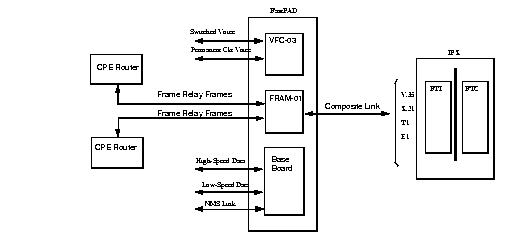
The Frame Relay Access Module (FRAM-01) provides three high-speed data ports in addition to the one on the base circuit card. The FRAM has a single DB-68 connector which can be converted to three DB-25 connectors through the use of an adapter cable.
There can be multiple FRAMs, however only one can be configured for a Frame Relay switch. The others can only be used for data connections. On the FRAM used for Frame Relay connections, one port is configured for a composite port, and the other two ports are configured to interface to CPE such as routers with frame relay interfaces, for example (Figure 17-2). One of the ports on the FRAM is used for a composite port since the baseboard composite port data rate is considerably slower. If a FRAM port is defined as the composite port (line interface to the IPX), the base board composite port (line) is disabled.
In setting up FastPAD connections across a network, a number of tasks need to be perfomed. These include the following:
The Y cable redundancy feature is supported for the FTC card, using the addyred, delyred, dspyred and prtyred commands. See the Node Commands chapter for details on setting up redundancy. The FTC/FTI card set supports V.35, X.21, T1, and E1 ports by the use of the corresponding four different FTI back cards
Logical frame relay ports are collections of DS0 timeslots that function as a port. They support up to 252 connections. The LMI signalling protocol is simultaneously supported on a maximum of 30 logical ports.
The addftcport and delftcport commands are used to create/delete logical ports. The addftcport command associates a line number and DS0 timeslot to a logical port. Any number of contiguous DS0 timeslots are optionally associated to form a logical port with the restriction of channel 16, which is used for signalling for E1. Logical ports are formed with DS0 timeslots configured for either 56 or 64 Kbps. The cnfftcport command may be used to configure the port.
FTC circuit line operations are included in the commands upln, upcln, dnln, and dncln. An FTI line can be configured as a network clock source with the command cnfclksrc.
Unassigned channel signals are transmitted on a channel which is not mapped to a logical port. Data code values 0x7F and 0x54 apply to the T1 and E1 channels. Signalling values 1111 and 1101 apply to T1/E1 ABCD signaling channels.
The FastPAD can be monitored and managed by the IPX through a control connection. This connection is a frame relay PVC connection between the CC on the IPX and the configuration application on the FastPAD. To configure the control connection:
This section describes the steps for setting up the FTC card and FastPAD link.
The ports on the FTC card for V.35 and X.21 interfaces are upped automatically. The ports for T1 and E1 cards must be added using the addftcport command. The T1 and E1 ports are configured for logical channels by specifying groups of DS0s. If the port is not up, use the upftcport command to up it.
For non-T1/E1 ports (e.g., V.35, X.21)
cnfftcport FTC_slot.port  speed  port_type  port_ID  port_Q_depth
           ecnq_thresh  DE_thresh signalling_protocol
For T1/E1 ports, after adding the logical ports with the addftcport command, configure each port:
cnfftcport  FTC_slot.port   txq_depth  ecnq_depth  DE Threshold
            updt_prot_id
addfp FTC_slot.port name ID source_DLCI
where name is up to eight characters to identify FastPAD, and ID must match the value entered at the FastPAD front panel (source DLCI = [S x 16] + P).
The upln and dnln commands are used to bring the line up and down, respectively.
Two commands are used to configure FastPAD data ports. These are cnfdclk and cnfict. cnfdclk sets the data mode (transparent, H/SDLC, or asynchronous) and the clock mode (internal or external). cnfict allows limited control lead mapping from one data port to another.
Two commands are used to configure FastPAD voice ports and connections. These are cnfvchtp and cnfchgn. The cnfvchtp command defines interface type, signalling, SLT timeout period, and DTME detect timeout. The cnfchgn command configures the input gain and output gain values.
cnffrport  FTC_slot.port.FP_slot.port  [port_speed  rcv_clk_type
           xmt_clock_type  signalling_protocol  protocol_parameters
           data_coding
dspfrport  FTC_slot.port.FP_slot.port
upfrport   FTC_slot.port.FP_slot.port
dnpfrport  FTC_slot.port.FP_slot.port
Before two FastPADs can establish switched voice connections, they must be paired or associated to each other. Once paired, a PVC is created within the two FastPADs. Switched voice connections or sessions are established over this PVC. Each switched voice session does not have a dedicated PVC. Any FastPAD voice channel that has not been assigned a dedicated or permanent voice connection can be used for a switched voice connection. To set up a FastPAD switched voice connection:
|
| cnfchgn | Configures the channel gain. This command allows the gain inserted in the receive and transmit directions to be adjusted to between -31 dB to +6 dB in 1 dB increments. |
| cnfchutl | Configures the channel utilization. See the Routing and Bandwidth commands chapter. | |
| cnfvfpchtp | Configures the FastPAD voice channel interface type. This command configures the telecommunications interface type. |
Rel. 8.4 supports CELP-based voice connections that terminate on a pair of VCF03s and CELP-based switched voice connections between a pair of FastPADs. The compression type, e.g., CELP-8k is not configurable from the IPX.
FastPAD Data Traffic
The base board low-speed data ports support the following:
The base board high-speed data port supports the following:
The optional FRAM high-speed ports support the following:
To set up a permanent FastPAD voice connection, you merely pair two FastPAD voice channels.
|
| cnfchgn | Configures the channel gain. This command allows the gain inserted in the receive and transmit directions to be adjusted to between -31 dB to +6 dB in 1 dB increments. |
| cnfchutl | Configures channel utilization. See the Routing and Bandwidth Commands chapter. | |
| cnfvfpchtp | Configures the FastPAD voice channel interface type. This Command configures the telecommunications interface type. |
To set up a permanent FastPAD data connection, perform the following tasks.
|
| cnfcondsc | Configures the connection descriptor. |
| cnfdclk | Configures the clocking for the data channel. | |
| cnfict | Configures the interface control template that determines the output lead behavior for data channels. Output leads can be configured as steady state (on or off) or can be programmed to follow an input lead. For the FastPAD, there is only one template-the active template. | |
| cnfchutl | Configures channel utilization. See the Routing and Bandwidth Commands chapter. |
The FastPAD, in conjunction with the IPX, provides frame relay connections of CPE (routers, bridges, packet switches, etc.) via PVCs. The CPE is connected to the FRAM-01 card that supports Frame Relay. The FTI back card (V.35, X.21, T1, or E1) performs the adapter layer function to convert between the FastPAD special frame format and FastPackets.
The CPE transmits data to the FRAM-01 based upon the core functions of Q.922 (LAPD). The FastPAD scans the first two octets of the DLCI and forwards the frame to the destination CPE via the IPX.
For adding/deleting connections, the following commands are used:
addcon  local_chan(s)  node  chan  class  [frp_bw  avoid]
chan(s) = FTC_slot.port.FP_slot.port.DLCI
frp_bw = MIR/MIR  VC-Q/VC_Q  PIR/PIR  Cmax/Cmax  ECNQ_thresh/ECNQ_thresh
         QIR/QIR  FST  %util/%util
delcon  channel(s)
channels = FTC_slot.port.FP_slot.port.DLCI
Frame forwarding connections allow the connection of non-frame relay frames (HDLC and SDLC). Frame forwarding for FastPAD to FastPAD may be configured on either the FastPAD base card or FRAM-01 expansion card. However, for Rel. 8.4, frame forwarding from FastPAD to FRP is limited to the data ports on the FRAM-01 expansion card.
NOTE: The FTC port ID cannot be changed to a different value if a frame forwarded connection exists between the attached FastPAD and an FRP. This is because the FTC port ID is used as a unique identifier in the FTC card's logical connection entry.
The following commands assist in managing bandwidth to achieve satisfactory traffic patterns.
cnfcos | Specifies a class of service (COS) for a data or voice channel. The COS is a number from 0 to 15 that determines the channel's priority for rerouting in a trunk fails. |
| cnfpref | Specifies preferred routing for intra-domain connections. This command can be used to assist in balancing the load on the network's trunks. |
| dsprts, prtrts | Displays/prints the current connection routing information. Used in conjunction with the cnfpref command. The display of the connection routes terminates at the IPX. |
| dncon, upcon | Temporarily downs/ups connections of a specified COS, thus releasing bandwidth for other services. Often it is possible to down some voice connections to provide more bandwidth for data and frame relay connections. |
Frames received and transmitted, packets received and transmitted, bytes received and transmitted, receive and transmit frames discarded, receive and transmit packets discarded, and receive and transmit bytes discarded.
Applicable commands are: cnfchstats, dspchstats, clrchstats, dspchstatscnf, dspchstathist. The format is the same as in previous releases, except that the target frame relay port is specified as:
FTC_slot.port.FP_slot.port.DLCI
There are three data channel types and one Frame Relay Type on the FastPAD (Figure 17-3).
| Port Type | Transparent | H/SDLC | Asynchronous | Frame Relay |
| Base-board low speed | Yes | Yes | Yes | No |
| Base-board high speed | Yes | Yes | No | No |
| FRAM high speed | No | Yes | No | Yes |
Transparent: The transparent mode is used for synchronous data applications. In order to reduce bandwidth utilization on the Composite Link, the FastPAD suppresses repeating patterns. After a synchronous data frame is built, the FastPAD searches for repeating patterns within the frame. The first occurrence of a repeating pattern of at least five in length is reduced to three octets and the smaller frame if sent out across the Composite Link. This process is called Run Length Compression (RLC).
H/SDLC: High-level Data Link Control (HDLC) and Synchronous Data Link Control (SDLC)_ are synchronous data protocols. SDLC is a subset of HDLC that was developed for use on SNA networks. The FastPAD recognizes HDLC frames and arranges them into 65 byte segments to be packetized into frame relay frames. All HDLC frames are separated by hexadecimal 7E flags. The FastPAD suppresses inter-HDLC frame idle flags to reduce utilization on the composite link.
Async: In asynchronous mode, the data channel protocol is preset to 8-bit characters with no parity and one stop bit, which cannot be changed. However, 7-bit protocols with parity can be used and the FastPAD forwards the parity bit as the eighth data bit. In order to reduce bandwidth use, frames are not generated during idle periods, and start and stop bits are not included in the frame. There is a configurable time period that the FastPAD waits to receive data from an asynchronous device before sending a frame that is 66 bytes long. This ensures propagation through the network with minimal delay.
The data traffic on the composite link of the FASTPAD is encapsulated into frames. FastPAD frames with synchronous data contain 65 data bytes, and frames with asynchronous data contain data bytes. Data frames may be shorter in some cases. Data frames may be marked as discard eligible.
The composite link can connect a FastPAD to a wide area network (e.g. IPX) or to another FastPAD. The Frame Relay network can be either public or private.
The standard frame relay format is shown in Figure 17-3. The standard frame relay format can be between 5 and 4096 bytes in length. There is at least one hex 7E lag between consecutive frames. On the composite link, the frame lengths used by the FastPAD can have up to 65 bytes of synchronous data, 66 bytes of asynchronous data, or between 5 and 4096 bytes of frame relay connection data.
0 | 1 | 1 | 1 | 1 | 1 | 1 | 0 |
DLCI (MSB ) | C/R | EA (0) | |||||
DLCI (LSB) | FECN | BECN | DE | EA(1) | |||
MUX | |||||||
CONTROL | |||||||
.. User Data (ASYNC up to 66 bytes) Transparent & HDLC up to 65 bytes) . . | |||||||
CRC (MSB) | |||||||
CRC (LSB) | |||||||
0 | 1 | 1 | 1 | 1 | 1 | 1 | 0 |
The commands discussed in the previous sections are summarized in the Table 17-2. The command name, a description, and the page on which more information can be found is included.
| Mnemonic | Description |
|---|---|
| addcon | Add Connection |
| addfp | Add FastPAD to IPX Node |
| addfpdial | Add FastPAD Speed Dial Number |
| addftcport | Add logical T1/E1 port link to FastPAD, using DS0 segments |
| addextlp | Add external loop. See the "Troubleshooting" chapter in the Command Reference. |
| addrmtlp | Add remote loop. See the "Troubleshooting" chapter in the Command Reference. |
| cnfchgn | Configure Gain Insertion for Channel(s) |
| cnfchpri | Configure FRP channel priority for a connection, supporting SNA applications |
| cnfchutl | Configure channel utilization for a channel. See the "Optimize Traffic Routing" chapter in the Command Reference. |
| cnfcondsc | Configure Connection Descriptor. |
| cnfcos | Configure class of service. Sets priority for rerouting a connection. See the "Optimize Traffic Routing" chapter in the Command Reference. |
| cnfdclk | Configure Data Clock |
| cnffrcls | Configure frame class parameters for FastPAD to FastPAD or FastPAD to FRP frame relay connections via FRAM-01 card. |
| cnffrcon | Configure FastPAD to FastPAD or FastPAD to FRP frame relay connections via FRAM-01 card. |
| cnffrport | Configure Frame Port for FastPAD to FastPAD or FastPAD to FRP frame relay connections via FRAM-01 card. |
| cnfftcport | Configure FTC Port |
| cnfict | Configure Interface Control Template |
| cnfpref | Configures preferred route. See the "Optimize Traffic Routing" chapter in the Command Reference. |
| cnfvchtp | Configure FastPAD Voice Channel Type |
| cpyict | Copy Interface Control Template |
| delcon | Delete Connection |
| delfp | Delete FastPAD from IPX or IGX Node |
| delftcport | Delete logical T1/E1 port |
| dncon | Down a connection. See the "Optimize Traffic Routing" chapter in the Command Reference. |
| dnfrport | Down Frame Port on FRAM-01 for FastPAD to FastPAD or FastPAD to FRP frame relay connections, using syntax FTC_port.slot.FP_slot.port |
| dnftcport | Down FTC port for link to FastPAD composite port using syntax FTC_slot.port. |
| dnln | Down an FTC line |
| dspchcnf | Display Channel Configuration |
| dspcon | Display Connection |
| dspcons | Display Connections |
| dspfp | Display FastPAD Card Information |
| dspfps | Display Information for All FastPADs |
| dspfrcls | Display frame class parameters for FastPAD to FastPAD or FastPAD to FRP frame relay connections via FRAM-01 card. |
| dspfrport | Display Frame Port configuration on FastPAD FRAM-01. |
| dspftcport | Display FTC Port Configuration |
| dspict | Display Interface Control Template |
| dsprts | Displays routes used by connections at a node. See the "Optimize Traffic Routing" chapter in the Command Reference. |
| prtchcnf | Print Channel Configuration |
| prtcons | Print connection(s) |
| prtict | Print Interface Control Template |
| resetfp | Reset FastPAD: do a cold boot and allow deletion of all PVCs. |
| restartfp | Restart FastPAD(s) |
| tstcon | Test Connection with a test pattern. See the "Troubleshooting" chapter in the Command Reference. |
| tstdelay | Test round trip delay. See the "Troubleshooting" chapter in the Command Reference. |
| tstport | Test Port, executing port loopback test. See the "Troubleshooting" chapter in the Command Reference. |
| upcon | Up a connection that has been downed. See the "Optimize Traffic Routing" chapter in the Command Reference. |
| upfrport | Up Frame Port on FRAM-01 for FastPAD to FastPAD or FastPAD to FRP frame relay connections, using syntax FTC_port.slot.FP_slot.port |
| upftcport | Up FTC port for link to FastPAD composite port using syntax FTC_slot.port. |
| upln | Up an FTC line. |
Adds channel connections between entities in the network. The same command with differing syntax may be used to add voice connections, data connections, frame relay connections or FastPAD voice, switched voice, or data connections. This command establishes channel connections between entities in the network. This format of the command adds a FastPAD voice, switched voice or data connection. The same command with differing syntax can be used to add different types of network connections. After a connection is added with the addcon command, the connection is routed automatically by the system.
The node where the addcon command is entered is considered the "owner" of the added connections. The concept of ownership is important because automatic rerouting and preferred routing information for a connection must be entered from the node that owns the connection. See the cnfpref and cnfcos commands for more information on automatic rerouting. Before a connection is added, the proposed connection appears on the screen and you are asked to confirm the addition.
Switched Voice: | addcon FTC_slot.port node FTC_slot.port type [BW] [%utl] |
| where BW = MIR | |
| Auto-Dial Voice: | addcon FTC_slot.port.FP_slot node FTC_slot.port.FP_slot type |
| Data: | addcon FTC_slot.port.FP_slot.port node FTC_slot.port.FP_slot.port rate |
| Frame: [params] | addcon FTC_slot.port.FP_slot.port.DLCI node FTC_slot.port.FP_slot.port.DLCI |
Add a connection
addcon parameters optional parameters
delcon, dncon, dspcon, dspcons, upcon
Privilege | 1-2 |
| Jobs | Yes |
| Log | Yes |
| Node | IPX |
| Lock | Yes |
addcon 31.1.8 IPX 31.2.8 atc12
Add a voice connection from FastPad port 31.1.8 to 31.2.3 with ATC12 compression. When prompted, type "y" to add the connection.
IPX            TRM   StrataCom       IPX 32    8.4     Date/Time Not Set
 Local      Remote      Remote                                      Route
 Channel    NodeName    Channel    State  Type    Compression  Code Avoid COS O
 31.1.8     IPX         31.2.8     Ok     atc12
 31.2.8     IPX         31.1.8     Ok     atc12
This Command: addcon 31.1.8 IPX 31.2.8 atc12
Add these connections (y/n)?
| Parameter | Description |
|---|---|
| local channel | Specifies the local frame relay channel to connect in the following format:
FTC_slot.port For switched voice connections In these formats, |
| node | Specifies the name of the IPX node at the other end of the connection. |
| remote channel | Specifies the remote FastPAD channel or destination channel of the connection. It is specified in the same format as:
FTC_slot.port For switched voice connections |
| type | Specifies the type of the connection. For switched voice connections, the type is "s" or "switch" to indicate the PVC is used for switched voice. For voice, type indicates the compression type. The following voice compression types are valid: ATC8, ATC12, ATC16 and CELP8, indicating ATC compression at 8K, 12K, or 16K and CELP compression at 8K. For data connections, the type is the data rate. The following Kbps values are valid:
Base board low-speed ports: Asynchronous rates between 300 and 9600 bps. Synchronous rates between 1.2 and 19.2 Kbps Base board high-speed ports: Synchronous rates between 1.2 and 64 Kbps FRAM-01 expan. card: Synchronous rates between 1.2 and 512 Kbps Frame Relay Class: 1-10 |
| Parameter | Description |
|---|---|
| avoid | Specifies the type of trunk for the connection to avoid. The default is no avoidance. The choices are:
*s avoid satellite trunks. *t avoid terrestrial trunks. *z avoid trunks using zero code suppression techniques that modify any bit |
| bandwidth | Specifies the amount of bandwidth to dedicate to the voice channel. This parameter is optional and only valid for FastPAD switched voice connections. |
| hop count bumping | Specifies whether to use hop count bumping (adjustment) to improve the quality of the PVC carrying a switched voice connection. Bumping the hop count can lower the delay for the PVC. This parameter is optional and only valid for switched voice connections. |
| utilization | Specifies a utilization percentage to be used by the IPX for bandwidth assignment. This parameter is optional and only valid for switched voice connections. |
addcon 10.1.3.12.1000 beta 11.1.1.12.1001 10
Add a frame relay connection between FastPADs.
gamma      TRM          YourID:1      Rev: 8.4.X          Mar 1 1995        PST
From            Rem        Rem
                NodeName   Channel         State    Type  Compression Code  COS
10.1.3.3.990   beta       11.1.1.2.991  Downed   fr                      10
11.1.100        beta       11.1.2.2.200   OK       fr                       3
12.1.1.3	        beta       10.1            OK       fr                       2
Last Command:  addcon 10.1.3.3.990 beta 11.1.1.2.991 10
Next Command:
|
LeftFastPad to FastPAD frame relay connection: addcon 10.1.2.3.990 beta 11.1.1.2.991 10 | FRP port to FastPAD frame relay connection: addcon 11.1.100 beta 11.1.2.2.200 3 |
| Frame Forwarding, FastPAD data channel to FRP port: addcon 12.1.1.12.* beta 10.1.* 2 |
For frame relay connections, the addcon syntax is:
The frp_bw parameters have the same parameter values options as defined in the cnffrcl command for the frp ports. These are:
Adds a FastPAD to the IPX network. This enables the local IPX to map the FastPAD to an FTC port and communicate with it over a frame relay PVC to establish a control session. The addfp command defines the IPX slot and port to which the FastPAD is connected and assigns the FastPAD a unique name and ID. (The name and ID must be unique to the local node, and ID must match the value entered at the control panel of the FastPAD). This command also assigns a source (FastPAD) DLCI to identify the PVC connection over which the devices communicate. If the port speed and related parameters on the FTC card match those of the composite link of the FastPAD, the IPX establishes a control session with the FastPAD, allowing configuration management to be performed over this session.
addfp FTC_slot.port name ID source_DLCI
Add FastPAD to an IPX node
addfp parameters
delfp, dspfp
Privilege | 1-2 |
| Jobs | Yes |
| Log | Yes |
| Node | IPX |
| Lock | Yes |
addfp 31.1 FP1 1 17
Add a FastPAD at slot port 31.1, specifying the name FP1, an ID of 1, and a source DLCI of 17.
IPX            TRM   StrataCom       IPX 32    8.4     Date/Time Not Set
                        FastPADs Information
 Slot.Port  Name       ID  FP_DLCI  Port_ID  Alarm
   31.1     FP1         1       17        0  OK
   31.2     FP2         2       18        0  OK
   31.3     FP3         3       19        0  OK
   31.4     FP4         4       20        0  OK
 Last Command: addfp 31.1 FP1 1 17
Next Command:
| Parameter | Description |
|---|---|
| slot | Specifies the slot containing the FTC card to which the FastPAD is to be added. |
| port | Specifies the port number on the FTC card to which the FastPAD is to be added. |
| name | Specifies the name of the FastPAD to be added to the node. This name must be unique to the local (physically connected IPX) node. |
| id | Specifies a value to be used as an identifier for the FastPAD. The value can be from 1 to 256 and must match the value entered into the FastPAD from the front panel. This value must be unique to the local (physically connected IPX) node. |
| source dlci | Specifies the DLCI used by the FastPAD to communicate with the local IPX node. |
Adds a speed dial number to the FastPADs map table. The map table is used by the FastPAD to route a FastPAD end user's analog voice connection to the remote FastPAD channel. Number must be between 0 and 9999. If FFFF is specified, then no speed dial is set. For auto-dial voice channels, a specific map must be assigned to the calling channel.
addfpdial FTC_port.slot.FP_port dial number
Add FastPAD speed dial number
addfpdial parameters
None
Privilege | 1-2 |
| Jobs | Yes |
| Log | Yes |
| Node | IPX |
| Lock | Yes |
addfpdial 31.2.8 777
Add a speed dial number of 777 to FastPAD at 31.2.8
| Parameter | Description |
|---|---|
| channel | Specifies the FastPAD channel to get a speed dial number |
| dial number | Specifies the phone number used by the local FastPAD. Number must be between 0 and 9999. If FFFF is specified, then no speed dial is set. |
Adds a logical frame relay port for T1/E1 by entering the slot number of the FTI/FTC and the DS0/timeslots that make up the logical port. The following lists the error/warning messages from this command.
| Messages | Reason for Message |
|---|---|
| "Slot is out of range" | Line number not correct for FTC T1/E1 |
| "Line must first be upped" | Line is down |
| "invalid channel range" | Channel number is out of range (T1: 1-24) or (E1: 1-31, no 16) |
| "Channel is busy" | Channel is already assigned to a logical port |
| "You cannot use signalling channel 16" (E1) | CAS channel 16 included in logical port (E1) |
| "Invalid rate" | Entered rate is not 56 or 64 Kbps |
| "This rate is available for single channel only" | Entered rate is 56 Kbps and multiple channels were specified |
Add FastPAD port T1/E1
addftcport parameters optional parameters
upcln, delftcport, cnfftcport, dspftcport
Privilege | 1-2 |
| Jobs | Yes |
| Log | Yes |
| Node | IPX |
| Lock | Yes |
addftcport 21.9 -15
Add a FTC port from a range of DS0/timeslots.
gamma          TRM   YourID:1        IPX 16    8.4.x    Mar. 15 1995 17:28 CST

Port configuration for FTC 21
From	Chan	Speed	Interface	State
1	9-15	448	FRI T1	INACTIVE


Last Command: addftcport 21.9-15


Next Command:
| Parameter | Description |
|---|---|
| line.channel | Specifies the FTI T1/E1 line number and the logical port number. e.g. addfrport 8.14 (a period separates the line from the logical port number). |
| Parameter | Description |
|---|---|
| - chan | Specifies that multiple DS0/timeslots should be aggregated into a logical port, e.g. addftcport 8.1 - 5 (a hyphen is used to separate the DS0/timeslots in a from - to range). The lowest DS0/timeslot number becomes the logical port number. |
| rate | Specifies the rate of a single logical port. By default, multiple ports are all 64 Kbps. A single DSØ/timeslot may be 56 Kbps or 64 Kbps. e.g. addftcport 8.14 56 (if rate is not entered, 64 Kbps is assumed). |
Configures the amount of gain inserted by the IPX mode for the specified FastPAD voice channel. Gain can be configured between +6 dB and -8 dB. The input gain is inserted at the receive side of an FTC line, and is therefore applied before the signal is packetized. The output gain is inserted at the transmit side of a FTC line and is applied after the signal has been depacketized.
Configure gain insertion for channels
cnfchgn parameters
dspchcnf
Privilege | 1-2 |
| Jobs | Yes |
| Log | Yes |
| Node | IPX |
| Lock | Yes |
cnfchgn 31.1.8 -4 2
Configure an input gain of -4db and an output gain of +2db for FastPAD channel 31.1.8
IPX            TRM   StrataCom       IPX 32    8.4     Date/Time Not Set
          %     Gain  (db)
Channels Util    In    Out   Interface Type   DTMF  SLT Timeout
31.1.8   100     -4    2     FXS L/S           30

Last Command: cnfchgn 31.1.8 -4 2
Next Command:
| Parameter | Description |
|---|---|
| channel(s) | Specifies the FastPAD channel |
| gain | Specifies the gain, in decibels, to assign to the channel. The range is -8 dB to +6 dB. |
Assigns a reference description to a connection. The connection descriptor is configured independently at each end of a connection. The connection descriptor cannot be deleted in a job, only reconfigured. The dspcon and dspcons +d commands display the connection descriptor, if one is configured.
Configure connection description
cnfcondsc parameters
dspcon, dspcons
Privilege | 1-2 |
| Jobs | Yes |
| Log | Yes |
| Node | IPX |
| Lock | Yes |
cnfcondsc 31.2.B.2 Maximillian's_fax
Give a descriptive name to channel 31.2.B.2. In this example, the name "Maximillian's_fax" is given to the connection 31.2.B.2. If a descriptor is desired for the other end of the connection, the user can "vt" to the other end of the connection and use the cnfcondsc command on that connection. The same name can be assigned or a different name.
IPX            TRM   StrataCom       IPX 32    8.4     Date/Time Not Set
Conn:  31.2.B.2   IPX         31.1.B.1    16         Desc: Maximillian's_fax
                                                            Status: OK
Path:   Route information not applicable for local connections
IPX       FTC:   OK                    IPX       FTC:   OK
          FTI:   OK                              FTI:   OK
          FastPAD: OK                            FastPAD: OK
Last Command: cnfcondsc 31.2.B.2 Maximillian's_fax

Next Command:
| Parameter | Description |
|---|---|
| channel | Specifies the FastPAD channel to configure. |
| descriptor | Specifies a string of up to 20 displayable characters starting with anything except a digit. No spaces are allowed. |
Configures the clocking for a FastPAD data channel. The FastPAD supports synchronous and asynchronous traffic. For synchronous traffic, the channel can support internal or external clocking. Asynchronous (character-oriented) traffic is sent as 8 bits, 1 stop bit, and no parity.
Configure data channel clocking type
cnfdclk parameters optional parameters
cnfict
Privilege | 1-2 |
| Jobs | Yes |
| Log | Yes |
| Node | IPX |
| Lock | Yes |
cnfdclk 31.2.B.2 TRANS i
Configure clock for channel 31.2.B.2 for transparent data and an internal clock mode.
IPX            TRM   StrataCom       IPX 32    8.4     Date/Time Not Set
Data Channel:      31.2.B.2
Interface:         RS232       DTE
Clocking:          Internal
            Interface Control Template for Connection while Active
      Lead       Output Value                Lead       Output Value
      DSR        ON                          RTS        N/A
      DCD        ON                          CTS        ON
Last Command: cnfdclk 31.2.B.2 TRANS i
Next Command:
| Parameter | Description |
|---|---|
| channel | Specifies the data channel to configure. Data channels are specified in the format slot.port.subslot.subport, where slot and port are the slot/port of the FTC card, subslot is the FastPAD card slot (1-8 for expansion, b for the base card), and subport is the port/channel on a FastPAD data card. The base card supports six ports/channels (1-5 are low speed, 6 is high speed). Other data cards support three ports/channels (1-3). |
| data mode | Specifies the data transmission mode as either:
|
|
clock type | Specifies a clocking type to assign to each channel. Valid clock types are:
|
Configures the parameters of a frame relay port. When configuring a frame relay port on a FastPAD, the user is prompted for each parameter. Pressing the Return key keeps the current value for the parameter. The screen display is shaded for parameters not configurable for some applications. The data rates for each of the four ports may be mixed and matched freely if the total for all four ports does not exceed the maximum data rate allowed (up to 512 Kbps.).
The rules for assigning data rates to the four ports when using the 1 Mbps FRI are as follows:
Configure Frame Relay port
cnffrport | Required parameters (left-to-right):
slot.logical port number |
prot queue depth |
| Optional parameters:
None |
cnffrport | Required parameters (left-to-right):
slot.port number | |
| Optional parameters:
speed |
clocking |
upfrport, dnfrport, dspfrport
Privilege | 1-2 |
| Jobs | Yes |
| Log | Yes |
| Node | IPX |
| Lock | Yes |
cnffrport 5.1 256 NORMAL 0 65535 65535 100 2 N
Reconfigure the FR port to 5.1 to change Q depths
D2.ipx5        TRM   YourID:1        IPX 16    8.4   Aug. 4 1995  16:40 PST

Port:       5.1               [ACTIVE  ]
Interface:	FRI-X21 DCE	Configured Clock:	256		Kbps
Clocking:	Normal	Measured Rx Clock:	256	Kbps
Port Type	FR		Min Flags/Frames	1
Port ID	0
Port Queue Depth	65535		OAM Pkt Threshold	3	pkts
ECN Queue Threshold	65535		T391 Link Intg Timer	6	sec
DE Threshold	100	%	N391 Full Status Poll	10	cyl
Signalling Protocol	None		ForeSight (CLLM)	No
Asynchronous Status	No		CLLM Status Tx Timer	0	msec
T392 Polling Verif Timer	15		IDE to DE Mapping	Yes
N392 Error Threshold	3		Interface Control Template
N393 Monitored Events Count	4	Lead	I
Communicate Priority	No	State	ON
Upper/Lower RNR Thresh	75%/25%

Last Command: cnffrport 5.1 256 NORMAL 0 65535 65535 100 2 N


Next Command:
cnffrport 8.1 256 n 12000 10000 100 4 15 3 4 N 75 25 1
Reconfigure an NNI FR port 8.1 to change Q depths
gamma 	TRM   YourID:1        IPX 16    8.4    Mar. 15 1995 15:51 PST

Port:       8.1     [ACTIVE  ]
Interface:  V35-4   DCE                    Configured Clock:         256 Kbps
Clocking:   Normal                         Measured Rx Clock:        256 Kbps
Port ID                   40
Port Queue Depth       12000
ECN Queue Threshold    10000               Min Flags / Frames          1
DE Threshold             100 %             OAM FastPacket Threshold    3 pkts
Signalling Protocol Annex A NNI            Link Integrity Timer (T391) 6 secs
Asynchronous Status      Yes               Full Status Polling (N391) 10 cycles
Polling Verif Timer       15               Interface Control Template
Error Threshold            3                  Lead       State
Monitored Events Count     4                   CTS        ON
Communicate Priority      No                   DSR        ON
Upper/Lower RNR Threshold 75/25 %              DCD        ON


Last Command: cnffrport 8.1 256 normal 12000 10000 100 6 15 3 4 N 75 25 1


Next Command:
The results for the update FR parameters as shown are as follows:
Port Queue Depth | 65535 | Depth of port queue is set at 65,535 bytes. |
| ECN Queue Depth | 65535 | Port queue must reach 65,535 bytes before FECN and BECN bits are set. |
| DE Threshold | 100 | Port buffer fill must be 100% before dropping DE frames. |
| Signalling Protocol | 2 | LMI disabled. |
| Asynchronous Status | N | No asynchronous messages to user device; wait for polling from user device. |
| Polling Verify Timer | 15 | 15 seconds heartbeat period. |
| Error Threshold | 3 | 3 failures trigger port comm failure. |
| Monitored Events Count | 4 | 4 events are monitored. |
| Communicate Priority | N | Do not communicate port priority to the user device. |
| Upper RNR Threshold | 75 | 75% of buffer triggers receiver not ready condition. |
| Lower RNR Threshold | 25 | 25% of buffer clears a receiver not ready condition. |
| Minimum Flags/Frame | 1 | There is only one flag for each FR data frame. |
| slot.p;ort | Specifies the FRP card slot and port number. (Slot and logical port number for T1/E1) |
| speed | Specifies the port clock speed in kbps; for a 2.0 Mbps FRP. Speed configured is displayed as Configured Clock. Actual clock rate is displayed as Measured Rx Clock. The available speeds are:
1 port (selected speeds, 56 to 2048 Kbps) The available clock rates for the 1, 2, 3, and 4 port combinations are provided in the command description. |
| clocking | Specifies the port clock type (normal/looped) [normal]. There are four combinations of clocking that may be used for the FRI-V.35 and two with the FRI-X.21. Refer to Chapter 2, Frame Relay Interface Card for a description of looped and normal clock modes. Not specified for T1/E1 ports.
FRP is DCE with normal clocking (V.35 and X.21) |
| port type | Specifies the port type as either FR for frame relay or ATM for Asynchronous Transfer Mode. Select ATM when using AIP to interface V.35 circuits to IPX FRP port. Configures alarm reporting and other miscellaneous functions for port. |
| port ID | Specifies the DLCI associated with the port (0 - 1024) {0}. The IPX uses this number only when adding bundled connections. Otherwise, it can be used by the customer as a network destination number in global addressing. Not specified for T1/E1 ports. |
| port queue depth | specifies the maximum bytes queued for transmission from the FRP port. The range is from 0-65535. The default is 65535. |
| ecn queue threshold | specifies the port explicit congestion notification. The range is from 0-65535. The default is 65535. This is the point at which the BECN and FECN bits will be set in the communications to the user device. |
| de threshold | Specifies the port queue depth above which frames with the Discard Eligibility bit set will be discarded. Valid entries are 0-100%, with a default of 100%. An entry of 100% effectively disables DE for the port. |
| signalling protocol | Specifies the LMI operation mode. The range is from 0-255. The following values are defined (the default is LMI=2):
LMI = 0 LMI is disabled at this port. LMI = 1 StrataCom LMI and the asynchronous update process is enabled at this port. Greenwich Mean Time is also enabled LMI = 2 LMI is disabled at this port. LMI = 3 StrataCom LMI is enabled at this port, but asynchronous update process is disabled. LMI = 4 Port configured as User-Network Interface using CCITT Q.933 Annex A parameters. LMI = 5 Port configured as User-Network Interface using ANSI T1.617 Annex D parameters. LMI = 6 Port configured as Network-Network Interface using CCITT Q.933 Annex A parameters. LMI = 7 Port configured as Network-Network Interface using ANSI T1.617 Annex D parameters. |
| asynchronous status | Specifies whether the IPX should send unsolicited LMI update messages as they appear or whether to wait for the polling from the user device. Valid values are y (yes) or n (no) |
| polling verify timer | Specifies the Link Integrity Verification Timer heartbeat (keep-alive) period with a valid range of 5-30. This should be set to 5 seconds more than the heartbeat time set in the user equipment. Default is 15. |
| error threshold | Specifies the number of failures in the monitored events that causes the "keep alive" process to report an alarm. It has an accepted range of 0-255 and a valid range of 1-10. A value of zero defaults to 1, and a value more than 10 defaults to 10. |
| monitored events count | Specifies the number of monitored events for the "keep alive" process. It has an accepted range of 0-255 and a valid range of 1-10. A port communication fail condition is cleared after this number of successful polling cycles. A value of 0 defaults to 1, and a value more than 10 defaults to 10. |
| communicate priority | Specifies whether the connections SNA priority (H or L) should be communicated to the user device attached to the port. Valid entries are y (yes) or n (no); default is no. |
| upper/lower RNR threshold | Specifies the receiver not ready thresholds. Upper threshold is the number of receiver not ready indications from the user equipment before alarm is generated for this port. The lower receiver not ready threshold is the number of indications from the user equipment before an alarm is cleared. Valid values are 1-255; defaults to 75 for upper, 25 for lower threshold. |
| min. flags/frame | Specifies the minimum number of flags between frames. All values greater than 0 are valid and the default is 1. |
| OAM FastPacket threshold | Specifies the OAM FastPackets are used within the local IPX network to transmit the NNI status from the remote network. This counter allows the user to define the number of dropped OAM packets before setting A-bit transmitted to the user device to 0 to indicate connection failure. This can be set from 0 to 15 packets and the default is 3 packets. A 0 disables this function. Set for both UNI and NNI ports. |
| link integrity timer (T391) | Specifies the interval to send Status Inquiry messages across the NNI port. This will result in a report of all failed connections. This can be set for 5-30 seconds and the default is 6 sec. Both networks must have the same value set for T391. |
| full status polling cycle (N391) | Specifies the interval to send the Full Status Report request for all PVCs across the NNI port. This can be set for 1-255 polling cycles and the default is 10 cycles. The Full Status reports the status of all the connections, failed or not, across the NNI. |
| card type | Specifies the card type (within a job only). This parameter is entered just after slot.port. The valid entries include V.35, X.21, port, and LINE with LINE indicating a T1 or E1 line. This parameter is not required in normal use of the command. |
| CLLM status Tx Timer | Specifies the interval to send ForeSight congestion messages across the NNI port. Can be set for 40 to 350 ms. and the default is 100 sec. Both networks must be StrataCom networks. |
| IDE to DE mapping | Specifies whether the internal DE bit (IDE) status in the FastPacket or ATM cell should be mapped to the frame relay DE bit at the destination. Selection is YES or NO. |
| interface control template | Specifies the control leads available on the V.35 and X.21 physical frame relay ports and their status. |
| channel range | Specifies the DS0s used for the T1 or E1 logical port. Can range from 1 to 1 -31 e.g. 7-12 indicates six DS0s used for the port starting with DS0 #7. Channel range is specified in the addfrport command. |
| channel speed | Specifies the bandwidth provided for the logical port. Speed is 64 Kbps times the number of DS0s indicated by the Channel Range |
Configures the parameters of an FTC port. When configuring an FTC port, the user is prompted for each parameter. Pressing the Return key keeps the current value for the parameter. The screen display is shaded for parameters not configurable for some applications. The data rates for each of the four ports may be mixed and matched freely provided the total for all four ports does not exceed the maximum composite data rate allowed by the FTC card (2.048 Mbps). Supported data rates are listed below.
| Data Rates at 56 Kbps Intervals | Data Rates at 64 Kbps Intervals | ||||||
|---|---|---|---|---|---|---|---|
| 56 | 112 | 168 | 224 | 64 | 128 | 192 | 256 |
| 280 | 336 | 392 | 448 | 320 | 384 | 448 | 512 |
| 504 | 560 | 616 | 672 | 576 | 640 | 704 | 768 |
| 728 | 784 | 840 | 896 | 832 | 896 | 960 | 1024 |
| 952 | 1008 | 1064 | 1120 | 1088 | 1152 | 1216 | 1280 |
| 1176 | 1232 | 1288 | 1344 | 1344 | 1408 | 1472 | 1536 |
| 1400 | 1456 | 1512 | 1568 | 1600 | 1664 | 1728 | 1792 |
| 1624 | 1680 | 1736 | 1792 | 1856 | 1920 | 1984 | 2048 |
When using cnfftcport in a job, an additional parameter, port type, is entered just after slot.port. Valid entries include V.35, X.21, port, and line, with line indicating a T1 or E1 line. This parameter is not required in normal use of the command.
The data rates for each of the four ports may be mixed and matched freely from the above data rates provided the total for all four ports does not exceed 2048 Kbps. Data rates (Kbps) available when using the 1 Mbps FTI are as follows:
Port Data Rates for 1Mbps FTI | |||
|---|---|---|---|
| 1024 | 512 | 256 | 128 |
| 896 | 448 | 224 | 112 |
| 768 | 384 | 192 | 64 |
| 672 | 336 | 168 | 56 |
When using cnfftcport in a job, an additional parameter, card type, is entered just after slot.port. Valid entries include V.35, X.21, T1, and E1. The data rates for each of the four ports may be mixed and matched freely from the above data rates provided the total for all four ports does not exceed 2048 kbps.
Configure FTC port
cnfftcport | Required parameters (left-to-right):
slot.logical port number |
port queue depth |
| Optional parameters:
None |
cnfftcport | Required parameters:
slot.port number | |
| Optional parameters (left to right):
speed |
clocking |
upftcport, dnftcport, dspftcport
Privilege | 1-2 |
| Jobs | Yes |
| Log | Yes |
| Node | IPX |
| Lock | Yes |
cnfftcport 3.1.1 256 NORMAL 0 65535 65535 100 2 N
Reconfigure the FTC port to change Q depths
IPX            TRM   StrataCom       IPX 32    8.4     Date/Time Not Set
Port:       31.1              [ACTIVE  ]
Interface:  FTI-V35 DCE                       Configured Clock:    256 Kbps
Clocking:   Normal                            Measured Rx Clock:   256 Kbps
Port Type                     FR       Min Flags / Frames           1
Port ID                        4
Port Queue Depth           65535       OAM Pkt Threshold            3 pkts
ECN Queue Threshold        65535       T391 Link Intg Timer         6 sec
DE Threshold                 100 %     N391 Full Status Poll       10 cyl
Signalling Protocol   STRATA LMI       ForeSight (CLLM)            No
Asynchronous Status           No       CLLM Status Tx Timer         0 msec
T392 Polling Verif Timer      15       IDE to DE Mapping          Yes
N392 Error Threshold           3       Interface Control Template
N393 Monitored Events Count    4          Lead    CTS    DSR    DCD
Communicate Priority          No          State   ON     ON     ON
Upper/Lower RNR Thresh  75%/ 25%
Last Command: cnfftcport 31.1  256  NORMAL 0 65535  65535  100  2  N
Next Command:
The results for the update FR parameters as shown are as follows:
Port Queue Depth | 65535 | Depth of port queue is set at 65,535 bytes. |
| ECN Queue Depth | 65535 | Port queue must reach 65,535 bytes before FECN and BECN bits are set. |
| DE Threshold | 100 | Port buffer fill must be 100% before dropping DE frames. |
| Signalling Protocol | 2 | LMI disabled |
| Asynchronous Status | N | No asynchronous messages to user device; wait for polling from user device. |
| Polling Verify Timer | 15 | 15 seconds heartbeat period |
| Error Threshold | 3 | 3 failures trigger port comm failure |
| Monitored Events Count | 4 | 4 events are monitored |
| Communicate Priority | N | Do not communicate port priority to the user device. |
| Upper RNR Threshold | 75 | 75% of buffer triggers receiver not ready condition |
| Lower RNR Threshold | 25 | 25% of buffer clears a receiver not ready condition |
| Minimum Flags/Frame | 1 | There is only one flag for each FR data frame. |
| slot.port | Specifies the FRP card slot and port number. (Slot and logical port number for T1/E1) |
| speed | Specifies the port clock speed in kbps; for a 2.0 Mbps FRP. Speed configured is displayed as Configured Clock. Actual clock rate is displayed as Measured Rx Clock. The available speeds are:
1 port (selected speeds, 56 to 512 Kbps) The available clock rates for the 1, 2, 3, and 4 port combinations are as follows: |
| clocking | Specifies the port clock type (normal/looped) [normal]. There are four combinations of clocking that may be used for the FRI-V.35 and two with the FRI-X.21. Refer to Chapter 2, Frame Relay Interface Card for a description of looped and normal clock modes. Not specified for T1/E1 ports.
FRP is DCE with normal clocking (V.35 and X.21) |
| port ID | Specifies the DLCI associated with the port (16-991). |
| port queue depth | specifies the maximum bytes queued for transmission from the FRP port. The range is from 0-65535. The default is 65535. |
| ecn queue threshold | specifies the port explicit congestion notification. The range is from 0-65535. The default is 65535. This is the point at which the BECN and FECN bits will be set in the communications to the user device. |
| de threshold | Specifies the port queue depth above which frames with the Discard Eligibility bit set will be discarded. Valid entries are 0-100%, with a default of 100%. An entry of 100% effectively disables DE for the port. |
| signalling protocol | Specifies the LMI operation mode. The range is from 0-255. The following values are defined (the default is LMI=2):
LMI = 0 LMI is disabled at this port. LMI = 1 Port configured as Network-Network Interface using ANSI T1.617 Annex D parameters. LMI = 2 StrataCom LMI is enabled at this port. |
| asynchronous status | Specifies whether the IPX should send unsolicited LMI update messages as they appear or whether to wait for the polling from the user device. Valid values are y (yes) or n (no) |
| polling verify timer | Specifies the Link Integrity Verification Timer heartbeat (keep-alive) period with a valid range of 5-30. This should be set to 5 seconds more than the heartbeat time set in the user equipment. Default is 15. |
| error threshold | Specifies the number of failures in the monitored events that causes the "keep alive" process to report an alarm. It has an accepted range of 0-255 and a valid range of 1-10. A value of zero defaults to 1, and a value more than 10 defaults to 10. |
| monitored events count | Specifies the number of monitored events for the "keep alive" process. It has an accepted range of 0-255 and a valid range of 1-10. A port communication fail condition is cleared after this number of successful polling cycles. A value of 0 defaults to 1, and a value more than 10 defaults to 10. |
| communicate priority | Specifies whether the connections SNA priority (H or L) should be communicated to the user device attached to the port. Valid entries are y (yes) or n (no); default is no. |
| upper/lower RNR threshold | Specifies the receiver not ready thresholds. Upper threshold is the number of receiver not ready indications from the user equipment before alarm is generated for this port. The lower receiver not ready threshold is the number of indications from the user equipment before an alarm is cleared. Valid values are 1-255; defaults to 75 for upper, 25 for lower threshold. |
| min. flags/frame | Specifies the minimum number of flags between frames. All values greater than 0 are valid and the default is 1. |
Sets the interface control template signals for a FastPAD data channel. The signals that can be set using cnfict are RTS, CTS, DSR and DCD.
Configure interface control template
cnfict parameters optional parameters
cpyict, dspict, prtict
Privilege | 1-2 |
| Jobs | Yes |
| Log | Yes |
| Node | IPX |
| Lock | Yes |
cnfict 31.1.B.7 act dcd r
Configure port 31.1.B.7 with the active interface control template as remote for DCD following RTS
IPX            TRM   StrataCom       IPX 32    8.4     Date/Time Not Set
Data Channel:      31.1.B.7
Interface:         RS232       DTE
Clocking:          Internal
Framing:           DLC
            Interface Control Template for Connection while Active
      Lead       Output Value                Lead       Output Value
      DSR        ON                          RTS        N/A
      DCD        Remote RTS                  CTS        ON
Last Command: cnfict  31.3.B.7  act  dcd  r
Next Command:
| Parameter | Description |
|---|---|
| channel | Specifies the FastPAD data channel whose interface control template to configure in the format: slot.port.subport.subslot |
| template | Specifies the interface control template to configure for the channel. The only valid template for a FastPAD data channel is the ACTIVE template. It is specified as "a". |
| output | Specifies the output lead to configure. Valid output leads are RTS, CTS, and DCD.
on The output lead is asserted. off The outpue lead is inhibited. |
| Parameter | Description |
|---|---|
| delay | Specifies the time in milliseconds that separates the "off" to "on" lead transitions. Delay is valid only when the output lead is CTS and the input lead is local RTS. "On" to "Off" lead transitions are not subject to this delay. |
| source | Specifies how the lead is to be configured and has the format: on | off |local|remote input delay Delay is an optional parameter. The following lists the valid source choices: on The output lead is asserted. off The output lead is inhibited. l (for local) indicates that the output follows a local lead. r (for remote) indicates that the output follows a remote lead. |
| input | Specifies the time in milliseconds that separates the "off" to "on" lead transitions. Delay is valid only when the output lead is CTS and the input lead is local RTS. "On" to "Off" lead transitions are not subject to this delay. |
This command configures an interface signalling type for a FastPAD voice channel. The following interface types are supported:
Any of the five E & M signalling types are supported, as well as four-wire and two-wire facilities. FXS indicates the FastPAD emulates a single line telephone. It operates in loop start mode and provides loop to the connected device. FXO indicates the FastPAD emulates a central office. It operates in loop start or ground start mode and provides loop current and ring voltage to the attached device. AC-15 indicates the European signalling mode. This mode is similar to E & M. Both the A and B types are supported. This command also sets Dual Tone Multi Frequency detect period.
Configure voice FastPAD channel type
cnfvchtp parameters optional parameters
None.
Privilege | 1-2 |
| Jobs | Yes |
| Log | Yes |
| Node | IPX |
| Lock | Yes |
cnfvchtp 31.1.4 FXS * * 1
Configure FastPAD voice channel for interface type FXS and a DTMF value of 1
alpha          TRM   YourID:1        IPX 16    8.4    Mar. 16 1995 1:06 PST

           %    Gain (dB)
Channels  Util   In  Out    Interface Type    DTMF    SLT Timeout
14.1      N/A    7    5     FXS  L/S            1


Last Command: cnfvchtp 31.1.4  FXS * * 1


Next Command:
| Parameter | Description |
|---|---|
| channel | Specifies the FastPAD channel for which to configure the interface type where channel is specified in the format: slot.port.subslot |
| interface type | Specifies the interface type to assign to the channel. This specifies the operational mode of the channel. The possible values are:
|
| Parameter | Description |
|---|---|
| dtmf detect | Specifies whether the FastPAD sends DTMF in-band as a voice-wave signal or detects DTMF codes control frame for transmission and regenerates is detected. |
| slt timeout | Specifies the timeout period for single line telephone mode. Valid only with FXS ground start. |
Copies all control template information associated with a specified FastPAD data channel to another. Once copied, the control template information may be edited with the cnfict command. See the cnfict command for more information on interface control templates.
Copy interface control template
cpyict parameters
cnfic, dspict
Privilege | 1-2 |
| Jobs | Yes |
| Log | Yes |
| Node | IPX |
| Lock | Yes |
cpyict 31.1.B.1 31.1.B.2
Copy the interface control template from channel 31.1.B.1 to channel 31.1.B.2
IPX            TRM   StrataCom       IPX 32    8.4     Date/Time Not Set
Data Channel:      31.1.B.2
Interface:         RS232       DTE
Clocking:          Internal
            Interface Control Template for Connection while Active
      Lead       Output Value                Lead       Output Value
      DSR        ON                          RTS        N/A
      DCD        OFF                         CTS        ON
Last Command: cpyict 31.1.B.1 31.1.B.2
Next Command:
| Parameter | Description |
|---|---|
| source channel | Specifies the channel whose interface control template information to copy in the format slot.port.subport.subslot |
| destination channel | Specifies he channel that will receive the copied interface control template information in the format: slot.port.subport.subslot. |
Deletes a FastPAD connection. All FastPAD connection types can be deleted with this command, including switched voice, voice and data connections. When you enter the delcon command, a prompt appears asking you to confirm the deletion. Connections can be deleted from the IPX node at either end of the connection. Do not delete a connection when the node at the other end of the connection is unreachable. The unreachable node will not recognize the deletion. It is especially important not to delete a connection to an unreachable node and then connect that channel to another node. Channel connections are added to the network with the addcon command.
Delete connections
delcon parameters
addcon, dspcon, dspcons
Privilege | 1-2 |
| Jobs | Yes |
| Log | Yes |
| Node | IPX |
| Lock | Yes |
delcon 31.1.B.1
Delete connection 31.1.B.1. The connections to delete are highlighted, and a prompt appears asking you to confirm the deletion. Respond with "y" for yes. Connection 25.1 is deleted.
 Local      Remote      Remote                                      Route
 Channel    NodeName    Channel    State  Type    Compression  Code Avoid COS O
 31.1       IPX         31.3       Ok     session
 31.1       IPX         31.2       Ok     session
 31.1.B.1   IPX         31.2.B.2   Ok     16
 31.1.8     IPX         31.2.8     Ok     atc12
 31.2       IPX         31.1       Ok     session
 31.2.B.2   IPX         31.1.B.1   Ok     16
 31.2.8     IPX         31.1.8     Ok     atc12
 31.3       IPX         31.1       Ok     session
This Command: delcon 31.1.B.1
Delete these connections (y/n)?
| Parameter | Description |
|---|---|
| channel(s) | Specifies the FastPAD channel to delete. Channel is specified in the following format:
slot.port For switched voice connections |
Deletes a FastPAD from the IPX network. The FastPAD to delete is specified by its unique name (assigned using the addfp command).
Delete connection group
delfp parameters
addfp, dspfp
Privilege | 1-2 |
| Jobs | Yes |
| Log | Yes |
| Node | IPX |
| Lock | Yes |
delfp 31.1
Delete FastPAD 31.1.
IPX            TRM   StrataCom       IPX 32    8.4     Date/Time Not Set
                        FastPADs Information
 Slot.Port  Name       ID  FP_DLCI  Port_ID  Alarm
   31.1     FP1         1       17        0  OK
   31.2     FP2         2       18        0  OK
   31.3     FP3         3       19        0  OK
   31.4     FP4         4       20        0  OK
This Command: delfp 31.1
Delete FastPAD (y/n)?
| Parameter | Description |
|---|---|
| slot.port | Specifies the location of the FastPAD to be removed. |
| Parameter | Description |
|---|---|
| name | Specifies the name of the FastPAD to be removed. |
The following information applies only to FTC T1/E1 applications. Deletes logical FTC ports and unassigns associated DSØ/timeslots. The unassigned DSØ/timeslots may be recombined with the addftcport command to create new logical ports. Logical port numbers range from 1 to 24 for T1 lines and 1 to 31 (16 reserved) for E1 lines. The port screen (normally seen with the dspftcport command) will be displayed regardless of successful port deletion. The screen will display defined port numbers for the specified line. Error messages are displayed when the procedure is incorrect. The following lists the error/warning messages of this command.
| Messages | Reason for Message |
|---|---|
| "Slot is out of range" | Line number not correct for FRP T1/E1 |
| "Port does not exist" | Logical port number does not exist |
| "You must first down the port" | Logical port is up |
| "You must first down the port" | Specified port is not first DSØ/timeslot of logical port |
Delete FTC (T1/E1)
delfrport parameters
addfrport, dspfrport, dnfrport
Privilege | 1 |
| Jobs | Yes |
| Log | Yes |
| Node | IPX |
| Lock | Yes |
delfrport 8 .1
Delete FTC port 8.1
alpha TRM   YourID:1        IPX 16    8.4.Z    Mar. 15 1995 17:28 CST

Port configuration for FRP 8
From	Chan	Speed	Interface	State
1	9-15	448	FTI T1	ACTIVE
20	20-24	320	FTI T1	ACTIVE


Last Command: delftcport 8.1


Next Command:
| Parameter | Description |
|---|---|
| slot | Specifies the FTC T1 or E1 line (cabinet slot) number of the port to delete |
| port | Specifies the logical port number of the port to delete. |
Downs the specified FastPAD FRAM-01 frame relay port. All connections must be removed from the port before the port can be deactivated.
Down Frame Relay port
dnfrport parameters
cnffrport, dspfrport, upfrport
Privilege | 1-2 |
| Jobs | Yes |
| Log | Yes |
| Node | IPX |
| Lock | Yes |
dnfrport 6.3
Down frame relay port 6.3
| Parameter | Description |
|---|---|
| slot | Specifies the slot number of the frame relay card with the port to down. |
| port | Specifies the port number to down on the specified frame relay card. |
Downs (deactivates) the specified FTC port. All connections must be removed from the port before the port can be deactivated.
Down FTC port
dnftcport parameters
cnfftcport, dspftcport, upftcport
Privilege | 1-2 |
| Jobs | Yes |
| Log | Yes |
| Node | IPX |
| Lock | Yes |
dnftcport 31.1
Down (deactivate) FTC port 3.1
IPX            TRM   StrataCom       IPX 32    8.4     Date/Time Not Set
Port:       31.1              [INACTIVE]
Interface:  FTI-V35 DCE                       Configured Clock:    64 Kbps
Clocking:   Normal                            Measured Rx Clock:    0 Kbps
Port Type                     FR       Min Flags / Frames           1
Port ID                        4
Port Queue Depth           65535       OAM Pkt Threshold            3 pkts
ECN Queue Threshold        65535       T391 Link Intg Timer         6 sec
DE Threshold                 100 %     N391 Full Status Poll       10 cyl
Signalling Protocol   STRATA LMI       ForeSight (CLLM)            No
Asynchronous Status           No       CLLM Status Tx Timer         0 msec
T392 Polling Verif Timer      15       IDE to DE Mapping          Yes
N392 Error Threshold           3       Interface Control Template
N393 Monitored Events Count    4          Lead    CTS    DSR    DCD
Communicate Priority          No          State   ON     ON     ON
Upper/Lower RNR Thresh  75%/ 25%
Last Command: dnftcport 31.1

Next Command:
| Parameter | Description |
|---|---|
| slot | Specifies the slot number of the FTC to down. |
| port | Specifies the port number to down on the specified FTC card. |
Displays configuration details for FastPAD voice and data channels:
If the channel specified is a FastPAD voice channel, the display includes configuration details for all voice channels on the FTC port starting with the specified channel. If the channel specified is a data channel, the display includes configuration details for all channels on the specified FTC port starting with the specified channel.
Display channel configuration
dspchcnf parameters
prtchcnf
Privilege | 1-6 |
| Jobs | No |
| Log | No |
| Node | IPX |
| Lock | No |
dspchcnf 31.1.8
Display configuration values for channel 31.1.8
IPX            TRM   StrataCom       IPX 32    8.4     Date/Time Not Set
          %     Gain  (db)
Channels Util    In    Out   Interface Type   DTMF  SLT Timeout
31.1.8   100     -4    2     FXS L/S           30
Last Command: dspchcnf 31.1.8
Next Command:
| Parameter | Description |
|---|---|
| start channel | Specifies the channel with which to start the display in the format:
slot.port.subport For FastPAD voice connections |
Displays connection information for a specified channel. The information displayed includes:
Display connections
dspcons parameters
addcon, delcon, dspcons
Privilege | 1-6 |
| Jobs | No |
| Log | No |
| Node | IPX |
| Lock | No |
dspcon 31.1.8
Display voice connection information for FTC channel 31.1.8
IPX            TRM   StrataCom       IPX 32    8.4     Date/Time Not Set

Conn:  31.1.8     IPX         31.2.8      atc12
                                                            Status: OK
Path:   Route information not applicable for local connections
IPX       FTC:   OK                    IPX       FTC:   OK
          FTI:   OK                              FTI:   OK
          FastPAD: OK                            FastPAD: OK
Last Command: dspcon 31.1.8
Next Command:
| Parameter | Description |
|---|---|
| channel | Specifies the FastPAD channel for which to display connection details. The command displays connection information for one channel at a time. You cannot specify a set of channels. slot.port For switched voice connections |
Displays a summary of the connections on an IPX node. The fields displayed in the dspcons screens
are as follows:
| Fields | Description |
|---|---|
| Local Channel | The connection's channel at this node. |
| Remote Node Name | The name of the node at the other end of the connection. |
| Remote Channel | The connection's channel at the remote node. |
| State | The state of the connection(s) are as follows
State Description
OK routed Down downed OK(Dn) waiting for onhook to occur to allow courtesy down to take place for connection(s) that have been courtesy downed using the dncon command. Failed unrouted, but trying |
| Type | The type of connection (v = voice, fr = frame relay. data rate in kbps for data). |
| Route Avoid | The type of lines to avoid when routing (satellite lines, terrestrial lines, lines with zero code suppression). |
| Compression | The type of compression applied to the connection (ATC8, ATC12, ATC16, CELP8). |
| COS | The Class Of Service. |
| Owner | The end of the connection in control of re-routing. |
| Descriptor | The connection descriptor string (if +d option specified). |
| Loopback | A connection with a local loopback is indicated by a right parenthesis symbol between the "Local Channel" and "Remote NodeName" columns. A connection with a remote loopback is indicated by a right parenthesis symbol before the channel number in the "Remote Channel" column. |
Display connections
dspcons optional parameters
addcon, delcon, dspcon
Privilege | 1-6 |
| Jobs | No |
| Log | No |
| Node | IPX |
| Lock | No |
dspcons 31.1.8
Displays all connections starting with 31.1.8, in this case voice connections.
IPX            TRM   StrataCom       IPX 32    8.4    Date/Time Not Set

Conn:  31.1.8     IPX         31.2.8      atc12
                                                            Status: OK
Path:   Route information not applicable for local connections
IPX       FTC:   OK                    IPX       FTC:   OK
          FTI:   OK                              FTI:   OK
          FastPAD: OK                            FastPAD: OK
Last Command: dspcon 31.1.8
Next Command:
| Parameter | Description |
|---|---|
| start channel | Specifies the channel to begin the display. slot.port.DLCI frame relay channel If no starting channel is specified, the display begins with the first connected channel. All FastPAD connections are shown as part of frame relay connections on the IPX. |
| node name | Specifies that only connections to this remote node from the local note be displayed. If no "nodename" is designated, connections from the local node to all other nodes are displayed |
| connection type | Specifies that only connections of this type be displayed. If no "connection type" is designated, all connections appear. Valid connection types are:
-f Displays all FastPAD and frame relay connections. When you enter the connection type on the command line, it must be preceded with a hyphen, "-". |
| +d | Specifies that the display show the connection string in place of the usual compression and ownership fields. |
Displays the header identifying the shelf slot and port of the specified FastPAD and a listing of the cards within that FastPAD. The header contains a blinking "off line" indicator when the FastPAD is unreachable. The card listing includes the base card and all expansion slot cards within FastPAD. A revision level and status field are included for each card. The status field values are as follows:
· Active | Card in use. |
| · Empty | No card installed in slot. |
| · Failed | Card failed. |
| · Standby | Card in standby mode |
Display FastPAD card information
dspfp parameter
addfp, delfp, dspfps
Privilege | 1-2 |
| Jobs | No |
| Log | No |
| Node | IPX |
| Lock | No |
dspfp 31.1
Display 31.1 card information
IPX            TRM   StrataCom       IPX 32    8.4     Date/Time Not Set
                   FastPAD FP1      at shelf 31.1
    Card
    Type       Status
 B  BASE       Active                  | Lock Status:   Locked
 1  Empty                              | Composite Link: BASE.8
 2  Empty
 3  Empty
 4  VFC-01     Active(SWITCHED)
 5  Empty
 6  Empty
 7  Empty
 8  VFC-01     Standby
Last Command: dspfp 31.1
 Next Command: dspftcport
| Parameter | Description |
|---|---|
| slot.port | Specifies the slot and port for which information will be displayed. |
Displays a list of all FastPADs connected to an IPX node. The list includes the FastPAD name, ID, source DLCI, destination DLCI and alarm status (OK, Minor or Major). A FastPAD/IPX connectivity is added or deleted with the addfp and delfp commands respectively.
Display information for all FastPADs
dspfps
addfp, delfp, dspfps
Privilege | 1-2 |
| Jobs | No |
| Log | No |
| Node | IPX |
| Lock | No |
dspfps
Display card information for all FastPADs
cc7            VT    StrataCom       IPX 32    8.4     Mar. 21 1995 15:39 PST
                        FastPADs Information
 Slot.Port  Name       ID  FP_DLCI  Port_ID  Alarm
   31.2     cc7FP       5       53        0  OK
Last Command: dspfps
Next Command:
Displays one of three choices; the state of all frame relay ports in a FastPAD, general information on all ports on the FRAM-01card used for frame relay connections, or detailed status on a single specified frame relay port. The more specific the port address in the command, the more detail is provided. The following are examples of the dspfrport command:
dspfrport FTC_slot.port | displays all frame relay ports in a FastPAD |
| dspfrport FTC_slot.port.FPslot | displays the port states at the FastPAD card level |
| dspfrport FTC_slot.port.FPslot.port | detailed display of the designated FastPAD FRAM-01 port |
The following provides a list of displayed port parameters for a single port. A full description of these parameters is provided in the cnffrport command.
| Parameters | Description |
|---|---|
| Port number | Polling Verification Timer |
| DLCI number | Error Threshold |
| State: Active or inactive | Monitored Events Count |
| Interface Type: V.35 or X.21, DCE or DTE | Priority Communicated |
| Configured clock speed in kbps | The lead states in the Interface Control Template |
| Measured clock speed in kbps | Receiver Not Ready Thresholds |
| The port VC queue depth in bytes | Flags per frame |
| The VC queue ECN threshold in bytes | OAM FastPacket Threshold (for NNI ports) |
| The DE threshold | Link Integrity Timer (for NNI ports FRP rev. F/H or above) |
| The Signalling Protocol | Full Status Polling cycle (for NNI ports) |
| Asynchronous Status | The lead states in the Interface Control Template |
Display Frame Relay port
dspfrport
cnffrport, upfrport, dnfrport
Privilege | 1-2 |
| Jobs | No |
| Log | No |
| Node | IPX |
| Lock | ? |
dspfrport
Display the port status of the FRPs in the node
alpha          TRM   YourID:1        IPX 16    8.4    Mar. 15 1995 15:48 PST

FRP Port States
Port  ID   State
9.1   0    ACTIVE
9.2   0    ACTIVE
9.3   0    INACTIVE
9.4   0    INACTIVE


Last Command: dspfrport


Next Command:
dspfrport 8
Display the port statuses for the FRP in slot 8
D2.ipx6        TRM   YourID:1        IPX 16    7.1.B1    Aug. 12 1994 13:47 PST
Port configuration for FRP 8
Port   ID       Speed     Interface           State       Protocol     Port Type
1      0        256       FRI-V35 (DCE)       ACTIVE      None         FR
2      0        256       FRI-V35 (DCE)       ACTIVE      None         FR
3      0        256       FRI-V35 (DCE)       FAILED      Annex A UNI  FR
4      0        256       FRI-V35 (DCE)       ACTIVE      Annex D UNI  FR

Last Command: dspfrport 8


Next Command:
dspfrport 5.1
Display the port statuses for the frame relay port 5.1
D2.ipx5        TRM   YourID:1        IPX 16    8.4    Aug. 4 1995  16:39 PST

Port:       5.1               [ACTIVE  ]
Interface:     FRI-X21 DCE     Configured Clock:     256     Kbps
Clocking:     Normal     Measured Rx Clock:     256     Kbps
Port Type     FR          Min Flags / Frames     1
Port ID     0
Port Queue Depth     65535          OAM Pkt Threshold3pkts
ECN Queue Threshold     65535          T391 Link Intg Timer     6          sec
DE Threshold     100     %     N391 Full Status Poll     10     cyl
Signalling Protocol     None          ForeSight (CLLM)     No
Asynchronous Status     No          CLLM Status Tx Timer     0     msec
T392 Polling Verif Timer     15          IDE to DE Mapping     Yes
N392 Error Threshold     3          Interface Control Template
N393 Monitored Events Count     4          Lead     I
Communicate Priority     No          State     ON
Upper/Lower RNR Thresh  75%/ 25%

Last Command: dspfrport 5.1


Next Command:
Displays one of three choices; the state of all FTC ports in a node, general information on all four ports on a specified FTC card, or detailed status on a single specified FTC port. The more specific the port address in the command, the more detail is provided. The following are examples of the dspftcport command:
dspftcport | displays states of all FTC ports in the node |
| dspftcport 8 | displays the port states for FTC in slot 8 |
| dspftcport 8.1 | displays the configuration for port 1 of the FTC in slot 8 |
Parameters displayed by the dspftcport command are listed below:
| Parameters | Description |
|---|---|
| Speed | The port clock speed in Kbps. Speed configured is displayed as Configured Clock. Actual clock rate is displayed as Measured Clock. The available speeds are 19.2 Kbps, 38.4 Kbps, 56 Kbps, 64 Kbps, 128 Kbps. |
| Clocking | The port clock type (normal/looped) [normal]. |
| Port queue depth | The maximum bytes queued for transmission from the FTC. Range is 0 to 65535. Default is 65535. |
| ECN queue threshold | The maximum bytes queued for transmission from the FTC. Range is 0 to 65535. Default is 65535. |
| Update protocol ID | The lead states in the Interface Control Template |
| Measured clock speed in kbps | The update protocol supported. The default is 2. The following values are defined as follows:
0 None. 1 ANSI T1.617 Annex D 2 LMI Revision 1 |
Display FTC port configuration
dspftcport
cnfftcport, upftcport, dnftcport
Privilege | 1-2 |
| Jobs | No |
| Log | No |
| Node | IPX |
| Lock | No |
dspftcport
Display the port status of the FTCs on the node
IPX            TRM   StrataCom       IPX 32    8.4     Date/Time Not Set
FTC Port States
Port  ID   State     Type
31.1  0    ACTIVE    FR
31.2  0    ACTIVE    FR
31.3  0    ACTIVE    FR
31.4  0    ACTIVE    FR
 Last Command: dspftcport
Next Command:
dspftcport 31.1
Display the status of FTC port 31.1, slot 31, port 1.
IPX            TRM   StrataCom       IPX 32    8.4     Date/Time Not Set
Port:       31.1              [ACTIVE  ]
Interface:  FTI-V35 DCE                       Configured Clock:    64 Kbps
Clocking:   Normal                            Measured Rx Clock:   64 Kbps
Port Type                     FR       Min Flags / Frames           1
Port ID                        0
Port Queue Depth           65535       OAM Pkt Threshold            3 pkts
ECN Queue Threshold        65535       T391 Link Intg Timer         6 sec
DE Threshold                 100 %     N391 Full Status Poll       10 cyl
Signalling Protocol   STRATA LMI       ForeSight (CLLM)            No
Asynchronous Status           No       CLLM Status Tx Timer         0 msec
T392 Polling Verif Timer      15       IDE to DE Mapping          Yes
N392 Error Threshold           3       Interface Control Template
N393 Monitored Events Count    4          Lead    CTS    DSR    DCD
Communicate Priority          No          State   ON     ON     ON
Upper/Lower RNR Thresh  75%/ 25%
Last Command: dspftcport 31.1
Next Command:
Displays interface control template information for FastPAD data channels. The displayed information includes:
The input being followed, where applicable, is specified. Any RTS to CTS delay is also shown.
Display interface control template
dspict parameters
cnfict, cpyict
Privilege | 1-2 |
| Jobs | No |
| Log | No |
| Node | IPX |
| Lock | No |
dspict 31.1.8.1 a
Display the active interface control template for channel 31.1.8.1
IPX            TRM   StrataCom       IPX 32    8.4     Date/Time Not Set
Data Channel:      31.1.8.1
Interface:         RS232       DCE
Clocking:          External
            Interface Control Template for Connection while Active
      Lead       Output Value                Lead       Output Value
      DSR        ON                          RTS        N/A
      DCD        Remote RTS                  CTS        Local RTS
                                             CTS Delay  12 (x10 msec)
Last Command: dspict 31.1.8.1 a
Next Command:
| Parameter | Description |
|---|---|
| channel | Specifies the channel in the format slot.port.subslot.subport |
| template | Specifies the control template to display for the channel. There is only one template available for FastPAD data channels: "a" for the ACTIVE template. |
Prints the configuration details for FTC channels. This command uses the same syntax, and prints the same information as is displayed using the dspchcnf command. See the dspchcnf command for syntax and output information.
Print channel configurations
prtchcnf parameters (see the dspchcnf command)
dspchcnf
Privilege | 1-6 |
| Jobs | Yes |
| Log | No |
| Node | IPX |
| Lock | No |
Prints a summary of connections terminated at the IPX node. This command uses the same syntax and prints the same information as is displayed using the dspcons command. See the dspcons command for syntax and output information.
Print connection
prtcons parameters optional parameters (see the dspcons command)
dspcons
Privilege | 1-6 |
| Jobs | Yes |
| Log | No |
| Node | IPX |
| Lock | Yes |
Prints a data channel's interface control template. This command uses the same syntax, and prints the same information as is displayed using the dspict command. See the dspict command for syntax and output information.
Print interface control template
prtict parameters (see the dspict command)
dspict
Privilege | 1-2 |
| Jobs | Yes |
| Log | No |
| Node | IPX |
| Lock | Yes |
This command reboots a FastPAD.
Reset FastPAD
resetfp parameters
addfp, delfp, dspfp, dspfps
Privilege | 1-2 |
| Jobs | Yes |
| Log | Yes |
| Node | IPX |
| Lock | Yes |
resetfp 31.1
Restart port 31.1 on the FTC card
| Parameter | Description |
|---|---|
| slot.port | Specifies the slot and the port of the FTC card connecting the FastPAD. |
This command restarts a FastPAD to IPX control session. A control session is first established when a FastPAD is added to the node and the port speed and parameters match. Once a control session is established, the FastPAD can be configured and managed by commands issued at an IPX node.
Restart FastPAD session establishment
restartfp parameters
addfp, delfp, dspfp, dspfps
Privilege | 1-2 |
| Jobs | Yes |
| Log | Yes |
| Node | IPX |
| Lock | Yes |
restartfp 31.1
Restart port 31.1 on the FTC card
| Parameter | Description |
|---|---|
| slot.port | Specifies the slot and the port of the FTC card connecting the FastPAD whose session is to be reestablished. |
Activates a single port on an FRP. If the port has not been configured, the default configuration values are used to configure the port.
Up Frame Relay port
upfrport parameter
dnfrport, cnffrport
Privilege | 1-2 |
| Jobs | Yes |
| Log | Yes |
| Node | IPX |
| Lock | Yes |
upfrport 9.2
Activate port 2 on the FRP in slot 9
alpha          TRM   YourID:1        IPX 16    8.4    Mar. 15 1995 15:51 PST

Port:       9.2               [ACTIVE  ]
Interface:  FRI-V35 DTE                       Configured Clock:   256 Kbps
Clocking:   Normal                            Measured Rx Clock:    0 Kbps
Port ID                        4
Port Queue Depth           65535       OAM Pkt Threshold            3 pkts
ECN Queue Threshold        65535       T391 Link Intg Timer         6 sec
DE Threshold                 100 %     N391 Full Status Poll       10 cyl
Signalling Protocol         None       ForeSight (CLLM)            No
Asynchronous Status           No       CLLM Status Tx Timer         0 msec
T392 Polling Verif Timer      15       Interface Control Template
N392 Error Threshold           3          Lead       State
N393 Monitored Events Count    4           RTS        ON
Communicate Priority          No           DTR        ON
Upper/Lower RNR Thresh  75%/ 25%
Min Flags / Frames            1

Last Command: upfrport 9.2


Next Command:
| Parameter | Description |
|---|---|
| slot | Specifies slot number of the FRP card containing the port to be upped. |
| port | Specifies the port to be upped. Range is 1-4. |
Activates a single port on an FTC. If the port has not been configured, the default configuration values are used to configure the port.
Up FTC port
upftcport parameter
dnftcport, cnfftcport
Privilege | 1-2 |
| Jobs | Yes |
| Log | Yes |
| Node | IPX |
| Lock | Yes |
upftcport 31.1
Activate port 1 on the FTC in slot 31
IPX            TRM   StrataCom       IPX 32    8.4     Date/Time Not Set
Port:       31.1              [ACTIVE  ]
Interface:  FTI-V35 DCE                       Configured Clock:    64 Kbps
Clocking:   Normal                            Measured Rx Clock:    0 Kbps
Port Type                     FR       Min Flags / Frames           1
Port ID                        6
Port Queue Depth           65535       OAM Pkt Threshold            3 pkts
ECN Queue Threshold        65535       T391 Link Intg Timer         6 sec
DE Threshold                 100 %     N391 Full Status Poll       10 cyl
Signalling Protocol   STRATA LMI       ForeSight (CLLM)            No
Asynchronous Status           No       CLLM Status Tx Timer         0 msec
T392 Polling Verif Timer      15       IDE to DE Mapping          Yes
N392 Error Threshold           3       Interface Control Template
N393 Monitored Events Count    4          Lead    CTS    DSR    DCD
Communicate Priority          No          State   ON     ON     ON
Upper/Lower RNR Thresh  75%/ 25%
Last Command: upftcport 31.1
Next Command:
| Parameter | Description |
|---|---|
| slot . port | Specifies slot and port number on the FTC card to be upped. |
|
|