


|
|

This chapter provides installation steps for the mechanical placement of a BPX shelf in a standard STRATM cabinet. This cabinet provides rear rails at a 19.86 inch (50.5 cm) setback from the front of the cabinet.
Before proceeding to this chapter, the procedures should be completed, in:
The steps in this procedure apply to a BPX Shelf that is being installed in a STRATM cabinet and using factory installed rear rails located at 19.86 inches from the front.
If the BPX shelf is DC-powered, the DC Power Entry Modules are factory-installed in the lower portion of the rear of the BPX shelf (Figure 3-1). Locate the DC Power Entry Module(s) and make sure it/they are equipped as ordered. If the BPX shelf is AC-powered, an AC Power Tray is installed below it as part of the installation process.
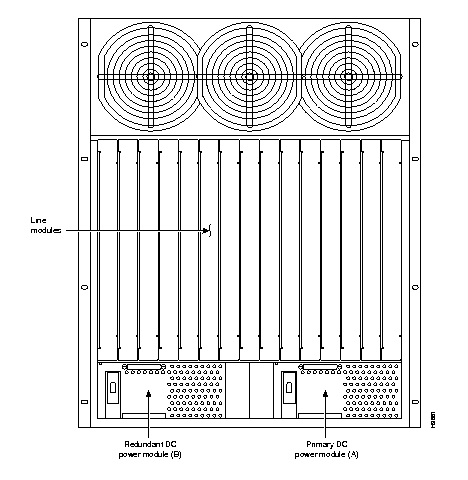
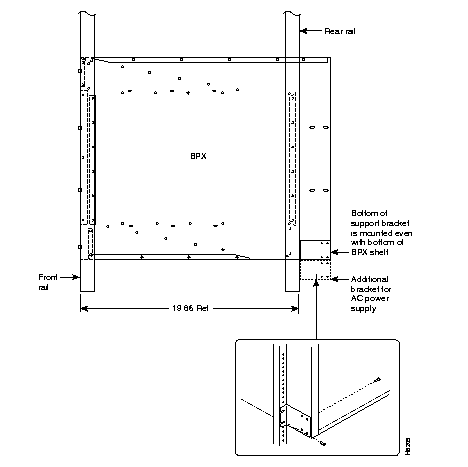
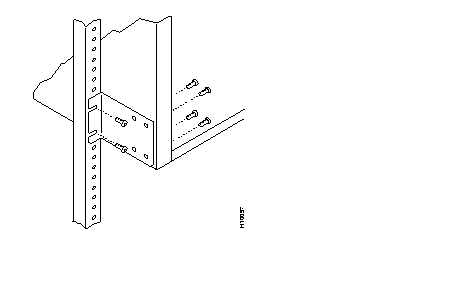
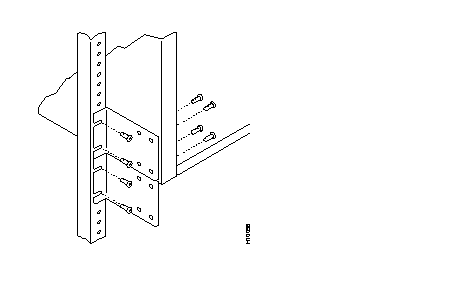
Figure 3-3 shows the location of the rear vertical rails (at a 19.86 inch setback from the front flange of the STRATM cabinet) and the corresponding support bracket location on the BPX shelf. Figure 3-4 shows a detailed view of the rear-rail brackets for a BPX with DC power supplies, and Figure 3-5 shows a detailed view of the rear-rail brackets for a BPX that uses AC power supplies.
Proceed as follows to install either an AC or DC powered BPX shelf
Step 1 Locate the two rear support brackets (P/N 700-216037-00) in the miscellaneous parts kit.
Step 2 Secure one each support bracket to the back of the rear rail located at 19.86 inches from the front flange of the STRATM cabinet using #10-32 machine screws and flat washers.
 | Warning An empty BPX enclosure weighs 75 pounds (34 Kgs.) and requires a 2 or 3-person lift to move into place. |
Step 3 With one person on each side of the BPX shelf, lift the pallet tray and BPX chassis positioning the slots at the rear of the pallet tray over the locating tabs on the spacer bracket (Figure 3-2).
Step 4 Slide the BPX shelf back over the temporary support brackets and into place.
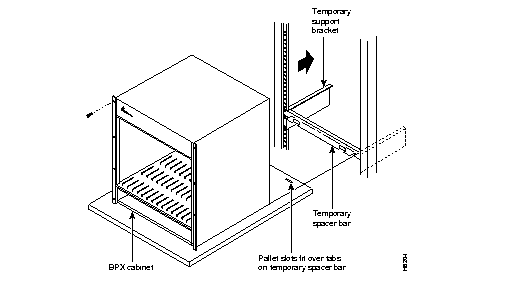
Step 5 Attach the BPX shelf to the cabinet front rail using 8 each # 10-32 screws.
Step 6 Attach the BPX shelf to the previously installed support brackets by inserting 8 each #10-32 machine screws and flat washers from inside the back of the BPX shelf.
Step 7 Remove the temporary support brackets and spacer bracket.
Step 8 If this is a DC powered shelf, proceed to Chapter 5, Installation, DC Shelf Initial Setup.
Step 9 If this is an AC powered shelf, proceed to Chapter 6, Installation, AC Shelf Initial Setup.
|
|