


|
|


This chapter describes the ATM commands that activate and configure ATM connections as well as statistical reporting for these connections at an ATM UNI in a BPX or IGX node. You can add ATM connections to an ASI or BXM in a BPX node or to an ALM/A in an IGX node. Table 9-1 lists the ATM UNI card combinations for BPX and IGX nodes. For details regarding ATM commands and other support on an AXIS shelf, refer to the AXIS documentation.
| Front Card | Back Card |
|---|---|
| ALM/A | BC-UAI-1T3 or BC-UAI-1E3 |
| ASI-T3 | LM-2T3 (Two ports) |
| ASI-E3 | LM-2E3 (Two ports) |
| ASI-155 | MMF-2-BC, SMF-2-BC, or SMF LR-2-BC |
| BXM-T3-8 or BXM-T3-12 | BPX-T3/E3-8/12 (a universal back card for BXM-T3 or E3) |
| BXM-E3-8 or BXM-E3-12 | BPX-T3/E3-8/12 (a universal back card for BXM-T3 or E3) |
| BXM-155-4 | MMF-155-4, SMF-155-4, or SMFLR-155-4 |
| BXM-155-8 | MMF-155-8, SMF-155-8, or SMFLR-155-8 |
| BXM-622 | SMF-622 or SMFLR-622 |
| BXM-622-2 | SMF-622-2 or SMFLR-622-2 |
To set up an ATM connection, perform the following steps:
Step 1 Activate a line with the upln command. Activation makes the line available for you to configure it and causes statistics gathering to begin. Subsequently, you can begin to add connections with addcon. You can verify activation with the dsplns command. (See the chapter titled "Setting Up Lines" for descriptions of upln and dsplns.)
Step 2 Activate the ATM port with the upport X.X command, where X.X is the slot and port (1-4) of the ATM card set.
Step 3 Use the cnfport command to establish the characteristics for the ATM port.
Step 4 If a suitable class is already configured, note its number and use this class when adding the ATM connection with the addcon command. (The dspcls command displays the parameters for each connection class. The cnfcls command allows an individual class to be modified.)
Step 5 Use the vt command to log in to the node at the remote end of the proposed ATM connection.
Step 6 At the remote node, use the upport and cnfport as listed in steps 1 and 2 to activate and configure the remote port.
Step 7 Use the addcon command at one end of the connection to activate the ATM connection.
There are a number of commands that assist in managing bandwidth to achieve satisfactory traffic patterns.
|
The configure preference command can be used to specify preferred routing for intra-domain connections. This command can be used to assist in balancing the load on the network's trunks. |
|
The display and print routes commands can be used in conjunction with the cnfpref command to display the current connection routing information. |
|
The up and down connection commands can be used to temporarily down connections, thus releasing bandwidth for other services. Often it is possible to down some voice connections to provide more bandwidth for data, frame relay, or ATM traffic. |
The following commands may be useful for establishing connections.
|
Deletes a connection from an ATM line. |
|
Displays the connections on a specified ATM line. |
|
Displays the line utilization for an ATM line. |
Table 9-2 shows the name of each ATM connection command and starting page of its description.
| Mnemonic | Description | Page |
|---|---|---|
| addcon | Add connection | 9-6 |
| clrchstats | Clear channel statistics | 9-16 |
| cnfabrparm | Configure ABR parameters (applies to BXM) | 9-18 |
| cnfcls | Configure class | 9-20 |
| cnfport | Configure port | 9-24 |
| cnfportq | Configure port queue | 9-27 |
| delcon | Delete connection | 9-29 |
| delcongrp | Delete connection group | 9-31 |
| dnport | Down port | 9-33 |
| dspchstats | Display channel statistics | 9-35 |
| dspcls | Display class | 9-38 |
| dspcon | Display connection | 9-40 |
| dspconcnf | Display connection configuration | 9-44 |
| dspcongrp | Display connections in a group | 9-46 |
| dspcongrps | Display connection groups | 9-48 |
| dspcons | Display connections | 9-50 |
| dsplmistats | Display LMI statistics | 9-54 |
| dspport | Display port | 9-56 |
| dspportq | Display port queue | 9-59 |
| dspportstats | Display Port Statistics | 9-61 |
| upport | Up port | 9-63 |
Establishes an ATM connection between the current node and one or more nodes in the network. You can add ATM connections at a UNI port on either an ASI or a port-mode BXM in a BPX node or an ALM/A in an IGX node. When used with the syntax in this chapter, addcon adds either a standard ATM connection or an ATM-frame relay interworking connection. For a description of the addcon command as it applies to frame relay connections, voice connections, or serial data connections, refer to the chapter in this manual that describes the applicable traffic type. For descriptions of the ATM commands that operate on an AXIS shelf, see the AXIS documentation.
The node on which addcon executes is the "owner" of the connection. Connection ownership is important because automatic rerouting and preferred routing information for a connection is entered on the node that owns the connection. See the cnfpref and cnfcos descriptions for information on automatic rerouting.
The displayed parameter prompts depend on the connection type. Before the switch actually adds a connection, the proposed connection appears on the screen with a prompt for confirmation. After addcon executes, the system software automatically routes the connection. Figure 9-1, Figure 9-2, and Figure 9-3 are flow diagrams that show the sequence of possible parameter prompts according to the connection type and whether Usage Parameter Control (UPC) is enabled. The flow diagrams begin at the point after you have entered the local VPI and VCI, remote node name, remote VPI and VCI (or DLCI for service interworking), and con_type (VBR, CBR, ABR, ATFR, ATFST, ATFT, ATFTFST, ATFX, or ATFXFST). The subsequent tables define the parameters and list the defaults and ranges for each parameter. Refer to the Cisco StrataCom System Overview and the ATM Forum specifications for more details on ATM parameters and concepts such as the leaky buckets for controlling cell admissions to the network.
A form of notation appears for some parameters that may need explanation. The notation is either (0), (1), or (0+1). This refers to the state of the Cell Loss Priority (CLP) bit. The usage of the CLP bit is in the traffic policing schemes. (0+1) means cells with CLP=0 or 1. (0) means cells with CLP=0. (1) means cells with CLP=1. The CLP bit is used in different contexts. For example, CDVT (0+1) refers to Cell Delay Variation Tolerance (CDVT) for cells with CLP=0 or 1. CDVT (0) means CDVT for cells with CLP=0. PCR(0) means PCR for cells with CLP=0. For a description of CLP and CDVT usage and policing concepts in general, refer to the Cisco StrataCom System Overview and the ATM Forum specifications.
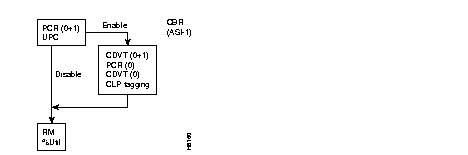
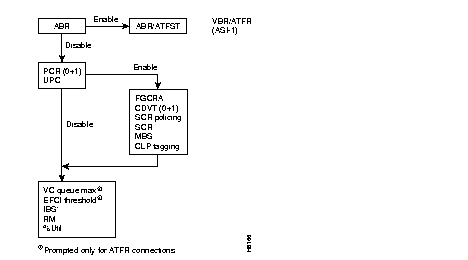
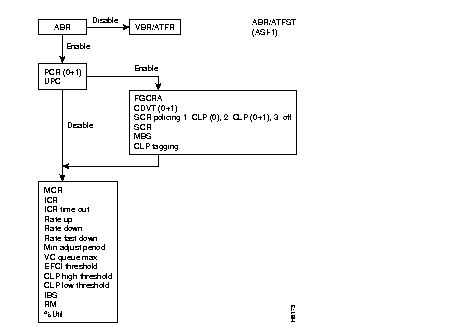
The following table contains descriptions of the ATM parameters that appear on screen. The subsequent table gives the defaults, ranges (or values), and granularity for each parameter. The last section contains screen examples. The preceding flow diagrams help clarify the information in these forthcoming sections.
| Parameter/Prompt | Description |
|---|---|
| local channel | Specifies the local slot, port, virtual path identifier (vpi), and virtual connection identifier (vci) for the connection. The format is slot.port.vpi.vci. The vpi and vci ranges are:
The vpi range for a UNI connection is 0-255. The vpi range for an NNI connection is 0-1023 The standard range for a vci is 1-4095. On an ALM/A, the vci range is 0-255. To indicate the connection is a virtual path, the vci can be an asterisk (*). For a virtual path connection, the vci does not provide a relevant distinction within the network. |
| remote node name | Specifies the name of the node at the other (or remote) end of the connection. |
| remote channel | Specifies the remote node's slot, port, vpi, and vci for this ATM connection. The format is slot.port.vpi.vci. The vpi and vci ranges are as follows:
The vpi range for a UNI connection is 0-255. The vpi range for an NNI connection is 0-1023 The range for a vci is 1-4095. The vci can be an asterisk (*) to indicate the connection is a virtual path (the vci does not provide a distinction within the network). |
| connection type | Specifies one of the following connection types: VBR--Variable Bit Rate, applies to ATM-only connections added at the ASI. CBR--Constant Bit Rate, applies to ATM-only connections added at the ASI. ABR--Available Bit Rate, applies to ATM-only connections added at the ASI. ATFR--Network interworking for a connection added to a BNI attached to an AXIS shelf. The near-end frame relay card is the FRSM in the AXIS. The far-end is a UFM/FRM/FRP. The ATFR connection type directs the AIT, BTM, or ALM/B in the IPX or IGX node to perform network interworking on the connection. ATFST--Network interworking for a connection added to a BNI attached to an AXIS. The near-end frame relay card is the FRSM in the AXIS. The far-end is a UFM/FRM/FRP. The ATFST connection type specifies ForeSight and directs the AIT, BTM, or ALM/B in the IPX or IGX node to perform network interworking on the connection. ATFT--Service interworking in transparent mode: this connection type applies to connections with a frame relay endpoint and an ATM endpoint. You can add the connection at an ASI for standard ATM connections at the UNI or a BNI that connects to an ATM card in an AXIS shelf. The endpoint cards must be capable of supporting service interworking. On the IGX node, the only card capable of supporting SIW is the UFM. The parameters that follow the con_type entry depend on the chosen connection type. Refer to the flow diagrams in Figure 9-1, Figure 9-2, or Figure 9-3. The option for choosing a class number is also available. The class is a template for a connection type. This serves as an alternative to specifying each parameter for a connection type. To specify a connection class, enter a digit in the range 1-10. To see the parameter values for a class, use the dspcls commands. To customize any class template, use cnfcls. |
| ABR | T3/E3: Enables/disables ForeSight. Refer to the flow diagrams on the preceding pages for help with the following explanation:
If the connection type selected at the "connection class" prompt was VBR and ABR is enabled at this prompt, the connection type changes to ABR, and prompts for ABR parameters subsequently appear. On the other hand, if the selected connection type is ABR and ABR is disabled at this ABR prompt, the connection type changes to VBR, so only VBR parameters are requested. |
| PCR(0+1) | T3/E3: Specifies the transmit/receive Peak Cell Rate (PCR) for cells leaving the first leaky bucket on the ASI card with CLP(0+1). Applies to only CBR connections.
OC3 (STM1): Specifies the transmit/receive Peak Cell Rate (PCR). The range is 10 cells per second up to the maximum line rate. (See table of defaults and ranges.) |
| AAL5 FBTC | T3/E3: Enables AAL5 Frame-Based Traffic Control (FBTC) algorithm. The default is the standard Generic Cell Rate Algorithm (GCRA).
AAL5 FBTC controls automatic cell discarding (or tagging) of the remainder of a frame when one cell from the frame is non-compliant. AAL5 FBTC is a Cisco enhancement of the ATM-UNI Generic Cell Rate Algorithm (GCRA) for associating a cell with the frame from which it originated. Cisco supports configuration on a per-connection basis. Enabling AAL5 FBTC at one end of a connection automatically enables it at the other end of the connection. |
| CDVT(0+1) | T3/E3 or OC3 (STM1): Specifies the transmit/receive Cell Delay Variation Tolerance (CDVT) for the first leaky bucket, which applies to cells with CLP(0+1). CDVT is the maximum time for accumulated violations of cell-arrival time parameters. |
| PCR(0) | T3/E3: Specifies the transmit/receive Peak Cell Rate (PCR) for cells leaving the second leaky bucket [CLP(0)] on the ASI card.
OC3 (STM1): PCR(0) not used by ASI-2 OC3 (STM1). |
| CDVT(0) | T3/E3: Specifies the transmit/receive Cell Delay Variation Tolerance (CDVT) for the second leaky bucket. The second bucket applies to cells with CLP(0). CDVT is the maximum time for accumulated violations of cell-arrival time parameters.
OC3 (STM1): CDVT(0) not used by ASI-2 OC3 (STM1) card. |
| SCR policing | T3/E3: Specifies the traffic policing for a VBR or ABR connection. The possible policing configurations are SCR policing of CLP (0+1) (which is selected as SCR#2), SCR policing of CLP(0) (which is selected as SCR#1), or SCR policing off (SCR#3). The SCR Policing parameter is not used by ASI-2 OC3 (STM1) card. |
| SCR | T3/E3: Sustainable Cell Rate (SCR) specifies a compliant cell rate threshold for transmit/receive. SCR is available with ABR and VBR connections and is less than or equal to the Peak Cell Rate (PCR). The ASI-2 OC3 (STM1) card does not use SCR policing. |
| MBS | T3/E3 or OC3 (STM1): The transmit/receive Maximum Burst Size for SCR policing. |
| CLP setting | T3/E3 and OC3 (STM1): Enables/disables Cell Loss Priority (CLP) tagging. If CLP tagging is enabled, the CLP bit is set as a result of a UPC violation. |
| MCR | T3/E3: Specifies the transmit/receive Minimum Cell Rate (MCR) for ABR connections. |
| ICR | T3/E3: Specifies the transmit/receive Initial Cell Rate. ICR is the rate that occurs after a period of inactivity on an ABR connection. (This period is the value of ICR TO). The cell rate then goes up or down under the control of the ForeSight Rate Control Algorithm. The range is 0 cps through the line's maximum. The ICR default is a range under the control of the ForeSight Rate Control Algorithm. See also the descriptions of Rate Up and Rate Dn. |
| ICR TO | T3/E3: ICR timeout. Specifies a period of inactivity before a connection's cell rate is reset to the specified ICR. |
| Rate Up | T3/E3: Specifies the increment in cell rate when the rate goes up. This ForeSight Rate Up increment is in cells per second per adjustment. |
| Rate Dn | T3/E3: Specifies large reductions in the transmit/receive cell rate. This ForeSight Rate Down value is a percentage of the current rate. |
| Rate FastDn | T3/E3: Specifies a rate of decrease in the transmit/receive cell rate when ForeSight quickly adjusts the rate down. This value is a percentage of the SCR. |
| Minimum Adjust | T3/E3: Minimum Adjust Period specifies the interval before the ingress sends rate adjustments for ABR connections. This is the time period before either a rate adjustment is made or a message is sent that an adjustment is not necessary. It serves as a stand-in round trip delay until a true RTD is measured. Older software refers to this as Maximum Adjust Rate. |
| VC Qdepth | T3/E3: Specifies the maximum ABR VC queue depth for transmit/receive. |
| EFCI | T3/E3: The transmit/receive percent of ABR VC queue depth that causes EFCI to be set. |
| CLP Hi | T3/E3: Specifies a percent of the transmit/receive ABR VC queue depth. When a transmit/receive threshold is exceeded, the node discards cells with CLP=1 in the connection until the VC queue level falls below the depth specified by CLP Lo. |
| CLP Lo/EPD | T3/E3: Specifies a percent of the transmit/receive ABR VC queue depth (percent of VC QMax) such that, when the VC queue level falls below this level, the node stops discarding CLP=1 cells.
If the card is a BXM and AAL5 FBTC=yes, the percent of VC QMax equals the value of Early Packet Discard (EPD). Frame-based Traffic Control (FBTC) is FGCRA for AAL5. If the card is an ASI, the percent of VC QMax is CLP Lo regardless of the FBTC setting. |
| % Util | T3/E3: Specifies the percent of bandwidth utilization for a connection. The allocation of trunk bandwidth that is based on %util depends on the connection type, as follows:
For CBR, the default is 100%, and the bandwidth allocation is PCR(0+1) * %util. For VBR, the default in the command prompt is the minimum of either 100% or 120(SCR/PCR). The bandwidth allocation is PCR(0+1) * %util. For ABR, the default is 100%. The bandwidth allocation is MCR * %util. |
| Parameter | Range or Value | Default | Dependency | Granularity |
|---|---|---|---|---|
| ABR | enable/disable | VBR: disable
ATFR: disable ABR: enable ATFST: enable | n/a | |
| PCR(0+1) | PCR in cells/sec
7-96000:T3 7-80000: E3 7-353200: OC3 (STM1) | 10 | Range is limited to 7-5333 cps for ATFR connections. | 10 cps |
| UPC | enable/disable | enable | n/a | |
| AAL5 FBTC | enable/disable | disable | n/a | |
| CDVT(0+1) | CDVT, in microsecs.
0-250000: T3/E3 and OC3/STM1 | CBR: 10000
All others: 250000 | 1 microsec. | |
| PCR(0) | PCR in cells/sec
7-96000:T3 7-80000: E3 | PCR(0+1) | PCR(0) <= PCR(0+1).
| 10 cps |
| CDVT(0) | CDVT uSec
0-250000: T3/E3 | CDVT(0+1) | 1 microsec. | |
| SCR policing | 1-3
1 = CLP(0) 2 = CLP(0+1) 3 = Off | 1 | n/a | |
| SCR | SCR in cells/sec
7-96000:T3 7-80000: E3 7-353200: OC3/STM1 | Value of PCR(0+1) | SCR <= PCR(0+1).
Range is limited to 7-5333 cps for ATFR connections. Upper limit = max line rate. | 10 cps |
| MBS | ASI T3/E3: 10-24000 cells
ASI-155: 10-1000 cells BXM:1-5,000,000 cells | 1000/1000 | 1 cell | |
| CLP tagging | enable/disable | enable | For SCR Policing CLP(0+1), tagging always disabled | n/a |
| MCR | MCR in cells/sec
0-96000:T3 0-80000: E3 | ABR: 0
ATFST: 10 | MCR <= PCR(0+1). Range is limited to 7-5333 cps for ATFST cons. | 10 cps |
| ICR | ICR in cells/sec
0-96000:T3 0-80000: E3 | Maximum of:
MCR or PCR(0+1)/10 | ICR >= MCR and
ICR <= PCR(0+1). Range is limited to 7-5333 cps for ATFST connections. | 10 cps |
| ICR time out | 1-255 Seconds | 10 | 1 second | |
| Rate up increment | In Cells/Sec/Adjust
10-96000 | Maximum of:
10% of MCR or 2000 | 10 cells | |
| Rate down | 1-100% | 87% | 1% | |
| Rate fast down | 1-100% | 50% | 1% | |
| Min. adjust period | 20-250 msec | 40 | 10 msec | |
| VC Qdepth | BXM: 0-61440
For ASI-T3/E3: For ASI-155: 1-1366 | ABR: 16000
ATFR/ATFST: 1366 | Does not apply to OC3/STM1 | 1 cell |
| EFCI threshold | 1-100% of VC queue depth | ATFR/ATFST: 100% All others: 30% | 1% | |
| CLP high threshold | 1-100% of VCqueue depth | 80% | 1% | |
| CLP low threshold | 1-100% of VCqueue depth | 35% | 1% | |
| IBS | ABR: 0-24000 cells ATFR: 1-107 cells | 0 | 1 cell | |
| % utilization
Note: For ABR and VBR-type connections, (including service interworking connections, %util is the percent of utilization of the PCR. | 1-100% | CBR:100%
ABR:100% VBR: minimum of | 1% |
Add a connection
addcon parameters (See flow diagrams in Figure 9-1, Figure 9-2, and Figure 9-3 and the descriptions Table 9-3 and Table 9-4.)
delcon, dspcons
| Privilege | 1-2 |
| Jobs | Yes |
| Log | Yes |
| Node | IPX, IGX, BPX |
| Lock | Yes |
addcon 4.1.2.1 sw53 4.1.2.2
Add a connection between 4.1.2.1 on node swstorm and 4.1.4.2 on node sw53.
swstorm        TN    StrataCom       BPX 15    8.5    July 26 1997 20:05 GMT
 Local           Remote      Remote                             Route
 Channel         NodeName    Channel         State  Type        Avoid COS O
 4.1.2.1         sw53        4.1.4.2         Ok     atfr               0  L
This Command: addcon 4.1.2.1 sw53 4.1.4.2 atfr * * * * * * * * * * * * * *
Add these connections (y/n)?
addcon 3.2.9.251 nmsbpx04 5.2.7.251 (with defaults illustrated)
In this case, the screen shows the value for each parameter entered on the command line.
nmsbpx03       TN    StrataCom       BPX 15    8.5    Aug. 3 1997  18:02 PDT
 Local           Remote      Remote                             Route
 Channel         NodeName    Channel         State  Type        Avoid COS O
 3.2.9.251       nmsbpx04    5.2.7.251       Ok     abr                0  L
This Command: addcon 3.2.9.251 nmsbpx04 5.2.7.251 abr e 10 10 1000 e 10 10 10 10
 110 87 50 100 64000 100 100 d e 100 90 e
Add these connections (y/n)?
Clears the gathered statistics for either a specific channel or all channels. When you enter a specific channel number, a display of the current channel statistics appears. The display asks if you confirm the choice for clearing. If you enter "*" (all channels) for the channel specification, the display prompts you to confirm the decision to clear all channel statistics.
Clear channel statistics
clrchstats
dspchstats
| Privilege | 1-2 |
| Jobs | Yes |
| Log | Yes |
| Node | IPX, IGX, BPX |
| Lock | Yes |
clrchstats 3.1.1
Clear channel statistics for 3.1.1.
sw83           TN    StrataCom       IPX 16    8.5       Aug. 23 1997 19:24 PST
Channel Statistics: 3.1.1         Cleared: Aug. 17 1997 08:10
MIR: 3.8 kbps           Collection Time: 6 day(s) 10:04:58      Corrupted: NO
                     Frames   Avg Size Avg    Util          Packets     Avg
                              (bytes)  (fps)  (%)                      (pps)
From Port:          1516586        198      2   35
To Network:         1516215        198      2   35         16678365        30
Discarded:              371        198      0    0
From Network:       1518665        197      2   35         16705146        30
To Port:            1518629        198      2   35
Discarded:               36        120      0    0              238         0
                   ECN Stats:  Avg Rx VC Q:             0    ForeSight RTD    40
Min-Pk bytes rcvd:      52470  FECN Frames:             0    FECN Ratio (%)    0
Minutes Congested:          0  BECN Frames:            16    BECN Ratio (%)    0
Frames rcvd in excess of CIR:       0  Bytes rcvd in excess of CIR:         0
Frames xmtd in excess of CIR:       0  Bytes xmtd in excess of CIR:         0
This Command: clrchstats 3.1.1
OK to clear (y/n)?
| Parameter | Description |
|---|---|
| channel | Specifies the channel whose statistics are cleared. |
| * | Specifies all channel statistics. |
Configures ABR parameters for a BXM.
Configure ABR parameters
cnfcls
addcon
| Privilege | 1-5 |
| Jobs | Yes |
| Log | Yes |
| Node | BPX |
| Lock | Yes |
cnfabrparm 2
Configure ABR parameters for the BXM in slot 2.
sw60           TN    StrataCom       BPX 15    8.5 Date/Time Not Set

ABR Configuration for BXM in slot 2

CI Control         : Y
Egress ER Stamping : N


Last Command: cnfabrparm 2 Y N


Next Command:
| Parameter | Description |
|---|---|
| slot | Specifies the card. |
| CI Control | |
| Egress ER stamping |
The cnfcls command allows the ten StrataCom-supplied class templates for connection configuration to be modified. (The addcon command can take a class as an input).
When you enter the number of the class to configure, the display shows the current value of each parameter in the class. For each item in the class, a prompt appears for changing or keeping the current value.
Configure class
cnfcls
addcon, dspcls
| Privilege | 1-2 |
| Jobs | Yes |
| Log | Yes |
| Node | IPX, IGX, BPX |
| Lock | Yes |
cnfcls 10
Configure connection class 10. The command line interface (CLI) displays the current settings and requests the class type (see System Response 1). After you enter a class type, the CLI prompts you to specify each parameter for the selected class type (ABRSTD as System Response 2 shows).
sw60           TN    StrataCom       BPX 15    8.5 Date/Time Not Set

                        ATM Connection Classes
Class: 10                                                         Type: CBR
   PCR(0+1)     % Util       CDVT(0+1)         Policing
 4000/4000     100/100      10000/10000            4

       Description: "Default CBR 4000"


This Command: cnfcls 10


Enter class type (VBR, CBR, UBR, ABRSTD, ABRFST, ATFR):
sw60           TN    StrataCom       BPX 15    8.5 Date/Time Not Set

                        ATM Connection Classes
Class: 10                                                         Type: ABRSTD
   PCR(0+1)     % Util      MCR            CDVT(0+1)         AAL5 FBTC
 4000/4000     100/100  4000/4000         10000/10000            n

       Description: "Default CBR 4000"


This Command: cnfcls 10 abrstd * * * * *


Do you want this change (y/n)?
| Parameter | Description |
|---|---|
| class | Specifies the class to configure. The class numbers are 1-10. |
| Parameter | Description |
|---|---|
| optional parameters | Parameters are specific to the type of connection (VBR, CBR, UBR, ABRSTD, ABRFST, ATFR). Use dspcls to see the parameters in the classes. |
Configures the ATM bandwidth parameters for a specified connection. The initial cell rate (ICR) normally is set to the port speed. It may be lower if other constraints exist on the data generation rate. If ICR is too low, cells are dropped. If it is too high, bandwidth may be wasted unless ForeSight is used. Statistical reports are the best source of information for deciding what to adjust.
If the connection type includes ForeSight (abr enabled), the results of the last test round trip delay command (tstdelay) appear. Note that this is not the current RTD but the result of the last test that ran. Connection priority -- high or low -- is displayed for standard frame relay connections and ForeSight connections. Several checks are done on the parameters that specify bandwidth to assist users in efficient use of network bandwidth. The following messages describe the performance evaluation.
| · Error | Min cannot exceed peak. |
| · Warning | Min exceeds this port's speed. |
| · Warning | Sum of mins exceeds port's speed. |
| · Warning | Peak exceeds this port's speed. |
Warning messages are informational only, so the related operation continues. If an error message appears, the operation does not continue.
Configure connection
cnfcon
addcon, dspcon
| Privilege | 1-2 |
| Jobs | Yes |
| Log | Yes |
| Node | IPX, IGX, BPX |
| Lock | Yes |
cnfcon 12.1.1.6
Configure ASI port 12.1.1.6. Parameter prompts appear.
a20           LAN   StrataCom       BPX 15    8.5     Aug. 29 1997 11:43 PST
Conn:  12.1.1.6         ca19        4.1.1.6           ABR
Description:
    SCR           IBS         MBS     ABR     MCR         PCR           ICR
  100/100        10/10       10/10     y     10/10    96000/96000      10/10
ICR TO  Rate Up Rate Dn Rate FastDn Max Adjust    VC Qdepth     EFCI     % Util
  10      100     100       100        100      64000/64000   100/100   100/100
CLP   CLP Hi    CLP Lo
 y   100/100    90/90
This Command: cnfcon 12.1.1.6
MBS (10) must exceed IBS (10)
Enter the MBS [10/10]:
| Parameter | Description |
|---|---|
| channel | Specifies the connection to configure. This command configures one connection at a time. The channel specification has the following format:
slot.port.vpi.vci |
| Parameter | Description |
|---|---|
| bandwidth parameters | Refer to the addcon command in this chapter for descriptions and connection types. |
Configures the parameters of an ATM port on an ASI card. Press Return to keep the current value of a parameter. See the parameter table for important information.
Configure port
cnfport
upport, dnport, dspport, dspports
| Privilege | 1-2 |
| Jobs | Yes |
| Log | Yes |
| Node | BPX |
| Lock | Yes |
cnfport 12.1 N N N H N N
Configure port 12.1 to have an UNI cell header format; not to be an AXIS shelf; not to have a Metro Cell Header format; shift on HCF; use no protocol; and not to apply %util.
batman         TN    StrataCom       BPX 15    8.5      Date/Time Not Set
Port:       12.1
Interface:          T3-2
Type:               UNI                        %Util Use:        Disabled
Speed:              96000
Shift:              SHIFT ON HCF (Normal Operation)
VBR Queue Depth:    1000
Protocol:           NONE
Last Command: cnfport 12.1 N N N H N N
Next Command:
| Parameter | Description |
|---|---|
| slot.port | Specifies the ASI card slot and port number. |
| nni/uni | Specifies whether the cell header format is NNI or UNI. |
| axis | Specifies AXIS queue depth for each slot. |
| metro data cell header | Specifies whether the metro data cell header type is used. |
| shift h | n | Specifies whether a one-byte shift on the HCF field of the cell header occurs. The choice of H (shift) or N (no shift) depends on whether the ATM cloud includes non-StrataCom nodes and whether virtual trunking is in operation:
Select H (the default) if the cloud includes non-StrataCom nodes or if only a physical trunk is configured for the ASI port. Select N if virtual trunks are configured and the ATM cloud consists of StrataCom nodes only. |
| protocol | Specifies the use of either an LMI protocol, an protocol, or no specified protocol. |
| %util | Enables/disables percent utilization. This parameter supports ATM VBR/ABR fairness for ASI terminated connections and applies to only VBR and ABR connections. To change the %util status of a port, no connections can be currently terminating on the port. Therefore, if connections terminate on the port, they must be deleted before cnfport execution then re-added after execution of cnfport.
When this feature is disabled, the port queue bandwidth is calculated using the sum of the MCRs or PCRs for the connections terminating on the port. This is identical to the port queue bandwidth calculation prior to the implementation of the %util feature. The port queue bandwidth with %util feature disabled is:
When the %util feature is enabled, the port queue bandwidth is calculated for ABR and VBR connections as follows: for ABR connections, the port queue bandwidth is the sum of a percentage of the MCRs for the connections terminating on the port; for VBR connections, the port queue bandwidth is the sum of a percentage of the PCRs for connections terminating on the port. The feature is not applied to CBR connections. In summary, the port queue bandwidth with feature %util enabled is:
For CBR connections Port Queue BW = sum (PCR) |
Configures queue parameters for a port on an ASI card. Pressing the Return key keeps the current value for the parameter.
Configure port
cnfport
upport, dnport, dspportq
| Privilege | 2 |
| Jobs | Yes |
| Log | Yes |
| Node | BPX |
| Lock | Yes |
cnfportq 4.2 200 80 60 80 1000 80 60 80 9800 80 60 80
Configure port 4.2 to the parameters indicated. Note that the sequence of three Ns is in response to questions about the interface, a cell header, and the presence of an AXIS.
ca19           VT    StrataCom       BPX 15    8.5    Aug. 23 1997 19:11 GMT
Port:       4.2     [INACTIVE]
Interface:          T3-2
Type:               UNI
Speed:              96000 (cps)
CBR Queue Depth:              200
CBR Queue CLP High Threshold: 80%
CBR Queue CLP Low Threshold:  60%
CBR Queue EFCI Threshold:     80%
VBR Queue Depth:              1000    ABR Queue Depth:               9800
VBR Queue CLP High Threshold: 80%     ABR Queue CLP High Threshold:  80%
VBR Queue CLP Low Threshold:  60%     ABR Queue CLP Low Threshold:   60%
VBR Queue EFCI Threshold:     80%     ABR Queue EFCI Threshold:      80%
Last Command: cnfport 4.2 N N N 200 80 60 80 1000 80 60 80 9800 80 60 80
Next Command:
| Parameter | Description |
|---|---|
| slot.port | Specifies the ASI card slot and port number. |
| nni/uni | Specifies whether the cell header format is NNI or UNI. |
| cbr queue parms | Specifies the CBR queue parameters of depth, cbr-hi, cbr-lo, and efci. The ranges are 0 to 24000 for depth and 0 to 100% for all others. |
| vbr queue parms | Specifies the VBR queue parameters of depth, vbr-hi, vbr-low, and efci. The ranges are 0 to 24000 for depth and 0 to 100% for all others. |
| abr queue parms | Specifies the ABR queue parameters of depth, abr-hi, abr-low, and efci. The ranges are 0 to 24000 for depth and 0 to 100% for all others. |
Removes connections from the network. The same command with differing syntax may be used to delete voice connections, data connections, frame relay connections, or ATM connections. The syntax in this section deletes an ATM connection. You can verify connection deletions by using the dspcons command.
Delete connections
delcon
addcon, dspcon, dspcons
| Privilege | 1-2 |
| Jobs | Yes |
| Log | Yes |
| Node | IPX, IGX, BPX |
| Lock | Yes |
delcon 4.1.1.4
Delete connection 4.1.1.4. The connections to delete are highlighted, and a prompt appears asking you to confirm the deletion. Respond with "y", for yes, and Connection 4.1.1.4 is deleted.
ca19           VT    StrataCom       BPX 15    8.5    Aug. 23 1997 20:36 GMT
 Local           Remote      Remote                             Route
 Channel         NodeName    Channel         State  Type        Avoid COS O
 4.1.1.4         ca20        12.1.1.4        Ok     CBR                0  R
 4.1.1.5         ca20        12.1.1.5        Ok     VBR                0  R
 4.1.1.6         ca20        12.1.1.6        Ok     ABR                0  R
 4.1.1.7         ca20        12.1.1.7        Ok     VBR                0  R
 4.2.1.1         ca20        12.2.1.1        Ok     CBR                0  L
 4.2.1.2         ca20        12.2.1.2        Ok     VBR                0  L
 4.2.1.3         ca20        12.2.1.3        Ok     ABR                0  L
Last Command: delcon 4.1.1.4
Delete connections? (y)
Next Command:
| Parameter | Description |
|---|---|
| channel | Specifies the channel or set of channels for deleting connections. slot.port.vpi.vci |
Deletes a group. The group must be empty (all connections must first have been removed with the delcon command). The group can be deleted from either the local or remote end of the group.
Delete connection group
delcongrp
dspcongrp, dspcongrps
| Privilege | 1-2 |
| Jobs | Yes |
| Log | Yes |
| Node | IPX, IGX, BPX |
| Lock | Yes |
delcongrp bpx4.1
Delete connection group bpx4.1.
bpx1           TN    StrataCom       BPX 15    8.5       Aug. 14 1997 20:12 PST
                               Route
Group            Count  State  Avoid  COS  FST  Owner
bpx4.1           0                              Local
This Command: delcongrp bpx4.1
Delete this group (y/n)?
| Parameter | Description |
|---|---|
| connection group | The connection group has the following format:
remote node name.group number |
Deactivates (or "downs") the specified ATM port. Before downing a port, you must remove all connections from the port.
Down port
dnport
cnfport, dspport, upport
| Privilege | 1-2 |
| Jobs | Yes |
| Log | Yes |
| Node | BPX |
| Lock | Yes |
dnport 4.2
Down port 4.2.
ca19           VT    StrataCom       BPX 15    8.5    Aug. 23 1997 19:49 GMT
ASI Port States
Port  State
4.1   ACTIVE
4.2   INACTIVE
Last Command: dspports
Next Command: dnport 4.2
| Parameter | Description |
|---|---|
| port | Specifies the slot number and port number in the format slot.port. |
Displays statistics for a channel. The system periodically updates the display until you press the Delete key. An optional parameter for dspchstats is an interval between screen updates.
Display channel statistics
dspchstats
clrchstats
| Privilege | 5 |
| Jobs | No |
| Log | No |
| Node | IPX, IGX, BPX |
| Lock | No |
dspchstats 4.1.50.1
Display the channel statistics for connection 4.1.50.1.
night          TN    StrataCom       BPX 15    8.58.5       July 17 1997 02:46 GMT
Channel Statistics for 4.1.50.1    Cleared: July 13 1997 02:53  (|)
MCR: 0 cps              Collection Time: 0 day(s) 18:10:22      Corrupted: NO
   Traffic      Cells      CLP      Avg CPS   %util  Discards:        Cells
From Port   :     14710          0        0       0  VcQ > CLP:             0
To Network  :     14710    ---            0       0  VcQ Full :             0
From Network:     14710    ---            0       0  Qbin Full:             0
To Port     :     14710      14710        0       0  Qbin> CLP:             0
                                                     Failed   :         14710
                            OAM           Cells      RsrcOVL  :             0
VC Q        :         0   Tx OAM :           29608   NonCompliant:          0
Rx EFCI     :         0   Rx AIS :           14710
Tx EFCI     :         0   Rx FERF:               0   ForeSight       Cells
                          Rx BCM :               0    Adj Up :              0
                          Tx BCM :               0    Adj Dn :              0
AAL-5 Frames:         0                               Adj Fdn:              0
This Command: dspchstats 4.1.50.1
Hit DEL key to quit:
dspchstats 131.100 10
Display statistics for connection 13.1.100 with a 10-second interval between screen updates. The card in slot 13 is an ALM/A.
sw142          TN    StrataCom       IGX 16    8.5 July 31 1997 14:38 PDT

Channel Statistics: 13.1.100      Cleared: July 31 1997 11:50   (/)
MCR:   150 cps          Collection Time: 0 day(s) 00:00:00      Corrupted: NO

                  Cells         Avg       Util
                              (cps)        (%)

From Port:            0           0          0
To Network:           0           0          0
Discarded:            0           0          0
From Network:         0           0          0
To Port:              0           0          0
Discarded:            0           0          0


This Command: dspchstats 13.1.100


Hit DEL key to quit:
| Parameter | Description |
|---|---|
| channel | Specifies the channel for statistics display. |
| Parameter | Description |
|---|---|
| interval | Specifies the interval between updates of the statistics display. The intervals are in seconds. If you specify an interval, you either can press Delete to terminate the command or wait until the command times out. |
Displays the current parameters for a connection class template. The number of classes is ten. The parameters and the values for each varies with the type of connection (CBR, VBR, ABR, and ATFR).
Display connection class
dspcls
addcon, cnfcls, dspcon, dspcons
| Privilege | 1-2 |
| Jobs | No |
| Log | No |
| Node | IPX, IGX, BPX |
| Lock | No |
dspcls 1
Display the parameters for configuration class 1.
night          TN    StrataCom       BPX 15    8.5    July 28 1997 13:22 GMT
                        ATM Connection Classes
Class:  1
Type:  VBR
UPC       SCR           IBS           MBS      ABR      PCR          ABR PCR
 y     500/500        10/10       1000/1000     -    500/500           -/-
     ICR        ICR TO Rate Up Rate Dn Rate FastDn Max Adjust    CDVT[in cells]
     -/-          -       -       -         -          -         64000/64000
  EFCI    % Util FGCRA      MFS      CLP  CLP Hi  CLP Lo   BCM
100/100  100/100  n/n       -/-       y  100/100 100/100   n/n
       Description: "Default VBR 500"
Last Command: dspcls 1
Next Command:
| Parameter | Description |
|---|---|
| class number | Specifies the class whose current parameters you want to see. Values are 1-10. |
Displays connection information for a specified channel. The information displayed includes:
Any failures that affect the connection flash on the screen. For frame relay NNI ports, the NNI value indicates the A-bit value received across the NNI from the remote network. The status that may be displayed includes:
| OK | Connection OK |
| FAILED | Connection failed |
| MISSING | VPI.VCI was deleted in other network at NNI. A previous status report indicated a valid VPI.VCI present but an updated report did not. |
| UNUSED | indicates the UNI port does not support reporting of NNI A-bit status |
Display connections
dspcon
addcon, cnfcon, dspcon
| Privilege | 1-6 |
| Jobs | No |
| Log | No |
| Node | IPX, IGX, BPX |
| Lock | No |
dspcon 12.1.1.5
Display connection information for channel 12.1.1.5 (a VBR connection).
ca20           LAN   StrataCom       BPX 15    8.5     Aug. 29 1997 10:44 PST
Conn:  12.1.1.5         ca19        4.1.1.5           VBR   Status: Down
    SCR           MBS           PCR         ABR PCR     UPC FST CLP  % util
 1000/1000       10/10        500/500        --/--       y   n   y  100/100
Owner: LOCAL  Restriction: NONE  COS: 0
Group: NONE  TestRTD: 16705 msec
Path:   Downed by user
Pref:   Not Configured
ca20          ASI-T3    : OK           ca19      ASI-T3    : OK
              Line 12.1 : OK                     Line  4.1 : OK
Last Command: dspcon 12.1.1.5
Next Command:
dspcon 12.1.1.4
Display connection information for channel 12.1.1.4 (CBR).
ca20           LAN   StrataCom       BPX 15    8.5     Aug. 29 1997 10:42 PST
Conn:  12.1.1.4         ca19        4.1.1.4           CBR   Status: Down
    PCR           CDVT          MCR         ABR PCR     UPC FST CLP  % util
  100/100        10/10         --/--         --/--       y   n   y  100/100
Owner: LOCAL  Restriction: NONE  COS: 0
Group: NONE  TestRTD: 0 msec
Path:   Downed by user
Pref:   Not Configured
ca20          ASI-T3    : OK           ca19      ASI-T3    : OK
              Line 12.1 : OK                     Line  4.1 : OK
Last Command: dspcon 12.1.1.4
Next Command:
dspcon 1.1.1.1
Display connection information for channel 1.1.1.1 (a VBR connection).
sw53           TN    StrataCom       BPX 15    8.5 Nov. 4 1997  22:06 PST

Conn:  1.1.1.1          sw53        1.2.1.1           vbr       Status:OK
    PCR(0+1)    % Util    CDVT(0+1)    FBTC       SCR           MBS     PLC
     50/50     100/100  250000/250000   n        50/50       1000/1000    3


Path:   Route information not applicable for local connections


sw53          ASI-T3    : OK           sw53      ASI-T3    : OK
              Line  1.1 : OK                     Line  1.2 : OK
              OAM Cell RX: Clear                 NNI       : OK
              NNI       : OK

Last Command: dspcon 1.1.1.1


Next Command:
dspcon 3.1.1.1
Display connection information for channel 3.1.1.1 (an ABRSTD connection).
sw60           TN    StrataCom       BPX 15    8.5 Date/Time Not Set

Conn:  3.1.1.1          sw60        3.1.1.1           abrstd    Status:OK
   PCR(0+1)     % util     MCR          CDVT(0+1)   FBTC  FST  VSVD  FCES
  96000/96000  100/100  96000/96000    10000/10000   n     n    n    y


Path:   Route information not applicable for local connections


sw60          BXM       : OK
              Line  3.1 : OK
              OAM Cell RX: Clear
              NNI       : OK

Last Command: dspcon 3.1.1.1


Next Command:
| Parameter | Description |
|---|---|
| channel | Specifies the channel for which to display connection details. The command displays connection information for one channel at a time. You cannot specify a set of channels. Channel is specified in the following format:
slot.port.vpi.vci |
Displays the following information for a connection's configuration:
Display connection configuration
dspconcnf
addcon, dspcon, dspcons, delcon
| Privilege | 1-6 |
| Jobs | No |
| Log | No |
| Node | BPX |
| Lock | No |
dspconcnf 3.1.1.1
Display the configuration for 3.1.1.1.
sw60           TN    StrataCom       BPX 15    8.5 Date/Time Not Set

Conn:  3.1.1.1          sw60        3.1.1.1           abrstd
Description:

   PCR(0+1)     % Util      MCR            CDVT(0+1)         AAL5 FBTC
96000/96000    100/100 96000/96000        10000/10000            n


Last Command: dspconcnf 3.1.1.1


Next Command:
| Parameter | Description |
|---|---|
| channel | Specifies the channel for which to display connection configuration. The command displays connection information for one channel at a time. You cannot specify a set of channels. Channel is specified in the following format:
slot.port.vpi.vci |
Displays the connections in a particular group. The information consists of:
Failures that affect a connection appear flashing on screen. For frame relay NNI ports, the NNI value indicates the A-bit value received across the NNI from the remote network.
Display connection group
dspcongrp
addcon, cnfcon, dspcon
| Privilege | 1-6 |
| Jobs | No |
| Log | No |
| Node | IPX, IGX, BPX |
| Lock | No |
dspcongrp sw86.14
Display the connections in the group named sw86.14.
sw81           TN    StrataCom       BPX 15    8.5    Aug. 29 1997 17:43 PST
 Local           Remote      Remote                             Route
 Channel         NodeName    Channel         State  Type        Avoid COS O
 13.1.1.209      sw86        12.1.1.209      Ok     abr-Grp            0  R
 13.1.1.210      sw86        12.1.1.210      Ok     abr-Grp            0  R
 13.1.1.211      sw86        12.1.1.211      Ok     abr-Grp            0  R
 13.1.1.212      sw86        12.1.1.212      Ok     abr-Grp            0  R
 13.1.1.213      sw86        12.1.1.213      Ok     abr-Grp            0  R
 13.1.1.214      sw86        12.1.1.214      Ok     abr-Grp            0  R
 13.1.1.215      sw86        12.1.1.215      Ok     abr-Grp            0  R
 13.1.1.216      sw86        12.1.1.216      Ok     abr-Grp            0  R
 13.1.1.217      sw86        12.1.1.217      Ok     abr-Grp            0  R
 13.1.1.218      sw86        12.1.1.218      Ok     abr-Grp            0  R
 13.1.1.219      sw86        12.1.1.219      Ok     abr-Grp            0  R
 13.1.1.220      sw86        12.1.1.220      Ok     abr-Grp            0  R
 13.1.1.221      sw86        12.1.1.221      Ok     abr-Grp            0  R
This Command: dspcongrp sw86.14
Continue?
| Parameter | Description |
|---|---|
| group | Specifies the group whose members are listed. The name can be obtained from the dspcongrps command. |
Displays a list of all grouped connections on the current node. The optional parameter narrows the scope of the list to grouped connections either on a named node or in a named group. The displayed information consists of:
Display connection groups
dspcongrps [node name | group name]
dspcongrp
| Privilege | 1-6 |
| Jobs | No |
| Log | No |
| Node | IPX, IGX, BPX |
| Lock | No |
dspcongrps
Display all grouped connections.
sw81           TN    StrataCom       BPX 15    8.5    Aug. 29 1997 16:51 PST
From                           Route
sw86.28          Count  State  Avoid  COS  FST  Owner
sw86.28          16     Ok             0    y   Remote
sw86.29          16     Ok             0    y   Remote
sw86.30          16     Ok             0    y   Remote
sw86.31          16     Ok             0    y   Remote
sw86.32          16     Ok             0    y   Remote
Last Command: dspcongrps
Next Command:
| Parameter | Description |
|---|---|
| node name or group name | Restricts the groups displayed to either a node name or a connection group name. |
Displays information about the connections on an IPX, IGX, or BPX node. (For information about dspcons for an AXIS card, refer to the AXIS Command Supplement.)
Table 9-23 lists all possible information headings that appear in the display. The actual headings that appear depend on the choice of selected optional parameters--including no parameters. The screen examples reflect various optional parameters.
| Fields | Description |
|---|---|
| Local Channel | The connection's channel at this node. |
| Remote Node Name | The name of the node at the other end of the connection. |
| Remote Channel | The connection's channel at the remote node. |
| State | The state of the connection(s) are as follows.
State Parameter OK routed Down downed Failed unrouted, but trying |
| Type | The type of connection (vbr, cbr, abr, atfr, or atfst). |
| Route Avoid | The type of lines to avoid when routing (satellite lines, terrestrial lines, lines with zero code suppression). |
| COS | The Class Of Service. |
| Owner | The end of the connection in control of re-routing. |
Full Name
Display connections
dspcons [start_channel] [nodename] [+d] [-f] [-v] [-d] [-g] [-atfr] [-abit] [-fabit] [-fail] [-down]
where
| start_channel | is the starting channel to display. |
| nodename | specifies that connections for only the named node appear in the display. |
| +d | specifies that the display show the optional descriptor for the connection. The command that specifies the descriptor (cnfcondsc) is obsolete. |
| -f | specifies that the display show frame relay connections only. |
| -v | specifies that the display show only voice connections. |
| -d | specifies that the display show only data connections (in Kbps). |
| -g | specifies that the display show only grouped connections. (Note that the addgrpcon and grpcon commands are obsolete.) |
| -atfr | specifies that the display show frame relay to ATM interworking connections (as well as atfr with ForeSight). |
| -abit | specifies that the display show status of the A-bit. |
| -fabit | specifies that the display show only connections with failed A-bits. |
| -down | specifies that the display show only downed connections. |
addcon, delcon
| Privilege | 1-6 |
| Jobs | No |
| Log | No |
| Node | IPX, IGX, BPX |
| Lock | No |
dspcons 4.1.1.4
Displays all connections starting with 4.1.1.4.
ca19           VT    StrataCom       BPX 15    8.5    Aug. 23 1997 19:44 GMT
 Local           Remote      Remote                             Route
 Channel         NodeName    Channel         State  Type        Avoid COS O
 4.1.1.4         ca20        12.1.1.4        Ok     CBR                0  R
 4.1.1.5         ca20        12.1.1.5        Ok     VBR                0  R
 4.1.1.6         ca20        12.1.1.6        Ok     ABR                0  R
 4.1.1.7         ca20        12.1.1.7        Ok     VBR                0  R
Last Command: dspcons
Next Command:
dspcons -abit
Display the A-bit status for all connections starting with 1.1.3.66.
sw81           TN    StrataCom       BPX 15    8.5       Aug. 14 1997 10:32 PST
 Local           Remote      Remote                    Local     Remote
 Channel         NodeName    Channel         State      A-bit     A-bit
 1.1.3.66        sw81        1.1.3.66        Ok        OK        OK
 1.1.3.67        sw81        1.1.3.67        Ok        OK        OK
 1.1.3.68        sw81        1.1.3.68        Ok        OK        OK
 1.1.3.69        sw81        1.1.3.69        Ok        OK        OK
 1.1.3.70        sw81        1.1.3.70        Ok        OK        OK
 1.1.3.71        sw81        1.1.3.71        Ok        OK        OK
 1.1.3.72        sw81        1.1.3.72        Ok        OK        OK
 1.1.3.73        sw81        1.1.3.73        Ok        OK        OK
 1.1.3.74        sw81        1.1.3.74        Ok        OK        OK
 1.1.3.75        sw81        1.1.3.75        Ok        OK        OK
 1.1.3.76        sw81        1.1.3.76        Ok        OK        OK
 1.1.3.77        sw81        1.1.3.77        Ok        OK        OK
 1.1.3.78        sw81        1.1.3.78        Ok        OK        OK
This Command: dspcons -abit
Continue?
| Parameter | Description |
|---|---|
| start channel | Specifies the beginning channel to display. The start channel format is: slot.port.vpi.vci
If no starting channel is specified, the display begins with the first connected channel. |
| node name | Specifies that connections to a specific remote node are displayed. |
| +d | Connection descriptor |
| -g | Grouped connections |
| -atfr | Frame relay to ATM interworking connections |
| -abit | A-bit status |
| -fabit | Connections with A-bit errors |
| -fail | Failed connections |
| -down | Downed connections |
Displays LMI statistics for a specified channel.
Display connections
dsplmistats
| Privilege | 1-6 |
| Jobs | No |
| Log | No |
| Node | IPX, IGX |
| Lock | No |
dsplmistats 1.1
Display LMI statistics for channel 1.1.1.1.
sw81           TN    StrataCom       BPX 15    8.5       Aug. 29 1997 14:44 PST
              Annex G  LMI Statistics for slot:1 port:1
VPI.VCI:       0.0                     Lmi enabled         Lmi polling enabled
Invalid Pdu      Rx:           0       Status Polling Timer (T396)    :    10
Invalid Pdu Len  Rx:           0       Status Enquiry Timer (T393)    :    10
Unknown Pdu Type Rx:           0       Max Status Enquiry Retry (N394):     5
Unknown IE Type  Rx:           0       Update Status Timer (T394)     :    10
Bad Transaction  Rx:           0       Max Update Status Retry (N395) :     5
Status           Rx:       77715       Spc Polling Timer              :     3
Status Enq       Tx:       77711       Spc Retry Timer                :     0
Status Enq       Rx:       77897       Spc Retry Counter              :     1
Status           Tx:       77897       Node Status Retry Timer        :     0
Status Ack       Rx:        1505       Node Status Retry Counter      :     0
Update Status    Tx:        1507       Node Status Polling Timer      :     7
Update Status    Rx:        2042
Status Ack       Tx:        2042
Last Command: dsplmistats 1.1
Next Command:
| Parameter | Description |
|---|---|
| channel | Channel is specified in the following format slot.port |
Displays one of three choices; the state of all ATM ports in a node, general information on all four ports on a selected ASI card, or detailed status on a single specified ATM port. The more specific the port address in the command, the more detail is provided. The following are examples of the dspport command:
| · dspport | displays states of all ATM ports in the node |
| · dspport 8 | displays the port states for ASI in slot 8 |
| · dspport 8.1 | displays the configuration for port 1 of the ASI in slot 8 |
A full description of these parameters is provided in the cnfport command.
Display port
dspport [slot | slot.port]
cnfport, upport, dnport
| Privilege | 1-2 |
| Jobs | No |
| Log | No |
| Node | BPX |
| Lock | No |
dspport
Display the port status of ASIs on the node.
a19           VT    StrataCom       BPX 15    8.5    Aug. 23 1997 18:52 GMT
ASI Port States
Port  State
4.1   ACTIVE
Last Command: dspport
Next Command:
dspport 4
Display the port statuses for the ASI in slot 4.
ca19           VT    StrataCom       BPX 15    8.5    Aug. 23 1997 18:53 GMT
Port configuration for ASI 4
Port   Chan        Speed      Interface       State       Protocol    Type
1      1        96000 (cps)   T3-2            ACTIVE      NONE        UNI
Last Command: dspport 4
Next Command:
dspport 4.1
Display the status of ASI port 4.1.
swstorm        TN    StrataCom       BPX 15    8.5    July 26 1997 17:57 GMT
Port:       4.1     [ACTIVE  ]
Interface:          T3-2
Type:               UNI
Speed:              96000 (cps)
VBR Queue Depth:    10800
Protocol:           NONE
Last Command: dspport 4.1
Next Command:
| Parameter | Description |
|---|---|
| slot.port | Specifies the slot number and port to display. |
Displays the port queue configuration for an ASI card. If you enter this command without a parameter, the display shows a list of ports on all ASI cards and the status (Active/Standby) of each. If you enter only the slot, the display shows a list of ports, the speed of each, its interface type, and queue information. If you enter the slot and port number, the display shows the detailed information shown in the example figure.
Display port queue configuration.
dspportq [slot | slot.port]
cnfportq
| Privilege | 1-2 |
| Jobs | No |
| Log | No |
| Node | BPX |
| Lock | No |
dspportq 4.1
Display the port queue configuration for 4.1.
swstorm        TN    StrataCom       BPX 15    8.5    July 26 1997 18:01 GMT
Port:       4.1     [ACTIVE  ]
Interface:          T3-2
Type:               UNI
Speed:              96000 (cps)
CBR Queue Depth:              200
CBR Queue CLP High Threshold: 80%
CBR Queue CLP Low Threshold:  60%
CBR Queue EFCI Threshold:     80%
VBR Queue Depth:              10800   ABR Queue Depth:               0
VBR Queue CLP High Threshold: 80%     ABR Queue CLP High Threshold:  80%
VBR Queue CLP Low Threshold:  60%     ABR Queue CLP Low Threshold:   60%
VBR Queue EFCI Threshold:     80%     ABR Queue EFCI Threshold:      80%
Last Command: dspportq 4.1
Next Command:
| Parameter | Description |
|---|---|
| slot or slot.port | Specifies either the slot number or the slot and port number. |
Displays a summary of port statistics for the ATM port specified. These include the cell count in the transmit and receive directions, and error counts associated with the port. The display indicates the date and time that the statistics were cleared and the statistics collection time since the last clearance. Cells transmitted indicates the amount of data transmitted out the port to the user device. Cells received indicates the amount of data received from the user device at the port. Corrupted statistics result from channel/port loopbacks or port tests. A yes in this field indicates that such loopback or port test have occurred since the statistics were last cleared.
Display port statistics
dspportstats
clrportstats
| Privilege | 1-6 |
| Jobs | No |
| Log | No |
| Node | IPX, IGX |
| Lock | No |
dspportstats 4.1
Display the statistics for ASI port 4.1.
ca19           VT    StrataCom       BPX 15    8.5    Aug. 23 1997 18:55 GMT
Port Statistics for 4.1         Cleared: Aug. 23 1997 18:19
Port Speed: 96000 cps   Collection Time: 0 day(s) 00:00:00      Corrupted: NO
              Cells           CLP         (EFCI)
Rx Port:    1274609       1032194              0
Tx Port:    1274607       1032192              0
                                                     CellBuf Ofl:         0
Unknown Addr:               0
Last Unknown Addr:
Tx Payload Err Cnt:         0
Tx Hdr Err discard:         0
Nonzero GFC Count:          0
This Command: dspportstats 4.1
Hit DEL key to quit:
| Parameter | Description |
|---|---|
| slot.port | Specifies the ATM card set and port number. |
| Parameter | Description |
|---|---|
| interval | Specifies the refresh interval time for data. It can be specified between 1 and 60 seconds. The default interval is 1 seconds. |
Activates a single port on an ASI. If the port has not been configured, the default configuration values are used to configure the port.
Up port
upport
dnport, cnfport, upln
| Privilege | 1-2 |
| Jobs | Yes |
| Log | Yes |
| Node | BPX |
| Lock | Yes |
upport 4.2
Activate port 2 on the ASI in slot 4.
ca19           VT    StrataCom       BPX 15    8.5    Aug. 23 1997 19:17 GMT
Port:       4.2     [ACTIVE  ]
Interface:          T3-2
Type:               UNI
Speed:              96000 (cps)
CBR Queue Depth:              200
CBR Queue CLP High Threshold: 80%
CBR Queue CLP Low Threshold:  60%
CBR Queue EFCI Threshold:     80%
VBR Queue Depth:              1000    ABR Queue Depth:               9800
VBR Queue CLP High Threshold: 80%     ABR Queue CLP High Threshold:  80%
VBR Queue CLP Low Threshold:  60%     ABR Queue CLP Low Threshold:   60%
VBR Queue EFCI Threshold:     80%     ABR Queue EFCI Threshold:      80%
Last Command: upport 4.2
Next Command:
| Parameter | Description |
|---|---|
| slot.port | Specifies the slot number of the ASI card and the port to activate. |
|
|