


|
|

Cisco 2517 and Cisco 2519 Router/Hub Maintenance
This appendix describes maintenance procedures you may need to perform on the 12- and 24-port hub port cards and management card. Router card maintenance procedures are described in the appendix "Router Card Maintenance."
Maintenance procedures for the router/hub include the following:
To change the hub port card options, you must remove the front cover of the router/hub as well as the hub port card, then set the switches. To change the management card ROM chips, you must remove the front cover, slide the management tray out of the chassis, then change the ROMs.

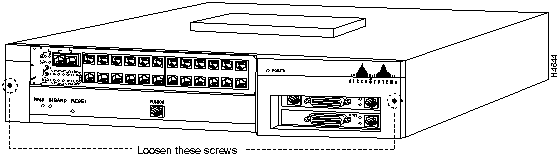
Before you can remove the hub port card or management tray, you must remove the front cover of the chassis. Perform the following steps to remove the front cover:
Figure B-1 Removing the Front Cover from the Chassis
The hub port card DIP switches are used to set the Token Ring speed and other features. The jumper is used to set the port impedance, determined by the impedance of the cable you are using.
Figure B-2 shows the location of the switches on the 12-port hub card and Table B-1 describes the switches.
Figure B-3 shows the location of the switches on the 24-port hub card and Table B-2 describes the switches.
Figure B-2 Cisco 2517 12-port Hub Port Card DIP Switch and Jumper Locations
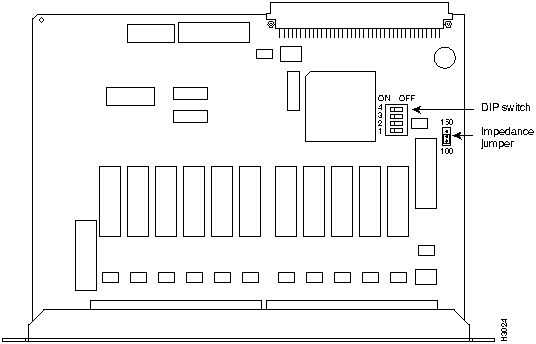
Table B-1 Cisco 2517 12-port Hub Port Card DIP Switch Settings
| SwitchNumber | Meaning | Default Setting |
|---|---|---|
| 1 | Sets the ring speed for the hub module: On---16 Mbps Off---4 Mbps |
On |
| 2 | Port 1 mode: Off---Extension mode On---Lobe mode |
On |
| 3 | Isolated or normal mode: Off---Isolated mode On---Normal mode |
On |
| 4 | Not used | Not used |
Figure B-3 Cisco 2519 24-port Hub Port Card
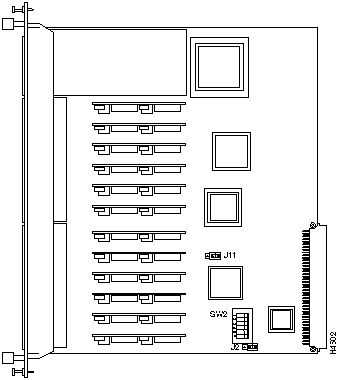
Table B-2 Cisco 2519 24-port Hub Port Card DIP Switch Settings
| SwitchNumber | Meaning | Default Setting |
|---|---|---|
| 1 | Sets the ring speed for the hub module: On---16 Mbps Off---4 Mbps |
On |
| 2 | Isolation mode: Off---Entire module is isolated from the backplane ring On---Normal mode |
On |
| 3 | Ports 1-12 isolated or normal mode: Off---Ports 1-12 are isolated On---Ports 1-12 normal mode |
On |
| 4 | Ports 13-24 isolated or normal mode: Off---Ports 13-24 are isolated On---Ports 13-24 normal mode |
On |
| 5 | Sets the Ring In port to repeater or MAU mode Off---MAU mode On---Repeater mode |
Off |
| 6 | Sets the Ring Out port to repeater or MAU mode Off---MAU mode On---Repeater mode |
Off |
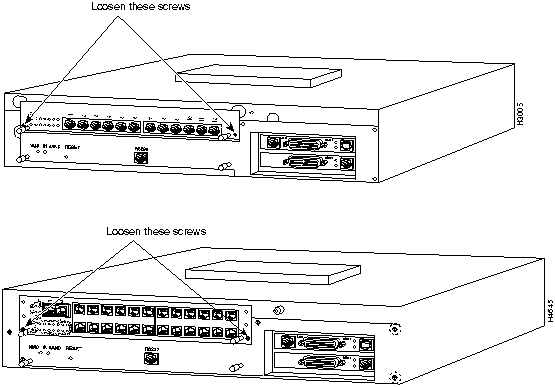
Perform the following steps to remove the hub port card and change the DIP switch settings or port impedance jumper:
Figure B-4 Removing the Hub Port Card
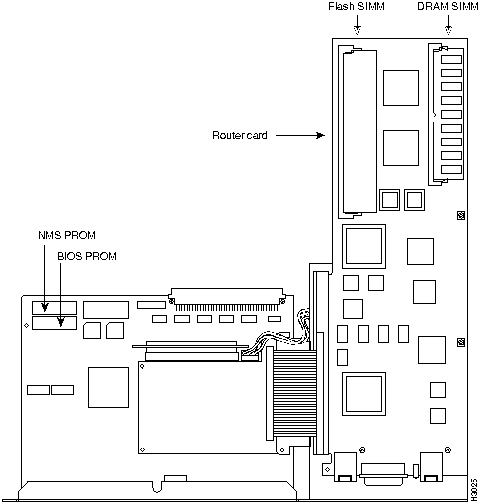
Perform the following steps to remove the management card tray and upgrade the management card ROMs:
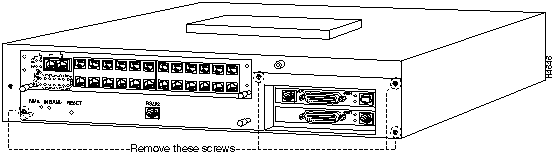
Figure B-6 Removing the Management Card Tray
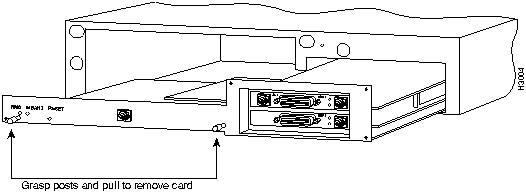
Figure B-7 Management Card ROMs

|
Copyright 1988-1995 © Cisco Systems Inc.