This publication provides international regulatory and safety compliance information for Cisco 2518 Router/Hubs. Use this publication with the Cisco 2518 Router/Hub User Guide publication and as an addendum to the Router Products Getting Started Guide.
Note These publications are available on UniverCD or printed copies can be ordered.
Safety Information for the Cisco 2518 Router/Hub
All the following statements are general warnings or safety guidelines that apply to all countries. A warning means danger. You are in a situation that could cause bodily injury. Before working on equipment, be aware of the hazards involved with electrical circuitry and standard safety practices to prevent accidents.
- Before opening the chassis, disconnect the telephone-network cables to avoid contact with telephone-network voltages.
- Do not work on the system or connect or disconnect cables during periods of lightning activity.
- The ports labeled "ETH" (Ethernet) and "AUX" (auxiliary) are safety extra low voltage (SELV) circuits. SELV circuits should only be connected to other SELV circuits. Because the BRI circuits are treated like telephone-network voltage, avoid connecting the SELV circuit to the telephone-network-voltage (TNV) circuits.
- The ISDN connection is regarded as a source of voltage that should be inaccessible to user contact. Users should not attempt to tamper with or open any public telephone operator (PTO)--provided equipment or connection hardware. Any hardwired connection (other than by nonremovable, connect-one-time-only lug) must be made only by PTO staff or suitably trained engineers.
- Do not touch the power supply when the power cord is connected. For systems with a power switch, line voltages are present within the power supply even when the power switch is off and the power cord is connected. For systems without a power switch, line voltages are present within the power supply when the power cord is connected.
- Read the installation instructions before you connect the system to its power source.
- This product relies on the building's installation for short-circuit (overcurrent) protection. Ensure that a fuse or circuit breaker no larger than 120 VAC, 15A U.S. (240 VAC, 10A international) is used on the phase conductors (all current-carrying conductors).
- The device is designed to work with TN power systems.
- This equipment is intended to be grounded. Ensure that the host is connected to earth ground during normal use.
- Ultimate disposal of this product should be handled according to all national laws and regulations.
- Before working on equipment that is connected to power lines, remove jewelry (including rings, necklaces, and watches). Metal objects will heat up when connected to power and ground and can cause serious burns or weld the metal object to the terminals.
- Network hazardous voltages are present in the BRI cable. If you detach the BRI cable, detach the end away from the router first to avoid possible electric shock. Network hazardous voltages also are present on the system card in the area of the BRI port (RJ-45 connector), regardless of when power is turned off.
- A voltage mismatch can cause equipment damage and may pose a fire hazard. If the voltage indicated on the label is different from the power outlet voltage, do not connect the chassis to that receptacle.
Operating Conditions for Italy
All warnings and safety guidelines listed in "Safety Information for the Cisco 2517 Router/Hub" apply to Cisco 2518 Router/Hub models used in Italy. In addition, the following warning applies only to Cisco 2518 Router/Hub models used in Italy:
- AVVERTENZA PER GLI UTENTI DELLA CISCO 2518 Router/Hub PER CONNESSIONI ISDN ACCESSO BASICO
- "Si raccomanda di spegnere il terminale quallora venisse spostato tra due prese dello stesso o di differente bus SO."
- WARNING FOR USERS OF THE CISCO 2518 Router/Hub FOR BASIC ACCESS ISDN CONNECTIONS
- "It is recomended to switch off the terminal equipment when it is moved between two sockets of the same or different bus."
Operating Conditions for the United Kingdom
In addition to the warnings and safety guidelines listed in "Safety Information for the Cisco 2517 Router/Hub," the following warnings apply to Cisco 2518 Router/Hub models used in the United Kingdom:
- The Cisco 2518 Router/Hub is designed to meet the requirements of NET1 and NET2 for products with serial interfaces, and NET3 for products with an ISDN BRI interface.
- Interconnection directly, or by way of other apparatus, of ports marked "BRI" with ports marked or not so marked may produce hazardous conditions on the network, and that advice should be obtained from a competent engineer before such a connection is made.
- The BRI connector must be hardwired permanently to the S-reference connection point by using a connect one-time-only, nonremovable plug (RJ-45 with the latch tab removed).
- The ports marked "ETH" (Ethernet)" and "AUX" (auxiliary) have a safety warning applied to them as follows:
- "These ports do not provide isolation sufficient to satisfy the requirement of EN60950:1992; apparatus connected to these ports should either have been approved to EN60950:1992 or have previously been evaluated against British Telecommunications plc (Post Office) Technical Guides 2 or 26 and given permission to attach; any that other usage will invalidate any approval given to this apparatus."
- Other usage will invalidate any approval given to this apparatus if as a result it ceases to comply with EN60950:1992.
- This apparatus must be connected to a main socket outlet with a protective earth contact.
Maintaining Safe Installation Distances
In order to maintain the independent approval of the router card, it is essential that, when other option cards are installed that use or generate a hazardous voltage, the minimum creepage and clearance specified in the table below are maintained. A hazardous voltage is one that exceeds 42.4 volts peak AC, or 60 volts DC. If you have any doubt, seek advice from a competent engineer before installing other adapter cards in the PC.
The equipment must be installed such that, with the exception of the connections to the PCbus, clearance and creepage distances shown in the table below are maintained between the card and any other assemblies that use or generate a voltage shown in the table below. The larger distance shown in brackets applies where the local environment within the chassis is subject to conductive pollution or dry non-conductive pollution that could become conductive due to condensation. Failure to maintain these minimum distances would invalidate the approval.
Except at the edge connector that plugs into the PCbus, clearance and creepage distances of X millimeters (mm) and Y mm as listed in Table 1 must be maintained between the cards and other parts of the chassis including any other expansion cards fitted.
Note that in Table 1 the following definitions apply:
- Clearance distances are defined as the minimum distance measured in air between two points (i.e., line of sight).
- Creepage distances are defined as the minimum distance measured across the surface of an insulator between two points (i.e., following the contour of the insulator).
Table 1 : Creepage and Clearance Distances Based on Voltage
| Up to 50
|
2.4 (3.8)
|
2.0
|
| Up to 125
|
3.0 (4.8)
|
2.6
|
| Up to 250
|
5.0 (8.0)
|
4.0
|
| Up to 3004
|
6.4 (10.0)
|
4.0
|
1 Vrms = root mean square voltage.
2 VDC = volts direct current.
3 The creepage distances not in parentheses apply when the equipment is installed in a normal office environment. The larger dimensions, given in parentheses, must be applied when the equipment is installed in an environment in which dust and other types of pollution could conduct electricity because of the effects of dampness and condensation. This applies to locations subject to high humidity.
4 For a expansion card fitted in the PC using or generating voltage greater than 300V (rms or dc), advice from a competent telecommunications safety engineer must be obtained before installation of the relevant equipment.
Creepage and clearance distances are measured between adjacent parts as shown in Figure 1.
Figure 1 : Creepage and Clearance Distances between BRI Module and Components
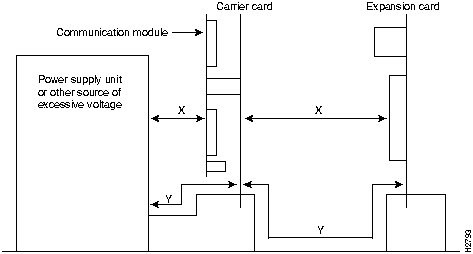
Note that in Figure 1, X indicates the clearance distances between cards and between adjacent cards and components, and Y shows the creepage path across the surface of an insulator and between the two points indicated by X.
Agency Approvals
The following agency approvals apply to the Cisco 2518 Router/Hubs:
- Safety: UL 1950, CSA 22.2-950, TUV EN60950:1992, AS3260, TS001
- EMI: FCC Part 15 Class B, EN55022 Class B, A53548 Class B (CISPR 22), VCCI Class 2, EN50082
- PTT for the router card: CE-168 mark, NET3, BAKOM, PTC, TS013, JATE, CR22
Directives Compliance
The CE mark signifies that the equipment complies with the following European Directives: 91/263/EEC (public telecommunications network compatibility), 89/336/EEC (electromagnetic compatibility), 73/23/EEC (low voltage), and 92/59/EEC (general product safety).
Cisco Information Online
Cisco Information Online (CIO) is Cisco Systems' primary, real-time support channel. Maintenance customers and partners can self-register on CIO to obtain additional content and services.
Available 24 hours a day, 7 days a week, CIO provides a wealth of standard and value-added services to Cisco's customers and business partners. CIO services include product information, software updates, release notes, technical tips, the Bug Navigator, configuration notes, brochures, descriptions of service offerings, and download access to public and authorized files.
CIO serves a wide variety of users through two interfaces that are updated and enhanced simultaneously---a character-based version and a multimedia version that resides on the World Wide Web (WWW). The character-based CIO (called "CIO Classic") supports Zmodem, Kermit, Xmodem, FTP, Internet e-mail, and fax download options, and is excellent for quick access to information over lower bandwidths. The WWW version of CIO provides richly formatted documents with photographs, figures, graphics, and video, as well as hyperlinks to related information.
You can access CIO in the following ways:
- WWW:
http://www.cisco.com.
- Telnet:
cio.cisco.com.
- Modem: From North America, 408 526-8070; from Europe, 33 1 64 46 40 82. Use the following terminal settings: VT100 emulation; databits: 8; parity: none; stop bits: 1; and baud rates up to 14.4 kbps.
For a copy of CIO's Frequently Asked Questions (FAQ), contact
ciohelp@cisco.com.
For additional information, contact
cioteam@cisco.com.
Note If you are a network administrator and need personal technical assistance with a Cisco product that is under warranty or covered by a maintenance contract, contact Cisco's Technical Assistance Center (TAC) at 800 553-2447, 408 526-7209, or
tac@cisco.com.
To obtain general information about Cisco Systems, Cisco products, or upgrades, contact 800 553-6387, 408 526-7208, or
csrep@cisco.com.

Copyright 1988-1996 © Cisco Systems Inc.



