|
|

Cisco Product Numbers MEM-3C16M= and MEM-3C8M=
This publication provides the procedures for installing the Cisco 3000 memory upgrade kit. MEM3C16M= provides replacement dynamic random access memory (DRAM) single in-line memory modules (SIMMs) (an additional 12 megabytes (MB) of memory in the Cisco 3000 models 3101, 3102, 3103, and 3202) and MEM-3C8M= provides an additional 4 MB in models 3104 and 3204. This publication contains the following sections:

Before performing procedures described in this publication, review the following sections: "Safety Recommendations," "Safety with Electricity," and "Tools and Equipment Required."
Follow these guidelines to ensure general safety:
Follow these guidelines when working on equipment powered by electricity:
Preventing Electrostatic Discharge Damage
Electrostatic discharge (ESD) can damage equipment and impair electrical circuitry. ESD damage occurs when electronic printed circuit cards are improperly handled and can result in complete or intermittent failures.
Always follow ESD prevention procedures when removing and replacing cards. Ensure that the chassis is electrically connected to earth ground. Wear an ESD wrist strap, ensuring that it makes good skin contact. Connect the clip to an unpainted chassis frame surface to safely channel unwanted ESD voltages to ground. To properly guard against ESD damage and shocks, the wrist strap and cord must operate effectively.
If no wrist strap is available, ground yourself by touching the metal part of the chassis.
You need the following tools and equipment to upgrade your system's memory:
Cover and Tray Removal Procedures
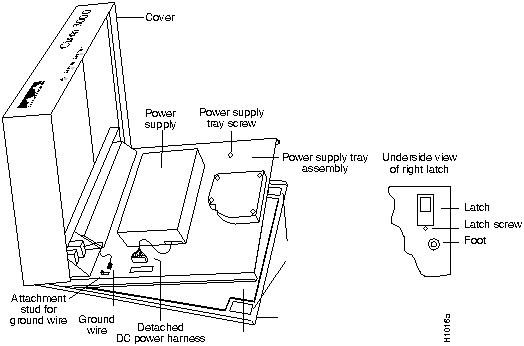
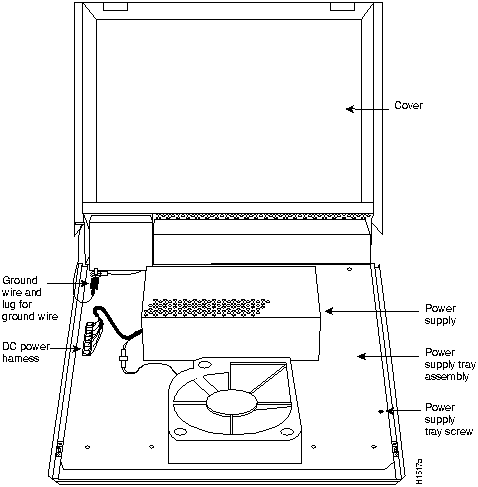
This section outlines the steps required to open the Cisco 3000 chassis. In the following discussion, it is assumed that you are looking at the chassis from the front. Use Figure 2 as a guide when removing the cover and power supply tray.
Figure 1 : Internal View of Cisco 3000 To remove the chassis cover, follow these steps:
Figure 2 : Cisco 3000 Tray Assembly Removing the Power Supply Tray Assembly
To access the Cisco 3000 system card, you must remove the power supply tray assembly as follows.
Table 4 lists the interface ports on the various Cisco 3000 models.
Table 4 : Network Interface Options
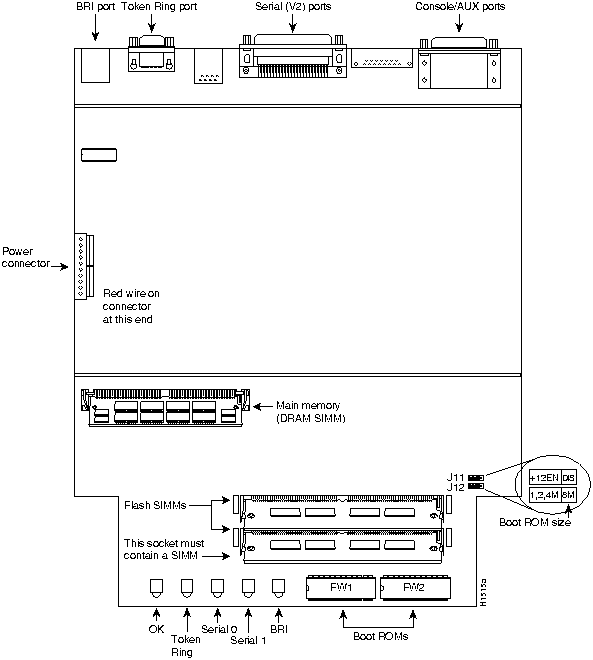
Figure 3 shows the location of the DRAM SIMM on the model 3204 system card.
Figure 3 : Model 3204 System Card Layout
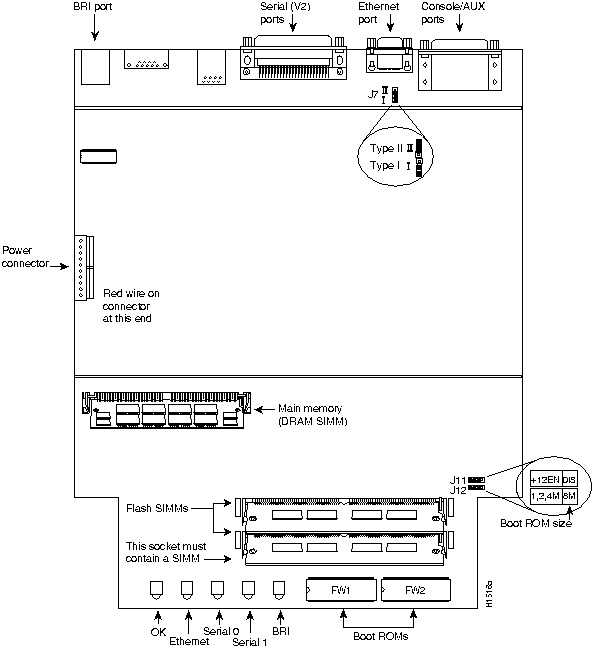
Figure 4 shows the location of the DRAM SIMM on the model 3104 system card.
Figure 4 : Model 3104 System Card Layout
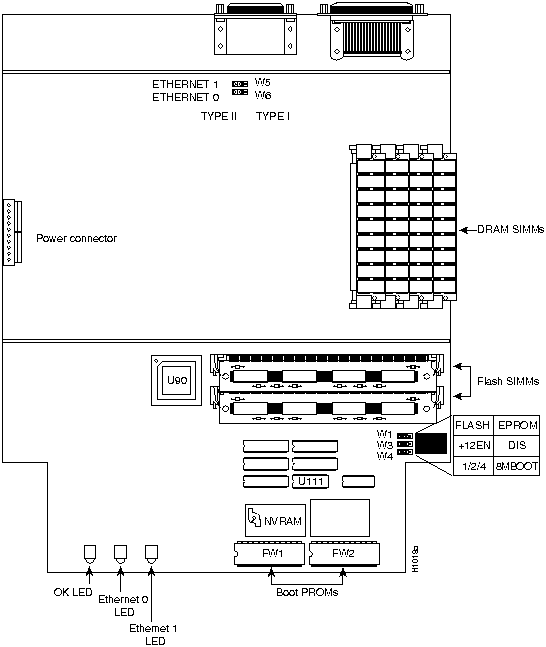
Figure 5 shows the location of the DRAM SIMMs on models 3101, 3102, and 3103. (Model 3101 is shown as typical of all three models.)
Figure 5 : Model 3101 System Card Layout---Typical of Models 3101, 3102, and 3103
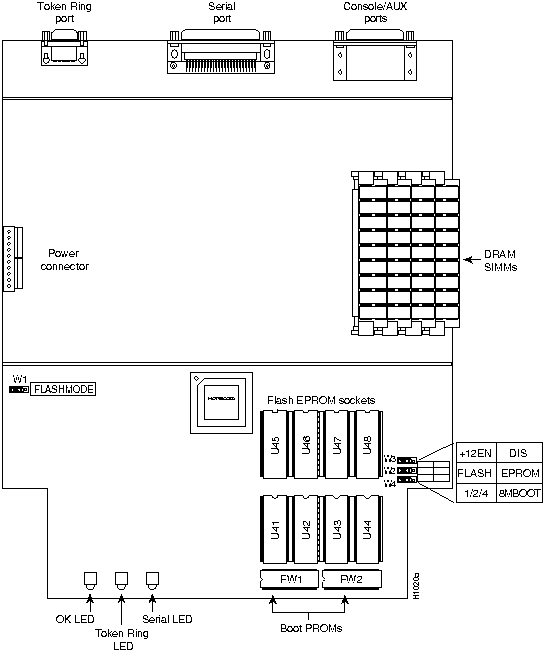
Figure 6 shows the location of the DRAM SIMMs on the model 3202 system card.
Figure 6 : Model 3202 System Card Layout The router contains primary (main) and secondary (shared) memory. Primary and secondary memory size, in kilobytes (KB), is shown in the system banner on the console screen. Primary memory is implemented with dynamic random access memory (DRAM) single in-line memory modules (SIMMs). Secondary memory, used for packet buffering, consists of a fixed 512 KB (2 megabytes (MB) for models 3104 and 3204).
After booting up, the system banner displays the amount of system memory. The following example shows a system with 4096 KB (4 MB) of primary memory.
Primary memory may need to be expanded when you use very large routing tables or many protocols. This might be necessary with configurations in which the router is set up as a connection device between large external networks and your internal network.
Primary Memory Configurations for Models 3101, 3102, 3103, and 3202
The standard primary memory (main memory) configuration of the router models 3101, 3102, 3103, and 3202 is 4 MB of 32-bit-wide DRAM. Upgrade to 16 MB of 32-bit-wide DRAM by replacing the system's four 1 MB x 9 SIMMs. For 16-MB configurations, substitute four 4 MB x 9 DRAM SIMMs.
Memory upgrade kits for the router include four new 4 MB x 9 DRAM SIMMs.
Approved DRAM SIMMs for Models 3101, 3102, 3103, and 3202s
Table 5 lists approved 4 MB x 9, 80-nanosecond DRAM SIMMs for models 3101, 3102, 3103, and 3202.
Table 5 : Approved 4 MB x 9, 80-Nanosecond DRAM SIMMs
After booting up, the system banner displays the amount of system memory.The following example shows a system with 4096 KB (4 MB) of primary memory and 512 KB (1/2 MB) of secondary memory:
Primary Memory Configurations for Models 3104 and 3204
The standard primary memory configuration of the router models 3104 and 3204 are 4 MB and 8 MB. You can upgrade from 4 MB of DRAM (main memory) by replacing the 72-pin DRAM SIMM in the main memory socket on the system card. Memory upgrade kits for router models 3104 and 3204 are obtainable from us. If you are upgrading with DRAM SIMMs you obtain from other vendors, use the SIMMs listed in Table 5.
Table 6 : Approved 2 MB x 36, 80-Nanosecond DRAM SIMMs
Upgrading Primary Memory in Router Models 3204 and 3104
You can upgrade your router, models 3204 and 3104, from the standard 4 MB of primary memory to 8 MB (see Table 5) using the memory upgrade kit as follows:
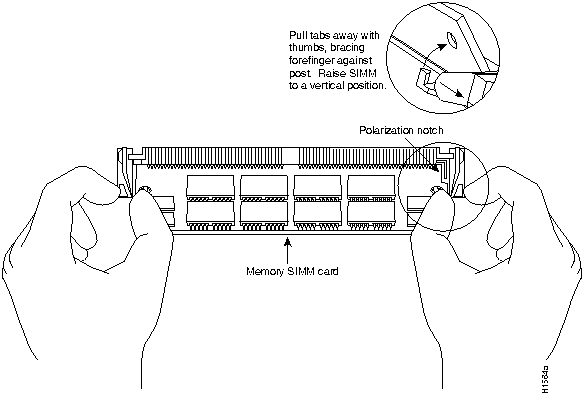
Figure 7 : Removing a SIMM from the SIMM Connector Socket Upgrading to 16 MB of Primary Memory in Models 3101, 3102, 3103, and 3202
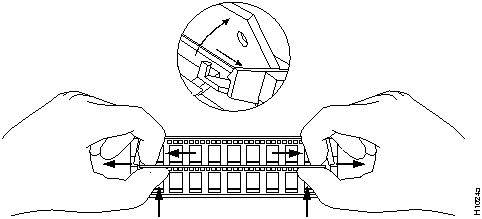
You can upgrade your router, models 3101, 3102, 3103, and 3202 from the standard 4 MB of primary memory to 16 MB using the memory upgrade kit as follows:
Figure 8 : Removing a SIMM from the SIMM Connector Socket Replacing the Chassis Cover and Tray
After you have performed the memory upgrade for your system, replace the cover and component tray by following these steps:
To test the SIMM upgrade installation, perform the following check:
This completes the Cisco 3000 memory upgrade procedures.
Copyright 1988-1996 © Cisco Systems Inc.




Model
Ethernet
Token Ring
Serial
BRI
3101 (See Figure 5)1
2
0
0
0
3102 (See Figure 5)
1
0
1
0
3103 (See Figure 5)
1
0
0
1
3202 (See Figure 6)
0
1
1
0
3104 (See Figure 4)
1
0
2
1
3204 (See Figure 3)
0
1
2
1
1 Figure 5 is indicative of the models 3101, 3102, and 3103.
System Bootstrap, Version 4.6(0.15), SOFTWARE
Copyright (c) 1986-1992 by cisco Systems
Cisco 3000/030 processor with 4096 Kbytes of memory
>
Manufacturer's Name
Manufacturer's Part Number
Motorola
MCM94000AS80
Micron
MT9D49M-8
Texas Instruments
TM100EAD9-80
System Bootstrap, Version 9.1 ROUTER SOFTWARE
Copyright (c) 1986-1992 cisco Systems, Inc.
Cisco 3000/030 processor with 4608 Kbytes of memory
>
Manufacturer's Name
Manufacturer's Part Number
Micron
MT18D236M-8
NEC
MC-422000A36B-80