|
|

Cisco 4000 Series Public Network Certification
This publication provides international regulatory and safety compliance information for the Cisco 4000 series of routers. Use this publication with the Cisco 4000 Series Router Installation Guide publication.
This document contains the following sections:
The following statements are warnings or safety guidelines. A warning means danger. You are in a situation that could cause bodily injury. Before working on equipment, be aware of the hazards involved with electrical circuitry and standard safety practices to prevent accidents.
Channelized T1/ISDN PRI Regulatory Compliance
The following text is required to comply with regulatory agencies.
This equipment complies with Part 68 of the FCC rules. On the side of this network module interface card is a label that contains, among other information, the FCC registration number. If requested, this information must be provided to the telephone company.
If this equipment causes harm to the telephone network, the telephone company will notify you in advance that temporary discontinuance of service may be required. If advance notice is not practical, the telephone company will notify customer as soon as possible. Also, you will be advised of your right to file a complaint with the FCC if you believe it is necessary.
The telephone company may make changes in its facility, equipment, operations, or procedures that could affect the operation of the equipment. If this happens, the telephone company will provide advance notice in order for you to make the necessary modifications that maintain uninterrupted service.
If trouble is experienced with this equipment, please contact the following address:
Cisco System, Inc.
RMA Receiving
1135 Walsh Avenue
Santa Clara, California 95050
USA
For warrenty information contact Cisco's Technical Assitance Center (see the section "Cisco Connection Online").If the trouble is causing harm to the telephone network, the telephone company may request you remove the equipment from the network until the problem is resolved.
It is recommended that the customer install an AC surge arrestor in the AC outlet to which this device is connected to avoid damage to equipment caused by local lightning strikes and other electrical surges.
The CT1/PRI network processor module for Cisco 4000 series routers has the 6.0F service order cable.
The CT1/PRI module has the following facility interface codes: 04DU9-BN, 04DU9-DN, 04DU9-KN, 04DU9-1SN.
ISDN Safety and Compliance Conditions
This section contains safety and agency compliance information.
BRI Network Processor Module Independent of Host
The Basic Rate Interface (BRI) network processor module for the Cisco 4000 series is a processor/interface card assembly for use within a range of data communication (gateway and router) chassis supplied by Cisco Systems throughout Europe. The BRI module is a self-contained product that provides all of the hardware necessary to allow connection of the Cisco 4000 series chassis to four or eight Basic Access Integrated Services Digital Networks (ISDNs) each at the S-reference point. The ISDN usage is restricted to point-to-point mode only.
The BRI network processor module must have a dedicated S-bus connection for each of its ISDN ports. The BRI module cannot share any of its S-bus connections with other terminal equipment; therefore, no other terminals should be connected to the same S-bus as a BRI module connection.
The four or eight ISDN connections must be made to network connection points that are provided by one network vendor or public telecom operator (PTO) to ensure that common network timing exists between the ISDN ports used. Failure to observe this point may result in lost (nonrecoverable) data packets because of timing slips.
The BRI network processor module is fully transportable between compatible host chassis. The choice of each compatible chassis has no impact on the capabilities, functionality, or performance of the BRI network processor module.
The BRI network processor module consists of the following subassemblies:
The BRI network processor module provides users of compatible host router or bridge chassis with a high-speed throughput, point-to-point connection that can be set up over the digital telecommunication network ISDN.
BRI Module Installation Requirements---Special Considerations
Observe the following considerations during the installation of a Cisco 4000 series router with ISDN interfaces.
Where your PTO has provided you with ISDN modular sockets, the BRI module can be plugged in to make the connection. Connections should only be made to a BRI module properly installed within the host chassis.
In certain countries, the BRI network processor module must be hardwired permanently to the S-reference connection point. This is accommodated for by the use of a connect one-time-only, nonremovable plug (an RJ-45 with the latch tab removed).
ISDN Connection, Safety Warning
The BRI network processor module is approved only for installation in a host chassis and with host attachments, which are either type approved for such apparatus, or covered by a general approval.
Maintaining Safe Installation Distances
Except at the edge connector that plugs into the host chassis expansion slot, clearance and creepage distances of X millimeters (mm) and Y mm as listed in Table 1 must be maintained between the cards and other parts of the host including any other expansion cards fitted.
Table 1 : Creepage and Clearance Distances Based on Voltage
Note the following points in Table 1:
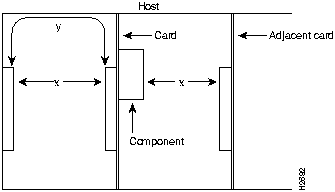
Creepage and clearance distances are measured between adjacent parts as shown in Figure 1.
Figure 1 : Creepage and Clearance Distances between BRI Module and Components Note that in Figure 1 x indicates the clearance distances between cards and adjacent cards and components, and y shows the creepage path across the surface of an insulator and between the two points indicated by x.
Host Power Supply Requirements
The power requirements of the BRI network processor module are as follows:
Ensure that the power drawn by the apparatus together with the power drawn by any auxiliary apparatus lies within the rating of the host chassis power supply.
The BRI network processor modules contain safety extra-low voltage (SELV) circuitry. Ensure that attachments at the interconnection ports of the apparatus are also SELV circuits. (SELV circuits are so designed and protected that, under both normal conditions and a likely fault condition, the current that can be drawn is not hazardous.)
Always disconnect the host chassis from the power supply before removing any covers.
Always disconnect the host chassis from any analog telephone circuits or Basic Access ISDN (where applicable) before removing any covers.
Failure to install the BRI modules in accordance with these instructions will invalidate any telecommunication terminal equipment type approval(s).
If you have any doubt as to how to safely install a Cisco 4000 series BRI module correctly within a host chassis, seek advice from a qualified telecommunications engineer.
Cisco Dual Port Serial Network Processor Module (2T-NIM) Independent of Host
The Cisco dual port serial network processor module is a processor/interface card assembly for use within a range of data communication (gateway and router) chassis supplied by Cisco Systems Europe. The dual port serial network processor module is a self-contained product which provides all of the hardware necessary to allow connection of Cisco Systems chassis to either Digital leased line circuits (point to point) or to Packet Switched Public Data Networks (PSPDN). The software is down loaded from a separate memory card installed in any Cisco compatible host.
The dual port serial network processor module is fully transportable between compatible "host" chassis. The choice of each compatible chassis has no effect on the capabilities, functionality, or performance of the dual port serial network processor module.
The dual port serial network processor module consists of the following subassemblies:
The dual port serial network processor module is a self-contained data communication device which provides any two out of four possible serial port connections. The four options for leased line connection are X.21, V.24, V.35, and V.36. Each port can provide connection to leased line or packet switched services. The dual port serial network processor module provides all of the hardware necessary for supporting Packet Switched Public Data Network communications. The wide area networking (WAN) operating software (designated as the X.25 Version 2.0) is downloaded from the storage medium by the Cisco compatible host.
The following port configurations are supported:
The final configuration of each serial interface is dependent on the serial port adapter cable used. The dual port serial network processor module incorporates cable sensing circuitry to detect the presence of a specific adapter cable for each service. Adapter cables are supplied with the dual port serial network processor module and are as follows:
X.25 packet switched support is provided by the operating software resident in the compatible Cisco chassis. This software is designated as the X.25 Version 2.0. This software provides both the link and packet level facilities of the dual port serial network processor module.
The operating software is accessed through a VT100 terminal connected to the console port of the host. The settings of the terminal should be as follows:
Dual Port Serial Network Processor Module Installation Requirements
The dual port serial network processor module is approved only for installation in a host and with host attachments, which are either type approved for such apparatus, or covered by a General Approval.
Maintaining Safe Installation Distances
Except at the edge connector that plugs into the host chassis expansion slot, clearance and creepage distances of X millimeters (mm) and Y mm as listed in Table 2 must be maintained between the cards and other parts of the host including any other expansion cards fitted.
Note that in Table 2:
Creepage and clearance distances are measured between adjacent parts as shown in Figure 1. Note that X indicates the clearance distances between cards and adjacent cards and components, and Y shows the creepage path across the surface of an insulator and between the two points indicated by X.
Table 2 : Creepage and Clearance Distances Based on Voltage
Creepage and clearance distances are measured between adjacent parts as shown in Figure 1.
Note that in Figure 1 x indicates the clearance distances between cards and adjacent cards and components, and y shows the creepage path across the surface of an insulator and between the two points indicated by x.
Host Power Supply Requirements
The power requirements of the dual port serial network processor module are as follows:
Ensure that the power drawn by the apparatus, together with the power drawn by any auxiliary apparatus, lies within the rating of the host chassis power supply.
The dual port serial network processor module contains Safety Extra-Low Voltage (SELV), circuitry. Ensure that attachments at the interconnection ports of the apparatus are also SELV circuits. (SELV circuits are so designed and protected that, under both normal conditions and a likely fault condition, the current which can be drawn is not hazardous.)
Always disconnect the chassis from the power supply before removing any covers.
Always disconnect the host product chassis from any analogue telephone circuits or Basic Access ISDN (where applicable) before removing any covers.
Failure to install the dual port serial network processor module in accordance with these instructions will invalidate the approval.
If you have any doubt as to how to safely install the Cisco dual port serial network processor module correctly within a host chassis, seek advice from a qualified data communications engineer.
Cisco Four Port Serial Network Processor Module (4T-NIM) Independent of Host
The Cisco four port serial network processor module is a processor/interface card assembly for use within a range of data communication (gateway and router) chassis supplied by Cisco Systems Europe. The four port serial network processor module is a self contained product which provides all of the hardware necessary to allow connection of Cisco Systems' chassis to either Digital leased line circuits (point to point) or to Packet Switched Public Data Networks (PSPDN). The software is down loaded from a separate memory card installed in any Cisco compatible host.
The four port serial network processor module is fully transportable between compatible "host" chassis. The choice of each compatible chassis has no effect on the capabilities, functionality or performance of the four port serial network processor module.
The four port serial network processor module consists of the following subassemblies:
The four port serial network processor module is a self contained data communication device which provides four serial port connections. Each port can provide connection to leased line or packet switched services of the type X.21, V.24, V.35, and V.36. The four port serial network processor module provides all of the hardware necessary for supporting Packet Switched Public Data Network communications. The wide area networking (WAN) operating software (designated as the X.25 Version 2.0), is down loaded from the storage medium by the Cisco compatible host.
Each serial port on the 5 in 1 Serial Port Adapter is presented as a custom 50 way connector. The following port configurations are supported:
The final configuration of each serial interface is dependent on the Serial Port Adapter Cable used. The four port serial network processor module incorporates cable sensing circuitry to detect the presence of a specific adapter cable for each service. Further configuration is not necessary. Custom adapter cables are supplied with the apparatus and are as follows.
Each cable provides adaption from a 50 way custom connector to the applicable ISO standard connector.
X.25 Packet switched support is provided by the operating software resident in the compatible Cisco chassis. This software is designated as the X.25 Version 2.0. This software provides both the link and packet level facilities of the four port serial network processor module.
The operating software is accessed through a VT100 terminal connected to the console port of the host. The settings of the terminal should be as follows:
Four Port Serial Network Processor Module Installation Requirements
The four port serial network processor module is approved only for installation in a host and with host attachments, which are either type approved for such apparatus, or, covered by a General Approval.
Maintaining Safe Installation Distances
Except at the edge connector that plugs into the host chassis expansion slot, clearance and creepage distances of X millimeters (mm) and Y mm as listed in Table 3 must be maintained between the cards and other parts of the host including any other expansion cards fitted.
Note that in Table 3:
Table 3 : Creepage and Clearance Distances Based on Voltage
Creepage and clearance distances are measured between adjacent parts as shown in Figure 1. Note that X indicates the clearance distances between cards and adjacent cards and components, and Y shows the creepage path across the surface of an insulator and between the two points indicated by X.
Host Power Supply Requirements
The power requirements of the four port serial network processor module are as follows:
Ensure that the power drawn by the apparatus, together with the power drawn by any auxiliary apparatus, lies within the rating of the host chassis power supply.
The four port serial network processor module contains Safety Extra-Low Voltage (SELV), circuitry. Ensure that attachments at the interconnection ports of the apparatus are also SELV circuits. (SELV circuits are so designed and protected that, under both normal conditions and a likely fault condition, the current which can be drawn is not hazardous.
Always disconnect the chassis from the power supply before removing any covers.
Always disconnect the host product chassis from any analogue telephone circuits or Basic Access ISDN (where applicable) before removing any covers.
Failure to install the four port serial network processor module in accordance with these instructions will invalidate the approval.
If you have any doubt as to how to safely install the Cisco four port serial network processor module correctly within a host chassis, seek advice from a qualified data communications engineer.
Operating Conditions for Canada
In addition to the warnings and safety guidelines listed in the section "Safety Information," the following warnings apply to models used in Canada:
Operating Conditions for the United Kingdom
Cisco Systems declaration of operating conditions:
The Cisco 4000 series router is designed to meet the requirements of NET1 and NET2.
Operating Conditions for the European Community
The following operating conditions are required within the European Community.
The following agency approvals apply to the router chassis:
Safety:
EMI:
PTT:
Cisco Connection Online (CCO), formerly Cisco Information Online (CIO), is Cisco Systems' primary, real-time support channel. Maintenance customers and partners can self-register on CCO to obtain additional content and services.
Available 24 hours a day, 7 days a week, CCO provides a wealth of standard and value-added services to Cisco's customers and business partners. CCO services include product information, software updates, release notes, technical tips, the Bug Navigator, configuration notes, brochures, descriptions of service offerings, and download access to public and authorized files.
CCO serves a wide variety of users through two interfaces that are updated and enhanced simultaneously---a character-based version and a multimedia version that resides on the World Wide Web (WWW). The character-based CCO supports Zmodem, Kermit, Xmodem, FTP, Internet e-mail, and fax download options, and is excellent for quick access to information over lower bandwidths. The WWW version of CCO provides richly formatted documents with photographs, figures, graphics, and video, as well as hyperlinks to related information.
You can access CCO in the following ways:
For a copy of CCO's Frequently Asked Questions (FAQ), contact
Copyright 1988-1996 © Cisco Systems Inc.

Voltage1 (Vrms or VDC)2
Creepage (Y mm)3
Clearance (X mm)
Up to 50
2.4 (3.8)
2.0
Up to 125
3.0 (4.8)
2.6
Up to 250
5.0 (8.0)
4.0
Up to 300
6.4 (10.0)
4.0
1 Refers to the voltage used or generated by other parts of the host or expansion card.
2 Vrms = root mean square voltage; VDC = volts direct current.
3 The creepage distances not in parentheses apply when the equipment is installed in a normal office environment. The larger dimensions, in parentheses, must be applied when the equipment is installed in an environment in which dust and other types of pollution could conduct electricity because of the effects of dampness and condensation. This applies to locations subject to high humidity.
Voltage Used or Generated by Other Parts of the Host or Expansion Card (Vrms1 or VDC2)
Creepage (Y mm)3
Clearance (X mm)
Up to 50
2.4 (3.8)
2.0
Up to 125
3.0 (4.8)
2.6
Up to 250
5.0 (8.0)
4.0
Up to 300
6.4 (10.0)
4.0
1 Vrms = voltage root mean square .
2 VDC= volts direct current.
3 The creepage distances not in parentheses apply when the equipment is installed in a normal office environment. The larger dimensions, in parentheses, must be applied when the equipment is installed in an environment in which dust and other types of pollution could conduct electricity because of the effects of dampness and condensation. This applies to locations subject to high humidity.
Voltage Used or Generated by Other Parts of the Host or Expansion Card (Vrms1 or VDC2)
Creepage (Y mm)3
Clearance (X mm)
Up to 50
2.4 (3.8)
2.0
Up to 125
3.0 (4.8)
2.6
Up to 250
5.0 (8.0)
4.0
Up to 300
6.4 (10.0)
4.0
1 Vrms = root mean square voltage.
2 VDC=volts direct current
3 The creepage distances not in parentheses apply when the equipment is installed in a normal office environment. The larger dimensions, in parentheses, must be applied when the equipment is installed in an environment in which dust and other types of pollution could conduct electricity due to the effects of dampness and condensation. This applies to locations subject to high humidity.

http://www.cisco.com.
cco.cisco.com.
cco-help@cisco.com.
For additional information, contact
cco-team@cisco.com.
tac@cisco.com.
To obtain general information about Cisco Systems, Cisco products, or upgrades, contact 800 553-6387, 408 526-7208, or
cs-rep@cisco.com.