


|
|

Cisco Access Server 5100 Public Network Certification
This publication provides international regulatory and safety compliance information for the Cisco Access Server 5100 product. Use this publication with the Cisco Access Server 5100 User Guide and as an addendum to the Router Products Getting Started Guide.
All the following statements are warnings or safety guidelines. A warning means danger. You are in a situation that could cause bodily injury. Before working on equipment, be aware of the hazards involved with electrical circuitry and standard safety practices to prevent accidents.
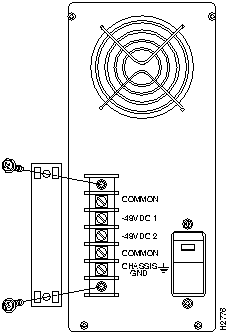
Figure 1 DC Input Power Supply Connections
The telephone company may request the telephone number (or numbers) to which the equipment is to be connected.
If a modem is malfunctioning, it may affect the telephone lines. In this case, the modem should be disconnected until the source of the difficulty is traced.
If the telephone company has any questions or raises problems, ask them to call Cisco Systems.
This digital apparatus does not exceed the Class A limits for radio noise emissions from digital apparatus set out in the radio interference regulations of Industry Canada (formerly Canadian Department of Communications).
Cet appareil numérique n'émet pas de bruits radioélectriques dépassant les limites applicables aux appareils numériques de classe A prescrites dans les réglementations sur le brouillage radioélectrique promulguées par Industrie Canada (précédemment Ministère des Communications du Canada).
The Load Number (LN) assigned to each terminal device denotes the percentage of the total load connected to the telephone loop used by the device, without overloading. The termination on a loop may consist of any combination of devices, subject only to the requirement that the total of the Load Numbers of all the devices not exceed 100. An alphabetic suffix is also specified in the Load Number for the appropriate ringing type (A or B), if applicable. For example, LN = 41B designates a Load Number of 41 and a B-type ringer.
The Industry Canada (IC) or Canadian Department of Communications (DOC) label identifies certified equipment. This certification means that the equipment meets certain telecommunications network protective, operational, and safety requirements. The department does not guarantee the equipment will operate to the purchaser's satisfaction.
Before installing this equipment, make sure connection to the facilities of the local telecommunications company is permitted. Install the equipment using an acceptable method. Be aware, however, that compliance with the above conditions may not prevent degradation of service in some situations.
Repairs to certified equipment should be made by an authorized Canadian maintenance facility designated by the supplier. Any repairs or alterations made by a user to this equipment, or equipment malfunctions, may give the telecommunications company cause to request the user to disconnect the equipment.
For protection, make sure that the electrical ground connections of the power utility, telephone lines, and internal metallic water pipe system, if present, are connected together. This precaution may be particularly important in rural areas.

All warnings and safety guidelines listed in "Safety Information for the Cisco Access Server 5100" apply to Cisco Access Server 5100 models used in the European Community.
In addition to the warnings and safety guidelines listed in "Safety Information for the Cisco Access Server 5100," the following warnings apply to Cisco Access Server 5100 models used in the United Kingdom:
Cisco Connection Online (CCO) is Cisco Systems' primary, real-time support channel. You can use your product serial number to activate CCO for a single user during your warranty period. Maintenance customers and partners can self-register on CCO to obtain additional content and services.
Available 24 hours a day, 7 days a week, CCO provides a wealth of standard and value-added services to Cisco's customers and business partners. CCO services include product information, software updates, release notes, technical tips, the Bug Navigator, configuration notes, brochures, descriptions of service offerings, and download access to public and authorized files.
CCO serves a wide variety of users through two interfaces that are updated and enhanced simultaneously---a character-based version and a multimedia version that resides on the World Wide Web (WWW). The character-based CCO (called "CCO Classic") supports Zmodem, Kermit, Xmodem, FTP, Internet e-mail, and fax download options, and is excellent for quick access to information over lower bandwidths. The WWW version of CCO provides richly formatted documents with photographs, figures, graphics, and video, as well as hyperlinks to related information.
You can access CCO in the following ways:
http://www.cisco.com
.
cio.cisco.com
(198.92.32.130).
For a copy of CCO's Frequently Asked Questions (FAQ), contact
ciohelp@cisco.com.
For additional information, contact
cioteam@cisco.com.

tac@cisco.com.
To obtain general information about Cisco Systems, Cisco products, or upgrades, contact 800 553-6387, 408 526-7208, or
csrep@cisco.com.

|
Copyright 1988-1995 © Cisco Systems Inc.