
Table of Contents
About This Manual
About This Manual
This section discusses the objectives, audience, organization, and conventions of the Cisco 750 Series and Cisco 760 Series Command Reference publication.
Cisco product documentation and additional literature are available on a CD called Cisco Connection Documentation, Enterprise Series. The CD is updated and shipped monthly so it might be more current than printed documentation. To order the Cisco Connection Documentation, Enterprise Series CD, contact your local sales representative or call Customer Service. The CD is available both as a single CD and as an annual subscription. You can also access Cisco technical documentation on the World Wide Web URL
http://www.cisco.com.
Document Objectives
This document provides descriptions of the commands necessary for configuring and maintaining your Cisco 750 series and Cisco 760 series router. It describes tasks only in the context of using a particular command. It does not describe how the tasks interrelate or provide comprehensive configuration examples. It can be used as a standalone reference manual or in conjunction with the Cisco 750 Series and Cisco 760 Series User Guide and the Cisco ConnectPro User Guide.
Audience
This publication is intended as a standalone document for users who will be configuring and maintaining the Cisco 750 series routers and the Cisco 760 series routers and just need to reference commands.
Document Organization
This publication is divided into chapters, describing related tasks or functions. The chapters in the publication are as follows:
- Chapter 1, "Overview," provides an overview of the Cisco 750 and Cisco 760 series dial-on-demand routers.
- Chapter 2, "Terminal Setting Commands," describes the commands used for configuring the terminal emulation software.
- Chapter 3, "System Management Commands," describes the commands pertaining to system interfaces, system booting, and terminal sessions.
- Chapter 4, "Profile Commands," describes the commands used to create and configure user profiles.
- Chapter 5, "Security Commands," describes the commands used to configure router security.
- Chapter 6, "ISDN Commands," describes the commands used to configure ISDN calling, such as on-demand, CALLBACK, and CALLERID.
- Chapter 7, "IP Commands," describes the commands used to configure IP routing, such as IP static routes, RIP, and IP filters.
- Chapter 8, "Novell IPX Commands," describes the commands used to configure IPX routing, such as IPX static routes, RIP, and SAP service routes.
- Chapter 9, "Transparent Bridging Commands," describes the commands used to configure transparent bridging, such as filtering and address learning.
- Chapter 10, "CPP and PPP Commands," describes the commands used to configure Point-to-Point protocol (PPP) parameters, and Combinet Packet Protocol (CPP) parameters such as call negotiation and authentication.
- Chapter 11, "SNMP Commands," describes the commands used to configure System Network Management Protocol (SNMP) parameters, such as management station and traps.
- Chapter 12, "DTMF Commands," describes the commands used to configure the basic telephone service interface.
- Appendix A, "Ethernet Packet Types," describes the Ethernet protocol types.
- Appendix B, "Common TCP Port Assignments," describes the TCP port assignment for each port.
- Appendix C, "Common UDP Port Assignments," describes the UDP port assignment for each port.
Document Conventions
Software and hardware documentation uses the following conventions:
- The caret character (^) represents the Control key.
- For example, the key combinations ^D and Ctrl-D are equivalent: Both mean hold down the Control key while you press the D key. Keys are indicated in capitals, but are not case sensitive.
- A string is defined as a nonquoted set of characters.
- For example, when setting an SNMP community string to "public," do not use quotation marks around the string; otherwise, the string will include the quotation marks.
Command descriptions use these conventions:
- Vertical bars ( | ) separate alternative, mutually exclusive, elements.
- Square brackets ([ ]) indicate optional elements.
- Arguments are enclosed in angle brackets (< >).
In this manual, command syntax contains a combination of bold and regular uppercase and lower-case alphanumeric characters. You can enter commands in full or you can enter an abbreviated form of many commands. The abbreviated form consists of the first characters in each word that appear in bold uppercase type in command syntax in this publication. These characters represent the minimum you must enter for the command to be recognized and executed. For example, the complete spelled out version of a command would be as follows:
SEt SYstemname <system name>
The abbreviated version of the same command would be as follows:
SE SY <system name>
The actual command you enter are not case-sensitive. The capitalization and bold type have been used in this manual only to differentiate the characters required for the abbreviated forms of commands.
Examples use these conventions:
- Examples that contain system prompts denote interactive sessions, indicating that the user enters commands at the prompt. The system prompt indicates the current command mode. For example, the prompt
router(config)#
indicates global configuration mode.
- Information you enter is in boldface screen font.
- Terminal sessions and information the system displays are in
screen
font.
- Nonprinting characters, such as passwords, are in angle brackets (< >).

Timesaver This symbol means the described action saves time. You can save time by performing the action described in the paragraph.
 Caution This symbol means reader be careful. In this situation, you might do something that could result in equipment damage or loss of data.
 Warning This warning symbol means danger. You are in a situation that could cause bodily injury. Before you work on any equipment, be aware of the hazards involved with electrical circuitry and be familiar with standard practices for preventing accidents.
Note Means reader take note. Notes contain helpful suggestions or references to materials not contained in this manual.
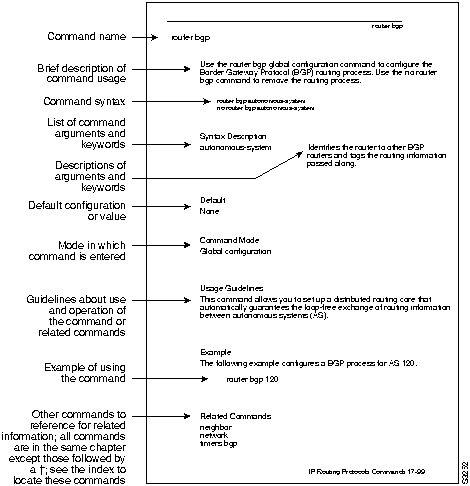
Figure 1 explains the fields of a typical command reference page.
Figure 1 : Typical Command Reference Page Fields
Copyright 1988-1996 © Cisco Systems Inc.



