Banner
HomeTOCPrevNextGlossSearchHelp

PDF

Table of Contents

Adding Additional Dynamic Random-Access Memory in Cisco 760 Series and CiscoPro CPA760 Series Routers

Adding Additional Dynamic Random-Access Memory in Cisco 760 Series and CiscoPro CPA760 Series Routers

Adding Additional Dynamic Random-Access Memory in Cisco 760 Series and CiscoPro CPA760 Series Routers

Customer Order Number MEM760-512D=
or
CiscoPro Order Number CPA076-MEM-0.5D=

Read the information and follow the procedure described in this document to install an additional
0.5 MB of dynamic random-access memory (DRAM) in Cisco 760 series or CiscoPro CPA760 series routers.

You should install additional DRAM in existing Cisco 760 series and CiscoPro CPA760 series routers if you want to migrate to future software releases. Software releases later than Software Release 3.2(4) will require 1.5 MB of DRAM.


Note Cisco router models 761, 762, 765, and 766 (shipped after August 15, 1996) contain 1.5 MB of DRAM, so you do not need to add DRAM to these router models to install future Cisco 700 series software releases. Cisco router models 765-US, 765-CA, 765-CE, 765-NL, 765-UK,766-US, and 766-CA (shipped before August 15, 1996) contain 1 MB of DRAM. You must add at least an additional 0.5 MB of DRAM to these models to run future Cisco 700 series software releases.


Note CiscoPro router models CPA0761, CPA0762, CPA0765, and CPA0766 (shipped after September 1996) contain 1.5 MB of DRAM, so you do not need to add DRAM to these router models to install future CiscoPro CPA700 series software releases. CiscoPro router models CPA0765-US, CPA0765-CA, CPA0765-CE, CPA0765-NL, CPA0765-UK, CPA0766-US, and CPA0766-CA (shipped before September 1996) contain 1 MB of DRAM. You must add at least an additional
0.5 MB of DRAM to these models to run future CiscoPro CPA700 series software releases.


Preparing to Install Additional DRAM in Your Router

Before you install additional DRAM in your router, please read the safety information in this section.


Note Translations into multiple languages of the safety warnings in this document are available in the appendix "Translated Safety Warnings" in the Cisco 700 Series and CiscoPro CPA700 Series Installation and Configuration Guide publication. Additional guidelines related to regulatory compliance and safety are available in the Cisco 700 Series and CiscoPro CPA700 Series Public Network Certification publication.


Safety Recommendations

This document uses the following safety conventions:

fig_4.gif Warning The warning symbol means danger. You are in a situation that could cause bodily injury. Before you work on any equipment, be aware of the hazards involved with electrical circuitry and standard practices for preventing accidents.

fig_5.gif Warning Before working on equipment that is connected to power lines, remove jewelry (including rings, necklaces, and watches). Metal objects will heat up when connected to power and ground and can cause serious burns or weld the metal object to the terminals.

fig_6.gif Warning Before opening the chassis, disconnect the telephone-network cables to avoid contact with telephone-network voltages.

fig_7.gif Warning Before working on a system that does not have an on/off switch, unplug the power cord.


Required Tools and Parts

Following are the tools and parts required to install additional DRAM in your router:

  • Small Phillips screwdriver

  • 0.5-MB DRAM, one of the following:

    • NEC uPD424260L, 256Kx16, 70 ns, SOJ40, Cisco part number 15-1722-01

    • MITSUBISHI M5M44260AJ, 256Kx16, 70 ns, SOJ40, Cisco part number 15-1722-01

    • SAMSUNG KM416C256B, 256Kx16, 70 ns, SOJ40, Cisco part number 15-1722-01

You will need to disconnect the router from your network before you add additional DRAM. Schedule a convenient time to do this.


Note Save any hardware (for example, screws) you remove during this procedure; you will need them later to reinstall your router cover.


Installing DRAM

Take the following steps to install additional 0.5 MB of DRAM in your router:

Step 1 Before you begin, make sure you turn OFF the power to the router. The power switch is located on the rear panel of the router. Make sure you completely depress the switch to the 0 position (off).

Step 2 Unplug the router from the AC outlet (by pulling out the plug, not by pulling on the power cord).

fig_8.gif Caution Electrical equipment can be hazardous if it is misused. To prevent injury, never remove the cover from the router unless the router is switched OFF and unplugged.

Electrostatic discharge can damage components in the router. Discharge any electrostatic buildup by touching an unpainted metal surface before you touch any internal component.
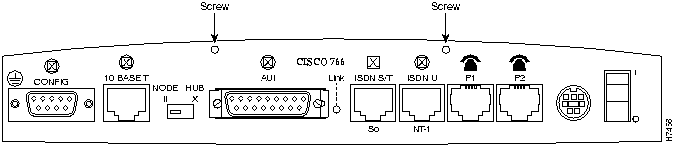
Step 3 To remove the router cover, remove the two Phillips screws that secure the cover to the rear panel of the router (see Figure 1).

Figure 1 : Location of Screws Securing the Router Cover

h7456.gif

Step 4 When you have removed the retaining screws, hold the sides of the cover and remove it by lifting it vertically until it clears the chassis.

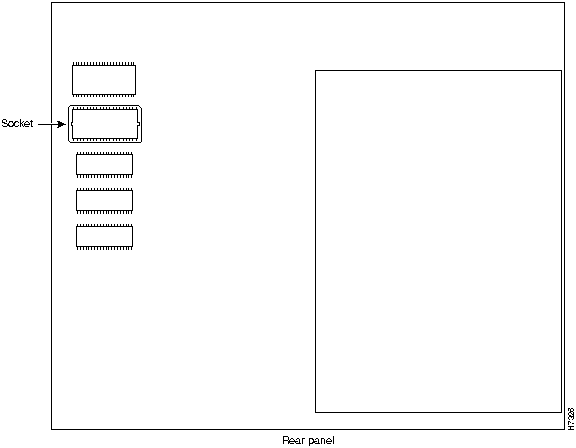
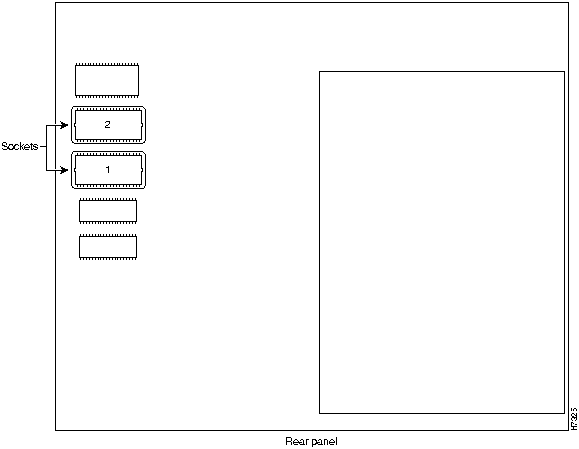
Figure 2 illustrates a Cisco 760 series or CiscoPro CPA760 series router with 1-MB DRAM installed (two empty sockets). Figure 3 illustrates the Cisco 760 series or CiscoPro CPA760 series router with 1.5-MB DRAM installed (one empty socket).

Figure 2 : Router with 1-MB DRAM Installed (Cover Removed)

h7325.gif


Note If you are installing an additional 0.5 MB DRAM in a Cisco 760 series or CiscoPro CPA760 series router that has two empty sockets, install the DRAM in the empty socket labeled 1, as shown in Figure 2.

Figure 3 : Router with 1.5-MB DRAM Installed (Cover Removed)

h7326.gif

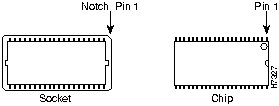
Step 5 Before installing the additional DRAM, make sure you align the DRAM correctly in its socket. DRAMs are physically keyed to show the location of pin 1 on the chip. Chips use a notch or small circle to indicate the location of pin 1 (see Figure 4). Your router contains a notched socket to show its pin 1 location.

Figure 4 : General DRAM Pin 1 Notations

h7327.gif

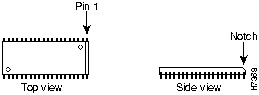
If you are installing a NEC DRAM, pin 1 is designated by the small circle next to the beveled edge of the chip (see Figure 5).

Figure 5 : NEC DRAM Pin 1 Notation

h7368.gif

Step 6 Align the notch or circle (pin 1) on the DRAM with the notch on the chip socket and gently press the pins into the socket.

fig_2.gif Caution Do not use excessive force when you install each chip into its socket. Excessive force can bend or damage the DRAM or socket pins.

Step 7 To replace the router cover, slowly lower it onto the chassis. Replace and tighten the two Phillips screws that secure the cover to the rear panel of the chassis.

Step 8 Plug in and power ON the router.

This completes the DRAM installation procedure. If necessary, use the software load command to load the latest version of software for your router. For more information on the software load command, refer to the Cisco 700 Series or CiscoPro CPA700 Series Command Reference publication.

When you have successfully installed the additional DRAM, the router should be ready for operation. You can now install a new version of software.


Troubleshooting

If you are running CiscoPro CPA700 series Software Release 3.2(4) or greater, use the show memory command to find the total memory installed in your CiscoPro CPA700 series router. The following shows a typical show memory command output:

NVStore Used:796, Remaining 1230 (Deleted 18 + Unused 1212), Total 2026
RamStore Used: 0, Remaining 10000, Total 10000
RAM Size = 0xf80000

Table 1 lists the RAM size values reported by the show memory command and their corresponding RAM size in Megabytes.

Table 1 : Show Memory Command RAM Sizes

RAM Size (hexadecimal) Model Memory on Board
0xf800 CPA750 Series 1-MB
0x10000 CPA760 Series 1-MB
0x18000 CPA760 Series 1.5-MB
0x20000 CPA760 Series 2-MB


DRAM Installation Problems

If all the LEDs on the front panel are on when you power on your router, there was most likely a problem with installing a DRAM chip. The most common DRAM installation problem is a bent or misaligned pin. If all the LEDs on the front panel are on for three to four seconds then start flashing, immediately power off the router. Repeat Step 1 through Step 4 to remove the cover and carefully inspect the installation of each DRAM chip for a bent or misaligned pin.

fig_3.gif Caution DRAMs and other components may become very hot during operation if installed incorrectly. Do not touch any component until the router has time to cool.


Obtaining Service and Support

For service and support for a product purchased from a reseller, contact the reseller. Resellers offer a wide variety of Cisco service and support programs, which are described in the section "Service and Support" in the information packet that shipped with your chassis.


Note If you purchased your product from a reseller, you can access Cisco Connection Online (CCO) as a guest. CCO is Cisco Systems' primary, real-time support channel.Your reseller offers programs that include direct access to CCO's services.

For service and support for a product purchased directly from Cisco, use CCO.


Cisco Connection Online

CCO is Cisco Systems' primary, real-time support channel. SMARTnet customers and partners can self-register on CCO to obtain additional content and services.


Note If you purchased your product from a reseller, you can access CCO as a guest. Your reseller offers programs that include direct access to CCO's services.

Available 24 hours a day, 7 days a week, CCO provides a wealth of standard and value-added services to Cisco's customers and business partners. CCO services include product information, software updates, release notes, technical tips, the Bug Navigator, configuration notes, brochures, descriptions of service offerings, and download access to public and authorized files.

CCO serves a wide variety of users through two interfaces that are updated and enhanced simultaneously---a character-based version and a multimedia version that resides on the World Wide Web (WWW). The character-based CCO supports Zmodem, Kermit, Xmodem, FTP, and Internet e-mail, and is excellent for quick access to information over lower bandwidths. The WWW version of CCO provides richly formatted documents with photographs, figures, graphics, and video, as well as hyperlinks to related information.

You can access CCO in the following ways:

  • WWW: http://www.cisco.com.

  • WWW: http://www-europe.cisco.com.

  • WWW: http://www-china.cisco.com.

  • Telnet: cco.cisco.com.

  • Modem: From North America, 408 526-8070; from Europe, 33 1 64 46 40 82. Use the following terminal settings: VT100 emulation; databits: 8; parity: none; stop bits: 1; and baud rates up to 14.4 kbps.

For a copy of CCO's Frequently Asked Questions (FAQ), contact ccohelp@cisco.com. For additional information, contact ccoteam@cisco.com.


Note If you need technical assistance with a Cisco product that is under warranty or covered by a Cisco maintenance contract, contact Cisco's Technical Assistance Center (TAC) at 800 553-2447, 408 526-7209, or tac@cisco.com.

Please use CCO to obtain general information about Cisco Systems, Cisco products, or upgrades. If CCO is not accessible, contact 800 553-6387, 408 526-7208.


fig_1.gif

HomeTOCPrevNextGlossSearchHelp
-

Copyright 1988-1996 © Cisco Systems Inc.