|
|

4-Port Token Ring UTP/STP Universal Feature Card Planning and Installation Guide
The 4-port Token Ring UTP/STP Universal Feature Card (UFC) provides four additional Token Ring connections for the base Catalyst 2600 Token Ring Switch. The ports of this UFC support Token Ring twisted-pair (UTP/STP) media connections via RJ-45 connectors. Similar to the ports of the base Catalyst 2600, each port can be connected to either shared or dedicated media. The ports can also be connected to ports of another Catalyst 2600, forming a TokenChannel. (For more information about TokenChannels, refer to the Catalyst 2600 Token Ring Switch User Guide.)
Table 1 lists the operational parameters.
Table 1 : Operational Parameters
| Temperature | 10° to 40°C (50° to 104°F) |
| Relative Humidity | 8% to 80% |
| Maximum Wet-Bulb Temperature | 27°C (81°F) |
| Calorific Value | 10 kcal/hr (40 Btu/hr) |
| Electrical Power | 12 watts |
Table 2 lists the physical dimensions.
| Width | 170 mm (6.7 in) |
| Depth | 214 mm (8.4 in) |
| Height | 25 mm (1 in) |
| Weight | 0.3 kg (.6 lb) |
The faceplate of the UFC has 14 LEDs. There are three LEDs for each of the four ports and two LEDs for the UFC itself.

Figure 1 : Front of 4-Port UTP/STP Token Ring UFC
Table 3 lists the LEDs for the ports (located on the right side of the UFC) and their meanings.
| LED | Location | State | Meaning |
|---|---|---|---|
| Connect | Top | On | Connected. |
| Off | Disabled or faulty port (if the UFC Fault LED is on). | ||
| Blinking | Attempting to connect. | ||
| FDX | Middle | On | The port has been set to full-duplex mode. |
| Off | The port has been set to half-duplex mode. | ||
| Tx/Rx | Bottom | On | Data is being transmitted or received by the port. |
Table 4 lists the LEDs for the UFC (located on the left side of the UFC) and their meanings.
| LED | Location | State | Meaning |
|---|---|---|---|
| OK | Middle | On | The UFC is working correctly. |
| Off | The UFC is not working correctly. | ||
| Blinking | Diagnostics are in progress. | ||
| Fault (Unlabeled) |
Bottom | On | A UFC failure has occurred. |
| Off | The UFC is working correctly. | ||
| Blinking | Diagnostics are in progress. |
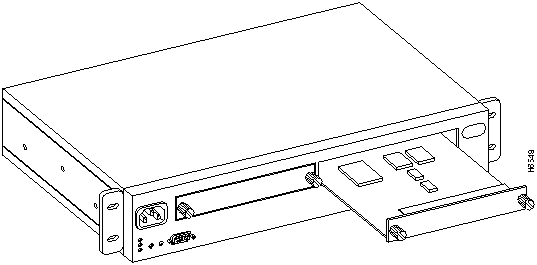
This UFC contains static-sensitive devices. Please follow proper ESD handling procedures (wristband with ground strap, ESD mat, etc.) when installing this UFC into your Token Ring Switch chassis.

To install the UFC, perform these steps:
Figure 2 : Installing the UFC Cabling the UFC Ports to Other Devices
This section provides instructions for connecting devices such as hubs, servers, PCs, and workstations to the UFC. When making a connection, remember the following:
To connect the cables, perform these steps:
After you have installed the UFC, perform the following steps to verify the installation:
The UFC ports are configured just like the other Token Ring ports. They appear as additional ports on any configuration panel where ports are listed. The numbers reflect the slot location of the UFC. For example, if the Catalyst 2600 has eight ports, the UFC ports are displayed after port eight on the various port configuration panels and are designated as ports 1-1, 1-2, 1-3, and 1-4. For more information about configuring ports on the Catalyst 2600, refer to the Catalyst 2600Token Ring Switch User Guide.
This section provides suggestions for resolving problems with the UFC that are indicated by the LEDs and problems with the individual ports.
Problems Indicated by the LEDs
If you are installing the UFC and the LEDs do not come on when the Catalyst 2600 is powered on, verify that the UFC is seated correctly.
During diagnostics, the UFC OK and Fault (unlabeled) LEDs blink in unison. If the UFC Fault LED is on at any other time, it indicates that the UFC is defective and needs to be serviced.
If you have been unable to get the UFC Connect LED to come on after installing a cable between a UFC port and another device, make sure that you are using the correct type of cable.
Problems with Individual Ports
With regard to troubleshooting, the UFC ports are like any other Token Ring port on the Catalyst 2600. You should follow the instructions contained in the Catalyst 2600 documentation to troubleshoot problems with individual ports on the UFC.
Copyright 1988-1996 © Cisco Systems Inc.