


|
|

This appendix provides information on cables that can be used with the Catalyst 2600 Token Ring Switch. It also provides minimum pinout information so that you can verify that the cables that you are using are correctly wired.
Connecting to the Management (EIA 232) Port
Table F-1 lists the type of cables that are used when connecting to the EIA 232 port on the Catalyst 2600.
Table F-1 : Connecting the Catalyst 2600 to the EIA 232 Port
| Cable Function | Cable Type Or Cable Solution |
|---|---|
| Connect a modem to the EIA 232 port | Connect one end of a straight-through, EIA 232 modem cable to the EIA 232 port and the other to the modem. |
| Connect a PC or other DTE device to the EIA 232 port | Connect one end of a crossover, EIA 232 cable to the EIA 232 port and the other end to the PC or DTE device. Attach a null-modem adapter to the EIA 232 port. Then, attach a straight-through modem cable to the null-modem adapter. |
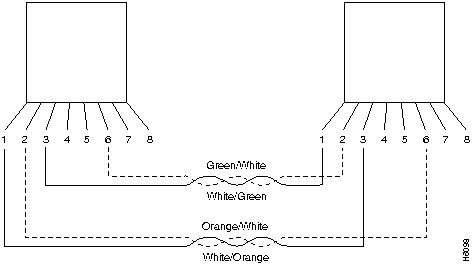
When connecting devices to the Token Ring ports on the Catalyst 2600, you must use a straight-through cable. Diagrams of these cables follow.
The Catalyst 2600 RJ-45 connector makes ground available on the shield and on pins 1, 2, 7, and 8. Shielded cables will provide continuity for ground to any shielded connector on the other end of the cable.
Figure F-1 : Straight-Through Cable
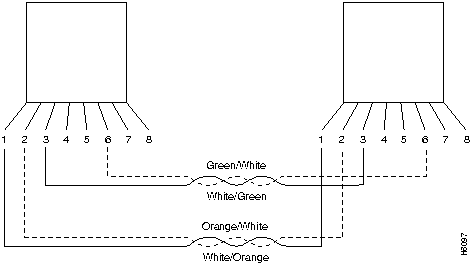
Figure F-2 : 150-Ohm Data Connector-to-RJ-45 Straight-Through Cable
EIA 232 Port and Cable Pinouts
The Catalyst 2600 has an EIA 232 port wired as a DTE. For this reason, you cannot use a straight-through modem cable to directly connect a terminal to the EIA 232 port.
For a terminal connection, you can use either a null-modem cable or a modem cable with a null-modem adapter attached. For a modem connection, you can use a standard modem cable.
This section provides pinout information for the cables you can use to connect to the EIA 232 port.
Table F-2 : Pinout of the EIA 232 Port
| Pin | Signal Name |
|---|---|
| Shell | CHS GND |
| 3 | TXD |
| 2 | RXD |
| 7 | RTS |
| 8 | CTS |
| 6 | DSR |
| 5 | SIG GND |
| 1 | CD |
| 4 | DTR |
| 9 | RI |
EIA 232 Modem Cable Connections
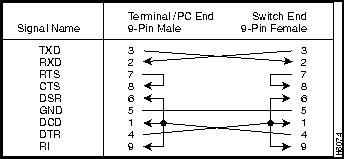
Use a straight-through modem cable to connect the EIA 232 port of the Catalyst 2600 to a modem.
Figure F-3 : EIA 232 Modem Cable
EIA 232 Null-Modem Connections
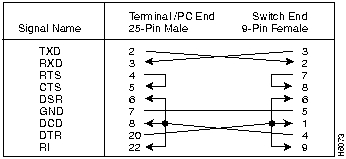
Use a null-modem (crossover) cable (Figure F-4) to connect the EIA 232 port to a terminal (DTE) with a 25-pin connector. Alternatively, you can use a modem cable and a null-modem adapter. DTR (pin 20) and RTS (pin 4) must be on, or high, on your terminal or in your terminal emulation program.
Figure F-4 : EIA 232 Null-Modem Cable for Terminal with 25-Pin Connector
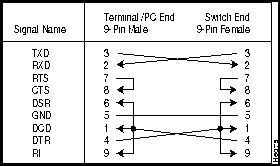
Use a null-modem (crossover) cable (Figure F-5) to connect the EIA 232 port to a terminal (DTE) with a 9-pin connector. Alternatively, you can use a modem cable and a null-modem adapter. DTR (pin 4) and RTS (pin 7) must be on, or high, on your terminal or in your terminal emulation program.
Figure F-5 : EIA 232 Null-Modem Cable for Terminal with 9-Pin Connector
The following tables contain the maximum supported lobe lengths. The maximum lengths reflect the longest lengths supported by the transmission characteristics of IEEE 802.5-compliant adapters. The recommended distances for the various cable types are set by North American and international commercial building wiring standards. These standards state that standards-compliant horizontal copper cabling shall not exceed 90 m (295 ft) leaving 10 m (33 ft) total for required patch cabling in both the office and telecommunications closet. It is good practice to follow the cabling standards guidelines when installing building cabling to help ensure a longer useful life for your cabling infrastructure, migration to new technologies, and maximum flexibility for the network configuration.
Table F-3 : Copper Cable Types
| Cable Type | Impedance |
|---|---|
| Type 1 and 1A | 150 ohm |
| Type 2 and 2A | 150 ohm |
| Type 8 | 150 ohm |
| Type 9 | 150 ohm |
| Type 3 | 100 ohm |
| Category 3 | 100 and 120 ohm |
| Category 4 | 100 and 120 ohm |
| Category 5 | 100 and 120 ohm |
Table F-4 : Multimode Optical Fiber Cable Types
| Cable Type |
|---|
| 65.5/125 Micron Fiber |
| 50/125 Micron Fiber |
| 100/140 Micron Fiber |
If you are installing new cabling for data applications, it is recommended that you use the following types of cable:
Cabling Length Recommendations for Dedicated-Media LAN Segments
The IBM Token Ring Network dedicated-media connections support only one attached entity (workstation or Catalyst 2600) per connection.
For all supported cable types except optical fiber, the recommended maximum cable lobe length is 190 m (625 ft) plus a 10-meter (33 ft) total allowance for the patch cords in the office and the telecommunications closets. For optical fiber, the recommended maximum cable lobe length is 2000 m (6562 ft).
In a Token Ring network, the section of cable that attaches a device to an access unit is called a lobe.
Lobe Wiring Rules for Dedicated-Media LAN Segments
Table F-5 and Table F-6 specify the maximum supported lobe lengths for the following types of cables. An additional 10 m (33 ft) per lobe length is allowed to accommodate patch cables, unless otherwise specified.
Table F-5 : Lobe Lengths for 150-Ohm Shielded Media
| Ring Speed | Types 1 and 1a, Types 2 and 2a | Type 8 | Type 9 |
|---|---|---|---|
| 4 Mbps | 750 m (2460 ft) | 376 m (1234 ft) | 500 m (1640 ft) |
| 16 Mbps | 290 m (952 ft) | 146 m (480 ft) | 200 m (656 ft) |
Table F-6 : Lobe Lengths for 100-/120-Ohm, Shielded or Unshielded Cable
| Ring Speed | 100-OHM Type 3 | 100-OHM Category 3 |
|---|---|---|
| 4 Mbps | 100 m (328 ft) | 250 m (820 ft) |
| 16 Mbps | Not Supported | 100 m (328 ft) |
Table F-7 : Lobe Lengths for 100- and 120-Ohm, Shielded or Unshielded Cable
| Ring Speed | 100- or120-OHM Category 4 | 100- or 120-OHM Category 5 |
|---|---|---|
| 4 Mbps | 350 m (1148 ft) | 350 m (1148 ft) |
| 16 Mbps | 200 m (656 ft) | 200 m (656 ft) |
Table F-8 : Lobe Lengths for 100-/120-Ohm Shielded or Unshielded Cable
| Ring Speed | 100-OHM Type 3 | 100-OHM Category 3 | 100- OR 120-OHM Category 4 | 100- or 120-OHM Category 5 |
|---|---|---|---|---|
| 4 Mbps | 100 m (328 ft) | 250 m (820 ft) | 350 m (1148 ft) | 350 m (1148 ft) |
| 16 Mbps | Not Supported | 100 m (328 ft) | 200 m (656 ft) | 200 m (656 ft) |
Cable Length and Lobe Wiring Rules for Shared-Media LAN Segments
The types of cables that can be used are the same as those described above for dedicated-media segments. The acceptable distances are defined by the hub or concentrator attached to the Catalyst 2600 port.
A Token Ring Network supports up to 260 attaching devices or nodes on a single network when using 150-ohm shielded media (type 1, 1A, 2, or 2A). When cable segments in the network are 100 or 120 ohm, this number is decreased to 132 (72 if using any 4-Mbps-only adapters or filters).

|
Copyright 1988-1996 © Cisco Systems Inc.