


|
|

Configuring Ethernet and Fast Ethernet Software
This chapter describes the procedure used to configure the Fast Ethernet ports on the supervisor engine module, the Fast Ethernet switching module, and the Ethernet switching module using the command line interface
The features you can customize have default values that will most likely suit your environment and probably need not be changed. The default values of these features are set as follows:
As the default configuration, all Ethernet and Fast Ethernet ports are enabled. To configure these ports, complete the tasks in the following sections:
Refer to the end of this chapter for switch configuration examples.
Assign a name to each port. To set a port name, perform the following tasks in privileged mode:
| Task | Command |
|---|---|
| Configure a name for a port. Figure 4-1 shows an example of the set port name command. | set port name mod_num/port_num [name_string] |
| Verify that the port name is correct. Figure 4-2 shows a sample display of the show port command. Port names are listed in the Name column. | show port mod_num/port_num |
Figure 4-1 : set port name Command Example
Console> (enable) set port name 1/1 Router Connection
Port 1/1 name set.
Console> (enable) set port name 1/2 Server 1
Port 1/2 name set.
show port Command Display Example
Console> (enable)         show port
Port Name                 Status   Vlan     Level  Duplex Speed Type
---- -------------------- -------- -------- ------ ------ ----- -------
1/1  Router Connection    ready    2        high     half   100 100BaseTX
1/2  Server 1             ready    1        high     half   100 100BaseTX
2/1                       ready    10       normal   half    10 10BaseT
2/2                       disabled 10       normal   half    10 10BaseT
2/3                       connect  10       normal   half    10 10BaseT
2/4                       connect  10       normal   half    10 10BaseT
.
.
.
2/23          0          0          0          0          0          0
2/24          0          0          0          0          0          0
Port Align-Err  FCS-Err    Xmit-Err   Rcv-Err
---- ---------- ---------- ---------- ----------
1/1           0          0          0          0
1/2           0          0          0          0
2/1           0          0          0          0
2/2           0          0          0          0
2/3           0          0          0          0
2/4           0          0          0          0
2/5           0          0          0          0
2/6           0          0          0          0
2/7           0          0          0          0
2/8           0          0          0          0
2/9           0          0          0          0
2/10          0          0          0          0
2/11          0          0          0          0
2/12          0          0          0          0

Port Single-Col Multi-Coll Late-Coll  Excess-Col Carri-Sens Runts     Giants
---- ---------- ---------- ---------- ---------- ---------- --------- ---------
1/1           0          0          0          0          0         0         -
1/2           0          0          0          0          0         0         -
2/1           0          0          0          0          0         0         -
2/2           0          0          0          0          0         0         -
2/3           0          0          0          0          0         0         -
2/4           0          0          0          0          0         0         -
2/5           0          0          0          0          0         0         -
2/6           0          0          0          0          0         0         -
2/7           0          0          0          0          0         0         -
2/8           0          0          0          0          0         0         -
2/9           0          0          0          0          0         0         -
2/10          0          0          0          0          0         0         -
2/11          0          0          0          0          0         0         -
2/12          0          0          0          0          0         0         -
Last-Time-Cleared
--------------------------
Sun Apr 21 1996, 11:51:37
Console>

Port Name                 Status     Vlan       Level  Duplex Speed Type

---- -------------------- ---------- ---------- ------ ------ ----- --------------

1/1  Management Port      notconnect 1          normal   half   100 100 BASE-TX

1/2  InterSwitchLink      connected  trunk      normal   half   100 100 BASE-TX

2/1  Dennis               connected  10         normal a-half  a-10 10/100 BASE-TX

2/2  Luis                 notconnect 10         normal   auto  auto 10/100 BASE-TX

2/3  Iris                 notconnect 10         normal   auto  auto 10/100 BASE-TX

2/4  Nancy                connected  10         normal a-half  a-10 10/100 BASE-TX

2/5  Arthur               notconnect 20         normal   auto  auto 10/100 BASE-TX

2/6  Ron                  notconnect 20         normal   auto  auto 10/100 BASE-TX

2/7  Connie               disabled   20         normal   auto  auto 10/100 BASE-TX

2/8  Bill                 notconnect 20         normal   auto  auto 10/100 BASE-TX

2/9                       notconnect 20         normal   auto  auto 10/100 BASE-TX

2/10                      notconnect 20         normal   auto  auto 10/100 BASE-TX

2/11                      notconnect 20         normal   auto  auto 10/100 BASE-TX

2/12                      notconnect 20         normal   full    10 10 BASE-T


Port Align-Err  FCS-Err    Xmit-Err   Rcv-Err

---- ---------- ---------- ---------- ----------

1/1           0          0          0          0

1/2           1          0          0          0

2/1           0          0          0          0

2/2           0          0          0          0

2/3           0          0          0          0

2/4          30          0          0          0

2/5           0          0          0          0

2/6           0          0          0          0

2/7           0          0          0          0

2/8           0          0          0          0

2/9           0          0          0          0

2/10          0          0          0          0

2/11          0          0          0          0

2/12          0          0          0          0


Port Single-Col Multi-Coll Late-Coll  Excess-Col Carri-Sens Giants

---- ---------- ---------- ---------- ---------- ---------- ----------

1/1           0          0          0          0          0          0

1/2         680        418          0          1          0          -

2/1         756         99          0          0          0          0

2/2           0          0          0          0          0          0

2/3           0          0          0          0          0          0

2/4         409        403          0         11          0       1256

2/5           0          0          0          0          0          0

2/6           0          0          0          0          0          0

2/7           0          0          0          0          0          0

2/8           0          0          0          0          0          0

2/9           0          0          0          0          0          0

2/10          0          0          0          0          0          0

2/11          0          0          0          0          0          0

2/12          0          0          0          0          0          0


Last-Time-Cleared

--------------------------

Wed Dec 27 1995, 16:09:47

Console> (enable)
Setting the Port Priority Level
| Task | Command |
|---|---|
| Configure the priority level for each port. Figure 4-3 shows an example of the set port level command. | set port level mod_num/port_num normal | high |
| Verify that the port priority level is correct. Figure 4-2 shows a sample display of the show port command. Port priority levels are listed in the Level column. | show port mod_num/port_num |
Figure 4-3 : set port level Command Example
        Console> (enable) set port level 1/1 high
Port 1/1 level set to high.
Console> (enable) set port level 1/2 high
Port 1/2 level set to high.
Setting the Port Speed
Configure the port speed for the 100BaseTX ports on the 10/100 Mbps Fast Ethernet Switching module if desired. To set the port speed for a port, perform the following steps in privileged mode:
| Task | Command |
|---|---|
| Set the port speed of a port. Figure 4-4 shows an example of the set port speed command. | set port speed <mod_num/port_num> <10|100|auto> |
| Verify that the port speed has been set correctly. | show port mod_num/port_num |
Figure 4-4 : set port speed Command Example
        Console> (enable) set port speed
Usage: set port speed <mod_num/port_num> <10|100|auto>
Console> (enable) set port speed 2/1 auto

Port 2/1 speed set to auto-sensing mode.
Console> (enable) set port speed 2/2 10

Port 2/2 speed set to 10 Mbps.
Console> (enable) set port speed 2/3 100
Port 2/3 speed set to 100 Mbps.
Setting the Port Transmission Type
Set the transmission type to full or half duplex for the ports that will be used. To set the transmission type of a port, perform the following steps in privileged mode:
| Task | Command |
|---|---|
| Set the transmission type of a port. Figure 4-5 shows an example of the set port duplex command. | set port duplex mod num/port num full | half |
| Verify that the transmission type has been set correctly. Figure 4-2 shows a sample display of the show port command. The transmission type is listed in the Duplex column. | show port mod_num/port_num |
Figure 4-5 : set port duplex Command Example
        Console> (enable) set port duplex 2/1 half
Port 2/1 set to half-duplex.
Console> (enable) set port duplex 2/2 half
Port 2/2 set to half-duplex.
Multiple Switch VLAN Configuration Example
VLAN groups can be set up across multiple Catalyst 2900 if the switches have any two ports of the same VLAN connected, as shown in the example in Figure 4-7. You need to configure the VLANs individually for both switches using the set vlan command.
Figure 4-6 : Multiple Catalyst 2900 VLAN Configuration
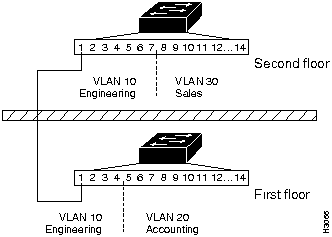
The VLANs for the Catalyst 2900 on the first floor were configured as follows:
system1> (enable)         set vlan 10 2/1-4
VLAN 10 modified.
VLAN 1 modified.
VLAN    Mod/Ports
10      2/1-4
system1> (enable) set vlan 20 2/5-14
VLAN 20 modified.
VLAN 1 modified.
VLAN    Mod/Ports
20      2/5-14
VLANs for the Catalyst 2900 on the second floor were configured as follows:
system2> (enable)         set vlan 10 2/1-7
VLAN 10 modified.
VLAN 1 modified.
VLAN    Mod/Ports
10      2/1-7
system2> (enable) set vlan 30 2/8-14
VLAN 30 modified.
VLAN 1 modified.
VLAN    Mod/Ports
30      2/8-14

|
Copyright 1988-1996 © Cisco Systems Inc.