|
|

This chapter describes the equipment and site requirements for installing the Catalyst 2900. It includes the power and cabling requirements that must be in place at the installation site and describes additional equipment you will need to complete the installation and the environmental conditions your site must meet to maintain normal operation. Instructions for unpacking the system and additional equipment are provided in the document Unpacking Instructions, which is attached to the outside of the shipping container.
This chapter includes information about the following preinstallation requirements:
The following guidelines will help to ensure your safety and protect the equipment. This list is not inclusive of all potentially hazardous situations that you may be exposed to as you install the switch, so be alert.
The switch chassis weighs 41pounds. The chassis is not intended to be moved frequently. Before you install the switch, ensure that your site is properly prepared so you can avoid having to move the chassis later to accommodate power sources and network connections.
Two people are required to lift the chassis. Whenever you lift the chassis or any heavy object, follow these guidelines:
Figure 2-1 : Unsafe Lifting Practices
Follow these basic guidelines when working with any electrical equipment:
In addition, use the guidelines that follow when working with any equipment that is disconnected from a power source but still connected to telephone wiring or other network cabling.
This section discusses the site environment requirements for the switch chassis.
The environmental monitor in the switch protects the system and components from potential damage from overvoltage and overtemperature conditions. To assure normal operation and avoid unnecessary maintenance, plan your site configuration and prepare your site before installation. After installation, make sure the site maintains an ambient temperature of 32 to 104°F (0 to 40°C), and keep the area around the chassis as free from dust as is practical.
The Catalyst 2900 should be installed in an enclosed, secure area such as a wiring closet. The wiring closet provides security, ensuring that only qualified personnel have access to the switch and control of the environment.
The 175W, AC-input power supply uses a power factor corrector (PFC) that allows it to operate on input voltage and current within the ranges of 100 to 240 VAC and 47 to 63 Hz.
Note the power consumption rating in Table A-1 in the appendix "System Specifications" for each unit before it is connected.
The following are guidelines for setting up the plant wiring and cabling at your site. When planning the location of the new system, consider the distance limitations for signaling, electromagnetic interference (EMI), and connector compatibility.
When wires are run for any significant distance in an electromagnetic field, interference can occur between the field and the signals on the wires. This fact has two implications for the construction of plant wiring:
If wires exceed recommended distances, or if wires pass between buildings, give special consideration to the effect of a lightning strike in your vicinity. The electromagnetic pulse (EMP) caused by lightning or other high-energy phenomena can easily couple enough energy into unshielded conductors to destroy electronic devices. If you have had problems of this type in the past, you may want to consult experts in electrical surge suppression and shielding.
Most data centers cannot resolve the infrequent but potentially catastrophic problems just described without pulse meters and other special equipment. These problems can take a great deal of time to identify and resolve, so take precautions by providing a properly grounded and shielded environment, and pay special attention to issues of electrical surge suppression.
Ethernet and Fast Ethernet Connections The maximum distances for Ethernet network segments and connections depend on the type of transmission cable used; for example, unshielded twisted-pair (10BaseT). The IEEE recommends a maximum distance of 328 feet (100 meters) between station (connection) and switch for 10BaseT connections using category 5 UTP. See Table 2-1 for maximum cable distances.
Table 2-1 : Ethernet Maximum Transmission Distances
Multimode Power Budget Example with Sufficient Power for Transmission
The following is an example of multimode power budget calculations based on the following variables:
Estimate the power budget as follows:
The value of 2.5 dB indicates that this link would have sufficient power for transmission.
Using Statistics to Estimate the Power Budget
Statistical models more accurately determine the power budget than the worst-case method. Determining the link loss with statistical methods requires accurate knowledge of variations in the data link components. Statistical power budget analysis is beyond the scope of this document. For further information, refer to User-Network Interface (UNI) Forum specifications, International Telecommunications Union Telecommunications Standardization Sector (ITU-T) standards, and your equipment specifications.
For Further Reference
The following publications contain information on determining attenuation and power budget:
Serial Connections As with all signaling systems, serial signals can travel a limited distance at any given bit rate; generally, the slower the baud rate, the greater the distance. Table 2-2 shows the standard relationship between baud rate and distance for EIA/TIA-232 signals.
Table 2-2 : IEEE Standard EIA/TIA-232 Transmission Speed Versus Distance
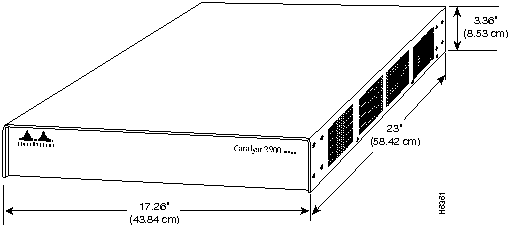
A standard rack-mount kit is provided for mounting the switch in a standard 19-inch equipment rack. The rack-mount kit is not suitable for use with telco-type equipment racks or those with obstructions (such as a power strip) that could impair access to the switching modules and power supplies. Figure 2-2 show the chassis footprint and outer dimensions.
Figure 2-2 : Chassis Footprint and Outer Dimensions
To use the standard rack-mount kit, your equipment rack must meet the following requirements:
When planning your rack installation, consider the following guidelines:
In addition to the preceding guidelines, review the precautions for avoiding overtemperature conditions in the section "Equipment-Rack Ventilation" later in this chapter.
The switch operates as a standalone system mounted in a rack in a secure wiring closet. It requires a dry, clean, well-ventilated, and air-conditioned environment. An internal fan assembly pulls cooling air through the chassis from the right side (intake) to the left side (exhaust) when facing the front of the system. The flow of ambient air must be maintained to ensure normal operation. If the airflow is blocked or restricted, or if the intake air is too warm, an overtemperature condition can occur. Under extreme conditions, the environmental monitor will shut down the system to protect the system components.
To ensure normal operation and avoid unnecessary maintenance, plan your site configuration and prepare your site before installation. After installation, make sure the site maintains an ambient temperature of 0 to 40°C (32 to 104°F), and keep the area around the chassis as free from dust as is practical. For a description of the environmental monitor and status levels, refer to the section "Environmental Monitoring and Reporting Functions" in the chapter ""
Table 2-3 lists the operating and nonoperating environmental site requirements. To maintain normal operation and ensure high system availability, maintain an ambient temperature and clean power at your site. The following ranges are those within which the switch will continue to operate; however, a measurement that is approaching the minimum or maximum of a range indicates a potential problem. You can maintain normal operation by anticipating and correcting environmental anomalies before they exceed the maximum operating range.
Table 2-3 : Specifications for Operating and Nonoperating Environments
Planning a proper location for the switch and the layout of your equipment rack or wiring closet is essential for successful system operation. Equipment placed too close together or inadequately ventilated can cause system overtemperature conditions. In addition, chassis panels made inaccessible by poor equipment placement can make system maintenance difficult. Following are precautions that can help avoid problems during installation and ongoing operation.
Follow these general precautions when planning your equipment locations and connections:
If you plan to install the switch in an equipment rack, follow these precautions to avoid overtemperature conditions. See also the guidelines that are provided in the section "Equipment Racks" earlier in this chapter:
For a functional description of the environmental monitor and the status levels, refer to the section "Environmental Monitoring and Reporting Functions," in the chapter "What Is the Catalyst 2900?"
Take the following precautions when planning power connections to the switch:
When preparing your site for network connections to the switch, you must consider numerous factors related to each type of interface:
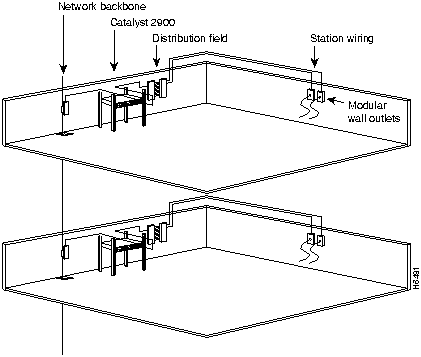
The network cabling components shown in Figure 2-3 consist of the following:
Figure 2-3 : Network Cabling Components
Additional and Optional Connection Equipment
You may need some of the following data communications equipment to complete your installation:
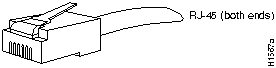
You will need an Ethernet transceiver and transceiver cable between each Ethernet port and the Ethernet network. You can use three different Ethernet connectors:
Figure 2-4 : Ethernet RJ-45 Interface Cable Connectors
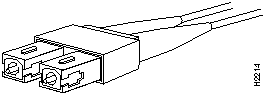
Figure 2-5 : Multimode Fiber-Optic Fast Ethernet Connector (SC Type)
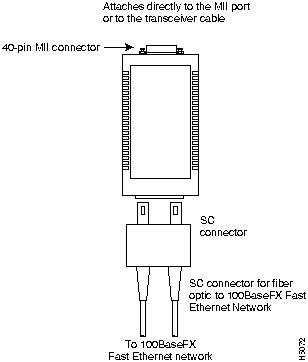
For multimode fiber-optic cabling (100BaseFX at 100 Mbps), Fast Ethernet transceivers are available from a variety of sources. Figure 2-6 shows examples of transceivers and connection equipment. You can connect either Ethernet Version 1 or Version 2/IEEE 802.3 interfaces; the switch automatically supports both types.
Figure 2-6 : Fast Ethernet Transceivers and Connection Equipment
When planning your connections, consider the types and locations of connectors on adjacent switching modules to avoid having the transceiver overlap and impair access to other connections.
For UTP and fiber optic cabling, Fast Ethernet transceivers are available from a variety of sources. Figure 2-7 shows examples of transceivers and connection equipment. You can connect either Ethernet Version 1 or Version 2/IEEE 802.3 interfaces; the switch automatically supports both types.
Figure 2-7 : Fast Ethernet Transceivers and Connection Equipment
Console Port Connection Equipment
The supervisor engine module contains an EIA/TIA-232 asynchronous console port (DB-25 receptacle). Synchronous transmission uses precise timing to synchronize transmissions between the transmitter and receiver, and maintains separate clock and data signals. Asynchronous transmission uses control bits instead of a precise clock signal to indicate the beginning and end of characters.
When connecting a serial device, consider the cable as an extension of the switch for an external connection; therefore, use null-modem cable to connect the switch to a remote DCE device such as a modem or data service unit (DSU), and use a straight-through cable to connect the switch to a DTE device such as a terminal or PC.
You will need a terminal to configure the interfaces and bring up the system. You will also need an EIA/TIA-232 DCE console cable to connect the terminal to the console port on the supervisor engine module. After you establish normal operation, you can disconnect the terminal. Both ends of the console cable should be EIA/TIA-232 plugs to enable you to connect to the supervisor engine module DCE console port DB-25 receptacle and to the DB-25 receptacles used on the DTE ports on most terminals.
Before you connect a terminal to the console port, configure the terminal to match the switch console port, as follows:
Unpacking and Repacking the System
Unpacking instructions are provided in the document Unpacking Instructions, which is attached to the outside of the shipping container; you should have already read that document and followed the procedures to unpack your Catalyst 2900. Proceed to the next section "Checking the Contents," to verify that you have received everything.
Take the following steps to check the contents of your Catalyst 2900 package:
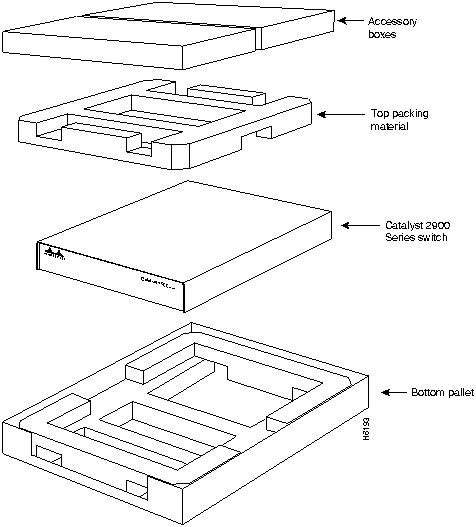
In the event you need to return or move the Catalyst 2900, the following instructions describe repacking the switch using the original packaging material:
Figure 2-8 : Catalyst 2900 Packing Material
Copyright 1988-1996 © Cisco Systems Inc.





Transceiver Speed
Cable Type
Duplex Mode
Maximum Distance Between Stations
100 Mbps
Category 5 UTP
Full and half
328 feet (100 meters)
100 Mbps
Multimode fiber
Full
1.2 miles (2 km)
100 Mbps
Multimode fiber
Half
1,312 feet (400 meters)
Rate (bps)
Distance (Feet)
Distance (Meters)
2400
200
60
4800
100
30
9600
50
15
19200
25
7.6
38400
12
3.7
56000
8.6
2.6


Minimum
Maximum
Temperature, ambient operating
32°F (0°C)
104°F (40°C)
Temperature, ambient nonoperating and storage
--4°F (--20°C)
149°F (65°C)
Humidity (RH), ambient (noncondensing) operating
10%
90%
Humidity (RH), ambient (noncondensing) nonoperating and storage
5%
95%
Altitude, operating and nonoperating
Sea level
10,000' (3050 m)
Vibration, operating
5--200 Hz, 0.5 g (1 octave/min.)
Vibration, nonoperating
5--200 Hz, 1 g (1 octave./min.)
200--500 Hz, 2 g (1 octave/min.)