


|
|

Monitoring Port Activity with SwitchProbe
This chapter explains how to monitor a port on the Catalyst 3000 using SwitchProbe.
This chapter covers the following topics:
The SwitchProbe port, located on the Catalyst 3000 back panel, connects to probe devices such as protocol analyzers, RMON probes, and other Ethernet-compliant devices. This enables you to decode packet contents for troubleshooting or to analyze network characteristics. Using the SwitchProbe port, you can monitor any one of the 10Base-T ports on the Catalyst 3000.
The SwitchProbe port can not monitor the 100Base-TX ports.
The SwitchProbe port is used for monitoring only; it cannot be used to transmit data. Therefore, monitoring the Catalyst 3000 with an RMON probe requires the use of two ports: one to listen through the SwitchProbe port and one to communicate with the SNMP station.
To monitor several Catalyst 3000 devices using a single monitoring device, connect each SwitchProbe port to a hub, then connect the monitoring device to the hub. Do not connect any ports other than SwitchProbe ports. Only one SwitchProbe may be active at once; disable all other SwitchProbe ports by entering 0 in the SwitchProbe Port field of the SwitchProbe Configuration menu (see the section, Selecting the Port to Analyze, later in this chapter).
When traffic at a port that is being monitored by the SwitchProbe is very heavy (above 80 to 90%), the SwitchProbe (not the port) may drop some packets.
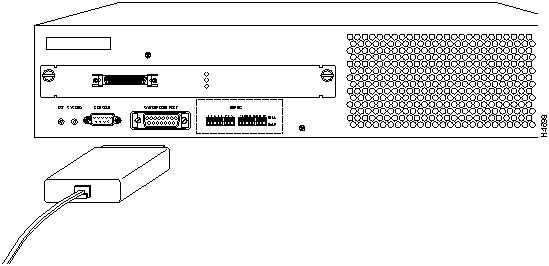
Use a standard Ethernet transceiver to connect the probe device to the SwitchProbe AUI port located on the back of the Catalyst 3000.
Figure 10-1 : Connecting a Probe Device to the SwitchProbe Port
You can select which port you want to analyze using either the network management console connected to the EIA RS-232 port of the Catalyst 3000, or using an SNMP network management application such as the Cisco SwitchVision application or a Telnet session.
SwitchProbe Configuration Screen
Follow these steps to select the port to analyze:
Copyright 1988-1996 © Cisco Systems Inc.

