|
|

This appendix lists cables that have been tested and verified for use with the Catalyst 3000. It also includes minimum pin-out information, if you use a cable that is not listed, you must verify that the cables used in your installation are wired correctly.
This appendix covers the following topics:
Twisted-pair Cable and Connector Pin-outs
10Base-T ports 1 through 15 on the Catalyst 3000 are always MDI-X, and port 16 can be set to MDI-X or MDI. Cabling these ports to different types of equipment will require a straight-through or a crossover cable.
A "straight-through" cable is used when connecting two ports that are not set to the same MDI mode or not set to the same MDI-X mode. 10Base-T ports 1 through 15 on the Catalyst 3000 are always MDI-X, and port 16 can be set to MDI-X. When connecting these MDI-X ports to ports that are MDI, such as PCs or servers, use a straight-through cable. A straight-through cable has each internal twisted pair of wires connected to the same pin number at each end. The twisted-pair wires must be twisted throughout the entire length of the cable. The wiring sequence must conform to AT&T 258A (not USOC). Figure A-1 shows the wiring diagram for a straight-through cable, and Table A-1, "10Base-T Cable Pin-Out" is a listing of the signals used on each pin.
Figure A-1 : Straight-through Cable Pin-out
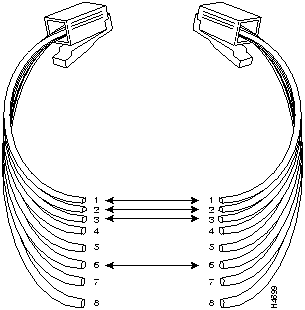
Pins 1 and 2 must be a twisted pair.
Pins 3 and 6 must be a twisted pair.
Pins 4, 5, 7, and 8 are not used in this application, although they may be wired in the cable.
The following table lists the pin numbers and their respective signal names for a 10Base-T straight-through cable.
Table A-1 : 10Base-T Cable Pin-out
| Pin | Signal | Note |
|---|---|---|
| 1 | TX+ |
Pins 4, 5, 7, and 8 are not used. |
| 2 | TX- | |
| 3 | RX+ | |
| 6 | RX- |
For cabling between two switches, the transmit and receive pairs must be reversed. You can do this in one of two ways:
Figure A-2 : Crossover Cable Pin-out
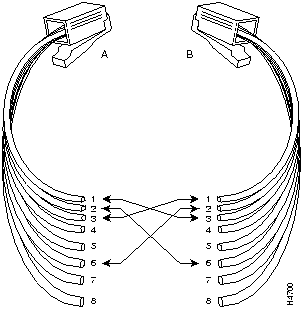
Pins 1 and 2 at A, must be a twisted pair wired through to pins 3 and 6, respectively, at B.
Pins 3 and 6 at A, must be a twisted pair wired through to pins 1 and 2, respectively, at B.
Pins 4, 5, 7, and 8 are not used in this application, although they may be wired in the cable.
A short crossover cable can be used to adapt a straight-through twisted-pair cable for "cascading" switches through the twisted-pair ports.
The 100Base-TX expansion module network port is always MDI-X. Cabling to different types of equipment will require a straight-through or a crossover cable.
Table A-2 : AUI Cable Pin-outs
| Transceiver end
15-pin Female |
Switch end
15-pin Male |
Signal |
|---|---|---|
| 2 | 2 | Control In circuit A |
| 3 | 3 | Data Out circuit A |
| 4 | 4 | Data In circuit Shield (common drain) |
| 5 | 5 | Data In circuit A |
| 6 | 6 | Voltage common |
| 9 | 9 | Control In circuit B |
| 10 | 10 | Data Out circuit B |
| 12 | 12 | Data In circuit B |
| 13 | 13 | Voltage plus (+12 @ 500ma) |
For this connection, you can use:
Some longer cables may have all 15 pins wired. See the IEEE 802.3 standards document for definitions of the pins not shown here.
Table A-3 : EIA-232 Cable Description
| Cable Function | Port Type on Terminal, PC, or Modem | Standard Cable or Cable Solution |
|---|---|---|
| Connecting a terminal or PC to the console port with an EIA(RS)-232-C | 25-pin female | Attach a null modem adapter&daggerdbl; (Tandy Null Modem Adapter No. 26-1496 has been tested) to the console port. Then attach a straight-through modem cable to the null modem adapter. |
| 9-pin male | Use a Black Box PC/AT Serial Printer Cable (EVENBPC has been tested). OR:
Attach a null modem adapter to the console port. Then attach a modem cable (EVENBMC and Cablex PC have been tested) to the null modem adapter. |
|
| Connecting a modem to the console port | 25-pin female or male port | Straight-through EIA-232-C modem cable (standard cable) |
| * For these cables, the signals DTR (pin 20) and RTS (pin 4) must be on, or high, on your terminal or in your terminal emulation program.
&daggerdbl; The required minimum pin-out is provided in the section "Console Connector and Cable Pin-Outs." |
||
Console Connector and Cable Pin-outs
The Catalyst 3000 has a DB-9 console port that automatically detects baud rate. The default is 9600 baud; other supported baud rates are 1200, 2400, 4800, and 19200.
For a terminal connection, you use a null-modem cable or a straight cable with a null modem adapter attached.
For a modem connection, you can use a standard modem (straight) cable.
The following table and two figures detail pin assignment information for the cables you can use on the console port of the Catalyst 3000.
Table A-4 : Pin-out for the Console Port Connector
| Pin | Function |
|---|---|
| 1 | DCD |
| 2 | RXD |
| 3 | TXD |
| 4 | DTR |
| 5 | SIG GND |
| 6 | DSR |
| 7 | RTS |
| 8 | CTS |
| 9 | RI |
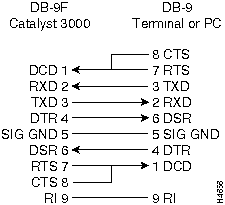
The following figures, (Figure A-3 and Figure A-4) detail pin assignment information for the cables you can use on the console port of the Catalyst 3000.
Figure A-3 : RS-232-C Null Modem Cable (for Terminal/PC with 25-pin Connector)
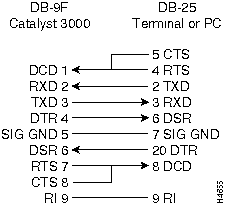
Figure A-4 : RS-232-C Null Modem Cable (for Terminal/PC with 9-pin Connector)

|
Copyright 1988-1996 © Cisco Systems Inc.