


|
|

This section lists specific site preparation specifications for each Cisco product. Included are any special requirements for your system, such as rack-mounting options, special power requirements, or cable connections.
The following is a list of the Cisco products covered in this section:
This section contains the hardware, software, and external connection requirements for the Cisco 200 series products, which include the Cisco 201, Cisco 202, Cisco 203, and Cisco 204.
Hardware and Software Requirements
Table 15 lists the hardware and software requirements for the Cisco 200 series.
Table 15 : Cisco 200 Series Minimum Hardware and Software Requirements
| Description | Specification |
|---|---|
| PC CPU type | 80386 or higher |
| PC type | Desktop |
| Memory | At least 1 MB |
| PC slot | One available half-length ISA slot |
| PC operating system | DOS version 5.0 or later |
| Windows | Version 3.1 or later |
| Windows for Workgroups | Version 3.11 or later |
| Windows 95 | Version 4.0 or later |
External Connection Requirements
This section contains the external connection requirements for the Cisco 200 series products.
This section contains physical specifications and external connection requirements for the Cisco 750 and 760 series routers, which include the Cisco 751, Cisco 752, Cisco 753, Cisco 765, and Cisco 766.
Table 16 lists the physical specifications for the Cisco 750 and 760 series routers.
Table 16 : Cisco 750 and 760 Series Physical Specifications
| Description | Specification |
|---|---|
| Dimensions (H x W x D) | Cisco 751 and 752: 1.5 x 6.2 x 9.5 in. (3.8 x 15.8 x 24.1 cm)Cisco 753: 1.5 x 7.5 x 9.5 in. (3.8 x 19.1 x 24.1 cm)Cisco 760 series:1.6 x 8.3 x 9.6 in. (4.1 x 21.1 x 24.4 cm) |
| Weight | Cisco 751 and 752: 1.4 lb. (.6 kg)Cisco 753: 1.9 lb. (.85 kg)Cisco 765: 1.6 lb. (0.7 kg)Cisco 766: 1.7 lb. (0.8 kg) |
| Power supply | External, Wall-mounted on 751 and 752External, Desktop-mounted on Cisco 753 and Cisco 760 series |
| Voltage | 100-120 or 220-240 VAC on Cisco 751 and 752100-250 VAC on Cisco 753 and Cisco 760 series |
| Frequency | 50 to 60 Hz |
| Operating temperature | 32 to 120°F (0 to 50°C) |
| Storage temperature | -- 30 to 160°F (-- 35 to 70°C) |
| Operating humidity | 20% to 95%, noncondensing |
External Connection Requirements
This section contains the external connection requirements for the Cisco 750 and 760 series routers.
This section contains the physical specifications and external connection requirements for the Cisco 1000 series, which includes the following models: the Cisco 1001 LAN Extender, the Cisco 1003, Cisco 1004, and the Cisco 1005 routers.
Table 17 lists the physical specifications for the Cisco 1000 series models.
Table 17 : Cisco 1000 Series Models Physical Specifications
| Description | Design Specification |
|---|---|
| Dimensions (H x W x D) | 1.75 x 8.0 x 8.3 in. (4.5 x 20. x 21 cm) |
| Weight | 6.0 lb (2.75 kg) |
| Input voltage | 12 VDCExternal power supply: 100 to 240 VAC |
| Frequency | 50 to 60 Hz |
| Power dissipation | 12W (maximum), 135.5 Btus/hour |
| Operating temperature | 32 to 104°F (0 to 40°C) |
| Nonoperating temperature | -- 40 to 185°F (-- 40 to 85°C) |
| Humidity (noncondensing) | 10 to 90% |
External Connection Requirements
This section contains the external connection requirements for the Cisco 1000 series.
This section contains the physical specifications and external connection requirements for the Cisco 2500 series. The specifications apply to the following Cisco 2500 series models:
Table 18 lists the physical specifications for Cisco 2500 series.
Table 18 : Cisco 2500 Series Physical Specifications
| Description | Specification |
|---|---|
| Dimensions (H x W x D) | Models 2501 to 2516 and 2520 to 2525: 1.75 x 17.5 x 10.56 in. (4.44 x 44.45 x 26.82 cm) Models 2517 to 2519: 3.0 x 19.0 in. (7.62 x 48.26 cm) |
| Weight (average shipping) | Models 2501 to 2516 and 2520 to 2525: 10 lb (4.5 kg) Models 2517 to 2519: 12.5 lb (5.7 kg) |
| Power consumption | For models 2501 to 2525: 40W |
| Input voltage and frequency,AC power supply | For models 2501 to 2516 and 2520 to 2525: 110 to 220 VAC, 50 to 60 Hz For models 2517 to 2519: 90 to 260 VAC, 47 to 63 Hz |
| Input voltage, DC power supply | 40 to 72 VDC |
| Current rating | For models 2501 to 2516 and 2520 to 2525: 1.0A at 60 Hz, 0.5A at 50 Hz For models 2517 to 2519: 5.0A at 60 Hz, 3.5A at 50 Hz |
| Operating temperature range | For models 2501 to 2516 and 2520 to 2525: 32 to 104°F (0 to 40°C) For models 2517 to 2519: 50 to 95°F (10 to 35°C) |
| Nonoperating temperature range | For models 2501 to 2516 and 2520 to 2525: -- 40 to 185°F (-- 40 to 85°C) For models 2517 to 2519: -- 4 to 185°F (-- 20 to 85°C) |
| Humidity (noncondensing) | For models 2501 to 2525: 5 to 95% |
| Noise level | 34 dBa @ 3' (0.914 m) |
External Connection Requirements for Fixed-Configuration Models
This section contains the external connection requirements for the Cisco 2500 series. The interfaces available for Cisco 2500 series products vary from model to model.
External Connection Requirements for Modular Router Modules
Only two Cisco 2500 series models include removable WAN modules: the Cisco 2524 and the Cisco 2525. The Cisco 2524 and Cisco 2525 routers provide LAN and WAN access in a modular router platform. The Cisco 2524 router includes an Ethernet (AUI or 10BaseT) LAN connection, and the Cisco 2525 router includes a Token Ring (STP or UTP) LAN connection. Both routers can accommodate up to three WAN modules: two synchronous serial and one ISDN.
The ISDN WAN modules are keyed so that you cannot insert them into the synchronous serial WAN slots. A blank slot cover is installed over unused slots to ensure proper air flow inside the chassis.
The synchronous serial WAN modules include the following external connectors:
The ISDN WAN modules include the following external connectors:
Following are the physical specifications and external connection requirements for the Cisco 4000 series products, which include the Cisco 4000-M, the Cisco 4500-M, and the Cisco 4700-M.
Table 19 contains the physical specifications for the Cisco 4000 series products.
Table 19 : Cisco 4000 Series Physical Specifications
| Description | Specification |
|---|---|
| Dimensions (H x W x D) | 3.4 x 17.6 x 17.7 in. (8.6 x 44.7 x 43.4 cm) |
| Weight | 24 lb (10.9 kg) |
| Power (heat) dissipation | 200W (682.6 Btu/hr) |
| Input voltage, current, and frequency | 100 to 240 VAC, 3.0 to 1.5A, 47to 63 Hz |
| Operating temperature | 32 to 104°F (0 to 40°C) |
| Nonoperating temperature | -- 40 to 185°F (-- 40 to 85°C) |
| Humidity (noncondensing) | 5 to 95% |
| Air flow and fan noise | Fan rated at 31 cfm, at 52 dBa |
| Agency approvals | UL 1950, CSA 22.2, TÜV-GS mark, EN 60950, FCC Class A, Canadian DOC Class A, VDE Class B, EN 55022 Class B, VCCI Class 2 |
External Connection Requirements
This section contains external connection requirements for the Cisco 4000 network processor modules, along with the other connections on the Cisco 4000 chassis.
All Cisco 4000 series models provide a configurable modular router platform using network processor modules (NPMs), individual removable cards used for external network connections.
The Cisco 4000 series routers can support combinations of up to three of the following NPMs:
Other External Connection Requirements
This section includes the other external connection requirements for Cisco 4000 series systems.
This section contains the physical specifications and the external connection requirements for the Cisco AS5100 access server.
Table 20 contains the physical specifications for the AS5100.
Table 20 : Cisco AS5100 Access Server Physical Specifications
| Specification | Description |
|---|---|
| AS5100 chassis capacity | Up to 17 front-loaded NACs, and their associated rear-loaded NICs. Two power supplies (both are required) |
| Power requirements | DC power supply nominal --48 VDC (--42 VDC to --60 VDC) with respect to ground AC power supply nominal 120V (90 to 132 VAC) @ 47 to 63 Hz, or strap-selectable nominal 240V (180 to 264 VAC) @ 47 to 63 Hz |
| Power supply output (maximum) | 330W45A @ +5.2V2A @ --5 V3.5A @ +12.2V3.5A @ --12.2V |
| Power supply input (maximum) |
470W1604 Btus4A (DC)10A (DC) |
| Operating temperature | 32 to 104oF (0 to 40oC) |
| Relative humidity | 0-95% noncondensing |
| Agency approvals | Complies with FCC Part 15 Class A EMI/RFI requirements; complies with FCC Part 68 for nationwide telephone systems; listed by Underwriters' Laboratories (UL), approved by the Canadian Standards Association (CSA), and is Department of Communications (DOC) certified |
Table 21 contains the physical specifications for the AS51 NAC and NIC cards.
Table 21 : AS51 NAC and NIC Physical Specifications
| Specification | Description |
|---|---|
| Power requirements(maximum) | 4A @ +5 VDC, 6.75W55 mA @ -- 5 VDC, 275 mW50 mA @ +12 VDC, 600 mW50 mA @ 12 VDC, 600 mW |
| Dimensions (L x H) | NAC: 12.45 x 6.4 in. (31.62 x 16.26 cm)NIC: 4.85 x 6.4 in. (12.32 x 16.26 cm) |
| Certification | Complies with FCC Part 15, UL-listed, CSA-approved |
Table 22 contains the physical specifications for the Quad Modem NAC and NIC cards.
Table 22 : Quad Modem NAC and NIC Physical Specifications
| Specification | Description |
|---|---|
| Power requirements(maximum) | 1.35A @ +5 VDC, 6.75W55 mA @ -5 VDC, 275 mW50 mA @ +12 VDC, 600 mW50 mA @ 12 VDC, 600 mW |
| Dimensions (L x H) | NAC: 12.45 x 6.4 in. (31.62 x 16.26 cm)NIC: 4.85 x 6.4 in. (12.32 x 16.26 cm) |
| Certification | Complies with FCC Part 15, UL-listed, CSA-approved |
Table 23 contains the physical specifications for the T1 NAC and NIC cards.
Table 23 : T1 NAC and NIC Physical Specifications
| Specification | Description |
|---|---|
| Power requirements | 1.5A @ 5 VDC0.1A @ 12 VDC5W |
| Dimensions (L x H) | NAC: 12.45 x 6.4 in. (31.62 x 16.26 cm)NIC: 4.85 x 6.4 in. (12.32 x 16.26 cm) |
| Heat | 17 Btus |
Table 24 contains the physical specifications for the network management NAC card.
Table 24 : Network Management NAC Physical Specifications
| Specification | Description |
|---|---|
| Power requirements (maximum) | 3.5A @ +5 VDC20 mA @ -- 5 VDC50 mA @ +12 VDC50 mA @ -- 12 VDC |
| Dimensions (L x H) | 12.45 x 6.4 in. (31.62 x 16.26 cm) |
| Certification | Complies with FCC Part 15 Class A, FCC Part 68, UL-listed, CSA-approved, and DOC-certified |
Table 25 contains the physical specifications for the network management Ethernet NIC card.
Table 25 : Network Management Ethernet NIC Physical Specifications
| Specification | Description |
|---|---|
| Power requirements | 1.5A @ +5 VDC50 mA @ +12 VDC50 mA @ -- 12 VDC |
| Dimensions (L x H) | 4.85 x 6.4 in. (12.32 x 16.26 cm) |
| Certification | Complies with FCC Part 15 Class A, FCC Part 68, UL-listed, CSA-approved, and DOC-certified |
External Connection Requirements
This section contains the external connection requirements for the AS5100 access server.
Cisco AS5200 Universal Access Server
This section contains the physical specifications and external connection requirements of the Cisco AS5200 universal access server.
Table 26 lists the physical specifications for the AS5200 access server.
Table 26 : Cisco AS5200 Universal Access Server Physical Specifications
| Description | Specification |
|---|---|
| Dimensions (H x W x D) | 3.5 x 17.5 x 15 in. two rack units (8.89 x 44.45 x 38.1 cm) |
| Weight | 25 lb (11.4 kg) |
| Input voltage, AC power supplyCurrent frequencyPower dissipation | 100 to 240 VAC1.0 to 2.0A50 to 60 Hz180W (maximum), 135.5 Btus/hour |
| Input voltage, DC power supplyMaximum input currentTypical input currentPower dissipationOutput voltage | -- 48 to -- 60 VDC6.0A4.0A180W (maximum)5.0 VDC |
| Alarm relay rating:VoltageCurrentMaximum switching powerMaximum switching voltage | 48 VDC3A150W220 VAC |
| Operating environment | 32 to 104°F (0 to 40°C) |
| Nonoperating temperature | -- 40 to 185°F (-- 40 to 85°C) |
| Operating humidity | 5 to 95%, noncondensing |
| Noise level | 34 dB @ 3 ft. (0.914 m) |
External Connection Requirements
The Cisco AS5200 access server has a 19-inch modular chassis that accommodates up to three feature cards. The feature cards should be a combination of one or two WAN cards and one or two modem carrier cards.
The types of cards and their external connection requirements are as follows:
Additional external connections for the Cisco AS5200 are as follows:
Cisco 7000 Series and 7500 Series
The following are the physical specifications and external connection requirements for the Cisco 7000 series and the Cisco 7500 series. The external connection requirements and rack mount requirements are the same for Cisco 7000 series and Cisco 7500 series. Physical specifications and power supply requirements vary from system to system. This section includes the following systems: the Cisco 7000 series---the Cisco 7000 and the Cisco 7010; the Cisco 7500 series---the Cisco 7505, Cisco 7507, and the Cisco 7513.
This section includes the physical specifications and power supply requirements of the Cisco 7000.
Table 27 lists the physical specifications for the Cisco 7000.
Table 27 : Cisco 7000 Physical Specifications
| Description | Specifications |
|---|---|
| Dimensions (H x W x D) | 19.25 x 17.5 x 25.1 in. (48.90 x 44.45 x 63.75 cm) |
| Weight | Chassis only: 76 lb (34.47 kg)1; chassis fully configured: 1 RP2, 1 SP (or SSP), or RSP7000 and RSP7000CI, 7 interface processors, and 2 power supplies: 145 lb (65.76 kg) |
| Power supply | 700W maximum |
| Power (heat) dissipation | 282W (962.5 Btu/hr), maximum configuration626W (2136.5 Btu/hr), maximum configuration530W (1808.9 Btu/hr), typical with maximum configuration |
| Total power (heat) dissipation | 1200W (4095.6 Btu/hr) |
| Input voltage and frequency | 100 to 240 VAC wide input with power factor corrector (PFC), 50 to 60 Hz |
| AC input rating | 12A maximum @ 90 VAC with chassis fully configured (AC-input power supplies) |
| DC input rating | -- 40 volts (V) minimum, -- 48V nominal, -- 72V maximum (AC-input power supplies) |
| Airflow | Dual blowers rated at a total of 140 cfm, at a noise level of 58 dBa |
| Humidity | 10 to 90% noncondensing |
| Agency approvals | Safety: UL 1950, CSA 22.2-950, EN60950, EN41003, AUSTEL TS001, AS/NZS 3260 EMI: FCC Class A, EN55022 Class B, VCCI Class 2 |
The Cisco 7000 contains either one 700W AC-input power supply or one 700W DC-input power supply. A second power supply, identical to the first, can be added for redundant power. These power supplies are automatically load sharing and redundant, which means a second power supply can be installed or replaced without interrupting system operation.
Each power supply should be connected to a separate AC or DC source, so that, in case of an input power line or power supply failure, the second power supply maintains uninterrupted system power. Ideally, an uninterruptible powers source (UPS) would be available for each AC-input power supply.
This section contains the physical specifications and power supply requirements for the Cisco 7010.
Table 28 lists the physical specifications for the Cisco 7010.
Table 28 : Cisco 7010 Physical Specifications
| Description | Specifications |
|---|---|
| Dimensions (H x W x D) | 10.5 x 17.5 x 17 in. (26.67 x 44.45 x 43.18 cm) |
| Weight | Chassis only (power supply and fan array): 46 lb (20.87 kg)Chassis fully configured: 1 RP1, 1 SP (or SSP), or RSP7000 and RSP7000CI, 3 interface processors: 70 lb (31.75 kg) |
| Power supply | 600W maximum |
| Power dissipation | 550W maximum configuration, 540W typical with maximum configuration |
| Heat dissipation | 715W (2440 Btu/hr) |
| Input voltage and frequency | 100 to 240 VAC wide input with power factor corrector (PFC), 50 to 60 Hz |
| AC input rating(AC-input power supply) | 9A maximum at 100 VAC, 4A maximum at 240 VAC with chassis fully configured |
| DC input rating(DC-input power supply) | -- 40 volts DC (VDC) minimum in North America (-- 56V in Europe)-- 48 VDC nominal in North America (-- 60V in Europe)-- 52 VDC maximum in North America (-- 75V in Europe) |
| Airflow | Six muffin fans (fan array), side to side through chassis |
| Operating temperatures | 32 to 104°F (0 to 40°C) and -- 4 to 149°F (-- 20 to 65°C) for nonoperating temperature |
| Humidity | 10 to 90%, noncondensing |
| Agency approvals | Safety: UL 1950, CSA 22.2-950, EN60950, EN41003, AUSTEL TS001, AS/NZS 3260EMI: FCC Class A, EN60555-2, EN55022 Class B, VDE 0878 Part 3, 30 Class B Immunity: EN55101/2 (ESD), EN55101/3 (RFI), EN55101/4 (Burst), EN55101/5 (Surge), EN55101/6 (Conducted), IEC77B (AC Disturbance) |
The Cisco 7010 comes equipped with one 600W AC-input power supply or one 600W DC-input power supply. The AC-input power supply operates on AC input power and supplies DC power to the internal components. The DC-input power supply operates on DC input power and supplies DC power to the internal components.
The AC power receptacle (or DC-input terminal block), power on/off switch, and status LED are on the interface processor end of the power supply. A modular power cord connects the AC power supply to the site power source. A cable retention clip on the power supply AC receptacle prevents the cable from being pulled out accidentally. The DC-input is supplied by a three-lead, 8-AWG cable you provide.
Inside the AC-input or DC-input power supply, two small fans draw cooling air through the power supply interior. The air flows in one side of the supply and out the other side, following the same direction as the chassis cooling air.
This section includes the physical specifications and power supply requirements of the Cisco 7505.
Table 29 lists the physical specifications for the Cisco 7505.
Table 29 : Cisco 7505 Physical Specifications
| Description | Specification |
|---|---|
| High-speed backplane | 5-slot, 1.067-Gbps CyBus: 4 interface processor slots plus the RSP slot |
| Dimensions (H x W x D) | 10.5 x 17.5 x 17.0 in. (26.67 x 44.45 x 43.18 cm)Chassis depth including power cord and cable management fixture is 19 in. (48.26 cm) |
| Weight | Chassis only (including power supply and fan array): 46 lb (20.87 kg)Chassis fully configured with RSP1 and 4 interface processors: 70 lb (31.75 kg) |
| Power dissipation | 600W maximum configuration with AC-input power supply600W maximum configuration with DC-input power supply540W typical with maximum configuration |
| Heat dissipation | 715W (2440 Btus/hr) |
| AC-input voltage | 100 to 240 volts AC (VAC), wide input with power factor corrector (PFC) |
| Frequency | 50 to 60 Hz |
| AC-input current | 9A maximum @ 100 VAC4A maximum @ 240 VAC at 600W |
| DC-input voltage | --40 volts DC (VDC) minimum in North America (--56 VDC in the Europe Community)--48 VDC nominal in North America (--60 VDC in the Europe Community)--52 VDC maximum in North America (--72 VDC in the Europe Community)20A maximum at --48 VDC and 16A maximum @ --60 VDC |
| DC voltages supplied and maximum, steady-state current ratings for AC- and DC-input | +5.2 VDC @ 75 amps (A)+12 VDC @ 15A-- 12 VDC @ 3A+24 VDC @ 5A |
| DC-input cable | 8 AWG (American Wire Gauge); recommended minimum wire gauge |
| DC-input hold-up time | 10 milliseconds (ms) of output after the DC input has been interrupted |
| Airflow | Side-to-side through chassis by variable-speed, 6-fan array |
| Operating temperature | 32 to 104°F (0 to 40°C) |
| Nonoperating temperature | --4 to 149°F (--20 to 65°C) |
| Relative humidity | 10 to 90%, noncondensing |
The Cisco 7505 comes equipped with one 600W AC-input power supply or one 600W DC-input power supply. The AC-input power supply operates on AC-input power and supplies DC power to the internal components. The DC-input power supply operates on DC-input power and supplies DC power to the internal components.
The AC power receptacle (or DC-input terminal block), power on/off switch (or circuit breaker-type switch on the DC-input power supply), and status LED are on the interface processor end of the power supply. A modular power cable connects the AC-input power supply to the site AC power source. A cable retention clip on the power supply AC receptacle prevents the cable from being pulled out accidentally. The DC-input is supplied by a three-lead, 8-AWG cable that you provide.
Inside the AC-input or DC-input power supply, two small fans draw cooling air through the power supply interior. The air flows in one side of the supply and out the other side, following the same direction as the chassis cooling air.
This section includes the physical specifications and power supply requirements of the Cisco 7507.
Table 30 lists the physical specifications for the Cisco 7507.
Table 30 : Cisco 7507 Physical Specifications
| Description | Specifications |
|---|---|
| High-speed backplane | 1.067-Gbps CyBus (the 7507 has dual CyBuses), 7 slots |
| Dimensions (H x W x D) | 19.25 x 17.5 x 25.1 in. (48.90 x 44.45 x 63.75 cm)Chassis depth including power cable is 28 in. (71.12 cm). |
| Weight | Chassis only: 76 lb (34.47 kg)Chassis fully configured with 2 RSP2s, 5 interface processors, and 2 power supplies: 145 lb (65.76 kg) |
| DC-input voltage | --40 volts direct current (VDC) minimum--48 VDC nominal--72 VDC maximum |
| DC voltages supplied and steady-state maximum current ratings | +5.2V @ 100 amps (A)+12V @ 15A--12V @ 3A+24V @ 5A |
| DC-input power | 1000 watts (W) |
| DC-input power supply hold-up time specification | 10 milliseconds (ms) of output after the input has been interrupted |
| DC-input wiring | 8 AWG (American Wire Gauge) wire, which you provide |
| Power supply | 700W maximum (AC-input and DC-input power supplies) |
| Power dissipation | 626W maximum configuration, 530W typical with maximum configuration |
| Heat dissipation | 1200W (4100 Btu/hr) |
| Input voltage | 100 to 240 VAC wide input with power factor correction (PFC) |
| Frequency | 50 to 60 Hz (hertz) autoranging |
| AC current rating | 12A maximum at 100 VAC, 6A maximum at 240 VAC with the chassis fully configured |
| Airflow | 140 cfm (cubic feet per minute) through the system blower |
| Operating temperature | 32 to 104°F (0 to 40°C) |
| Nonoperating temperature | --4 to 149°F (--20 to 65°C) |
| Humidity | 10 to 90%, noncondensing |
The Cisco 7507 contains either one 700W AC-input power supply or one 700W DC-input power supply. An optional second power supply, identical to the first, can be added for redundant power. These power supplies are automatically load-sharing and redundant, which means a second power supply can be installed or replaced without interrupting system operation.
Each power supply should be connected to a separate AC or DC source, so that, in case of an input power line or power supply failure, the second power supply maintains uninterrupted system power. Ideally, an uninterruptible powers source (UPS) would be available for each AC-input power supply.
This section includes the physical specifications and power supply requirements of the Cisco 7513.
Table 31 lists the physical specifications for the Cisco 7513.
Table 31 : Cisco 7513 Physical Specifications
| Description | Specification |
|---|---|
| Backplane | 13-slot, two 1.0677-Gbps CyBuses: 11 interface processor slots plus the two RSP2 slots |
| Dimensions (H x W x D) | 33.75 x 17.5 x 22 in. (85.73 x 44.45 x 55.88 cm)Chassis width including rack-mount flanges is 18.93 in (48.1 cm)Chassis depth including power cord and cable management fixture is 24 in. (60.96 cm) |
| Weight | Chassis with blower module: 75 lb (34.02 kg)Chassis with blower module and 1 power supply: 100 lb (45.36 kg)Chassis with blower module and 2 power supplies: 125 lb (56.7 kg)Chassis with blower module, 2 power supplies, and all slots filled: 160 lb (72.58 kg) Each processor module weighs 2.5 lb (1.13 kg) |
| Power dissipation | 1600W with a maximum configuration and one AC-input power supply1600W with a maximum configuration and one DC-input power supply1700W nominal with a maximum configuration and two AC- or DC-input power supplies |
| Heat dissipation | 1600W (5461 Btu/hr) |
| AC-input voltage and current | 100 VAC1 at 16 amps (A) maximum2 wide input with power factor correction (PFC)240 VAC at 7A maximum |
| Frequency | 50/60 Hz |
| AC-input cable | 12 AWG (American Wire Gauge), with three-leads, an IEC-320 receptacle on the power supply end, and a country-dependent plug on the power source end |
| DC-input voltage and current | --48 VDC3 nominal, at 35 amps (A) in North America (--60 VDC at 35A in the E.C.) |
| DC-input cable | 8 AWG recommended minimum, with three conductors rated for at least 194°F (90°C) |
| DC voltages supplied and maximum, steady-state current (AC- and DC-input) | +5.2 VDC @ 75 A+12 VDC @ 15A--12 VDC @ 3A+24 VDC @ 5A |
| Airflow and noise level | Through chassis by variable-speed blower; 62 to 70 dBA |
| Temperature | 32 to 104°F (0 to 40°C), operating; -- 4 to 149°F (-- 20 to 65°C), nonoperating |
| Relative humidity | 10 to 90%, noncondensing |
The Cisco 7513 contains either one 1200W AC-input power supply or one 1200W DC-input power supply. An optional second power supply, identical to the first, can be added for redundant power. These power supplies are automatically load sharing and redundant, which means a second power supply can be installed or replaced without interrupting system operation. Each power supply should be connected to a separate AC or DC source, so that, in case of an input power line or power supply failure, the second power supply maintains uninterrupted system power. Ideally, an uninterruptible power source (UPS) would be available for each AC-input power supply.
Follow these precautions and recommendations when planning power connections to the router:
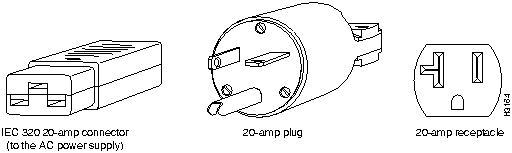
The AC-input-powered chassis operating at 120 VAC requires, at the minimum, a 20-amp service, with a 20-amp receptacle at the power source. The power cable supplied with the chassis uses a 20-amp plug. Figure 1 shows the cable features needed to connect the 20-amp plug to your AC source.
Figure 1 : 20-amp AC Power Cable Connector, Plug, and 20-amp Receptacle
The DC powered chassis requires a minimum 35A dedicated service (at -- 48VDC). We recommend that you use an 8 AWG, highly flexible, stranded cable for the DC power connections. The stranded cable should be routed through conduit at your site, and the conduit should attach to the terminal block cover on the power supply. (See Figure 2.)
Figure 2 : Terminal Block Cover
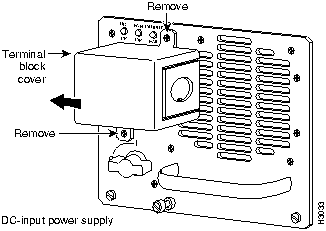
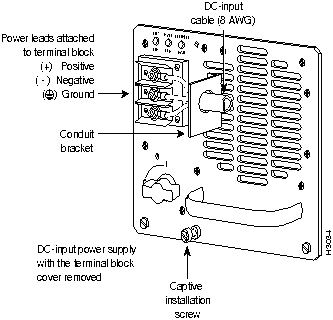
Figure 3 shows the conductor preparation for the DC-input cable connections.
Figure 3 : DC Power Cable Connection to Terminal Block
Cisco 7000 Series and 7500 Series External Connection Requirements
This section lists the external connection requirements for the Cisco 7000 series and 7500 series.
The Cisco 7000 series and 7500 series operate as either freestanding or rack-mounted units. An optional rack-mount kit is available for mounting the chassis in an EIA-310C standard 19-inch equipment rack or in a Telco-type rack. When the system is not mounted in a rack, place it on the floor or on a sturdy platform. Do not stack the chassis on other Cisco 7000 series, 7500 series, or any other equipment.
This section contains the physical specifications and external connection requirements for the LightStream 1010 ATM switch.
Table 32 lists the physical specifications for the Cisco LightStream 1010.
Table 32 : Cisco Light Stream 1010 Physical Specifications
| Specification | Description |
|---|---|
| Dimensions (H x W x D) | Chassis: 10.5 x 17.2 x 18.1 in. (26.7 x 43.7 x 46.1 cm); standard 19-inch rack mountASP1 and CAM: 1.2 x 14.4 x 16.0 in. (3.0 x 36.6 x 40.6 cm)PAM2: 1.2 x 6.5 x 10 in. (3.0 x 16.5 x 25.4 cm) |
| Weight | Empty: 43 lb (19.5 kg)Fully loaded: approximately 85 lb (39 kg) (depends on loading) |
| Power supply | Maximum power budget: 9.8A @ 115 VAC, 60 Hz 4.9A @ 230 VAC, 50 HzAuto sensing limits: 100-127/200-240 VAC, 8/4A, 47-63 HzMaximum wattage: 376 watts (W) |
| Altitude | -- 500 ft. to 10,000 ft. (-- 52 m to 3,048 m) |
| Temperature | 32° F to 104° F (0° C to 40° C) |
| Relative humidity | 10 to 90% noncondensing |
| Safety certifications | UL 1950EN 60950CSA-C22.2 No. 950-93Electromagnetic emissions certificationsFCC Class A (Part 15)EN 55022 Class BCE MarkVCCI Class II |
External Connection Requirements
The LightStream 1010 uses a five-slot chassis with an ATM backplane and fan tray. It has the following external connection requirements:
The LightStream 1010 ATM switch comes equipped with one 350W AC-input power supply. An optional second power supply, identical to the first, can be added for redundant power. Dual power supplies are automatically load sharing and redundant, which means that a second power supply can be installed or replaced without interrupting system operation.
When two power supplies are installed and both are turned on, each concurrently provides about half of the required power to the system. If one of the power supplies fails, the second power supply immediately ramps up to full power to maintain uninterrupted system operation. Load sharing and fault tolerance are automatically enabled when the second power supply is installed; no software configuration is required.
Each power supply can be connected to a separate AC source so that, in case of an input power line or power supply failure, the second power supply maintains uninterrupted system power.
The field-replaceable system fan assembly provides cooling air for the ASP, interface modules, and backplane. The fan assembly is located inside the chassis.
An internal fan in each power supply draws cooling air from the front of the chassis through the power supply and out the rear of the chassis. An air dam keeps the power-supply airflow separate from that of the rest of the chassis, which is cooled by the fan assembly.
When you are facing the front of the chassis, the fan assembly draws cool air from the right side of the chassis to cool the modules. The exhaust air is forced out the left side of the chassis.
Sensors on the ASP monitor the internal chassis air temperatures. If the air temperature at the sensor exceeds a desired threshold, the environmental monitor displays warning messages.
This section contains the physical specifications, external connection requirements, power supply requirements, and ventilation requirements for the Cisco LightStream 2020 ATM switch.
Table 33 lists the dimension and environmental specifications for the LightStream 2020.
Table 33 : LightStream 2020 Switch Physical Specifications
| Specification | Description |
|---|---|
| Dimensions (H x W x D) | 26.07 x 18.91 x 24.73 in. (66.2 x x 48.0 62.8 cm) |
| Operating temperature at sea level (760 mm Hg)1 | 41o to 104o F (5o to 40o C) |
| Relative operating humidity | 10% to 90% noncondensing |
| Altitude1 | Up to 10,000 feet (3048 m) |
| Nonoperating temperature | -- 4o to 140o F (-- 20o to 60o C) |
| Nonoperating humidity | 10% to 95% noncondensing |
| Air quality | The LightStream 2020 is designed to run in a noncorrosive, relatively dust-free environment. |
Table 34 shows how to calculate the weight of a LightStream 2020 system.
Table 34 : Calculating the Weight of a LightStream 2020
| System Configuration | Weight |
|---|---|
| Base system/AC power1 | 96.0 lb (43.6 kg) |
| Redundant base system2/AC power | 118.0 lb (53.6 kg) |
| Base system/DC power | 91.0 lb (41 kg) |
| Redundant base system/DC power | 108.0 lb (49 kg) |
Optional components:
|
3.75 lb (1.7 kg) 1.9 lb (0.9 kg) |
Example:
|
96.0 lb 15.0 lb 07.5 lb 07.6 lb |
| Total Weight | 126.1 lb |
To ensure that your heating, ventilation, and air conditioning system is capable of maintaining the proper operating temperature range for your LightStream 2020 switch, refer to the heat dissipation information provided in Table 35.
Table 35 : LightStream 2020 Power Consumption/Heat Dissipation
| Component | Power Consumption | Heat Dissipation |
|---|---|---|
| Base system | 335W | 1145 Btu/hr |
| Redundant base system | 445W | 1525 Btu/hr |
Optional components:
|
65W 65W 55W 30W |
225 Btu/hr 225 Btu/hr 190 Btu/hr 105 Btu/hr |
| Maximum configuration1 | 965W | 3325 Btu/hr |
Table 36 lists the power requirements of the LightStream 2020.
Table 36 : LightStream 2020 Site Power Requirements
| Power Option | Voltage | Current |
|---|---|---|
| AC | 100 to 240V | 20A to 10A |
| DC | 48V | 24A |
Table 37 lists the AC power ratings for the LightStream 2020.
Table 37 : LightStream 2020 AC Power Ratings
| Specification | Description |
|---|---|
| Inlet power connector | IEC 320 C20 |
| Input voltage frequency phase | 100 to 240 VAC, 50 to 60 Hz single |
| Input current | 16A to 8A |
| Power consumption1 | 975W maximum |
| Heat dissipation | 3330 Btu/hr maximum |
Table 38 lists the DC power ratings for the LightStream 2020.
Table 38 : LightStream 2020 DC Power Ratings
| Specification | Description |
|---|---|
| Input connections | Support for up to 2 separate -- 48 VDC input feeds via 3-position terminal blocks |
| Input voltage | -- 43 to -- 60VDC |
| Input current | 24A |
| Power consumption1 | 975W maximum |
| Heat dissipation | 3330 Btu/hr maximum |
External Connection Requirements
This section contains the external connection requirements for the Cisco LightStream 2020. External connectors attach to access cards and fantails on the interface modules of the LightStream 2020. The following interface modules are listed in this section:
The cell line card is designed to support up to 15 ports. It supports the following access cards and fantails:
The packet line card supports the following access cards:
This section describes medium-speed line and access cards.
The network processor access card supports one Ethernet port and a pair of serial ports.
In an LightStream 2020 switch, a bulk power tray unit converts power from an external source to bulk DC voltage before distributing DC power to the individual function and switch cards. The nominal voltage of the bulk power unit is --48 VDC.
There are up to two power trays in each chassis; each power tray is a field replaceable unit (FRU). If there are two power trays, both are connected to a 48-volt rail so that either tray can drive the entire system.
The power tray slots, designated A (on top) and B (on the bottom), are accessible from the rear of the chassis.
LightStream 2020 systems are available with two power options:
The LightStream 2020 chassis takes in cooling air from the front. Air is drawn up through the chassis and is exhausted at the back and the right side by blower units.
There are two blowers located at the top of the chassis in each LightStream 2020 system. One blower is accessible from the front and the other from the rear. Each blower is an FRU. During normal operation, both blowers should be running. If one blower fails, the system can continue to operate; however, the failed blower should be replaced as soon as possible.
In addition to the main air flow through the chassis, each bulk power tray in an AC-powered system contains its own fans.
The cooling system operates properly only when all cards, bulkheads, filler panels, covers, and components are in place. Removing these items disrupts the flow of air through the chassis, which may cause the system to shut down components to prevent damage from overheating.
This section contains the physical specifications and external connection requirements for the Catalyst 1200 series switch. The Catalyst 1200 includes four models: WS-C1201, WS-C1202, WS-C1211, and WS-C1212.
Table 39 lists the physical specifications for the Catalyst 1200 series switch.
Table 39 : Catalyst 1200 Series Switch Physical Specifications
| Specification | Description |
|---|---|
| Dimensions (H x W x D) | 2.7 x 17.4 x 16 in. (6.96 x 44.2 x 40.6 cm) |
| Weight | 17 lb (7.7 kg) |
| AC and DC voltage and current | 100 to 120 VAC, 2.0A maximum, 60 Hz200 to 240 VAC, 1.0A maximum, 50 Hz 12A @ +5 VDC, 1A @ +12 VDC, 0.5A @ --12 VDC |
| Power consumption | 80W, maximum (273.04 Btu/hr) |
| EMI1 certifications | FCC Class A (47 CFR, Part 15)CISPR 22 Class AVDE Class AVCCI Class 1 |
| Safety approvals | UL: 1950CSA-C22.2 No. 950-M89IEC 950 |
| FDDI transmit power levels: Single-mode fiber Multimode fiber | Average optical power: Maximum: -- 4.0 dBm Minimum: -- 7.0 dBm2 Maximum: -- 14.0 dBm Minimum: -- 18.5 dBm |
| FDDI receive power levels: Single-mode fiber Multimode fiber | Average optical sensitivity: -- 33 dBmAverage maximum input power: -- 14 dBmAverage optical sensitivity: -- 34 dBmAverage maximum input power: -- 14 dBm |
External Connection Requirements
This section contains the external connection requirements for the Catalyst 1200 switch:
This section contains the physical specifications and external connection requirements for the Catalyst 1600 series Token Ring switch.
Table 40 lists the physical specifications for the Catalyst 1600 series Token Ring switch.
Table 40 : Catalyst 1600 Series Token Ring Switch Physical Specifications
| Specification | Description |
|---|---|
| Network type | IEEE 802.5 Token Ring 4, or 16 Mbps |
| Dimensions (H x W x D) | 5.25 x 19 x 12.5 in. (13.3 x 44 x 31.9 cm) |
| Weight | 22 lb (10 kg) |
| Mounting | 19-inch wide rack, occupies 3U |
| Power supply | 90 to 130 VAC and 180 to 260 VAC; 47 to 63 Hz |
| Power consumption | 100W maximum with 8 ports |
| Temperature | 50 to 104°F (10 to 40°C) |
| Humidity | 10 to 90% |
| Altitude | 10 000 ft. (operating) |
| Agency approvals | FCC Class AEN55022 (Class A UTP cable)EN55022 (Class B STP cable)EN50082-1 |
External Connection Requirements
This section contains the external connection requirements for the Catalyst 1600:

This section contains the physical specifications and external connection requirements for the Catalyst 1700 Ethernet desktop switch
Table 41 lists the physical specifications for the Catalyst 1700 switch.
Table 41 : Catalyst 1700 Switch Physical Specifications
| Description | Specification |
|---|---|
| Dimensions (H x W x D) | 5.25 x 12.28 x 19" (13.34 x 31.19 x 48.26 cm) |
| Weight | 18 lb/8.2 kg |
| Reliability | 50,000 hours MTBF |
| Operating temperature | 32 to 104ºF (0 to 40ºC) |
| Operating humidity | 10% to 90%, noncondensing |
| Operating altitude | Up to 10,000 feet |
| Power consumption | 60W |
External Connection Requirements
This section contains the external connection requirements for the Catalyst 1700.
This section includes the physical specifications and the external connection requirements for the Catalyst 2000 series switches. The Catalyst 2000 series consists of three models: the Catalyst 2100, Catalyst 2800, and the Catalyst 2900.
Table 42 lists the physical specifications for the Catalyst 2100 and Catalyst 2800 switches.
Table 42 : Catalyst 2100 and Catalyst 2800 Physical Specifications
| Description | Specification |
|---|---|
| Dimensions (H x W x D) | 5.25 x 19 x 12.28 in. (13.34 x 48.26 x 31.2 cm) |
| Weight | Catalyst 2100: 18 lb (8.17 kg)Catalyst 2800: 23 lb (10.4 kg) |
| Input voltage | 90 to 250V, 50 to 60 Hz |
| Power consumption | Catalyst 2100: 60WCatalyst 2800: 110W |
| Operating altitude | up to 10,000' (3048 m) |
| Operating temperature | 32 to 104° F (0° to 40° C) |
| Operating relative humidity | 10% to 90% noncondensing |
| Agency approvals | UL 1950, CE, CSA 22.2, LR100902, TUV, EN60950, FCC Class A, EN55022A |
Table 43 lists the physical specifications for the Catalyst 2900 switch.
Table 43 : Catalyst 2900 Switch Physical Specifications
| Description | Specifications |
|---|---|
| Dimensions (H x W x D) | 3.4 x 17.25 x 23 in. (8.5 x 43.8 x 58.4 cm)Chassis depth including cable guide is 21.64 in. (55.0 cm) |
| Weight | Chassis: 41 lb (18.6 kg) |
| DC voltages supplied and steady-state maximum current ratings | +5V @ 30A+12V @ 2A+24V @ 0.2A |
| Power supply | 175W maximum (AC-input power supplies) |
| Power dissipation | 240W maximum configuration. |
| Heat dissipation | 240W (818 Btu1per hour) |
| Input voltage | 100-240 VAC wide input with power factor corrector |
| Frequency | 47-63 Hz autoranging |
| AC current rating | 3 A maximum at 100-240 VAC |
| Airflow | 95 cfm2 through the system fan assembly |
| Operating temperature | 32 to 104°F (0 to 40°C) |
| Nonoperating temperature | -- 40 to 167°F (-- 40 to 75°C) |
| Humidity | 10 to 90%, noncondensing |
| Agency approvals | Safety: UL3 1950, CSA4-C22.2 No. 950-93, and EN60950EMI11: FCC Class A (47 CFR, Part 15),CE Mark, EN55022 Class B and VCCI Class 2 with shielded cables |
External Connection Requirements
This section lists the external connection requirements for Catalyst 2000 series switches.
Catalyst 2100 and Catalyst 2800 Switches
This section lists the external connection requirements for Catalyst 2100 and Catalyst 2800 switches.
This section contains the external connection and ventilation requirements for the Catalyst 2900.
The Catalyst 2900 is a 2-slot, 14-port, fixed-configuration switch that fits in a standard 19-inch rack. One of the two slots is for the supervisor module; the other slot is for a 10/100BaseTX or 100BaseFX module. The modules have the following external connections:
Ventilation Requirements
The following sections describe the physical specifications and external connection requirements for the Catalyst 3000 system, which consists of the Catalyst 3000 switch and the Catalyst 3000 Matrix.
Table 44 lists the physical specifications for the Catalyst 3000 system.
Table 44 : Catalyst 3000 System Physical Specifications
| Description | Specification |
|---|---|
| Mounting | 19-inch rack-mount |
| Dimensions (H x W x D) | Catalyst 3000 switch: 3.5 x 17 x 13.4 in. (8.76 x 43 x 34 cm)Catalyst Matrix: 3.5 x 17 x 13.4 in. (8.75 x 43 x 34 cm) |
| Weight | Catalyst 3000 switch: 17 lb (7.7 kg)Catalyst Matrix: 14 lb (6.35 kg) |
| Input | 90 to 264 VAC autoranging |
| Frequency | 47 to 63 Hz |
| AC current rating | Catalyst 3000 switch: 1.5A @ 120V;.75A @ 220VCatalyst Matrix: 1.0A @ 120V;.5A @ 220V |
| Operating temperature range | 50 to 104°F (10 to 40°C) |
| Storage temperature | -- 13 to 167°F (-- 25 to 75°C) |
| Operating humidity | 8 to 80% noncondensing |
| Storage altitude | 40,000' |
| Emissions | FCC Class A (Part 15), EN55022 A, VCCI Class 1, CE Mark |
| Agency Approvals | UL1950, ULC, EN 60950 |
External Connection Requirements
This section contains the external connection requirements for the Catalyst 3000 switch and for the Catalyst 3000 Matrix.
The Catalyst 3000 16-port switch is a stackable switch with the following external connection requirements:
The Catalyst Matrix is an 8-port crosspoint matrix switch used to connect from three to eight 16-port switches to create a single-stack entity.
The Catalyst Matrix has eight I/O stack ports using 50-pin SCSI-2 type connectors (one per port).
The following section describes the physical specifications and external connection requirements for the Catalyst 5000 series switch.
Table 45 lists the physical specifications for the Catalyst 5000 series switch.
Table 45 : Catalyst 5000 Series Switch Physical Specifications
| Description | Specifications |
|---|---|
| Backplane | 1.2-Gbps1, 5 module connections |
| Dimensions (H x W x D) | 10.4 x 17.25 x 18.4 in. (26.4 x 43.1 x 46.0 cm)Chassis depth including cable guide is 21.64 in. (55.0 cm) |
| Weight | Chassis only: 43 lb (19.5 kg)Chassis fully configured with 1 supervisor engine module, 4 switching modules, and 2 power supplies: 84 lb (39 kg) |
| DC voltages supplied and steady-state maximum current ratings | +5V @ 70A+12V @ 2A+24V @ 0.2A |
| Power supply | 376W maximum (AC-input power supplies) |
| Power dissipation | 350W maximum configuration, 110W typical with maximum configuration |
| Heat dissipation | 563W (1919 Btu2/hr) |
| Input voltage | 100 to 240 VAC wide input with power factor corrector |
| Frequency | 47 to 63 Hz autoranging |
| AC current rating | 8A maximum at 100-127 VAC, 4A maximum at 200 to 240 VAC with the chassis fully configured |
| Airflow | 95 cfm3 through the system fan assembly |
| Operating temperature | 32 to 104°F (0 to 40°C) |
| Nonoperating temperature | -- 40 to 167°F (-- 40 to 75°C) |
| Humidity | 10 to 90%, noncondensing |
| Agency approvals | Safety: UL4 1950, CSA5-C22.2 No. 950-93, and EN60950EMI6: FCC Class A (47 CFR, Part 15),CE Mark, EN55022 Class B and VCCI Class 2 with shielded cables |
External Connection Requirements
This section contains the external connections for the Catalyst 5000 modules and ports.
The Catalyst 5000 376W AC-input power supply uses a power factor corrector that allows it to operate on input voltage and current within the ranges of 100 to 240 VAC and 47 to 63 Hz.
A second, identical power supply is also installed in chassis configured with the redundant power option. Redundant power ensures that power to the chassis continues uninterrupted in the event that one power supply fails. It can also provide uninterrupted power in the event a power line fails, so long as the power supplies receive power from separate power lines.
Catalyst WS-C1400 Concentrator
This section contains the physical specifications and external connection requirements for the Catalyst WS-C1400 concentrator.
Table 46 lists the physical specifications for the WS-C1400 concentrator.
Table 46 : WS-C1400 Concentrator Physical Specifications
| Description | Specification |
|---|---|
| Dimensions (H x W x D) | 2.7 x 18 x 16 in. (6.86 x 45.72 x 40.64 cm) |
| Weight | 16 lb (7.3 kg) |
| Power requirements | 3A @ 110 VAC, 60 Hz (WS-C1400)1.6A @ 220 VAC, 50 Hz (WS-C1400) |
| Power consumption | FDDI: 90W (maximum) (WS-C1400)CDDI: 110W (maximum) (WS-C1400) |
| Agency approvals | CDDI/FDDI: FCC Class A (47 CFR, Part 15)CDDI/FDDI: CISPR 22 Class AFDDI: VDE Class B |
| Safety | UL: 1950CSA-C22.2 No. 950-M89IEC 950 |
| Mounting | Desktop19-inch rack (hardware included)Wall-mount (hardware included with optional kit) |
| FDDI transmit power levels: Single-mode fiber Multimode fiber | Average optical power: Maximum: --4.0 dBm Minimum: --7.0 dBm Maximum: --14.0 dBm Minimum: --18.5 dBm |
| FDDI receive power levels: Single-mode fiber Multimode fiber | Average optical sensitivity: --33.0 dBmAverage maximum input power: --14.0 dBmAverage optical sensitivity: --34 dBmAverage maximum input power: --14 dBm |
External Connection Requirements
The following are the external connections for the Catalyst WS-C1400 concentrators:
The following Site Preparation Checklist form requests specific information about your installation site. To ensure a successful installation by reducing last-minute complications, verify the preinstallation requirements discussed earlier in this guide, and complete and return the Site Preparation Checklist form to Cisco Systems.
The Site Preparation Checklist form should be filled out by the installation site contact person. After the form is completed, it must be faxed to Cisco Systems.
Company Name ________________________________________________________________
Installation Date (month/day/year) _____/_____/_____
Site Installation Time ________________ a.m. p.m. (circle one)
Customer Purchase Order Number (new chassis only) __________________________________
Installation Site Address _________________________________________________________
_____________________________________________________________________________
Installation Site Contact and Chassis Information
Main Contact __________________________________________________________________
Telephone Number ________________________ Pager Number _________________________
Site Contact ___________________________________________________________________
Telephone Number ________________________ Pager Number _________________________
Site Modem Telephone Number (within 25 feet [7.6 m] of router) __________________________
Site Voice Telephone Number _____________________________________________________
Chassis Type/Model _____________________________________________________________
Software Configuration Information
Development of the software configuration is your responsibility. If you need assistance, please consult with your sales representative.
Options for Loading Your Software Configuration
Select one of the following options for loading a software configuration on your system:
_____ Option 1 You will either e-mail or fax the entire configuration to OSS. (The configuration will be downloaded to your system through the console port via a modem line.) Please check one: ______ e-mail sent to oss-ce@cisco.com _____ fax sent to 408 526-7550
_____ Option 2 You will store the entire configuration on a TFTP server. (The configuration will be downloaded to your system using Cisco's Autoinstall feature.)
_____ Option 3 OSS will configure one port on your system so you can Telnet to the system and download the entire configuration. (Only IGRP and RIP routing are supported for this option.)
If you choose Option 3, please provide the following information:
Password (the enable and virtual terminal password) ____________________________________
Routing Protocol (circle one) IGRP RIP
Autonomous system number for routing protocol (if applicable) ___________________________
Encapsulation (circle one) HDLC PPP Frame-Relay Other_________________________
Port to configure (for example, serial 0, Ethernet 2, Token Ring 3, etc.) ______________________
Port IP Address _______________________________
Mask (if subnetting is used) ______________________
Please retain a copy of this checklist for your records.
Fax this Checklist to Cisco Systems at 408-526-7550

|
Copyright 1988-1996 © Cisco Systems Inc.