


|
|

This appendix describes the connectors for the Catalyst 2820 FDDI and 100BaseT modules.
This section describes the following connectors:
The UTP SAS module uses standard RJ-45 connectors. The connector and the arrangement of the pins is shown in Figure B-1. Pinouts are shown in Table B-1. Note that connector shells are attached to the chassis ground. Stations are always attached with a crossover cable.
Figure B-1 : FDDI UTP SAS RJ-45 Connector
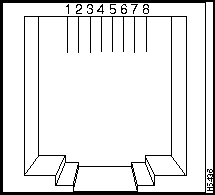
Table B-1 : FDDI UTP SAS RJ-45 Connector Pinout
| Pin | Description |
|---|---|
| 1 | TX+ |
| 2 | TX-- |
| 3 | NC |
| 4 | NC |
| 5 | NC |
| 6 | NC |
| 7 | RX+ |
| 8 | RX-- |
The FDDI module uses standard MIC connectors, as shown in Figure B-2.
Figure B-2 : FDDI MIC Connectors
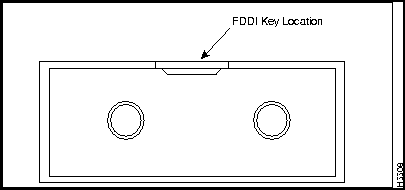
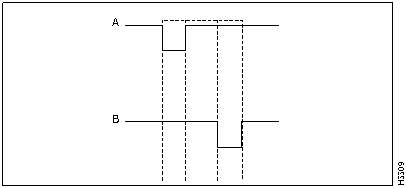
The receptacle keys for ports A and B of the FDDI Fiber DAS module are shown in a simplified form in Figure B-3.
Figure B-3 : Receptacle Keys for Ports A and B
Optical Bypass Switch Connector
The FDDI Fiber DAS module uses a 6-pin mini-DIN connector for the optical bypass switch. The connector is shown in Figure B-4 and the pin arrangement is shown in Table B-2.
Figure B-4 : 6-Pin Mini-DIN Connector
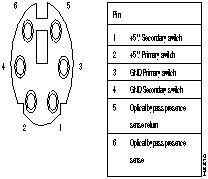
Table B-2 : 6-Pin Mini-DIN Connector
| Pin | Description |
|---|---|
| 1 | +5 V secondary switch |
| 2 | +5 V primary switch |
| 3 | GND primary switch |
| 4 | GND secondary switch |
| 5 | Optical bypass presence-sense return |
| 6 | Optical bypass presence sense |
This section describes the 100BaseTX (RJ-45) and 100BaseFX (ST) connectors for the Catalyst 2820 100BaseT modules.
100BaseTX RJ-45 Connector Pinouts
The 100BaseTX modules use standard RJ-45 connectors. The arrangement of the pins is shown in Figure B-5, and the pinouts are shown in Table B-3.
Figure B-5 : 100BaseTX RJ-45 Connector
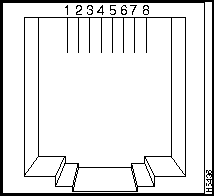
Table B-3 : 100BaseTX RJ-45 Connector Pinouts
| Pin | Description |
|---|---|
| 1 | RD+ |
| 2 | RD- |
| 3 | TD+ |
| 4 | NC |
| 5 | NC |
| 6 | TD- |
| 7 | NC |
| 8 | NC |
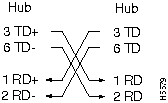
Connector shells are attached to the chassis ground. The 100BaseTX ports have the transmit (TD) and receive (RD) pairs internally crossed (as shown in Figure B-7) for attachment to an adapter using a straight-through cable.
The straight-through and crossover cable schematics are shown in Figure B-6 and Figure B-7.
Figure B-6 : Straight-Through Cable Schematic
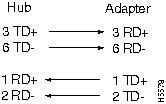
Figure B-7 : Crossover Cable Schematic
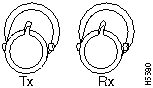
The 100BaseFX modules use standard ST connectors, as shown in Figure B-8.
Figure B-8 : 100BaseFX ST Connector

|
Copyright 1988-1996 © Cisco Systems Inc.