|
|

Catalyst 1600 4-Port Token Ring Switch Module Installation Instructions
Product Numbers: WS-C164R
This document contains instructions for installing the 4-port Token Ring switch module into a Catalyst 1600 Token Ring switch. For information about configuring the Catalyst 1600 Token Ring switch and a complete description of software commands, refer to the Catalyst 1600 Token Ring Switch User Guide.
Sections in this document include the following:
The Catalyst 1600 Token Ring switch module is a source routing Token Ring switch that supports the connection of wiring concentrators or lobe stations over either unshielded twisted-pair (UTP) or shielded twisted-pair (STP) media at ring speeds of 4 or 16 Mbps.
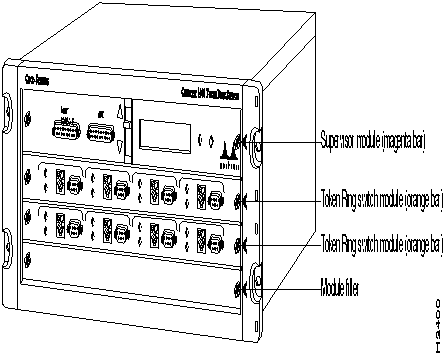
Figure 1 shows the front of the Catalyst 1600 Token Ring switch, which provides access to the four module slots. The uppermost slot is reserved exclusively for the supervisor module, which has a magenta colored bar on the right side of the carrier. There are three slots for switch modules such as the Token Ring switch module. The Token Ring Switch Module has an orange colored bar on the right side of the carrier.
You can install the Token Ring line card as an additional card in an empty slot, or as a replacement for an existing line card.

Figure 1 Catalyst 1600 Module Slots
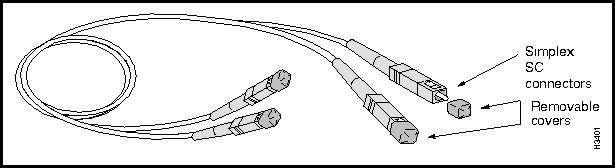
The 4-port Token Ring switch module, shown in Figure 2, is an optional unit that you can use to extend the functionality of the Catalyst 1600 Token Ring switch, or replace an existing switch module that is faulty.
The Token Ring switch module has four Token Ring switch ports that you can use in the same way as the existing Token Ring switch ports on the Catalyst 1600.
Figure 2 4-Port Token Ring Switch Module
Following are the technical specifications for the 4-port Token Ring switch module:
The Catalyst 1600 Token Ring switch supports a maximum of three Token Ring switch modules for a total of 12 Token Ring switch ports.
You can manage a Catalyst 1600 that has up to twelve Token Ring switch ports with TrueView Catalyst 1600 Manager version 1.1 or later. For information about the management software, refer to the TrueView Catalyst 1600 Manager User Guide.
Before you begin this installation, review the safety and ESD-prevention guidelines in this section to avoid injuring yourself or damaging the equipment. This section also provides a list of parts and tools you will need to perform the installation.
To configure the 4-port Token Ring switch module using the serial interface, you need a VT100 terminal or terminal emulator and a null-modem EIA/TIA-232 interface cable with a 25-way D-type connector.
To configure the Catalyst 1600 from the network management station, you need TrueView Catalyst 1600 Manager version 1.1 or later. For information about the management software, refer to the TrueView Catalyst 1600 Manager User Guide.
If you need a later version of the software, contact your service representative for ordering information.
You need the following tools and parts to install the 4-port Token Ring switch module:
Follow these basic guidelines when working with any electrical equipment:
Electrostatic discharge (ESD) damage, which can occur when electronic cards or components are improperly handled, results in complete or intermittent failures. The Token Ring switch module comprises a printed circuit board that is fixed to a metal carrier. Electromagnetic interference (EMI) shielding and connectors are integral components of the carrier. Although the metal carrier helps protect the board from ESD, use a preventative antistatic strap whenever handling the switch module. Handle the switch module by the metal carrier and the edges of the card only; never touch components on the board or the connector pins.
Following are guidelines for preventing ESD damage:

Before you install a 4-port Token Ring switch module in a Catalyst 1600 Token Ring switch, make sure that you can fulfil the installation requirements (see the section "Installation Prerequisites"), and that you are familiar with the safety guidelines in the Catalyst 1600 Token Ring Switch User Guide.
Read all the installation procedures in this section before installing the switch module into a Catalyst 1600.

Disconnect the power cable from the Catalyst 1600 before removing the existing Token Ring switch module or module filler. The Catalyst 1600 does not support online insertion and removal of modules.
When you loosen the captive installation screws that retain the existing switch module or module filler, always alternate between turning the captive installation screw on the left side of the carrier, and the captive installation screw on the right side of the carrier. Remove each screw using a flat-blade screwdriver, and take care not to use excessive force.

To remove the existing switch module or module filler:
To insert the Token Ring switch module:

Figure 3 Inserting the Token Ring Switch Module
When you tighten the captive installation screws that retain the switch module or module filler, always alternate between turning the captive installation screw on the left side of the carrier, and the captive installation screw on the right side of the carrier. Tighten each screw using a flat-blade screwdriver, and take care not to use excessive force.

To tighten the screws with a flat-blade screwdriver:
Reconnect the power cable to the power socket on the rear of the Catalyst 1600. The Catalyst 1600 automatically runs the self-test program to ensure that it is operating correctly.
When the Catalyst 1600 starts up:
For more information about the self-test program, and the LCD and LED displays, refer to Catalyst 1600 Token Ring Switch User Guide.
If you are upgrading the Catalyst 1600 by installing the Token Ring switch module into an empty slot, and the slot has never been used before, configure the Token Ring switch ports. For information about configuring Token Ring switch ports on the Catalyst 1600, refer to Catalyst 1600 Token Ring Switch User Guide.
If the slot has been used before, the port settings that were configured for the Token Ring switch module that was previously installed will apply to the new Token Ring switch module.
If the Token Ring switch ports were configured properly before you replaced the switch module , and you want to continue using the ports in the same way with the replacement switch module, you do not need to reconfigure the port settings.


|
Copyright 1988-1996 © Cisco Systems Inc.