


|
|

The Catalyst 1600 Token Ring switch supports serial management and Telnet sessions, and provides a simple command-line interface that you can use to configure the Catalyst 1600 before connecting other network devices.
To manage the Catalyst 1600 using the serial interface, connect one of the following devices to the serial port on the front panel (see Figure 1-1):
When you connect the terminal to the Catalyst 1600:
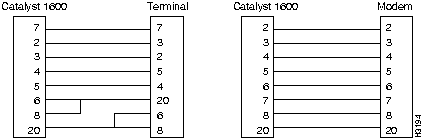
Pin Connections for the Serial Port
Figure 4-1 illustrates the pin connections to use when you connect the Catalyst 1600 to a terminal using a null-modem EIA/TIA-232 cable, or to a modem using a straight-through EIA/TIA-232 cable.
Figure 4-1 : Pin Connections for Catalyst 1600 Serial Port
When you connect to the serial interface using the Catalyst 1600 password, or when no password is set, you can gain access to read commands such as show bridge status and write commands such as set port ifmode.
If you do not enter the correct password, you can only enter read commands and you cannot change the configuration of the Catalyst 1600. If you have read-only access to the device, the help command displays only the commands that are available.
Whether you have read-only or read/write access to the Catalyst 1600, you can enter commands by typing only the first part of the command and pressing the space bar. Depending on the combination of command lines that can result from the part that you have entered, the remaining part of the command line is completed for you.
For example, to enter the command show bridge characteristics:
The command line The read-only commands that you can use without entering the Catalyst 1600 password are described below.
The read/write commands that you can use after entering the Catalyst 1600 password include all read-only commands, and the commands described below.
Copyright 1988-1996 © Cisco Systems Inc.
show
is added to the command line.
b
and press the space bar.
bridge
is added to the command line.
show
bridge
characteristics
is complete.
CmdEnvExample:  >show bridge characteristics
Bridge Name:                            switch B
Bridge Number:                                 2
IP Address:                       194.32.220.119
IP Subnet Mask:                    255.255.255.0
Spanning Tree Root Priority:               40000
Example:  >show bridge status
Spanning Tree Bridge ID:            00400BC2000B
Spanning Tree Designated Root Priority:    32768
Spanning Tree Designated Root:      00400BC2000B
Software Version:                        1.01.06
Boot EPROM Version:                      1.00.29
Switch Hardware Version:                 1.00.06
Switch Software Version:                 1.00.33
MAC Software Version:                    1.00.04
Example:  >show bridge counters
Total Frames Transmitted:                621,080
Total Frames Received:                   251,211
Frames Per Second:                            22
Bytes Per Second:                          9,891
Example:  >show bridge all
Bridge Name:                            switch B
Bridge Number:                                 2
IP Address:                          195.3.42.55
IP Subnet Mask:                    255.255.255.0
Spanning Tree Root Priority:               32768
Spanning Tree Bridge ID:            00400BC2000B
Spanning Tree Designated Root Priority:    32768
Spanning Tree Designated Root:      00400BC2000B
Software Version:                        1.01.06
Boot EPROM Version:                      1.00.29
Switch Hardware Version:                 1.00.06
Switch Software Version:                 1.00.33
MAC Software Version:                    1.00.04
Total Frames Transmitted:                 33,200
Total Frames Received:                    33,200
Frames Per Second:                            45
Bytes Per Second:                          1,256
Input Broadcast Discards:                      0
Output Broadcast Discards:                     0
Switched Frame Discards:                       0
Example:  >show port characteristics 2
Interface Admin. Status:                Disabled
Interface Mode:                     Concentrator
Interface Speed:                         16 Mbps
S.R. Port Admin. Status:                 Enabled
S.R. Port Segment Number:                    9B7
S.R. Port Spanning Tree Mode:          Automatic
S.R. Port Hop Count:                           7
S.R. Port Spanning Tree Path Cost:           100
Example:  >show port status 2
Interface Actual Status:                Disabled
Interface Active MAC Address:       0002D0000F62
S.R. Port Actual Status:                  Broken
S.R. Port Spanning Tree Broadcast:      Disabled
S.R. Port Designated Bridge:        00006F00F006
Example:  >show port counters 2
Bytes Transmitted:                    19,339,380
Bytes Received:                          455,390
Non-broadcast Frames Transmitted:          1,029
Non-broadcast Frames Received:             2,747
All Routes Explorer Frames Received:           0
All Routes Explorer Frames Transmitted:    4,289
Spanning Tree Explorer Frames Received:      259
Spanning Tree Explorer Frames Transmitted:28,065
Receiving Segment Mismatch Discards:           0
Duplicate Segment Mismatch Discards:           0
ARE Hop Count Exceeded Discards:               0
Example:  >show port all 2
Interface Admin. Status:                Disabled
Interface Mode:                     Concentrator
Interface Speed:                         16 Mbps
S.R. Port Admin. Status:                 Enabled
S.R. Port Segment Number:                    9B7
S.R. Port Spanning Tree Mode:          Automatic
S.R. Port Hop Count:                           7
S.R. Port Spanning Tree Path Cost:           100
Interface Actual Status:                Disabled
Interface Active MAC Address:       0002D0000F62
S.R. Port Actual Status:                  Broken
S.R. Port Spanning Tree Broadcast:      Disabled
S.R. Port Designated Bridge:        00006F00F006
Bytes Transmitted:                             0
Non-broadcast Frames Transmitted:              0
Non-broadcast Frames Received:                 0
All Routes Explorer Frames Received:           0
All Routes Explorer Frames Transmitted:        0
Spanning Tree Explorer Frames Received:        0
Spanning Tree Explorer Frames Transmitted:     0
Receiving Segment Mismatch Discards:           0
Duplicate Segment Mismatch Discards:           0
ARE Hop Count Exceeded Discards:               0
