


|
|

This chapter describes how to install the Catalyst 2800 modules in the Catalyst 2800 high-speed expansion slots. When unpacking the Catalyst 2800 modules, check the contents of the package against the list in "Packing List" in the "Introduction" chapter.
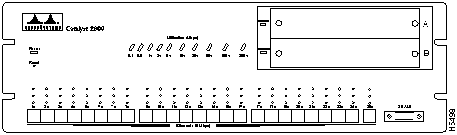
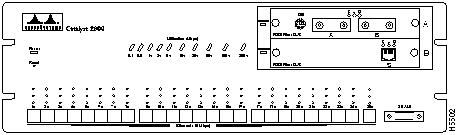
Blank face plates cover the high-speed expansion slots on the Catalyst 2800. Figure 2-1 shows a Catalyst 2800 with two blank face plates.
To remove the face plates, do the following:
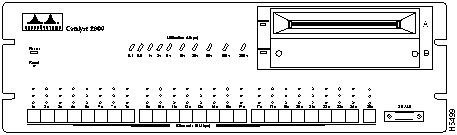
Figure 2-1 : Catalyst 2800 with Blank Face Plates Figure 2-2 : Catalyst 2800 with an Empty High-Speed Expansion Slot After the face plate has been removed, follow these steps to install a module into an empty Catalyst 2800 high-speed expansion slot:
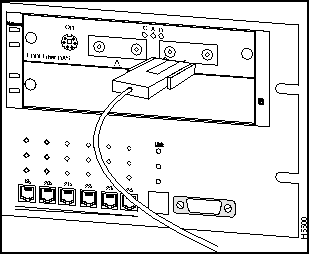
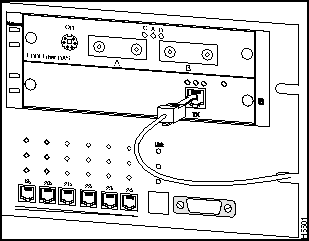
Figure 2-3 : Attaching a Fiber Optic Cable to an FDDI Module Figure 2-4 : Attaching a UTP Cable to the FDDI Module The module is now installed. The Catalyst 2800 should look like Figure 2-5.
Figure 2-5 : Installed FDDI Module Figure 2-5 shows a Catalyst 2800 with two FDDI modules installed. To remove a module from a Catalyst 2800 high-speed expansion slot, do the following:
Power-On Self-Test (POST) for FDDI
When an FDDI module is installed in a Catalyst 2800, all LEDs on the module front panel are on, and the module automatically begins its Power-On Self-Test or POST. If the module passes the POST, the module enabled LED on the Catalyst 2800 remains on. If the module fails the Post, the module enabled LED blinks. For more information about the module enabled LED, refer to the Catalyst 2800 User Guide.
If the module fails the POST, the LEDs on the module indicate the type of failure. Table 2-1 shows how to read LEDs for possible POST failures.
Table 2-1 : LED Indicators of Failed FDDI POST
POST for Fast Ethernet Modules
When first powered on, all LEDs on the module front panel are on, and a Power-On Self-Test (POST) automatically begins. If the module passes POST, the Module Enabled LED on the Catalyst 2800 remains on. If the module fails POST, the Module Enabled LED is off to indicate a problem.
For a complete description of each LED, see "Fast Ethernet Module LEDs" in the chapter "Introduction."
Copyright 1988-1996 © Cisco Systems Inc.

Failed Component
Connected LED
Activity LED
Disabled LED
Response
CPU
On
On
On
Call for assistance.
FLASH
On
On
On
Local RAM
On
On
On
Shared RAM
Slow blink
On
Slow blink
Start the Catalyst 2800 Management Console and check for errors.
100 Mbps controller
Slow blink
Slow blink
On
FDDI controller
Slow blink
On
On
ES loopback test
Fast blink
Slow blink
On
FDDI loopback test
Fast blink
On
On
Player+ (A)
On
On
Fast blink
Player+ (B)
On
Fast blink
On
