


|
|

The Catalyst 2800 is an Ethernet switch that provides a superior mix of configuration and backbone options. With twenty-five switched Ethernet ports for individual workstations and existing 10Base-T hubs, and two high-speed expansion slots, the Catalyst 2800 delivers the benefits of Ethernet switching to 100Base-T, FDDI, and future ATM networks.
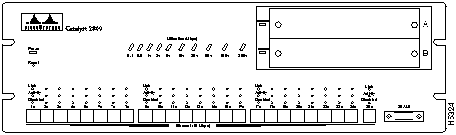
The Catalyst 2800 offers the following features:
See the "Concepts" chapter for more information about these features. To implement them via out-of-band management or Telnet, turn to the "Out-of-Band Management" chapter for more information. If you are using SNMP, the Catalyst 2800's inband capabilities are described in the "Standard MIBs and MIB Extensions" section in the "In-Band Management" chapter.
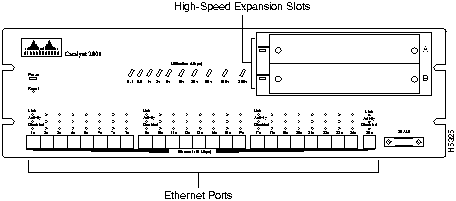
The Catalyst 2800 has twenty-five switched 10Base-T ports and two high-speed expansion slots.
The twenty-five 10Base-T ports, shown in Figure 1-2, connect to single workstations, 10Base-T hubs, or any 10Base-T compatible device, using RJ45 connectors. The attached devices use standard 10Base-T adapters and wiring. Port 25 also supports an alternative AUI connection for attachment to a thick coax, thin coax, or fiber optic media transceiver.
Figure 1-2 Catalyst 2800 Ports
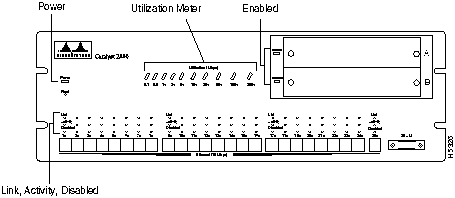
The Catalyst 2800 has an extensive range of LEDs that allow you to easily monitor network activity and performance. Figure 1-3 shows the location of the LEDs described in Table 1-1.
| LED Name | Function |
|---|---|
| Power | This LED lights when the Catalyst 2800 is turned on. If it does not come on, see the "Diagnosing Problems" section in the "Troubleshooting" chapter. |
| Link | This LED indicates that the port is properly connected to a powered-on device. It is on when the link-integrity test passes and off when it fails. |
| Activity | This LED blinks when the port is transmitting or receiving data. If the traffic level is high, it will blink continuously. It is off when there is no activity. |
| Disabled | This LED is on when the port is disabled or suspended. This could be due to the Spanning-Tree Protocol blocking the port or a secure-address violation, or the port could have been manually disabled by an administrator. |
| Enabled | The module-enabled LED indicates that the Catalyst 2800 module in a high-speed expansion slot has passed POST and is enabled. This LED is off when the Catalyst 2800 expansion slot is empty, the module failed POST, or the module has been manually disabled or suspended using the Catalyst 2800 in-band or out-of-band management system. |
| Utilization meter | This group of ten LEDs measures theCatalyst 2800's current and peak bandwidth use in Mbps. Current bandwidth is shown with a series of lit LEDs topped by a rapidly blinking one. Peak utilization is indicated by the right-most solidly lit LED. The default setting for the capture interval is 24 hours and is recorded at midnight each night. Table 1-2 shows the bandwidth associated with each of the ten LEDs. |
Table 1-2 Activity Meter LED Information
| LEDs | LED Label | Mbps Activity |
|---|---|---|
| Far left (1) | 0.1+ | 0.1 - 0.5 |
| 0.5+ | 0.5 - 1 | |
| 1+ | 1 - 2 | |
| 2+ | 2 - 5 | |
| 5+ | 5 - 10 | |
| 10+ | 10 - 20 | |
| 20+ | 20 - 50 | |
| 50+ | 50 - 100 | |
| 100+ | 100 - 200 | |
| Far right (10) | 200+ | 200 - 320 |
The reset switch should only be used if the Catalyst 2800 does not respond to network management or packet forwarding has stopped. Resetting a Catalyst 2800 has the same effect as turning it off and on. The reset switch is located below the power LED on the Catalyst 2800 front panel as shown in Figure 1-3. Reset the Catalyst 2800 by inserting an unbent paper clip into the hole. All configuration values are saved when the Catalyst 2800 is reset.
The rear panel contains the following components:
Figure 1-4 The Catalyst 2800 Rear Panel
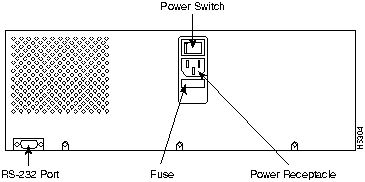
You can configure and manage a Catalyst 2800 using any SNMPcompatible management station, or you can connect an ASCII terminal to the Catalyst 2800 via the RS-232 port and use the Catalyst 2800 management console. The management console is also accessible via Telnet. SMT-compatible workstations can support installed Catalyst 2800 FDDI modules.
The Catalyst 2800 management console provides a simple, menu-driven interface for configuring and monitoring your network. The application is password protected and will lock out a user who fails to enter the password within a definable number of attempts. In such a case, the network administrator can be alerted via in-band management.
Most of the statistics and information generated by the Catalyst 2800 are available through the Catalyst 2800 management console. You can continue to use it even when the network is down.
The Catalyst 2800 is fully manageable by any SNMP-compatible management station. The product supports all pertinent SNMP MIB II variables, the 802.1d bridge MIB, the FDDI MIB and a comprehensive set of MIB extensions designed for maximum support of Catalyst 2800's hub and switching capabilities.
The Catalyst 2800 SNMP MIB objects are supplied in ASCII format for compiling into any SNMP network management system for use with a general MIB browser. In addition, the Catalyst 2800 MIB is precompiled and supplied with installation procedures for the following management platforms:
Before you can use one of these platforms, you need to customize it to understand the Catalyst 2800 MIB. Turn to the "Network Management Platforms" section in the "In-Band Management" chapter for more information.

|
Copyright 1988-1996 © Cisco Systems Inc.