|
|

This section discusses the objectives, audience, organization, and conventions of the LightStream 1010 ATM Switch Command Reference publication.
This publication provides an in-depth description of the commands necessary for configuring and maintaining your LightStream 1010 ATM switch. It describes tasks only in the context of using a particular command; it does not describe how the tasks interrelate nor does it provide comprehensive configuration examples.You can use this publication as a standalone reference manual or in conjunction with the LightStream 1010 ATM Switch Configuration Guide and LightStream 1010 ATM Switch User Guide. Not all of the debug commands are included in this publication. For a complete guide to the debug commands, refer to the LightStream 1010 ATM Switch Debug Command Reference.
Several Cisco IOS commands are not currently supported in the LightStream 1010 ATM switch environment. In this document these commands are identified with a note indicating the command or some of its parameters might not function as expected.
Cisco documentation and additional literature are available on a CD-ROM called Cisco Connection Documentation, Enterprise Series. The CD is updated and shipped monthly so it might be more current than printed documentation. To order the documentation CD, contact your local sales representative or call Customer Service. The CD is available both as a single CD and as a manual subscription. You can also access Cisco technical documentation on the World Wide Web URL http://www.cisco.com.
Use the LightStream 1010 ATM Switch Command Reference to do the following:
This publication is intended as a standalone document for experienced network administrators who will be configuring and maintaining switches and would like to reference commands. For less-experienced users who need to understand the tasks as well as the commands, it is intended as a companion guide to the LightStream 1010 Configuration Guide.
This document is organized alphabetically. Each chapter covers all commands that start with a particular letter.
Chapter 1 covers the commands from aaa accounting through auto-summary.
Chapter 2 covers the commands from background-routes through buffers huge size.
Chapter 3 covers the commands from calendar set through custom-queue-list.
Chapter 4 covers the commands from databits through downward-compatible-config.
Chapter 5 covers the commands from editing through exit.
Chapter 6 covers the commands from flowcontrol through full-help.
Chapter 7 covers the commands from help through hostname.
Chapter 8 covers the commands from ip access-group through ip unreachables.
Chapter 9 covers the keepalive command.
Chapter 10 covers the commands from lane auto-config-atm-address through loopback.
Chapter 11 covers the commands from mac-address through mtu.
Chapter 12 covers the commands from name through ntp-update-calendar.
Chapter 13 covers the commands from padding through pwd.
Chapter 14 covers the commands from queue-list-default through queue-list-stun.
Chapter 15 covers the commands from refuse-message through rxspeed.
Chapter 16 covers the commands from scheduler-allocate through summary-address.
Chapter 17 covers the commands from tacacs-server-attempts through tx-queue-limit.
Chapter 18 covers the commands from undebug through username.
Chapter 19 covers the commands from vacant-message through verify.
Chapter 20 covers the commands from width through write terminal.
Appendix A lists the books and periodicals you can read for more information about the ATM technology.
Appendix B lists regular expressions for ATM technology.
Software and hardware documentation uses the following conventions:
Command descriptions use these conventions:
Examples use these conventions:
Switch(config)#
indicates global configuration mode.
screen
font.
boldface screen
font.

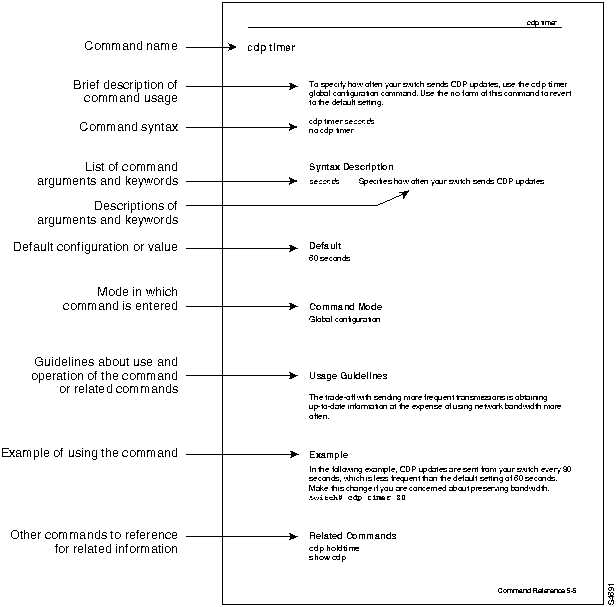
The following illustration explains the fields of a typical command reference page.
Copyright 1988-1996 © Cisco Systems Inc.