


|
|

This chapter describes the I/O interfaces, the data cables, and power cordsets required in using the LS2020 enterprise ATM switch. These facilities are described in the following order:
Signal diagrams are provided for each I/O connector and data cable.
For most cables, two part numbers are provided in an associated table in the body of the chapter: the manufacturing number (which appears on the cable itself); and the order number (which is used in ordering the cable from Cisco Systems). Cables without associated order numbers are not available from Cisco Systems; such cables are widely available from other vendors as standard items.
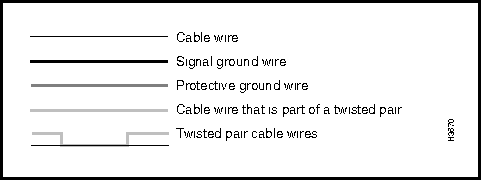
Figure 3-1 shows the conventions used in representing the signal paths in the LS2020 I/O interface connectors and data cables illustrated in this chapter.
Figure 3-1 : LS2020 Cable Signal Diagram Conventions
Low-Speed Connectors and Data Cables
This section presents the specifications for the connectors and data cables for the low-speed X.21, RS-449, and V.35 serial I/O interfaces of the LS2020 switch. This information is presented as follows:
Figure 3-2 shows the pin assignments of the X.21 fantail connector.
Interface connector type: DB15 female
Connectors per fantail: 8 (numbered 0 - 7)
Figure 3-2 : X.21 Connector Pin Assignments
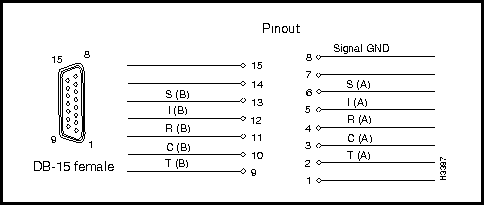
Figure 3-3 shows the pin assignments of the RS-449 fantail connector.
Interface connector type: DB37 male
Connectors per fantail: 4 (numbered 0 - 3)
Figure 3-3 : RS-449 Connector Pin Assignments
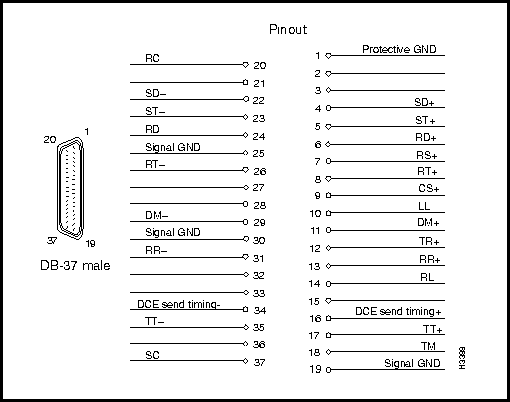
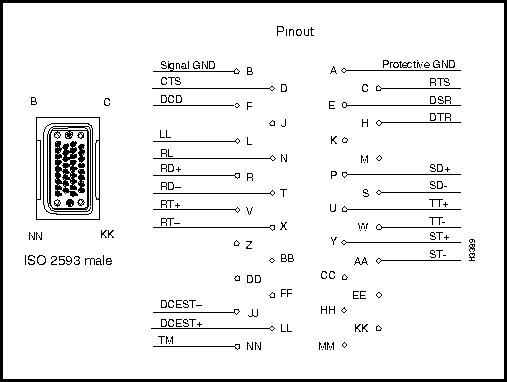
Figure 3-4 shows the pin assignments of the V.35 fantail connector.
Interface connector type: ISO 2593 male (34-pin block type)
Connectors per fantail: 4 (numbered 0 - 3)
Figure 3-4 : V.35 Connector Pin Assignments
DSU/CSU Control Port Connector
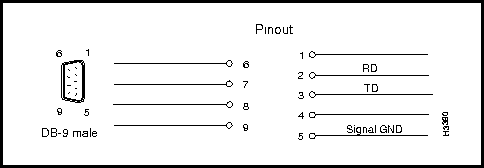
The RS-232 DSU/CSU connector appears on both the V.35 and RS-449 fantails. If you connect the control port to the craft port on a DSU/CSU device, you can use the csumon program to communicate with the DSU/CSU from an LS2020 switch.
Interface connector type: DB9 male
Connectors per fantail: 4 (numbered 0 - 3)
Figure 3-5 shows the pin assignments of the RS-232 DSU/CSU control port connector.
Figure 3-5 : RS-232 DSU/CSU Control Port Pin Assignments
Low-Speed Access Card Fantail Cable
This 100-pin data cable is used as the means of interconnection between the bulkhead connector of a low-speed X.21, RS-449, or V.35 access card and the back of the fantail.
The cable is available from Cisco Systems in three lengths. For ordering purposes, use the appropriate order number from the table below.
| Manufacturing No. | Length | Order No. |
| 72-1117-01 | 4 feet | L2020-CAB-F4= |
| 72-1118-01 | 8 feet | L2020-CAB-F8= |
| 72-1119-01 | 12 feet | L2020-CAB-F12= |
Note that two such data cables are required to connect one X.21 fantail to a low-speed access card, while one only such cable is required to connect each V.35 or RS-449 fantail to a low-speed access card.
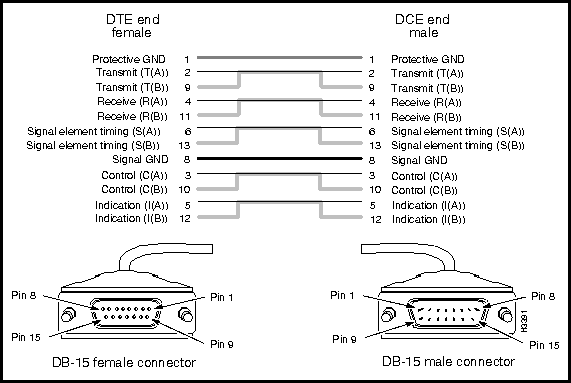
This cable is used to connect the X.21 fantail connector to an external X.21 device.
The cable is available from Cisco Systems in three lengths. For ordering purposes, use the appropriate order number from the table below.
| Manufacturing No. | Length | Order No. |
| 72-0991-01 | 30 feet | LS-CAB-X21-TC30= |
| 72-0992-01 | 50 feet | LS-CAB-X21-TC50= |
| 72-0993-01 | 100 feet | LS-CAB-X21-TC100= |
Figure 3-6 is a signal diagram for the X.21 fantail cable.
Figure 3-6 : X.21 Cable Signal Diagram
RS-449 Interface Straight-Through Cable
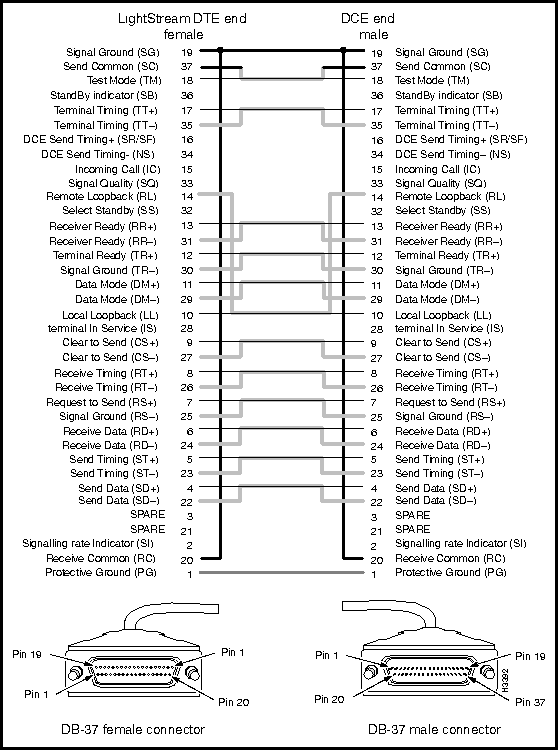
This cable is used to connect an RS-449 fantail interface to an external RS-449 DCE device.
This cable is available from Cisco Systems. For ordering purposes, use the appropriate order number from the table below.
| Manufacturing No. | Length | Order No. |
| 72-1002-01 | 30 feet | LS-CAB-RS4-TC30= |
| 72-1003-01 | 50 feet | LS-CAB-RS4-TC50= |
| 72-1004-01 | 100 feet | LS-CAB-RS4-TC100= |
Figure 3-7 is a signal diagram for the RS-449 fantail straight-through cable.
Figure 3-7 : RS-449 Straight-through Cables Signal Diagram
RS-449 Interface Crossover Cable
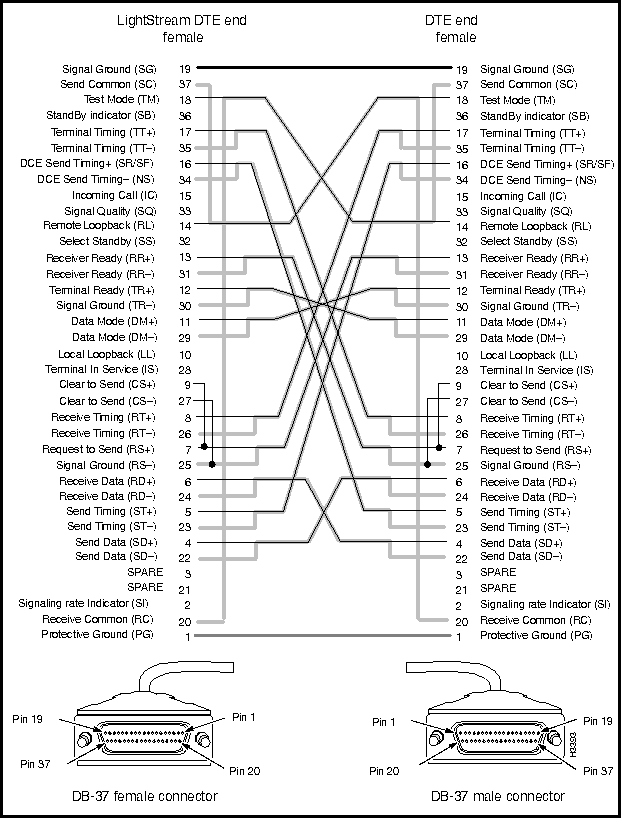
This cable is used to connect two LS2020 switches via their RS-449 fantail interfaces, or to connect an RS-449 fantail interface to an external RS-449 DTE device.
The cable is available from Cisco Systems. For ordering purposes, use an appropriate order number from the table below.
| Manufacturing No. | Length | Order No. |
| 72-1008-01 | 8 feet | LS-CAB-RS4-TT8= |
| 72-1005-01 | 30 feet | LS-CAB-RS4-TT30= |
| 72-1006-01 | 50 feet | LS-CAB-RS4-TT50= |
| 72-1007-01 | 100 feet | LS-CAB-RS4-TT100= |
Figure 3-8 is a signal diagram for the RS-449 fantail crossover cable.
Figure 3-8 : RS-449 Crossover Cable Signal Diagram
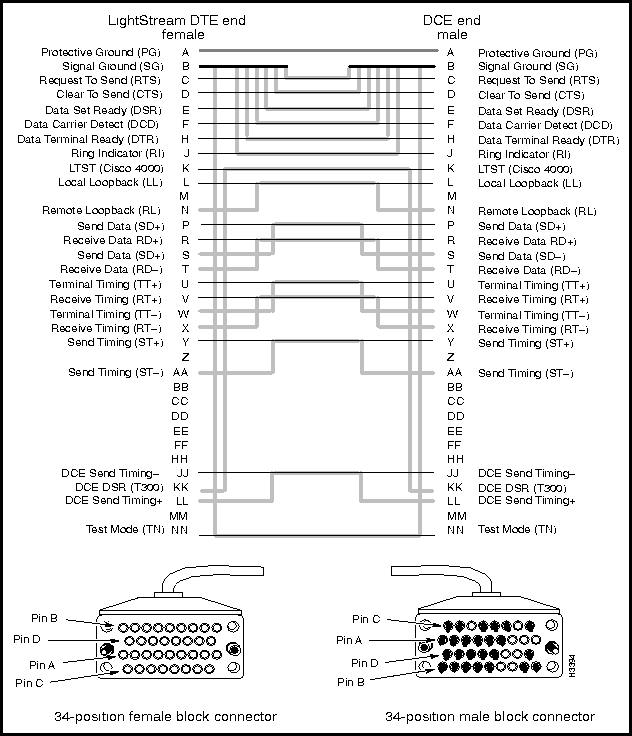
V.35 Interface Straight-Through Cable
This cable is used to connect a V.35 fantail interface to an external V.35 DCE device.
The cable is available from Cisco Systems. For ordering purposes, use an appropriate order number from the table below.
| Manufacturing No. | Length | Order No. |
| 72-1009-01 | 30 feet | LS-CAB-V35-TC30= |
| 72-1010-01 | 50 feet | LS-CAB-V35-TC50= |
| 72-1011-01 | 100 feet | LS-CAB-V35-TC100= |
Figure 3-9 is a signal diagram for the V.35 fantail straight-through cable.
Figure 3-9 : V.35 Straight-through Cable Signal Diagram
V.35 Interface Crossover Cable
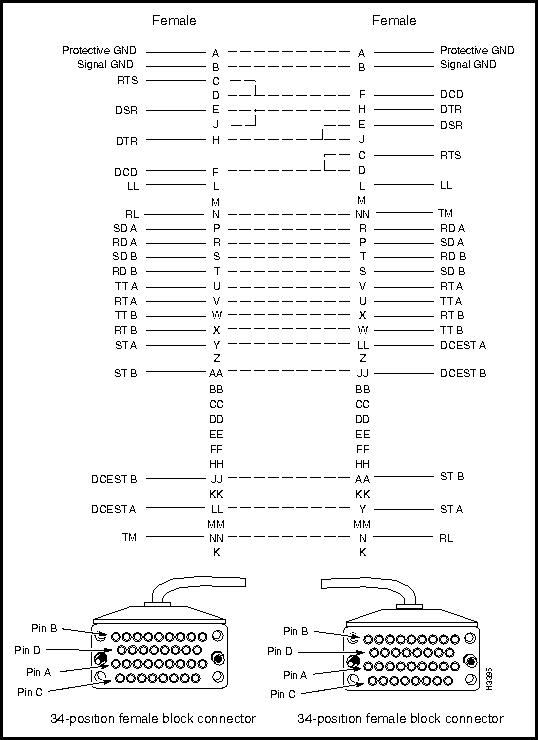
This cable is used to connect two LS2020 switches via their V.35 fantail interfaces, or to connect a V.35 fantail to an external V.35 DTE device.
This cable is available from Cisco Systems. For ordering purposes, use the appropriate order number from the table below.
| Manufacturing No. | Length | Order No. |
| 72-0997-01 | 8 feet | LS-CAB-V35-TT8= |
| 72-0994-01 | 30 feet | LS-CAB-V35-TT30= |
| 72-0995-01 | 50 feet | LS-CAB-V35-TT50= |
| 72-0996-01 | 100 feet | LS-CAB-V35-TT100= |
Figure 3-10 is a signal diagram for the V.35 fantail crossover cable.
Figure 3-10 : V.35 Crossover Cable Signal Diagram
Circuit Emulation Access Card (CEMAC) Connectors and Cables
Figure 3-11 shows the CEMAC card and its associated data cable. To make a more secure connection, unscrew the top mounting screw (shown as "1" in the figure) in the connector retention bracket and reposition it in the connector (as shown by "2" in the figure). Next, tighten down the mounting screw to attach the data cable to the CEMAC card securely (as shown by "3" in the figure). Finally, secure the cable to the CEMAC bulkhead connector with the Velcro strip.
Figure 3-11 : CEMAC Access Card and Data Cable Connection
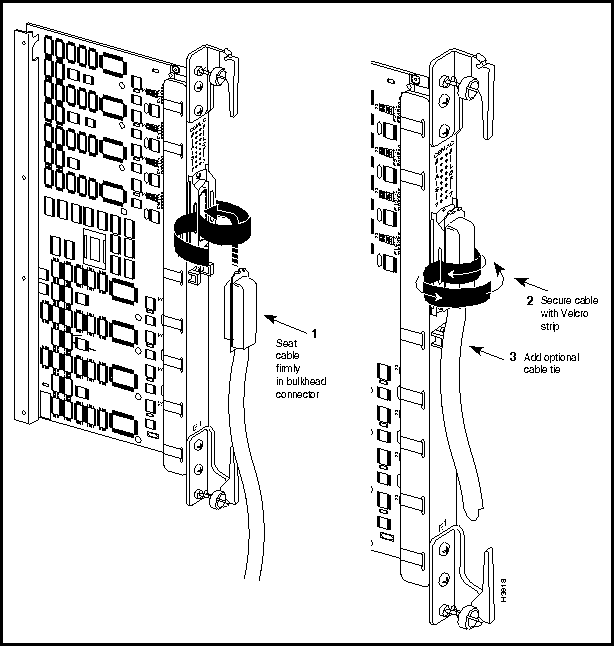
Table 3-1 shows the pinout assignments of the CEMAC access card connector.
| Receive | Transmit | |||
|---|---|---|---|---|
| Port | Tip | Ring | Tip | Ring |
| 0 | 26 | 1 | 39 | 14 |
| 1 | 27 | 2 | 40 | 15 |
| 2 | 28 | 3 | 41 | 16 |
| 3 | 29 | 4 | 42 | 17 |
| 4 | 30 | 5 | 43 | 18 |
| 5 | 31 | 6 | 44 | 19 |
| 6 | 32 | 7 | 45 | 20 |
| 7 | 33 | 8 | 46 | 21 |
| Not used | 34 | 9 | 47 | 22 |
| Not used | 35 | 10 | 48 | 23 |
| Not used | 36 | 11 | 49 | 24 |
| Not used | 37 | 12 | 50 | 25 |
| Note: The information in this table is an extraction from Figure 10 of American National Standard T1.403-1989. | ||||
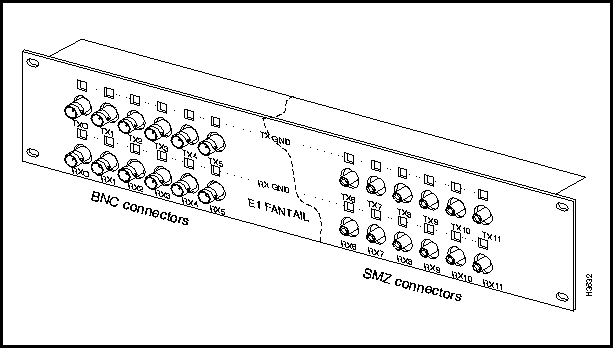
Figure 3-12 shows the E1 fantail for 75-ohm CEMAC applications. For convenience, Figure 3-12 illustrates both the BNC and SMZ connector types that can be used in the E1 fantail.
Figure 3-12 : E1 Fantail (75-ohm)
Refer to the LightStream 2020 Hardware Reference and Troubleshooting Guide for information regarding the configuration of the TX GND and RX GND jumpers on the E1 fantail.
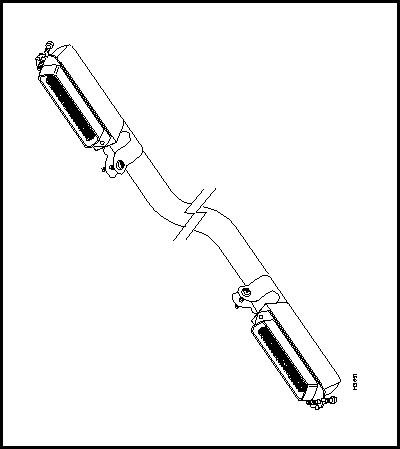
This 50-pin cable is used as the means of interconnection between the 8-port bulkhead connectors on the CEMAC card and the back of the E1 fantail. Figure 3-13 illustrates this cable.
The cable is available from Cisco Systems in three lengths. For ordering purposes, use the appropriate order number from the table below.
| Manufacturing No. | Length | Order No. |
| 72-1094-01 | 4 feet | LS-CAB-8E1-4B= |
| 72-1095-01 | 8 feet | LS-CAB-8E1-8B= |
| 72-1096-01 | 12 feet | LS-CAB-8E1-12B= |
Figure 3-13 : E1 Fantail Data Cable
Medium Speed Connectors and Cables
This section describes the connectors and cables for the medium-speed (2-port) access card, as well as the T3 and E3 (4-port and 8-port) access cards, as indicated below:
Connectors on Medium-speed Access Card
Interface connector type: 75 ohm BNC jacks
Connectors per access card: 4 (2 receive and 2 transmit)
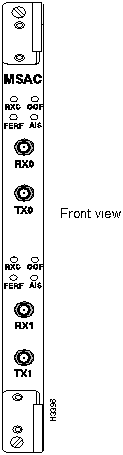
Figure 3-14 shows the external coaxial connectors for the medium-speed (2-port) access card.
Figure 3-14 : Medium-speed Access Card Connectors
Connectors on T3/E3 Access Card
Interface connector type: SMB connector at card; BNC connector at fantail
Connectors per access card: 8 or 16, depending on the number of ports (either 4 or 8) on the T3/E3 access card. Each port has one receive connector and one transmit connector.
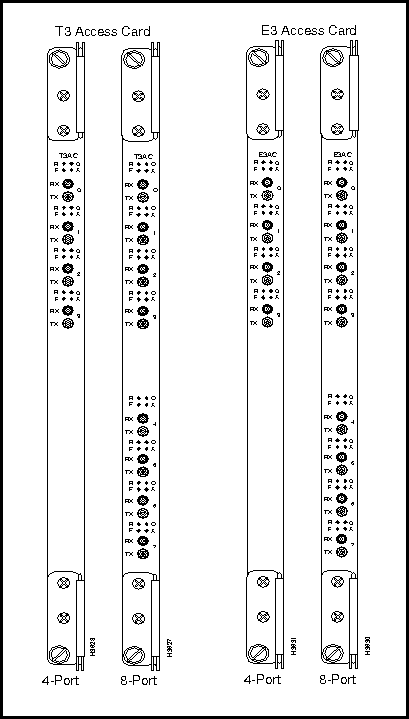
Figure 3-15 shows the external connectors for the 4-port and 8-port versions of the T3 and E3 access cards.
Figure 3-15 : T3/E3 Access Card Connectors
T3/E3 Fantail Cable Harness and Dressing Panel
To interconnect patch panel/fantails to T3/E3 access cards, both 4-port and 8-port coaxial cable harnesses are offered by Cisco Systems. In addition, both the 4-port and 8-port harnesses are available in 4-, 8-, or12-foot lengths.
The table below shows appropriate ordering information for the T3 fantail cable harnesses in desired port and length combinations.
| Manufacturing No. | Ports | Length | Order No. |
| 72-1097-01 | 4 | 4 feet | LS-CAB-4T3-4B= |
| 72-1098-01 | 4 | 8 feet | LS-CAB-4T3-8B= |
| 72-1099-01 | 4 | 12 feet | LS-CAB-4T3-12B= |
| 72-1061-01 | 8 | 4 feet | LS-CAB-8T3-4B= |
| 72-1062-01 | 8 | 8 feet | LS-CAB-8T3-8B= |
| 72-1063-01 | 8 | 12 feet | LS-CAB-8T3-12B= |
The table below shows appropriate ordering information for the E3 fantail cable harnesses in desired port and length combinations.
| Manufacturing No. | Ports | Length | Order No. |
| 72-1097-01 | 4 | 4 feet | LS-CAB-4E3-4B= |
| 72-1098-01 | 4 | 8 feet | LS-CAB-4E3-8B= |
| 72-1099-01 | 4 | 12 feet | LS-CAB-4E3-12B= |
| 72-1061-01 | 8 | 4 feet | LS-CAB-8E3-4B= |
| 72-1062-01 | 8 | 8 feet | LS-CAB-8E3-8B= |
| 72-1063-01 | 8 | 12 feet | LS-CAB-8E3-12B= |
The table below shows appropriate ordering information for the T3/E3 coaxial cable dressing panel.
| Manufacturing No. | Order No. |
| 700-00605-01 | LS2020-T3E3-FT= |
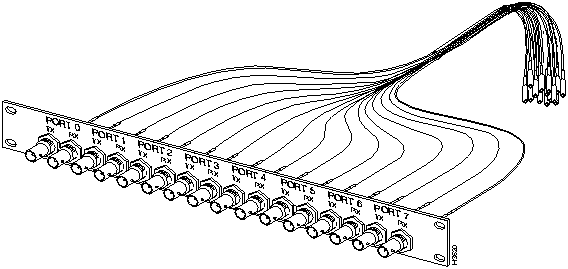
Figure 3-16 shows the T3/E3 coaxial cable dressing panel, together with a T3/E3 fantail cable harness. Note however that these components, although shown as connected in Figure 3-16, are available separately using the ordering information from the tables above.
Figure 3-16 : T3/E3 Fantail Cable Harness and Dressing Panel
Where used:
The T3/E3 75-ohm coaxial cable is available from Cisco Systems in four different lengths. Use the appropriate number from the table below for ordering purposes.
| Manufacturing No. | Length | Order No. |
| 72-0998-01 | 3 feet | LS-CAB-T3-CX3= |
| 72-0399-01 | 25 feet | LS-CAB-T3-CX25= |
| 72-1000-01 | 50 feet | LS-CAB-T3-CX50= |
| 72-1001-01 | 100 feet | LS-CAB-T3-CX100= |
Figure 3-17 is a physical representation of 75-ohm T3/E3 coaxial cable.
Figure 3-17 : T3/E3 75-ohm Coaxial Cable
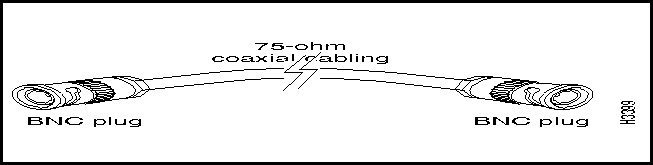
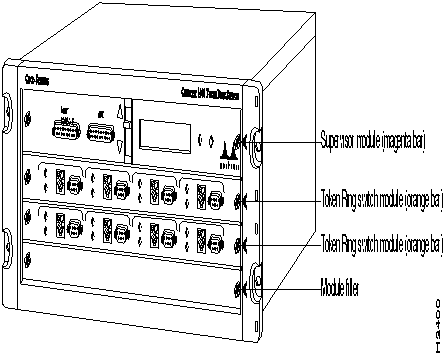
Figure 3-18 shows the external connectors on both the multimode and single mode OC-3c access cards. The multimode OC-3c and single mode OC-3c cables are described in separate sections below.
Multimode interface connector type: Duplex SC
Connectors per multimode access card: 4 (2 per port; ports are numbered 0 and 1)
Single mode interface connector type: ST
Connectors per single mode access card: 4 (2 per port; ports are numbered 0 and 1)
Figure 3-18 : Connectors on Multimode and Single Mode OC-3c Access Cards
Where used: To connect a multimode OC-3c access card on an LS2020 switch to another OC-3c device.
Cisco Systems does not provide this cable; it is widely available from other vendors.
The LS2020 OC-3c interfaces operate at a wavelength of 1300 nanometers. Multimode cables should conform to the following specifications:
Standard: ISO/IEC 9314-3
Maximum path length (all cables in a connection, end to end): 2 km
Cabling: 62.5 micron core with an optical loss of 0-9 dB, or 50 micron core with an optical loss of 7 dB.
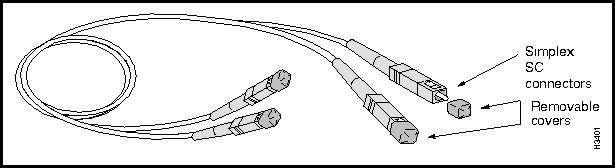
Figure 3-19 shows a multimode OC-3c cable with simplex SC connectors.
Figure 3-19 : Multimode OC-3c Cable with Simplex SC Connectors
Where used: To connect a single mode OC-3c access card on an LS2020 switch to another OC-3c device. Cisco Systems does not provide this cable; it is widely available from other sources.
The LS2020 OC-3c interfaces operate at a wavelength of 1300 nanometers. Single mode cables should conform to the following specifications:
Standard: EIA class IVa
Cabling: 8.3 micron core with an optical loss of 0-12 dB and a maximum cable attenuation of 500 MHz/km at 1300 nanometers.
Connector Type: ST
Figure 3-20 shows a single mode OC-3c cable with ST connectors.
Figure 3-20 : Single Mode OC-3c Data Cable with ST Connectors

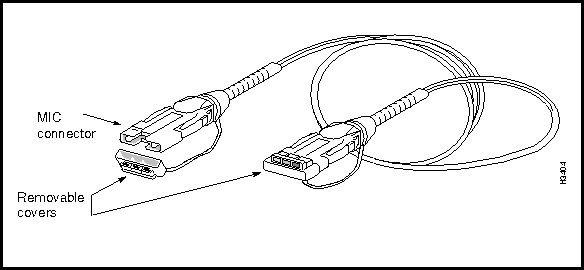
Figure 3-21 shows the media interface connectors (MICs) on an FDDI access card.
Figure 3-21 : Connectors on FDDI Access (FAC) Card
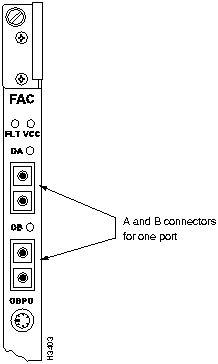
Each FDDI port consists of two connectors, A (red) and B (blue). FDDI connectors are keyed to ensure proper connection of the cable to the access card.
Where used: To connect an LS2020 multimode FDDI access card to another FDDI device. Cisco Systems does not provide this cable; it is widely available from other vendors.
The LS2020 FDDI interface operates at a wavelength of 1300 nanometers. Cables should conform to the following specifications:
Cabling: 62.5 micron core, graded-index fiber with an optical loss of 11 dB and a maximum cable attenuation of 1.5 dB/km at 1300 nanometers.
Connectors: MIC
Maximum path length: (all cables in a connection, end to end): 2 km
Figure 3-22 shows a physical representation of an FDDI cable.
Ethernet Connectors and Cables
This section describes the Ethernet connectors and cables for the NP access card and the Ethernet access card.
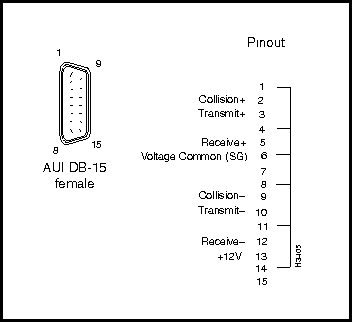
Figure 3-23 is a schematic diagram of the 15-pin Ethernet AUI connector for the NP access card and the Ethernet access card (ports 0 and 7).
The data cable for this connector is described in the section "Ethernet AUI Data Cable" later in this chapter.
Interface connector type: AUI DB15 connector
AUI connectors per NP access card: one
AUI connectors per Ethernet access card: 2 (numbered 0 and 7)
Figure 3-23 : Ethernet AUI Connector Schematic Diagram
Ethernet 10Base-T (RJ-45) Connector
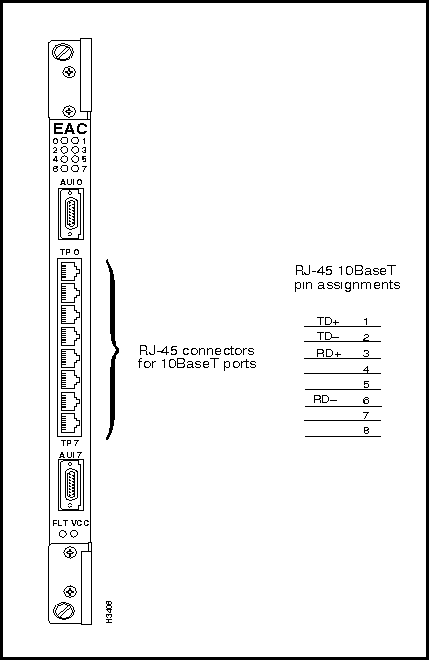
Figure 3-24 shows the RJ-45 connectors and pinout assignments on the Ethernet access card. These connectors are used by the twisted pair (10Base-T) ports.
The cables used with these ports are described in the section Ethernet 10Base-T Straight-Through Cable and the section Ethernet 10Base-T Crossover Cable.
Figure 3-24 : Ethernet RJ-45 Connectors and Pinout Assignments
Where used: Connects an AUI port on the NP access card or Ethernet access card of an LS2020 switch to an Ethernet 10Base2 or 10Base5 transceiver.
Cisco Systems does not provide this cable; it is widely available from other vendors.
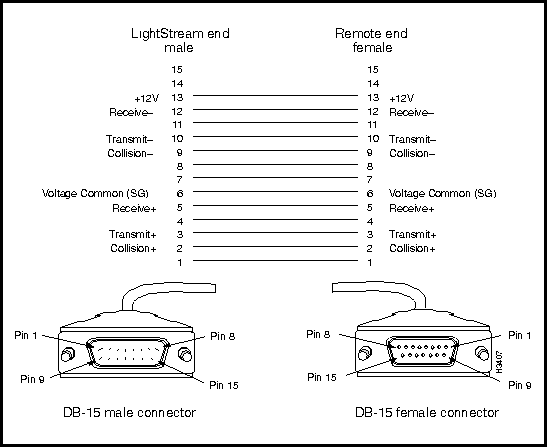
Figure 3-25 shows a schematic diagram of the Ethernet AUI data cable.
Figure 3-25 : Ethernet AUI Data Cable Schematic Diagram
Ethernet 10Base-T Straight-Through Cable
Where used:
Cisco Systems does not provide this cable; it is widely available from other vendors.
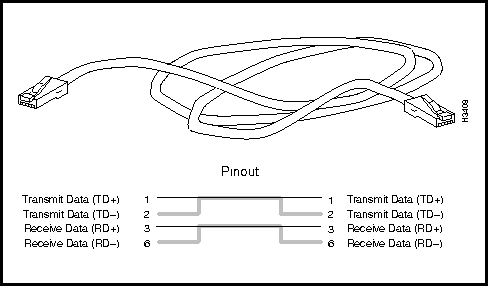
Figure 3-26 shows a physical representation of the Ethernet 10Base-T (twisted pair) straight-through cable and provides a schematic diagram of its pinout assignments.
Figure 3-26 : Ethernet 10Base-T Straight-through Cable and Pinout Assignments
Ethernet 10Base-T Crossover Cable
Where used: To directly connect an Ethernet access card on an LS2020 switch to another device on the Ethernet, such as a workstation.
Cisco Systems does not provide this cable; it is widely available from other sources.
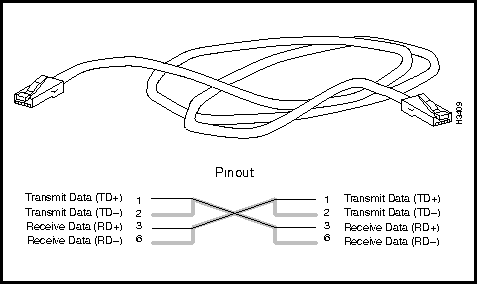
Figure 3-27 shows a physical representation of the Ethernet 10Base-T (twisted pair) crossover cable and provides a schematic diagram of its pinout assignments.
Figure 3-27 : Ethernet 10Base-T Crossover Cable and Pinout Assignments
Fiber Ethernet Connectors and Cable
This section describes the fiber Ethernet Connectors and data cable.
Fiber Ethernet Access Card Connectors
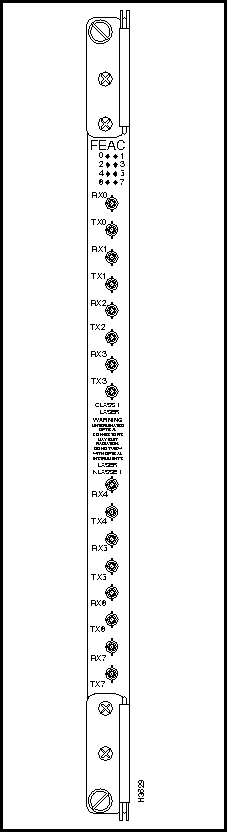
Figure 3-28 shows the bulkhead connectors on the fiber Ethernet access card.
Figure 3-28 : Fiber Ethernet Access Card Connectors
Fiber Ethernet Access Card Data Cable
Where used: To connect a multimode fiber (10Base-FL) Ethernet access card in an LS2020 chassis to another fiber Ethernet device.
Cisco Systems does not provide this cable; it is widely available from other vendors.
The LS2020 fiber Ethernet interfaces operate at a wavelength of 850 nanometers. Multimode cables should conform to the following specifications:
Standard: ISO/IEC 9314-3
Maximum path length (all cables in a connection, end to end): 2 km
Cabling: 62.5 micron core with an optical loss of 0-9 dB, or 50 micron core with an optical loss of 7 dB.
Connector Type: ST
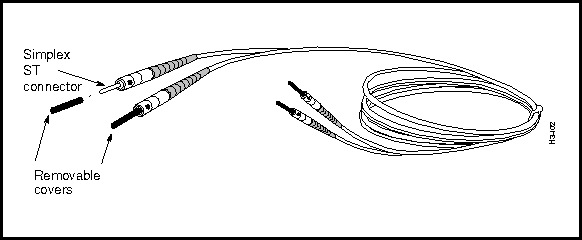
Figure 3-29 illustrates the multimode fiber Ethernet access card data cable.
Figure 3-29 : Multimode Fiber Ethernet Data Cable with ST Connectors
Modem/Console Connectors and Cables
Figure 3-30 and Figure 3-31 illustrate the modem and console connectors, respectively, on the switch card console/modem assembly.
The data cable used for both the console and modem ports is described in the section RS-232 Straight-Through Data Cable.
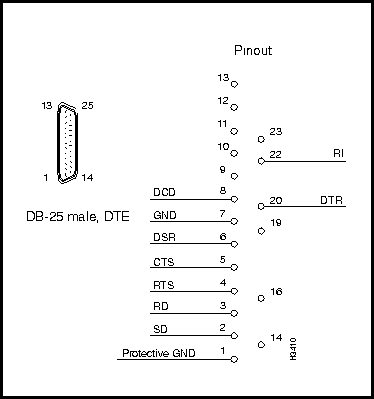
RS-232 Modem Connector Specification
Interface connector type: DB25 male, DTE
Connectors per assembly: 1, labeled MODEM
Figure 3-30 shows a schematic diagram of the RS-232 modem port connector.
Figure 3-30 : RS-232 Modem Port Schematic Diagram
RS-232 Console Connector Specification
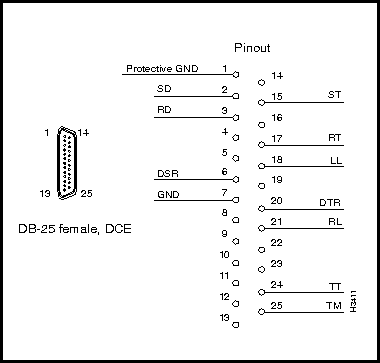
Interface connector type: DB25 female, DCE
Connectors per assembly: 1, labeled CNSL
Figure 3-31 shows a schematic diagram of the console port connector.
Figure 3-31 : RS-232 Console Port Schematic Diagram
RS-232 Straight-Through Data Cable
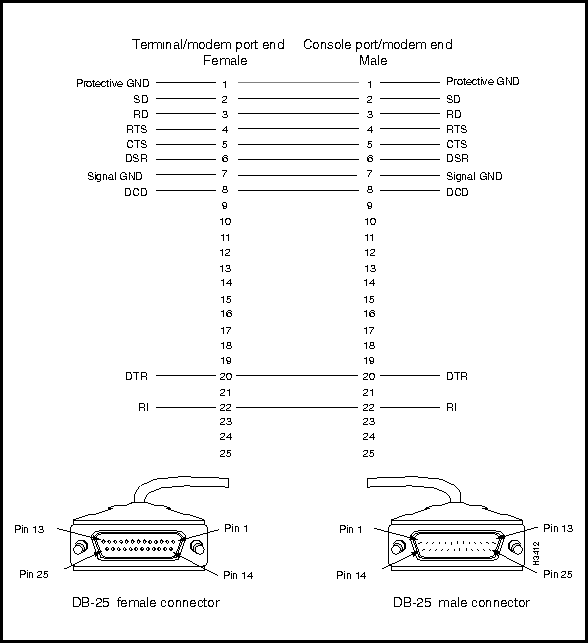
Where used: To connect the LS2020 console port or modem port to a console or modem.
Cisco Systems does not provide this cable; it is widely available from other vendors.
Figure 3-32 shows a schematic diagram of the RS-232 straight-through data cable.
Figure 3-32 : RS-232 Straight-through Data Cable Schematic Diagram
Country Kits and Power Cordsets
AC-Powered LightStream 2020 Systems
A variety of power cordsets is available for AC-powered LS2020 switches. These cordsets are available either with systems or as spare parts. This section enables you to choose the proper cordset for your LS2020 site.
If you are specifying a cordset as part of a new system order, refer to the LS2020 Price List or the Products Catalogue and order the appropriate Country Power Kit. Doing so ensures that you will also receive the appropriate labels and instructions for the country of destination.
If you want to check the cordset included in a specific Country Power Kit, refer to Table 3-2, which cross-references cordset product numbers and Country Power Kit models.
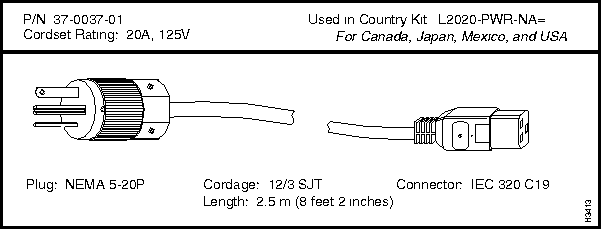
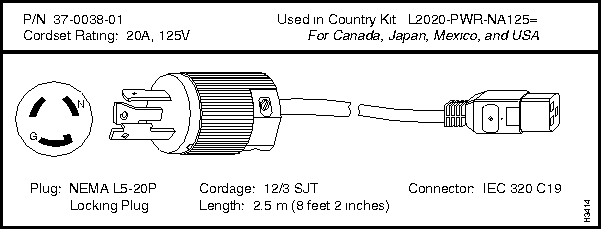
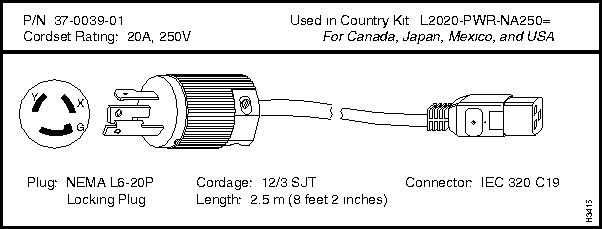
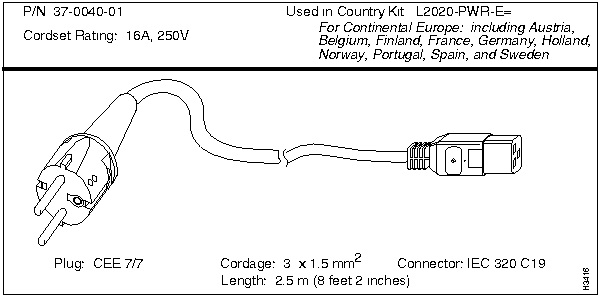
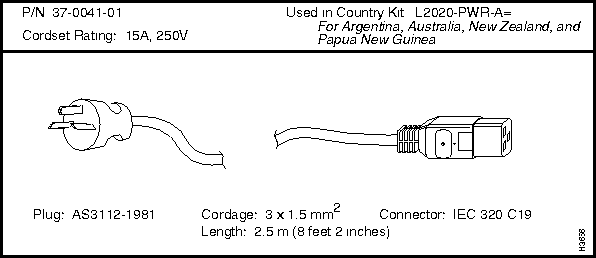
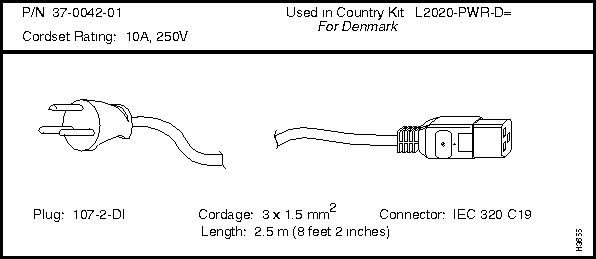
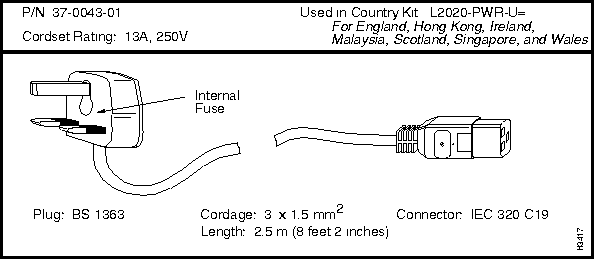
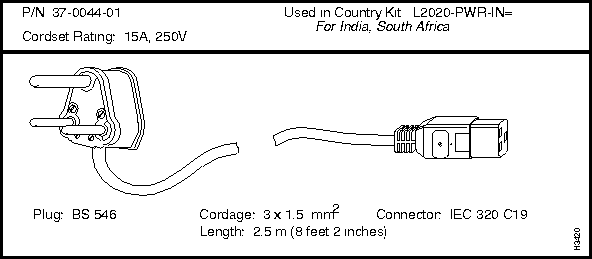
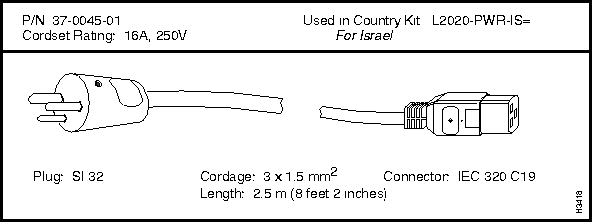
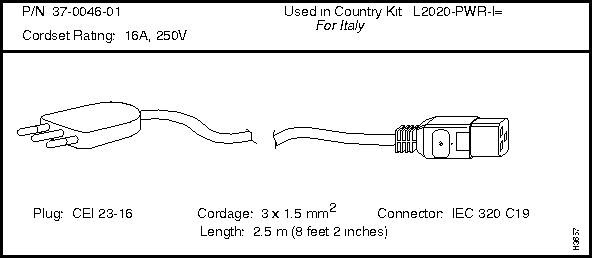
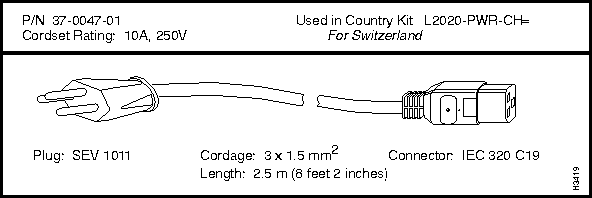
If you need to order a replacement cordset that is not part of a Country Power Kit, you must reference the cordset's part number. This part number (P/N) appears above each cordset illustrated in the following section entitled "LightStream 2020 AC Power Cordsets."
DC-powered LightStream 2020 Systems
A DC-powered system does not use a detachable power cord. The DC power cord must be permanently wired to a DC power source. Therefore, in place of a Country Power Kit, each DC-powered system is shipped with a DC Mounting Kit, Order Number L2020-PWR-DC=.
LightStream 2020 AC Power Cordsets
Each LS2020 AC power tray is equipped with one recessed male power inlet. The power connectors follow IEC Standard 320 C20 and require cordsets with an IEC 320 C19 female connector. (All cordsets offered by Cisco Systems for the LS2020 switch have IEC 320 C19 female connectors.)
Table 3-2 summarizes the specifications of AC power cordsets. The table lists the country of use, cordset rating, plug type, part number, and Country Power Kit for each cordset.
Table 3-2 : Specifications for LightStream 2020 AC Power Cordsets
| Country of Use | Cordset Rating | Plug Type | Mfg. Part
Number |
Country Power Kit
Order Number |
| Canada, Mexico, Japan, and USA | 125V @ 20A | NEMA 5-20P | 37-0037-01 | L2020-PWR-NA= |
| Canada, Mexico, Japan, and USA | 125V @ 20A | NEMA L5-20P | 37-0038-01 | L2020-PWR-NA125= |
| Canada, Mexico, Japan, and USA | 250V @ 20A | NEMA L6-20P | 37-0039-01 | L2020-PWR-NA250= |
| Continental Europe, including Austria, Belgium, Finland, France, Germany, the Netherlands, Norway, Portugal, Spain, and Sweden | 250V @ 16A | CEE 7/7 | 37-0040-01 | L2020-PWR-E= |
| Argentina, Australia, New Zealand, and Papua New Guinea | 250V @ 15A | AS3112-1981 | 37-0041-01 | L2020-PWR-A= |
| Denmark | 250V @ 10A | 107-2-DI | 37-0042-01 | L2020-PWR-D= |
| England, Hong Kong, Ireland, Malaysia, Scotland, Singapore, and Wales | 250V @ 13A | BS 1363 | 37-0043-01 | L2020-PWR-U= |
| India and South Africa | 250V @ 15A | BS 546 | 37-0044-01 | L2020-PWR-IN= |
| Israel | 250V @ 16A | SI 32 | 37-0045-01 | L2020-PWR-IS= |
| Italy | 250V @ 16A | CEI 23-16 | 37-0046-01 | L2020-PWR-I= |
| Switzerland | 250V @ 10A | SEV 1011 | 37-0047-01 | L2020-PWR-CH= |

|
Copyright 1988-1996 © Cisco Systems Inc.