


|
|

This appendix contains information on how to modify existing MIB files and establish new MIB files, as well as a brief example of MIB objects and their use with CiscoWorks polling capabilities.
For more detailed information on MIB objects, refer to the Cisco MIB User Quick Reference publication. For a list of MIB reference sources relating to building MIB object structure, refer to Appendix D, "References and Recommended Reading."
For consistency, this manual uses the term object to represent such terms as MIB objects, MIB object instances, and so on. Other publications might use different terms, but they can be used interchangeably.
There are many MIB objects that can help you to manage your network. All objects are documented in either the RFC standard or a vendor-specific MIB (for example, the Cisco MIB). Here are a few MIB objects to consider using:
The textual MIB files must be written in the ASN.1 subset format described in RFC 1212. This guide does not describe all of the aspects of the ASN.1 language.
A MIB is organized into a tree structure consisting of labeled nodes. A complete object identifier is built by traversing the tree from the root node, collecting labels as each node is passed. The root of the MIB tree is iso(1). (See Figure A-1.)
Except for the MIB tree root iso(1), all nodes in the tree must have the parent node defined before a child node can be defined. Upper level nodes (those above mib(1)) can be most conveniently defined with the following statement:
MibName is an arbitrary name. The numbers in parentheses are preassigned node numbers. The previous statement is interpreted as follows: mgmt is the beginning of a subtree (called MIBName) under internet, which is under dod, which is under org, which is under iso.
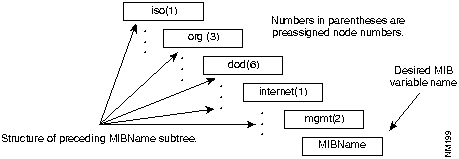
Additional subtrees below mgmt can be defined using OBJECT IDENTIFIER statements as follows:
Child Node OBJECT IDENTIFIER
::= { ParentNode ChildNodeNumber }
For example, to define mib (an object type) as a child of mgmt and assign a node number of 1, you would enter the following:
mib OBJECT IDENTIFIER ::= { mgmt 1 }
Most object types in a MIB should be defined using the OBJECT-TYPE macro. Following are the basic structure elements and format of an object type using the OBJECTTYPE macro:
ObjectDescriptor OBJECT-TYPE
  SYNTAX ASN1_Type
  ACCESS AccessType
  STATUS StatusType
  ::= ObjectIdentifier
An example of defining an OBJECT-TYPE macro with the name atNetAddress follows:
atNetAddress OBJECT-TYPE
  SYNTAX NetworkAddress
  ACCESS read-write
  STATUS mandatory
:= { atEntry 3 }
MIB trees must define the parentage of every branch from terminal object IDs to the iso(1) tree root. All trees must have the same root (iso(1) is the recommended root) in order to determine how one MIB tree relates to another.
The MIB object set read by CiscoWorks at the time it is started defines the objects that can be monitored and collected in the database for future analysis. At startup, CiscoWorks looks for the files mib.bin and mib.alias in the CiscoWorks directory $NMSROOT/etc/mibs. These files define the MIB object set and the aliases that will be used for polling and data collection. These two files in addition to the alias.gen, alias.master and the mib source files (*.mib) comprise the set of MIB-related files necessary for operating CiscoWorks.
Several MIB source files are shipped with CiscoWorks:
The alias.master file contains the list of aliases upon which CiscoWorks depends. It is located in $NMSROOT/etc/mibs directory.
The Cisco private MIB object file, cisco.mib, is located in the CiscoWorks directory $NMSROOT/etc/mibs. This section lists the Cisco private MIB objects that have been introduced starting with Software Release 8.1.
Following are the objects introduced with Software Release 8.1:
actAge
ipCkAccountingTable
  ipckactSrc
  ipckactDst
  ipkactPkts
  ipckactByts
ckactAge
Following are the objects introduced with Software Release 8.2:
writeMem
writeNet
busyPer
avgBusy1
avgBusy5
idleCount
idleWired
locIfCarTrans
locIfReliab
locIfDelay
locIfLoad
locIfCollisions
tsLineNoise
dnAreaTable
  dnACost
  dnAHop
  dnAIfIndex
  dnANextHop
  dnAAge
  dnAPrio
vinesInput
vinesOutput
vinesLocaldest
vinesForwarded
vinesBcastin
vinesBcastout
vinesBcastfwd
vinesNotlan
vinesNotgt4800
vinesNocharges
vinesFormaterror
vinesCksumerr
vinesHopcout
vinesNoroute
vinesEncapsfailed
vinesUnkown
vinesIcpIn
vinesIcpOut
vinesMetricOut

vinesMacEchoIn
vinesMacEchoOut
vinesEchoIn
vinesEchoOut
Following are the objects introduced with Software Release 8.3:
bufferHgsize
bufferHgTotal
bufferHgFree
bufferHgMax
bufferHgHit
bufferHgMiss
bufferHgTrim
bufferHgCreate
locIfInputQueueDrops
locIfOutputQueueDrops
ipNoaccess
actCheckPoint
tsMsgTtyLine
tsMsgIntervaltim
tsMsgDuration
tsMsgTest
tsMsgTmpBanner
tsMsgSend
dnIfTable
  dnIfCost
Following are the objects introduced with Software Release 9.0:
netConfigProto
hostConfigProto
sysConfigAddr
sysConfigName
sysConfigProto
sysClearARP
sysClearInt
envPresent
envTestPt1Descr
envTestPt1Measure
envTestPt2Descr
envTestPt2Measure
envTestPt3Descr
envTestPt3Measure
envTestPt4Descr
envTestPt4Measure
envTestPt5Descr
envTestPt5Measure
envTestPt6Descr
envTestPt6Measure

locIfDescr
locIfPakmon
Following are the objects introduced with Software Release 9.1:
envTestPt4MarginPercent
envTestPt5MarginPercent
envTestPt6MarginPercent
envTestPt1last
envTestPt2last
envTestPt3last
envTestPt4last
envTestPt5last
envTestPt6last
envTestPt1MarginVal
envTestPt2MarginVal
envTestPt3MarginVal
envTestPt4MarginVal
envTestPt5MarginVal
envTestPt6MarginVal
envTestPt1warn
envTestPt2warn
envTestPt3warn
envTestPt4warn
envTestPt5warn
envTestPt6warn
envFirmVersion
envTechnicianID
envType
envBurnDate
envSerialNumber
locIfSlowInPkts
locIfSlowOutPkts
locIfSlowInOctets
locIfSlowOutOctets
locIfFastInPkts
locIfFastOutPkts
locIfFastInOctets
locIfFastOutOctets
locIfotherInPkts
locIfotherOutPkts
locIfotherInOctets
locIfotherOutOctets
locIfipInPkts
locIfipOutPkts
locIfipInOctets
locIfipOutOctets
locIfdecnetInPkts
locIfdecnetOutPkts
locIfdecnetInOctets
locIfdecnetOutOctets
locIfxnsInPkts

locIfxnsOutPkts
locIfxnsInOctets
locIfxnsOutOctets
locIfclnsInPkts
locIfclnsOutPkts
locIfclnsInOctets
locIfclnsOutOctets
locIfappletalkInPkts
locIfappletalkOutPkts
locIfappletalkInOctets
locIfappletalkOutOctets
locIfnovellInPkts
locIfnovellOutPkts
locIfnovellInOctets
locIfnovellOutOctets
locIfapolloInPkts
locIfapolloOutPkts
locIfapolloInOctets
locIfapolloOutOctets
locIfvinesInPkts
locIfvinesOutPkts
locIfvinesInOctets
locIfvinesOutOctets
locIfbridgedInPkts
locIfbridgedOutPkts
locIfbridgedInOctets
locIfbridgedOutOctets
locIfsrbInPkts
locIfsrbOutPkts
locIfsrbInOctets
locIfsrbOutOctets
locIfchaosInPkts
locIfchaosOutPkts
locIfchaosInOctets
locIfchaosOutOctets
locIfpupInPkts
locIfpupOutPkts
locIfpupInOctets
locIfpupOutOctets
locIfmopInPkts
locIfmopOutPkts
locIfmopInOctets
locIfmopOutOctets
locIflanmanInPkts
locIflanmanOutPkts
locIflanmanInOctets
locIflanmanOutOctets
locIfstunInPkts
locIfstunOutPkts
locIfstunInOctets
locIfstunOutOctets
locIfspanInPkts
locIfspanOutPkts
locIfspanInOctets

locIfspanOutOctets
locIfarpInPkts
locIfarpOutPkts
locIfarpInOctets
locIfarpOutOctets
locIfprobeInPkts
locIfprobeOutPkts
locIfprobeInOctets
locIfprobeOutOctets
flashSize
flashFree
flashcontoller
flashcard
flashVPP
flashErase
flashEraseTime
flashEraseStatus
flashToNet
flashToNetTime
flashToNetStatus
netToFlash
netToFlashTime
netToFlashStatus
flashStatus
flashEntries
flashDirName
flashDirSize
flashDirStatus
Following are the objects introduced with Software Release 9.21:
locIfDribbleInputs
vinesProxy
vinesProxyReply
vinesNet
vinesSubNet
vinesClient
vinesIfMetric
vinesIfEnctype
vinesIfAccesslist
vinesIfPropagate
vinesIfArpEnabled
vinesIfServerless
vinesIfServerlessBcast
vinesIfRedirectInterval
vinesIfSplitDisabled
vinesIfLineup
vinesIfFastokay
vinesIfRouteCache
vinesIfIn
vinesIfOut
vinesIfInBytes

vinesIfOutBytes
vinesIfRxNotEnabled
vinesIfRxFormatError
vinesIfRxLocalDest
vinesIfRxBcastin
vinesIfRxForwarded
vinesIfRxNoRoute
vinesIfRxZeroHopCount
vinesIfRxChecksumError
vinesIfRxArp0
vinesIfRxArp1
vinesIfRxArp2
vinesIfRxArp3
vinesIfRxArpIllegal
vinesIfRxIcpError
vinesIfRxIcpMetric
vinesIfRxIcpIllegal
vinesIfRxIpc
vinesIfRxRtp0
vinesIfRxRtp1
vinesIfRxRtp2
vinesIfRxRtp3
vinesIfRxRtp4
vinesIfRxRtp5
vinesIfRxRtp6
vinesIfRxRtpIllegal
vinesIfRxSpp
vinesIfRxUnknown
vinesIfRxBcastHelpered
vinesIfRxBcastForwarded
vinesIfRxBcastDuplicate
vinesIfRxEcho
vinesIfRxMacEcho
vinesIfRxProxyReply
vinesIfTxUnicast
vinesIfTxBcast
vinesIfTxForwarded
vinesIfTxFailedEncaps
vinesIfTxFailedAccess
vinesIfTxFailedDown
vinesIfTxNotBcastToSource
vinesIfTxNotBcastNotlan
vinesIfTxNotBcastNotgt4800
vinesIfTxNotBcastPpcharge
vinesIfTxBcastForwarded
vinesIfTxBcastHelpered
vinesIfTxArp0
vinesIfTxArp1
vinesIfTxArp2
vinesIfTxArp3
vinesIfTxIcpError
vinesIfTxIcpMetric
vinesIfTxIpc
vinesIfTxRtp0

vinesIfTxRtp1
vinesIfTxRtp2
vinesIfTxRtp3
vinesIfTxRtp4
vinesIfTxRtp5
vinesIfTxRtp6
vinesIfTxSpp
vinesIfTxEcho
vinesIfTxMacEcho
vinesIfTxProxy
chassisType
chassisVersion
chassisId
romVersion
romSysVersion
processorRam
nvRAMSize
nvRAMUsed
configRegister
configRegNext
cardTable
cardTableEntry
cardIndex
cardType
cardDescr
cardSerial
cardHwVersion
cardSwVersion
cardSlotNumber
chassisSlots
Following are the objects introduced with Software Release 10.0:
ipxThresh
ipxactLostPkts
ipxactLostByts
ipxactSrc
ipxactDst
ipxactPkts
ipxactByts
ipxactAge
ipxckactSrc
ipxckactDst
ipxckactPkts
ipckactByts
ipxckactAge
ipxactCheckPoint
vinesIfInputNetworkFilter
vinesIfInputRouterFilter
vinesIfOutputNetworkFilter
Since many networks are built with equipment from various vendors, and there are custom objects that you as a network manager may want to monitor, you can add these non-Cisco custom MIBs to the standard object set using the makemib script.
CiscoWorks uses two files to define how it accesses MIB object information from devices. The first, mib.bin, is a database of all the objects currently defined in the MIB source files. The second file, mib.alias, allows Cisco Systems to define a protocol-independent application environment.
The mib.alias file also allows you to assign your own names to existing MIB objects. For instance, you could assign the name UpTimeInterval to the MIB object sysUptime. You also could assign several names to the same MIB object. The mib.alias file provides the translation matrix for the object information you want to collect.
If you want to collect custom MIB information from non-Cisco SNMP devices in your network, use the makemib script to create new mib.bin and mib.alias files for your installation.
To use the makemib script, perform the following steps:
When the makemib process finishes, you are ready to start CiscoWorks.
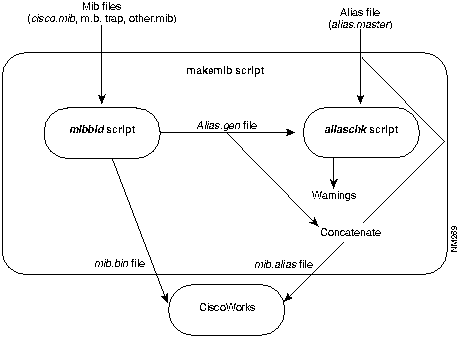
The makemib script runs mibbld to generate the mib.bin file and the alias.gen file, and then runs aliaschk to check the alias.gen file. It then combines the alias.gen and alias.master files to form the mib.alias file. (See Figure A-2.)
Figure A-2 : CiscoWorks MIB Build Process The process of expanding the MIB object set starts with a series of files supplied by the vendors of the various network products. These files define the MIB objects and can be edited with any standard text editor, as long as you conform to the concise MIB format. You can store as many vendor files as you like. The file specification must include the .mib extension.
Use the following syntax to start the makemib script:
MasterAlias is the master alias file (default: alias.master). FinalAlias is the final alias file (default: mib.alias). Options are described in Table A-1.
Running makemib completes the creation of the mib.alias file in a single command step. You can, however, run the mibbld and aliaschk scripts individually instead of running the makemib script. These scripts are described later in this chapter under their individual headings.
Cisco Systems recommends that you use the makemib script.
MIB aliases are used by CiscoWorks to create protocol-independent MIB objects. The mib.alias file defines a name in terms of a MIB object name and a protocol. Aliases also allow one or more protocol specific object identifiers to be associated with a single MIB object. Currently, only SNMP is supported.
The mib.alias file is an ASCII file. Each alias entry takes the following general format:
The ObjectID can be in either numeric or textual form, but must be fully qualified. MIB trees must define the parentage of every branch from terminal object IDs to the iso(1) tree root. All trees must have the same root. The recommended root is Iso(1). As a side effect of ASN.1 object identifier encoding, the first two subidentifiers are compressed into a single numeric value. Thus, iso(l) -- org(3) becomes 43. rather than 1.3. This convention is followed when specifying a numeric object identifier within an alias entry.
For uniformity, iso(l) through org(3) also are compressed to isoorg in a textual object identifier. Note that in actual application, each textual subidentifier must be introduced with the underbar delimiter (_), even the first subidentifiers (such as _isoorg).
An example of a portion of a mib.alias file follows:
If you list more than one object identifier for a given alias, CiscoWorks searches for the ID in the order the IDs are listed.
You can include comments in the MIB alias file by placing two dashes (--) in front of the comment text, as follows:
The makemib script builds the alias entries in alias.gen and then concatenates alias.gen and alias.master into mib.alias. It generates a name that is unique for each object by prefixing the mib file identifier (defined within the mib file) to the object name with a hyphen (-). If the MIB filename is new.mib, the file name identifier in this file is NEW-MIB, and the object name is newMibVar, the alias name generated would be as follows:
The protocol and object identifier as defined in the file follows:
However if the filename identifier is already part of the object name, it is not prefixed to the object name. For example, if the MIB filename were new.mib, the filename identifier in this file was new and the object name was newMibVar, the alias name generated would be as follows:
The alias name would not be new-newMibVar.
You also can modify the mib.alias file with any text editor. This is the most convenient way to add a name definition to an already existing MIB object. For instance, if you want to define the name UpTimeInterval as the standard MIB object sysUptime, enter the following in the mib.alias file:
At times, you might want to have several names for the same MIB object. For instance, if you want to define the names Myhost, Ciscohost, and Routername as the Cisco Systems private MIB object CISCO-MIB-hostName, enter the following in the mib.alias file:
At times, you might want to have a single name for the several MIB objects. For instance, if you want to define the name Routemetric to include the four objects---SNMP::43.6.1.2.1.4.21.1.3, SNMP::43.6.1.2.1.4.21.1.4, SNMP::43.6.1.2.1.4.21.1.5, and SNMP::43.6.1.2.1.4.21.1.6---enter the following in the mib.alias file:
When you start CiscoWorks, the changes you made to the mib.alias file are used when you ask CiscoWorks to poll for that object.
There are two forms of directory pathing:
CiscoWorks requires the mib.alias file to appear in the same directory as the mib.bin file. CiscoWorks software looks for the MIB alias file in the directory $NMSROOT/etc/mibs or $NMSROOT/MIBDIR. NMSROOT defines the root directory for all Network Management System (NMS) software. MIBDIR is a relative path name that defines the directory below the NMS root directory which contains one or more MlB files and the mib.alias file.
If MIBDIR is not defined, the MIB directory defaults to $NMSROOT/etc/mibs. If a full path to the MIB directory or a MIB filename is specified using the --p or --f options, NMSROOT and MIBDIR are ignored.
The base name of the output MIB file will default to mib.bin unless a specific binary output file is defined. The directory in which the output file appears is determined as follows:
The script used to build the binary MIB file is mibbld. The script checks the contents of all the files with the .mib extension in the specified directory for syntax errors and creates a binary format mib.bin and alias.gen files usable by CiscoWorks.
The format of the statement used to invoke mibbld follows:
The mibbld script options are described in Table A-2.
If you run mibbld without specifying full path names, mibbld looks for the environment objects NMSROOT and MIBDIR.
The showmib command displays the contents of the binary MIB file in a tree structure. The command also checks the contents of the MIB alias file against the MIB tree. The form of the showmib command follows:
The showmib command processes the contents of a binary format MIB file and displays the contents in a hierarchical tree structure starting from the tree's root. The MIB alias file is then processed. Aliases are displayed with corresponding fully qualified object IDs.
The showmib command options are described in Table A-3.
Table A-3 : showmib Command Options
If you run showmib with no arguments, it looks for the environment objects NMSROOT and MIBDIR.
The aliaschk script ensures that alias names defined in alias.gen do not conflict with alias names in alias.master.
The last step in the makemib process is to concatenate the alias.master and alias.gen files together as mib.alias. Enter the following UNIX command at the prompt:
Copyright 1988-1996 © Cisco Systems Inc.
%
makemib
Option
Description
--f MibFile
Specifies the MIB file to be processed by filename MibFile (default *.mib).
--o OutMib
Indicates the name of the output file for the MIB binary file (default mib.bin).
--p PathToMibs
Processes all MIB files found in the directory specified by the path name PathToMibs (default $NMSROOT/$MIBDIR)
--a AliasFile
Indicates the name of output file for the aliases (default alias.gen)
--w WarnLevel
Sets the warning message level at the level specified by WarnLevel. A level of 0 suppresses all warning messages (including "unknown variable type") that you want to receive. The default setting is 1. The mibbld script will issue warning and error messages regarding syntax errors, bad keywords, and so on, so it is wise to run with the warning level set to 1 or greater.
--t
Displays MIB table after processing (on stdout).
--n
Disables alias generation.
--v
Displays copyright and version information (on stdout).
--h
Displays help information (on stderr).
UpTime { SNMP::43.6.1.2.1.1.3 }
ItsTime { SNMP::_isoorg_dod_internet_mgmt_mib_system_sysUpTime }
EgpNeighbor { SNMP::43.6.1.2.1.8.5.1.1, SNMP::43.6.1.2.1.8.5.1.2 }
RouteMetric { SNMP::43.6.1.2.1.4.21.1.3, SNMP::43.6.1.2.1.4.21.1.4,
SNMP::43.6.1.2.1.4.21.1.5, SNMP::43.6.1.2.1.4.21.1.6 }
-- This is a comment.
UpTimeInterval{SNMP::_isoorg_dod_internet_mgmt_mib_system_sysUpTime}
Myhost{SNMP::_isoorg_dod_internet_private_enterprises_cisco_local_lsystem_hostName}
CiscoHost{SNMP::_isoorg_dod_internet_private_enterprises_cisco_local_lsystem_hostName}
Routername{SNMP::_isoorg_dod_internet_private_enterprises_cisco_local_lsystem_hostName}
Routemetric {
  SNMP::43.6.1.2.1.4.21.1.3
  SNMP::43.6.1.2.1.4.21.1.4
  SNMP::43.6.1.2.1.4.21.1.5
  SNMP::43.6.1.2.1.4.21.1.6
}
Option
Description
-f MibFile
Specifies the MIB file to be processed by filename MibFile (default *.mib).
-o OutMib
Provides the name of the output file for the MIB binary file (default mib.bin).
-p PathToMibs
Processes all MIB files found in the directory specified by the path name PathToMibs (default $NMSROOT/$MIBDIR). The environment objects, NMSROOT and MIBDIR, are ignored.
-a AliasFile
Provides the name of output file for the aliases (default alias.gen).
-w WarnLevel
Sets the warning message level at the level specified by WarnLevel. A level of 0 suppresses all warning messages (including "unknown variable type," which you want to receive). The default setting is 1. The mibbld script will issue warning and error messages regarding syntax errors, bad keywords, and so on. For this reason, it is wise to run with the warning level set to 1 or greater.
-t
Displays the MIB table after processing to standard output.
-n
Disables the alias generation.
-v
Displays copyright and version information to standard output.
-h
Displays help information to standard error.
Option
Description
-a AliasFile
Provides name of MIB alias file.
-f MibFile
Processes the single MIB file specified by filename (path name) MibFile.
-p PathToMibs
Processes all MIB files found in the directory specified by path name PathToMibs. The Environment objects NMSROOT and MIBDIR are ignored.
-s SuppressO
Suppresses output. If SuppressO is set to m, the output of the MIB tree is suppressed. If SuppressO is set to a, the output of the output of aliases is suppressed. If set to -h, displays the showmib options list.
-h
Displays help information to standard error.
% cat alias.master alias.gen > mib.alias
