


|
|
Validating CiscoWorks Installation
To validate the CiscoWorks installation and configuration, you must edit the .cshrc file on your system. Follow the procedures in this chapter to complete the validation of your CiscoWorks installation.
This section briefly summarizes the steps you should follow to complete the CiscoWorks installation and configuration and to validate the installation. These steps are explained in detail following:
To use SNM, CiscoWorks, and Sybase, you must define the appropriate environment variables and paths in your .cshrc file.
Environment variables define how your particular system is set up, such as directory paths that specify the location of files (either manual pages or software). The environment variables and paths are explained in in Table 4-1.
Table 4-1 Environment Variables and Directory Paths
| Environment Variable or Path | Explanation |
|---|---|
| SNMHOME | Refers to the directory path for SNM software. If you do not already have the environment variable SNMHOME set for SunNet Manager, you must define it. |
| NMSROOT | Refers to the directory /usr/nms where the CiscoWorks software was installed. If the software was installed in a different directory, substitute the appropriate directory path to ensure a correct definition of the NMSROOT environment variable. |
| SYBASE | Refers to the directory path $NSMROOT/ sybase. In this case, the Sybase software was installed in the /usr/nms/sybase directory. The SYBASE variable refers to the NMSROOT variable and the sybase directory following it. |
| PATH | Refers to the directory path for $SNMHOME/bin, $NMSROOT/bin, $NMSROOT/etc, and $SYBASE/bin. The path should be specified for SNM, CiscoWorks, and Sybase. |
| MANPATH | Refers to the directory path for the CiscoWorks manual pages. |
| DISPLAY | Refers to the environment variable for the monitor on which CiscoWorks displays. The default is :0 or <hostname>:0 |
The addition of environment variables and path names to your .cshrc file will be applicable only to your login account. If you have other system administrators or network managers who need access to CiscoWorks, edit their .cshrc files and add the information specified in the following procedure.
The following steps describe how to add the appropriate environment variables and path names to the .cshrc file or the .login file. If you installed SNM, CiscoWorks, and Sybase software in directories other than the default directories, substitute the correct directory paths.
#Set environment variables for SNM, CiscoWorks, and Sybase
setenv SNMHOME /usr/snm
setenv NMSROOT /usr/nms
setenv SYBASE $NMSROOT/sybase
#Set path for SNM
set path = ($path $SNMHOME/bin)
#Set path for CiscoWorks and Sybase executables
set path = ($path $NMSROOT/bin $NMSROOT/etc $SYBASE/bin)
#Set path for CiscoWorks man pages
if (!($?MANPATH)) setenv MANPATH /usr/man
setenv MANPATH "$MANPATH":"$NMSROOT"/man
hostname% source .cshrc
After you edit the .cshrc file, verify that the changes you made are active. Enter the following command at the UNIX prompt to display the edited .cshrc file:
hostname% printenv | more
Note that the environment variables for SNMHOME, NMSROOT, and SYBASE are displayed. In addition, the paths are defined for SNM, CiscoWorks and Sybase executables, and the CiscoWorks manual pages, as well as other system variables.
To verify the CiscoWorks installation and configuration, access SNM and display the CiscoWorks applications.
For detailed information on how to start the SNM Console, refer to the SunNet Manager 2.0 User's Guide.
If you are upgrading from a previous version of CiscoWorks, perform the following steps to view CiscoWorks applications:
hostname % snm -i
If you are installing CiscoWorks for the first time, perform the following steps to view CiscoWorks applications.
hostname % snm -i
Figure 4-1 shows the Tools menu with both SNM tools and CiscoWorks applications. CiscoWorks applications are prefixed by CW.
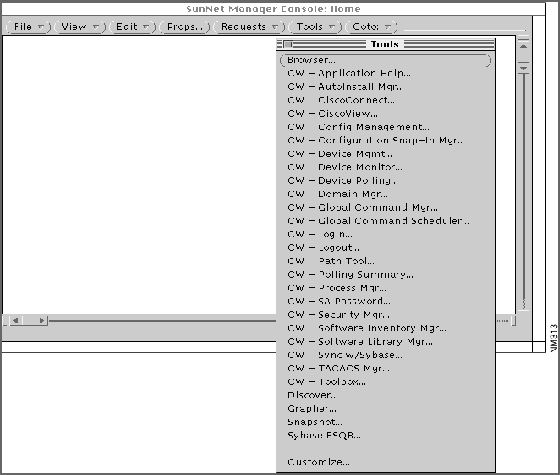
Figure 4-1 Tools Menu with CiscoWorks Applications
If the Tools menu does not contain the CiscoWorks applications, perform the getagents procedure for SNM as explained in the SNM documentation. Then restart SNM and check the Tools menu again. You may not be able to use all applications until you complete the rest of the procedures in this chapter.
Use the CiscoWorks Process Manager application to select different types of CiscoWorks processes or daemons. A daemon is a process that performs a specific function for the system. Each CiscoWorks process performs specific functions. For example, the Device Monitor daemon polls for information about devices on your network and forwards this information to SNM.
The Process Manager monitors the following seven CiscoWorks daemon processes: nmlogd, nmpolld, nmeventd, nmdevmond, syslogd, TACACS Authentication Server, and dataserver. Figure 4-2 shows the Process Manager window with the processes.
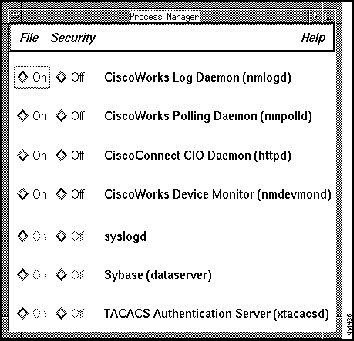
Figure 4-2 Process Manager Window
By default, the first four CiscoWorks processes in the Process Manager window are running whenever you reboot your system. These processes can run continuously, even if SunNet Manager is not running on your system. To verify that the appropriate CiscoWorks processes are running, you must access the Process Manager window.
To invoke the Process Manager application, perform the following steps:
After validating the CiscoWorks installation as described in this chapter, proceed to Chapter 5, "Learning to Use CiscoWorks," to learn some simple tasks associated with CiscoWorks.

|
Copyright 1988-1995 © Cisco Systems Inc.