|
|

Replacing the Temperature Sensing Unit
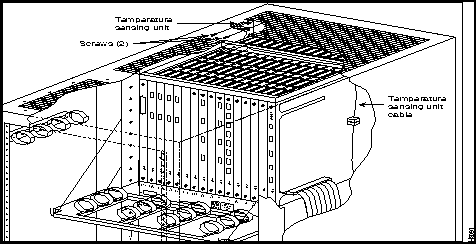
The temperature sensing unit is located at the top of the back of the upper card cage.
To remove a temperature sensing unit (Figure 4-12), perform the following steps:
To install a temperature sensing unit (Figure 4-12), perform the following steps:
Figure 4-12 : Location of Temperature Sensing Unit Replacing a Backplane/Bus (IPX 8)
The backplane MUXBUS on the IPX 8 is not field replaceable. The cabinet must be returned to the factory.
The utility buses are replaced as they are in the IPX 16/32 cabinets. See the "Replacing a Power Supply (IPX 16/32)" section earlier in this chapter.
Replacing a Power Supply (IPX 8)
In a node equipped with redundant power supplies, one of the two power supplies may be replaced without disrupting system operation.
The power supply and the shelf is keyed for a DC or AC power supply to fit into the shelf. There are screws in the shelf (factory installed) that allow only a DC or AC power supply to be inserted. When a cabinet is converted the shelf screws must be altered to allow the different supply to be installed. If redundant supplies are installed, both must be removed and the node must be shut down.
Power Distribution Units (IPX 8)
There are two possible power distribution units available for the IPX 8. The AC or the DC power distribution units are factory installed. To replace these units see the following paragraphs.
AC Power Distribution Unit (IPX 8)
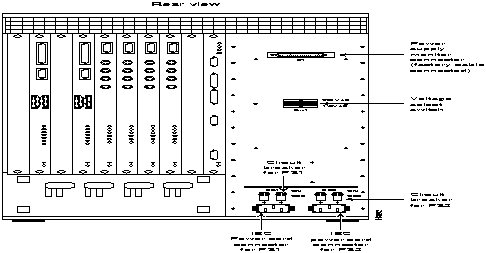
AC-powered IPX 8 cabinets, shown in Figure 4-13 have two 10A circuit breaker/power switches, CB1 and CB2. CB1 controls the lower power supply, and CB2 controls the upper power supply.
There is a separate power cord and circuit breaker for each of the power supplies for connection to separate power sources. These should be connected to separate outlets in the utility facility. A cable clamp is provided as part of each of the two power cord receptacles to prevent the power cords from accidentally becoming disconnected. Connector P1 is used to carry power sense leads to the SCC where the voltages are monitored. It is not a customer connection.
A two-position sliding voltage selector switch in the center of the AC Power Distribution Unit is used to select either 110 VAC or 220 VAC input. Each AC input is protected by a series line filter mounted on the back of the AC PDU. These line filters suppress any noise that may be induced on the AC line.
Figure 4-13 : IPX 8 with AC Power (Rear View) DC Power Distribution Unit (IPX 8)
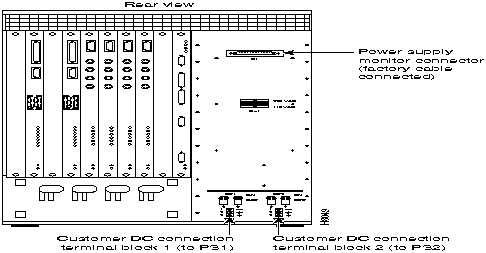
DC-powered IPX 8 cabinets shown in Figure 4-14 are powered from 48 VDC from either central office battery supplies or wherever a battery backup is provided to power the IPX 8 during loss of primary AC. Two circuit breakers are provided for overload protection and for turning the input DC power feed on and off.
Two terminal blocks, TB1 and TB2, on the DC Power Distribution Unit terminate the input power and ground wiring. The top screw terminal connects to --48V input, the bottom terminal connects to the 48V return and the middle terminal connects to chassis ground. The DC PDU does not incorporate any line filters.
Figure 4-14 : IPX 8 with DC Power (Rear View) Replacing an IPX 8 Power Distribution Unit
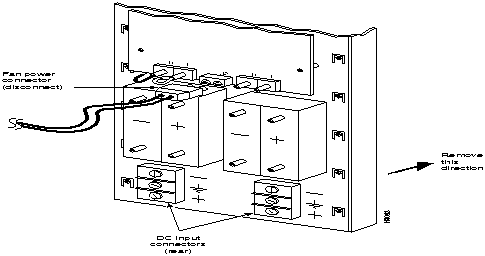
Both the AC and the DC PDU's are replaced as an assembly. A PDU should not need replacing except for one of the following two conditions:
To replace a PDU, proceed as follows:
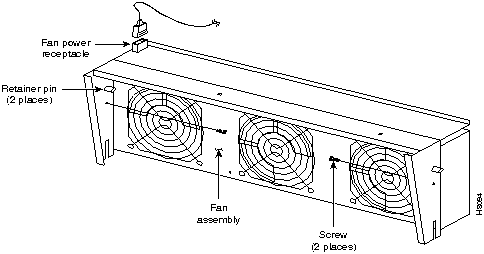
Figure 4-15 : Replacing the IPX 8 Power Distribution Unit Replacing the IPX 8 Fan Assembly
If an IPX 8 fan fails, the whole fan assembly is replaced as a unit. Individual fans are not replaceable. Replacement fan assemblies are available from StrataCom. Order a replacement fan assembly before beginning this procedure. Generally, two fans will provide sufficient cooling for the IPX 8, but a fan assembly with a failed fan should be replaced in the event that a second fan should fail.
To replace the IPX 8 fan assembly, refer to Figure 4-16 and proceed as follows:
Figure 4-16 : Replacing the IPX 8 Fan Assembly
Copyright 1988-1996 © Cisco Systems Inc.