This might be niche, but some customers are still relying on wired guest solutions.
In the case of wireless guest portals, particularly security-conscious customers require dedicated PSNs to handle their guest traffic, as highlighted in the ISE Guest Access Prescriptive Deployment Guide. That’s easy to implement since PSNs are configured at the SSID level. The guest SSID can be configured with one set of PSNs (the DMZ PSNs, for example), while the corporate SSID uses a different set.
Trying to apply that recommendation in the wired context doesn’t make much sense at first. In IOS, PSNs are configured centrally for both 802.1X and MAB. In this kind of setup, implementing such a “best practice” used to be considered “mission impossible.”
The introduction of IBNSv2, however, opened new perspectives.
Some guides already illustrate how to segment 802.1X authentication from MAB authentication. This design goes one step further by leveraging the very little-known concept of session “role”.
Obviously, as with any portal customization, this solution will add complexity to the design and impact support. As soon as wired guest is no longer a priority, it’s recommended to simplify the deployment by reverting to a more classical solution.
The Core Concept #
The trick is to use RADIUS-assigned session roles to dynamically change which PSN set the switch contacts. Here’s the high-level flow:
- Endpoint connects → authentication starts
- Switch sends request to corporate PSN (initial authentication)
- ISE assigns “guest” role → Triggers 1-second re-auth timer
- Switch detects “guest” role → Re-authenticates to guest PSN instead
- Guest PSN handles portal flow OR non-guest device gets profiled and kicked back
The magic happens in IBNSv2 class-maps on the switch that detect the role and route RADIUS requests accordingly.
Prerequisites: IOS Configuration #
Before diving into the ISE policy, let’s understand how the switch is configured to detect and act on session roles.
RADIUS Server Groups #
Two different RADIUS server groups are created. One refers to the guest/DMZ PSNs, and the other points to the corporate PSNs.
aaa group server radius AAA_GUEST
 server name guest-radius_10.1.1.14
 server name guest-radius_10.1.1.15
 ip radius source-interface Loopback0

aaa group server radius AAA_CORPORATE
 server name dnac-radius_10.1.2.4
 server name dnac-radius_10.1.2.5
 server name dnac-radius_10.1.2.6
 ip radius source-interface Loopback0
AAA Method Lists #
Two sets of method lists for AAA are created based on these groups:
aaa authentication dot1x ML_GUEST group AAA_GUEST
aaa authentication dot1x ML_CORPORATE group AAA_CORPORATE
aaa authorization network ML_GUEST group AAA_GUEST
aaa authorization network ML_CORPORATE group AAA_CORPORATE
aaa accounting network ML_CORPORATE start-stop group AAA_CORPORATE
aaa accounting network ML_GUEST start-stop group AAA_GUEST
Role Detection Class-Map #
This is the critical piece: a class-map that detects the guest role pushed from ISE:
class-map type control subscriber match-all GUEST_ROLE
 match user-role guest
Policy-Map: The Routing Logic #
The policy map is configured to use the guest method list for MAB if the session is assigned to the guest role. Otherwise, the corporate method list is used for both 802.1X and MAB.
policy-map type control subscriber PMAP_CORPORATE_GUEST
 event session-started match-first
  5 class GUEST_ROLE do-until-failure
   10 authenticate using mab aaa authc-list ML_GUEST authz-list ML_GUEST acct-list ML_GUEST priority 5
  10 class always do-until-failure
   10 authenticate using dot1x aaa authc-list ML_CORPORATE authz-list ML_CORPORATE acct-list ML_CORPORATE retries 2 retry-time 0 priority 10
 event authentication-failure match-first
  5 class DOT1X_FAILED do-until-failure
   10 terminate dot1x
   20 authenticate using mab aaa authc-list ML_CORPORATE authz-list ML_CORPORATE acct-list ML_CORPORATE priority 20
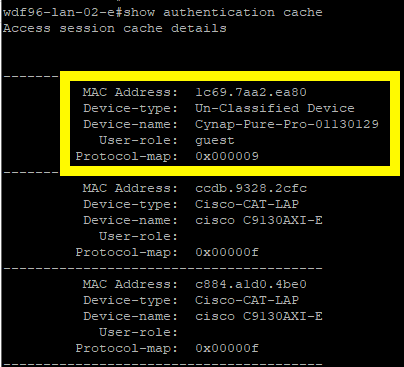
Key takeaway: When the switch sees user-role guest in the RADIUS response, it matches the GUEST_ROLE class and sends subsequent authentications to the guest PSN group.
You can verify the role assignment with show authentication cache:
The ISE Flow #
Now that we understand how the switch behaves, let’s walk through the ISE policy logic.
Step 1: Initial MAB Authentication (Corporate PSN) #
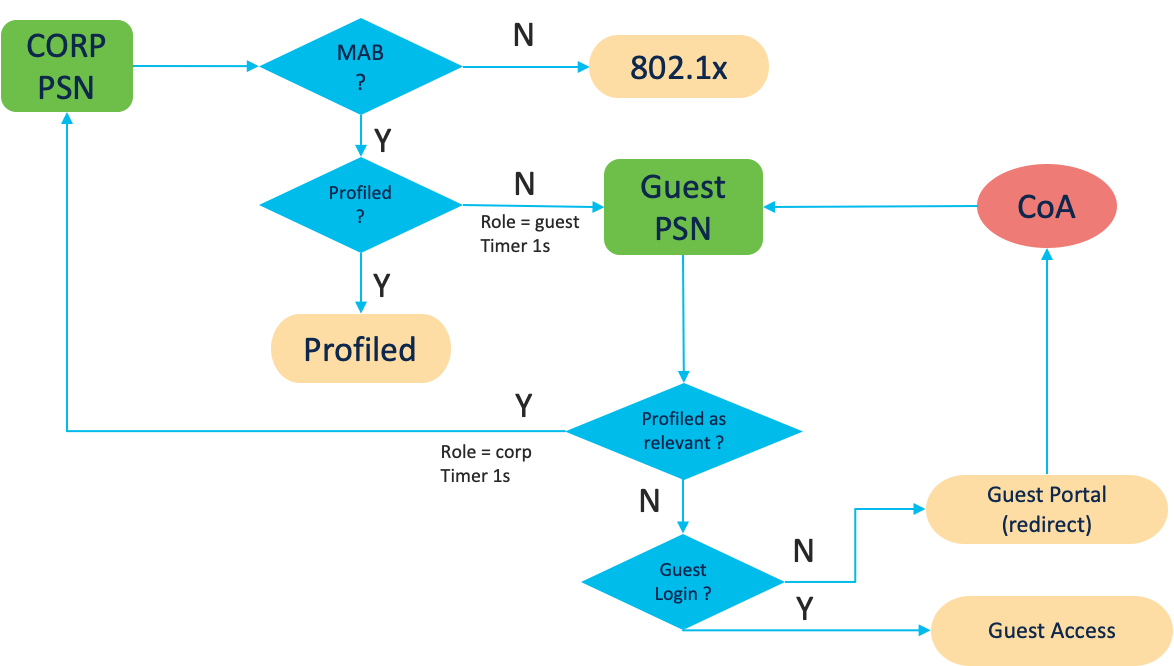
When an endpoint connects, the switch sends the initial MAB request to the corporate PSN.
This policy set handles MAB requests that are not originated from the guest PSNs (note the logical NOT in the LC_Guest_PSN condition):

The authorization policy checks if the device has been profiled:

If profiled: Assign the appropriate authorization profile for that device class.
If unknown: Return a special authorization profile that assigns the guest role and triggers re-authentication in 1 second:
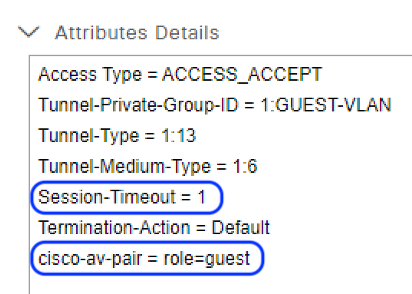
This profile pushes:
cisco-av-pair = "session:role=guest"→ Triggers the IOSGUEST_ROLEclass-map- Session-Timeout = 1 → Forces immediate re-auth
Step 2: Re-Authentication Routed to Guest PSN #
The switch receives the session:role=guest attribute, detects it in the GUEST_ROLE class-map, and sends the next MAB authentication to the guest PSN group instead.
This policy set now handles the request:

The authorization policy has three rules:
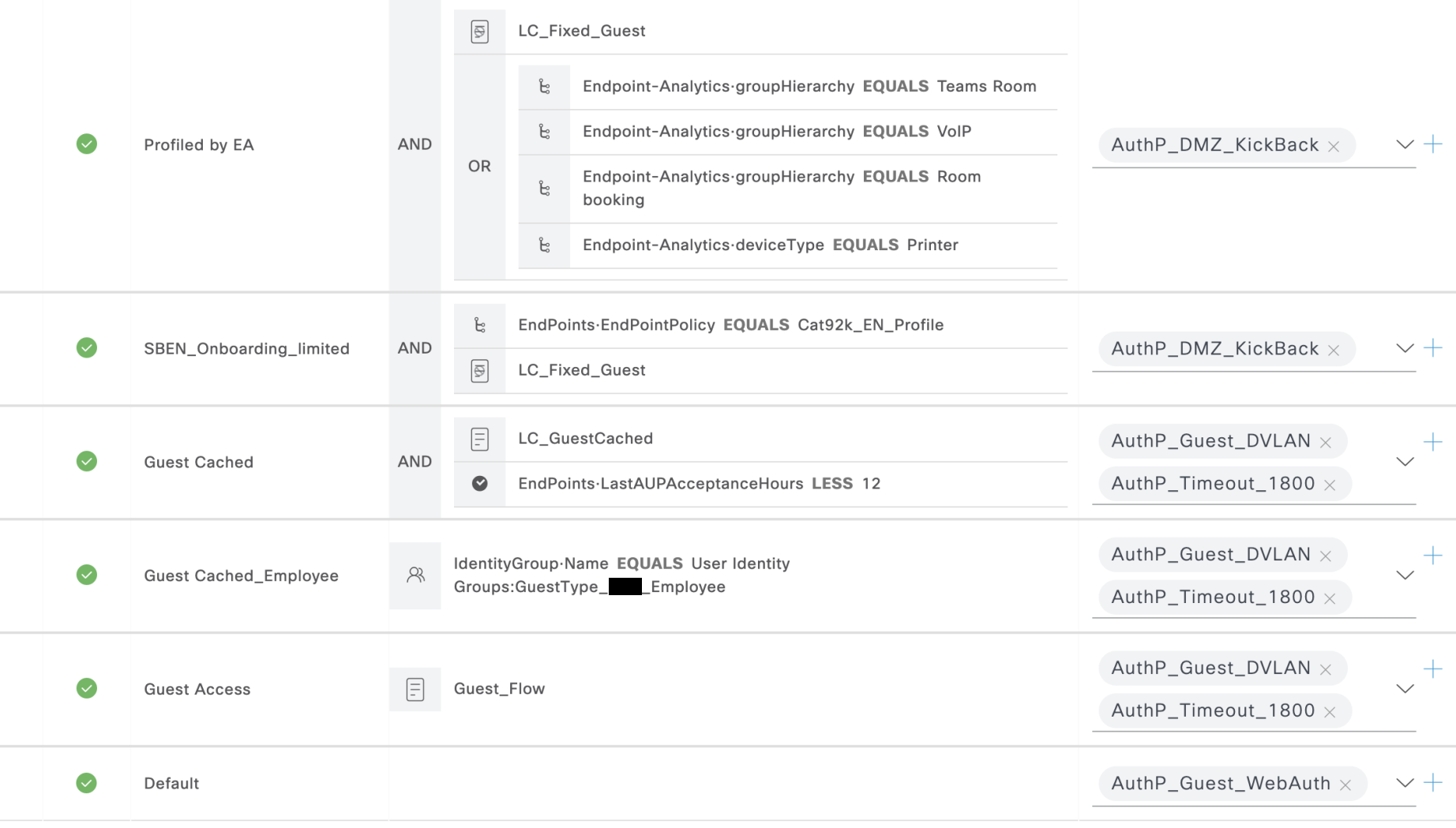
- Check if profiled → Shouldn’t match initially (device is unknown)
- Check if remembered guest → Matches if user authenticated before (cached/remember-me flow)
- Default rule → Redirect to guest portal with limited network access
Step 3A: Guest Authenticates (Portal Flow) #
At this point, the endpoint can follow the standard guest workflow:
- Open the browser, hit the captive portal
- Authenticate as guest
- ISE sends RADIUS CoA
The session role remains “guest”, so the re-authentication still goes to the guest PSN. This time, the authorization policy grants access to the guest network.
Step 3B: Non-Guest Device Gets Profiled (Kickback) #
If the endpoint is not meant for guest access (e.g., a printer, IP phone, security camera), it will be profiled while it has limited access to the guest portal.
Once profiled, ISE triggers a RADIUS CoA. The authorization policy is evaluated again. This time, since the endpoint has been profiled, it matches the first rule in the guest PSN authorization policy (see screenshot above).
That rule assigns the DMZ_Kickback authorization profile:
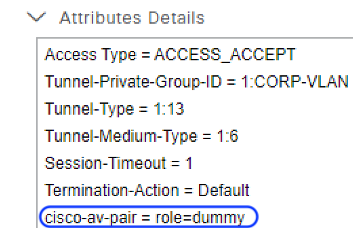
This profile:
- Overwrites the role with an arbitrary value (e.g., “dummy”)
- Forces re-authentication in 1 second
When the switch re-evaluates the IBNSv2 policy, the GUEST_ROLE class-map no longer matches (role is now “dummy” instead of “guest”). The RADIUS request is sent back to the corporate PSN.
The corporate PSN’s authorization policy is evaluated again. This time, the device is profiled, so it matches the appropriate rule in the first set (see the “PS_for_profiled_endpoints.png” screenshot in Step 1) and gets the correct authorization for its device class.
Production-Tested #
What’s worth noting is that this is not some esoteric lab experiment. This design has been running live in a very large deployment for a couple of years already.
While it works perfectly fine, it will take a while for any engineer facing the setup for the first time to understand how it works. Hopefully, this post will help popularize the idea.