So we now know how SKIP works on paper. Time to plug in some cables… well, virtual ones.
The feature has been introduced in IOS XE 17.11.1a (if you missed the previous post on what SKIP actually is, worth a read first): https://www.cisco.com/c/en/us/td/docs/routers/ios/config/17-x/sec-vpn/b-security-vpn/m-sec-cfg-quantum-encryption-ppk.html
…and is supported on the Catalyst 8000v. If setting up the encryptor is the easy part, finding a proper key server for testing is another story. Luckily an internal project provides exactly that. The tool is simply called “PQCagent”. It runs in a Docker container and is based on the open-source strongSwan to provide a key based on PQC.
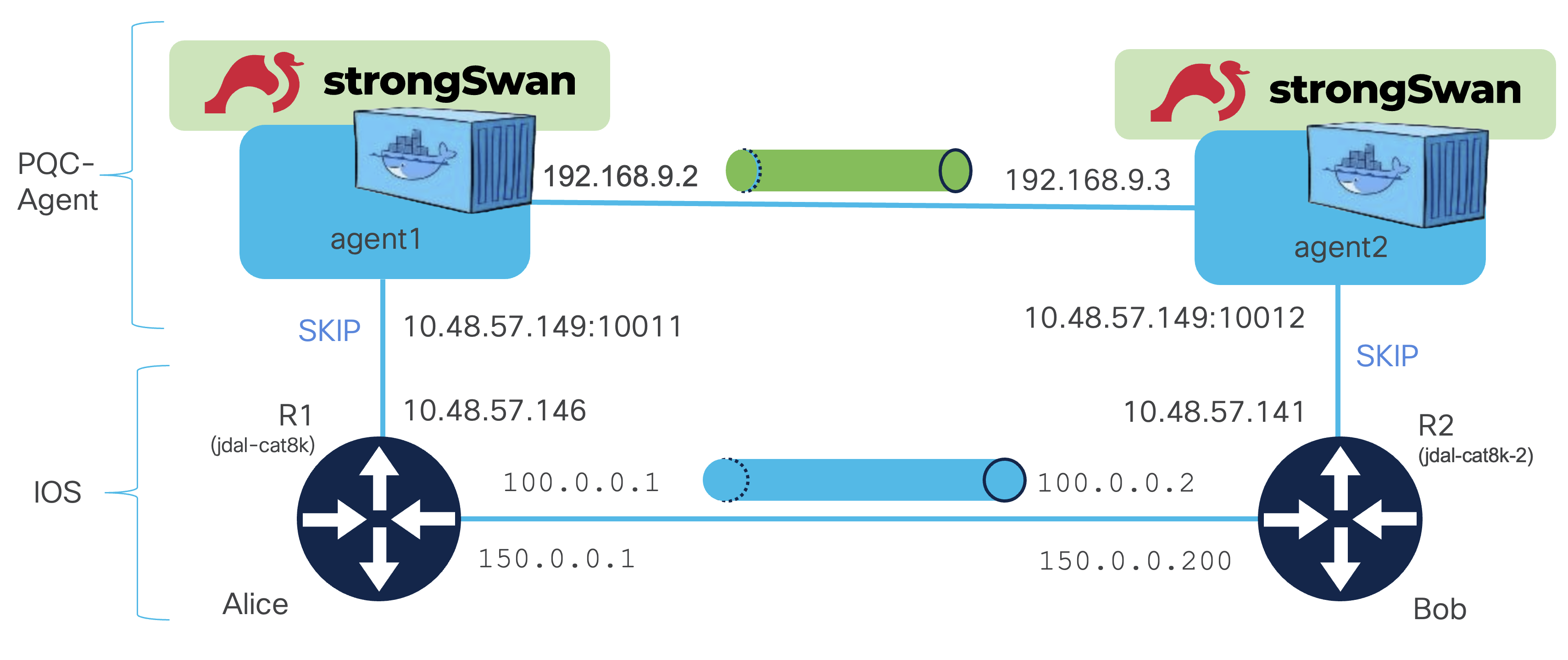
Here is the simple topology I used:
Router configuration #
Here is the configuration on one side:
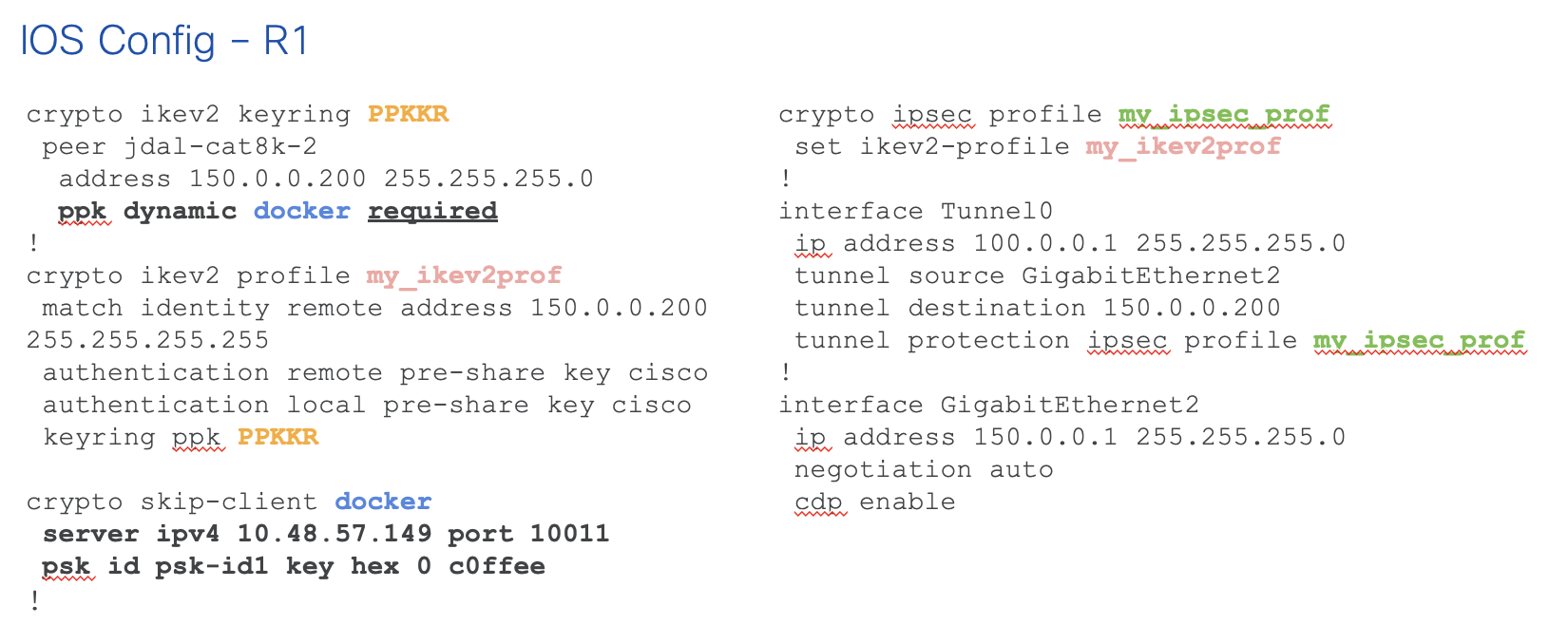
Two things worth flagging:
ppk dynamic docker required
The required keyword prevents falling back to a regular pre-shared key if the SKIP process fails.
psk id psk-id1 key hex 0 c0ffee
As discussed in the previous post, the communication between the encryptor and the key provider is protected with TLS. In this IOS version, the only option is TLS PSK. We are defining here the pre-shared key “C0FFEE” (yes, really ;-). It is encoded in hexadecimal as indicated by the hex keyword.
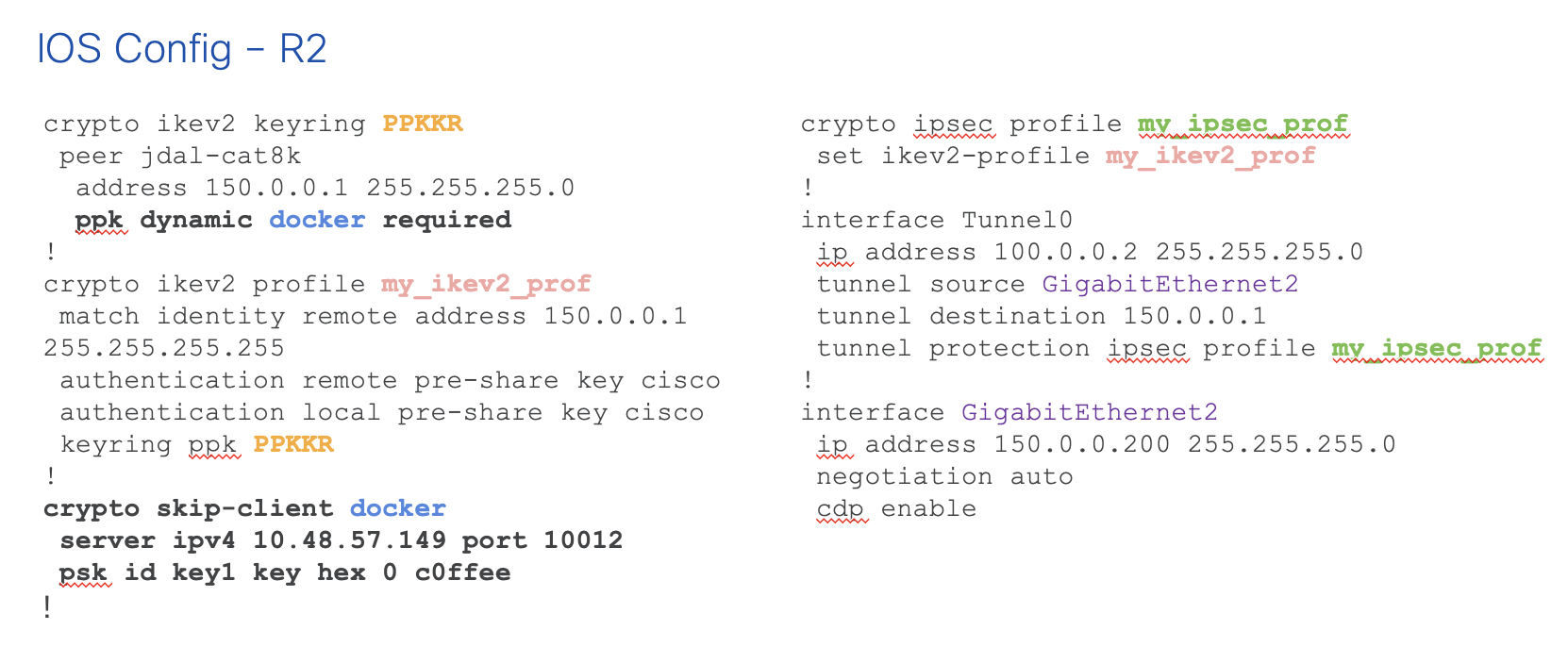
And the other side, no real surprise:
PQCagent #
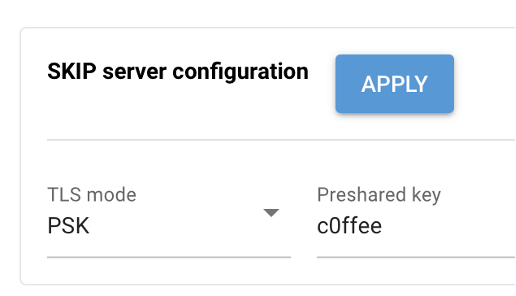
As a bonus, here is a screenshot from the GUI of PQCagent:
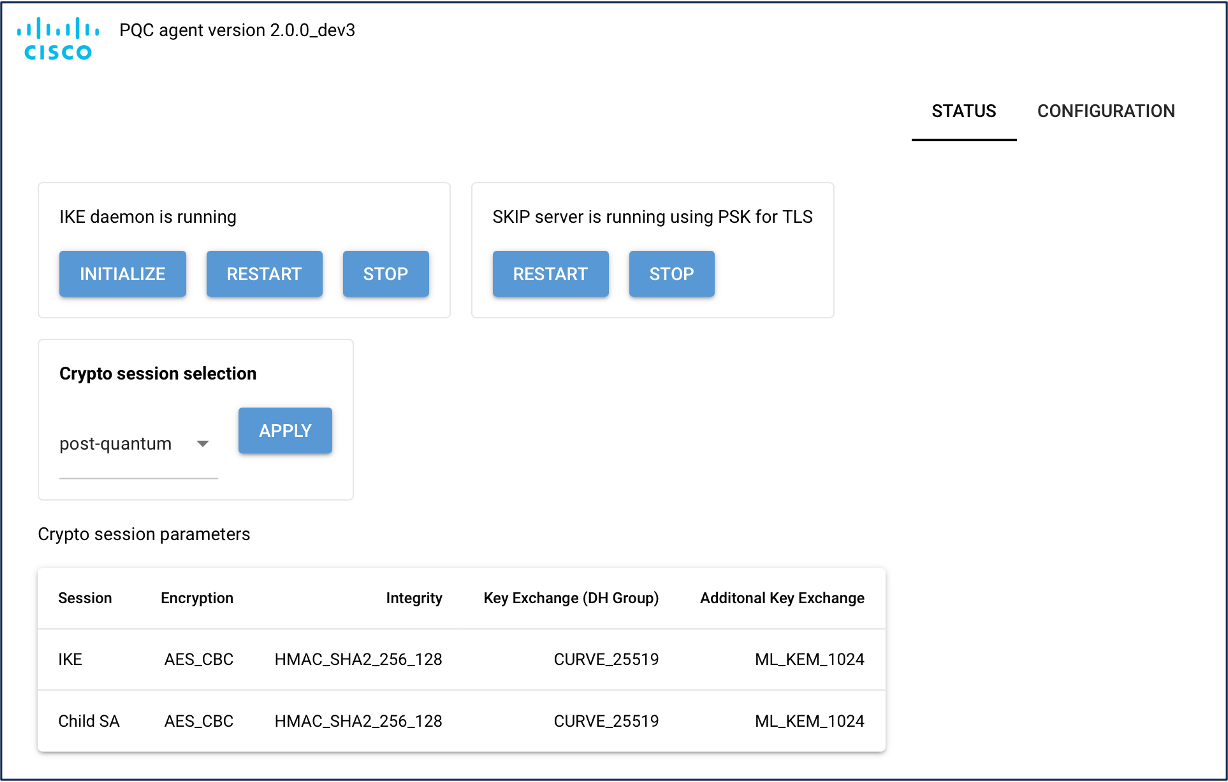
…and obviously, maybe the most important, the configuration of the matching shared secret!
The result #
jdal-cat8k#show crypto ikev2 sa detailed
 IPv4 Crypto IKEv2  SA

Tunnel-id Local                 Remote                fvrf/ivrf            Status
6         150.0.0.1/500         150.0.0.200/500       none/none            READY
      Encr: AES-CBC, keysize: 256, PRF: SHA512, Hash: SHA512, DH Grp:19, Auth sign: PSK, Auth verify: PSK, QR
      Life/Active Time: 86400/77771 sec
      CE id: 0, Session-id: 1
      Local spi: ECE42353967F863A       Remote spi: F72734318C5B3E84
      Status Description: Negotiation done
      Local id: 150.0.0.1
      Remote id: 150.0.0.200
      Local req msg id:  52             Remote req msg id:  0
      Local next msg id: 52             Remote next msg id: 0
      Local req queued:  52             Remote req queued:  0
      Local window:      5              Remote window:      5
      DPD configured for 0 seconds, retry 0
      Fragmentation not  configured.
      Dynamic Route Update: enabled
      Extended Authentication not configured.
      NAT-T is not detected
      Cisco Trust Security SGT is disabled
      Initiator of SA : Yes
      Quantum-safe Encryption using Dynamic PPK
      Local Sys Id: agent1  Remote Sys Id: agent2
      PEER TYPE: IOS-XE
Not very exciting here… the only thing pointing to PPK is Auth verify: PSK, QR where QR stands for Quantum Resistant. …and there is this too: Quantum-safe Encryption using Dynamic PPK.
More interesting are the SKIP client stats:
jdal-cat8k#show crypto skip-client statistics
 Collecting SKIP Client Statistics, Please wait..
SKIP Client Statistics :
  Send Statistics
Application Requests                : 9103
Application Requests Success        : 9103
Application Requests Failure        : 0
Get Capabilities Requests           : 8865
Get Capabilities Send Failure       : 0
Get Capabilities Other Failure      : 0
Get Key Requests                    : 238
Get Key Send Failure                : 0
Get Key other Failure               : 0
Get Key By ID Requests              : 0
Get Key By ID Send Failure          : 0
Get Key By ID other Failure         : 0
  HTTP Requests
HTTP Requests Sent                  : 9103
HTTP Requests Success               : 9103
HTTP Requests Failure               : 0
HTTp Requests Other Failure         : 0
  Response Statistics
Invalid SKIP Client context Failure  : 0
Callback Success                    : 417
Callback Failure                    : 8686
Other Response Failure              : 0
  Allocation Statistics
SKIP Client Context Allocated        : 9103
SKIP Client Context Freed           : 9103
Config Name Allocated               : 89
Config Name Freed                   : 89
SKIP Client Response Allocated       : 417
SKIP Client Response Freed           : 417
The high Callback Failure count is not a concern, it reflects previous failed attempts before the lab was properly set up. The counters are cumulative and don’t reset between sessions.
Debugging #
Now if we really want to understand what is going on, or troubleshoot a failure, the output from debug crypto skip-client is key. Here is how it looks on the initiator side:
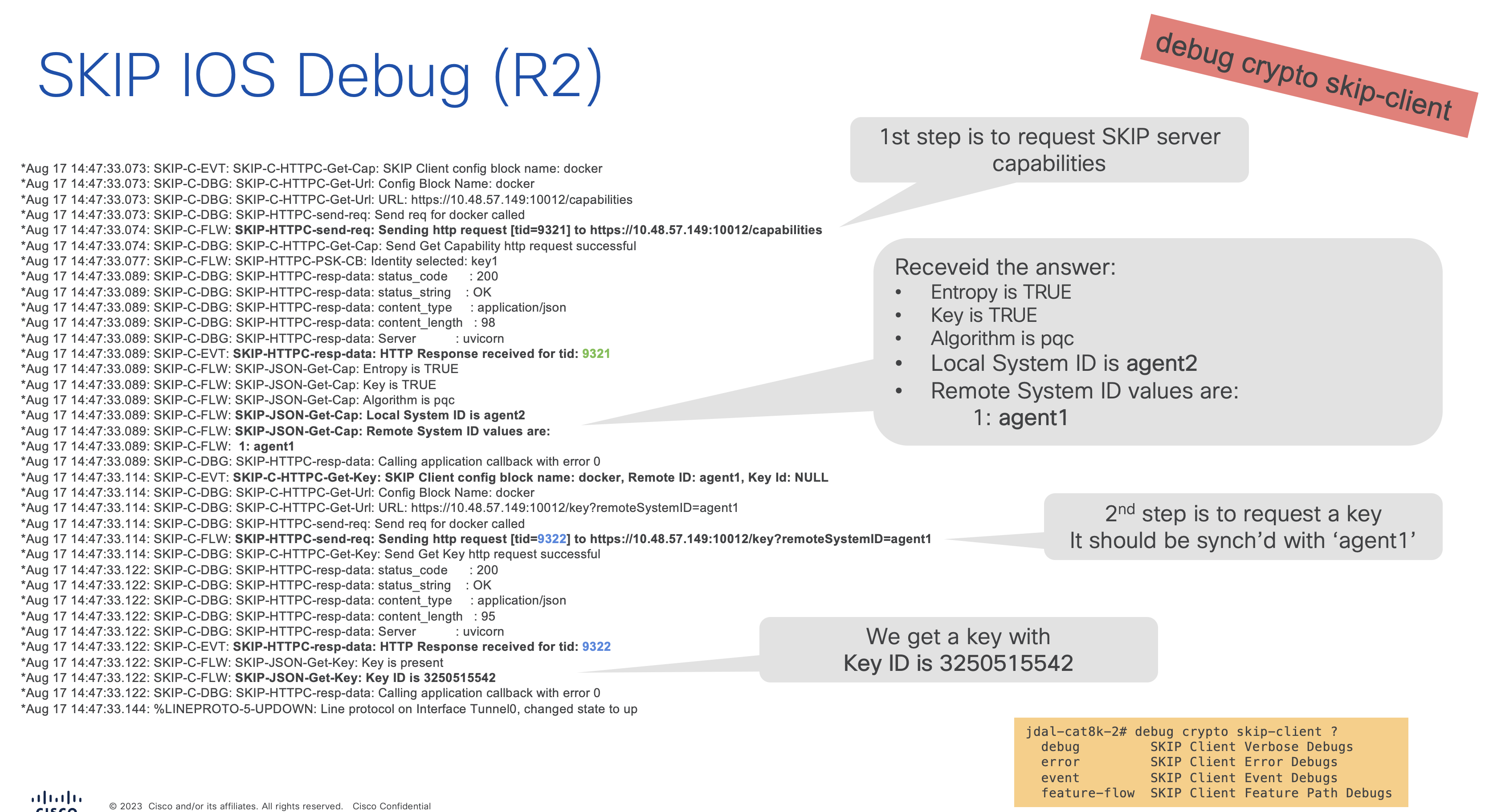
We can see it requesting a key from agent2:
*Aug 17 14:47:33.114: SKIP-C-FLW: SKIP-HTTPC-send-req: Sending http request [tid=9322] to https://10.48.57.149:10012/key?remoteSystemID=agent1…and receiving one along with a key ID:
*Aug 17 14:47:33.122: SKIP-C-FLW: SKIP-JSON-Get-Key: Key ID is 3250515542Before that, there is a first phase to confirm the capabilities of the key server.
Now the debug from the other side is interesting too:
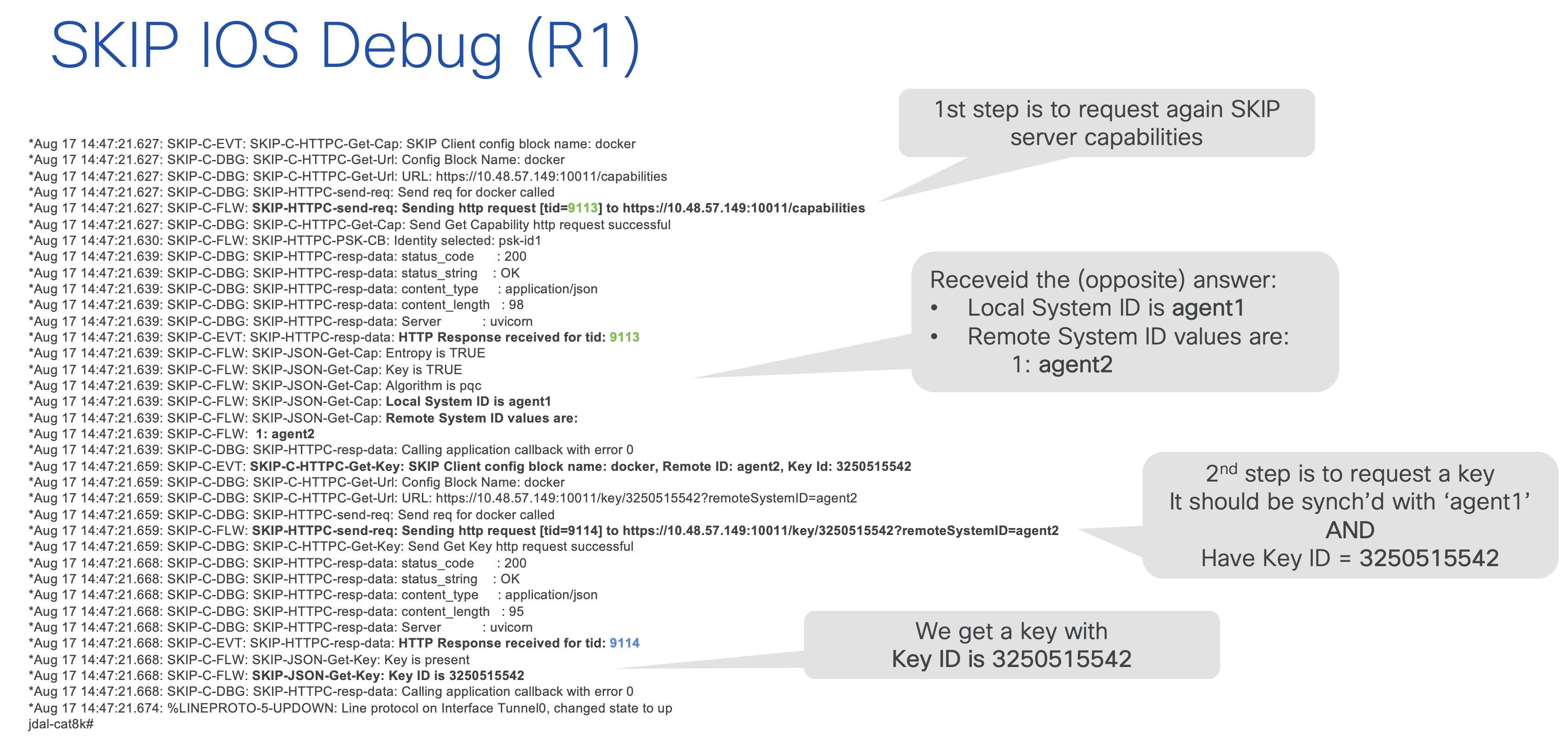
Similar, but this time the router has learned the key ID through IKEv2 and is now specifically asking for the corresponding key:
*Aug 17 14:47:21.659: SKIP-C-FLW: SKIP-HTTPC-send-req: Sending http request [tid=9114] to https://10.48.57.149:10011/key/3250515542?remoteSystemID=agent2Last but not least, debug ssl openssl is also worth knowing about. This provides visibility into the TLS connection between the encryptor and the key provider:
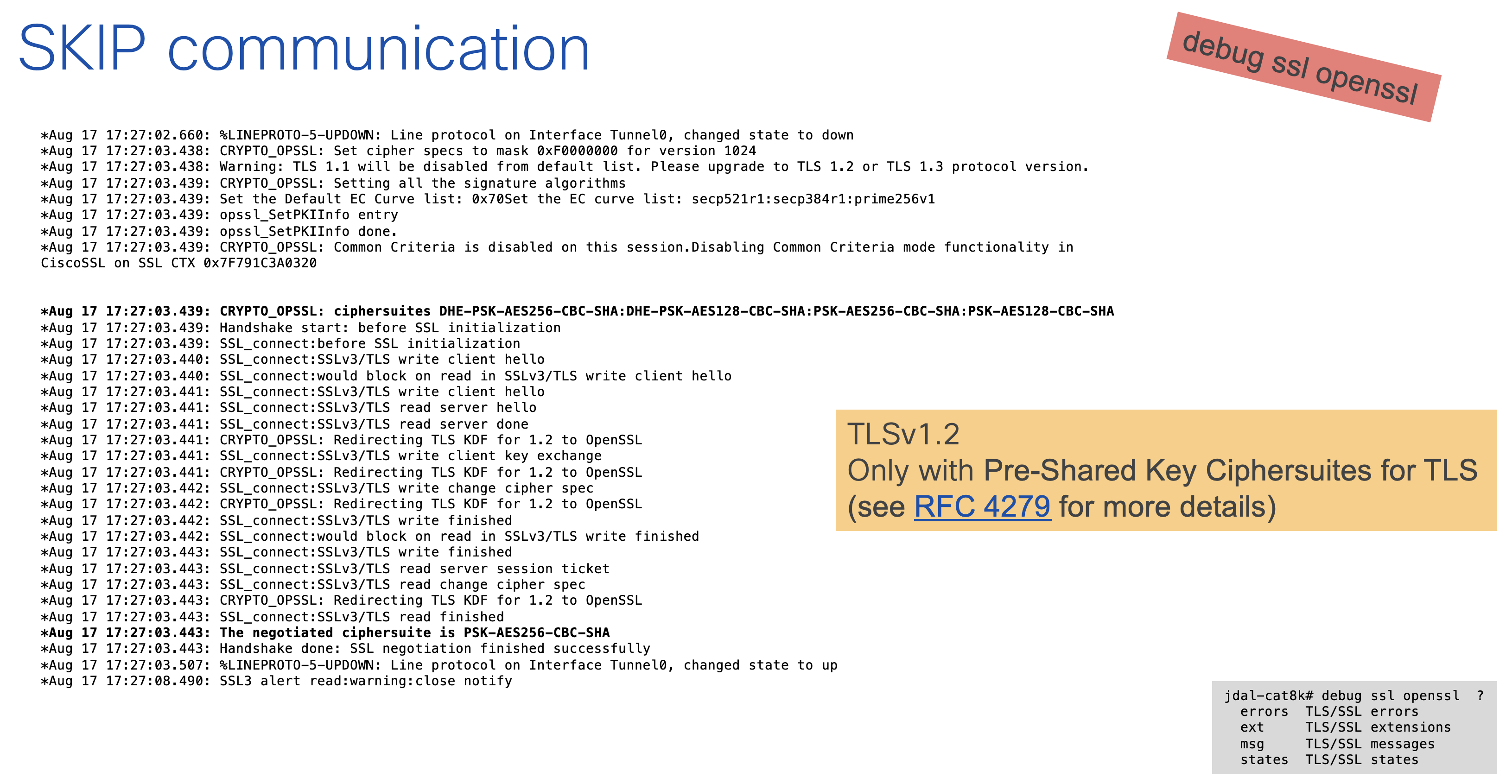
We can see here which cipher suite is being negotiated to protect that link.
See, this was really not that complicated! For the little story, I have been struggling quite a lot building the Docker image. Turns out Python only recently added TLS PSK support natively… so the team shipped their own patched build in the meantime. Not something you expect to discover when setting up a network lab ;-)